Saturday, 10 December 2022
Azure Storage Mover–A managed migration service for Azure Storage
Thursday, 21 July 2022
Azure Premium SSD v2 Disk Storage in preview
We are excited to announce the preview of Premium SSD v2, the next generation of Microsoft Azure Premium SSD Disk Storage. This new disk offering provides the most advanced block storage solution designed for a broad range of input/output (IO)-intensive enterprise production workloads that require sub-millisecond disk latencies as well as high input/output operations per second (IOPS) and throughput—at a low cost. With Premium SSD v2, you can now provision up to 64TiBs of storage capacity, 80,000 IOPS, and 1,200 MBPS throughput on a single disk. With best-in-class IOPS and bandwidth, Premium SSD v2 provides the most flexible and scalable general-purpose block storage in the cloud, enabling you to meet the ever-growing demands of your production workloads such as—SQL Server, Oracle, MariaDB, SAP, Cassandra, Mongo DB, big data, analytics, gaming, on virtual machines, or stateful containers. Moreover, with Premium SSD v2, you can provision granular disk sizes, IOPS, and throughput independently based on your workload needs, providing you more flexibility in managing performance and costs.
With the launch of Premium SSD v2, our Azure Disk Storage portfolio now includes one of the most comprehensive sets of disk storage offerings to satisfy workloads ranging from Tier-1 IOPS intensive workloads such as SAP HANA to general purpose workloads such as RDMS and NoSQL databases and cost-sensitive Dev/Test workloads.
Benefits of Premium SSD v2
As customers transition their production workloads to the cloud or deploy new cloud-native applications, balancing performance and cost is top of mind. For example, transaction-intensive database workloads may require high IOPS on a small disk size or a gaming application may need very high IOPS during peak hours. Similarly, big data applications like Cloudera/Hadoop may require very high throughput at a low cost. Hence, customers need the flexibility to scale their IOPS and throughput independent of the disk size. With Premium SSD v2, you can customize disk performance to precisely meet your workload requirements or seasonal demands, without the need to provision additional storage capacity.
Premium SSD v2 also enables you to provision storage capacity ranging from 1 GiB up to 64 TiB with GiB increments. All Premium SSD v2 disks provide a baseline performance of 3,000 IOPS and 125 MB/sec. If your disk requires higher performance, you can provision the required IOPS and throughput at a low cost, up to the max limits shown below. You can dynamically scale up or scale down the IOPS and throughput as needed without downtime, allowing you to manage disk performance cost-effectively while avoiding the maintenance overhead of striping multiple disks to achieve more performance. Summarizing the key benefits:
◉ Granular disk size in 1 GiB increments.
◉ Independent provisioning of IOPS, throughput, and GiB.
◉ Consistent sub-millisecond latency.
◉ Easier maintenance with scaling performance up and down without downtime.
Premium SSD v2, like all other Azure Disk Storage offerings, will provide our industry-leading data durability and high availability at general availability.
Following is a summary comparing Premium SSD v2 with the current Premium SSD and Ultra Disk.
| Ultra Disk | Premium SSD v2 | Premium SSD | |
| Disk Size | 4 GiB - 64 TiB | 1 GiB - 64 TiB | 4 GiB - 32 TiB |
| Baseline IOPS | Varies by disk size | 3,000 IOPS free | Varies by disk size |
| Baseline throughput | Varies by disk size | 125 MBPS free | Varies by disk size |
| Peak IOPS |
160,000 IOPS |
80,000 IOPS | 20,000 IOPS |
| Peak Throughput | 4,000 MBPS | 1,200 MBPS | 900 MBPS |
| Durability |
99.999999999% durability (~0% annual failure rate) |
Supported Azure Virtual Machines
Pricing
Thursday, 10 March 2022
The anatomy of a datacenter—how Microsoft's datacenter hardware powers the Microsoft Cloud
Leading hardware engineering at a company known for its vast portfolio of software applications and systems is not as strange as it sounds, as the Microsoft Cloud depends on hardware as the foundation of trust, reliability, capacity, and performance, to make it possible for Microsoft and our customers to achieve more. The underlying infrastructure that powers our 60 plus datacenter regions across 140 countries consists of hardware and systems that sit within the physical buildings of datacenters—enabling millions of customers to execute critical and advanced workloads, such as AI and quantum computing, as well as unleashing future innovations.
Datacenter hardware development is imperative to the evolution of the Microsoft Cloud
As the Microsoft Cloud offers services and products to meet the world’s ever-growing computing demands, it is critical that we continuously design and advance hardware systems and infrastructure to deliver greater performance, higher efficiency, and more resiliency to customers—all with security and sustainability in mind. Today, our hardware engineering efforts and investments focus heavily on roadmap and lifecycle planning, sourcing and provisioning of servers, and innovating to deliver next-generation infrastructure for datacenters. In our new Hardware Innovation blog series, I’ll be sharing some of the hardware development and investments that are driving the most impact for the Microsoft Cloud and making Azure the trusted cloud that delivers innovative, reliable, and sustainable hybrid cloud solutions. But first, let’s look “under the hood” of a Microsoft datacenter:
From server to cloud: the end-to-end cloud hardware lifecycle
Our hardware planning starts with what customers want: capacity, differentiated services, cost-savings, and ultimately the ability to solve harder problems with the help of the Microsoft Cloud. We integrate key considerations such as customer feedback, operational analysis, technology vetting, with evaluation of disruptive innovations into our strategy and roadmap planning, improvement of existing hardware in our datacenters for compute, network architecture, and storage, while future-proofing innovative workloads for scale. Our engineers then design, build, test, and integrate software and firmware into hardware fleets that meet a stringent set of quality, security, and compliance requirements before deploying them into Microsoft’s datacenters across the globe.
Sourcing and provisioning cloud hardware, sustainably and securely
With Microsoft’s scale, the ways in which we provision, deploy, and decommission hardware parts have the potential to drive massive planetary impact. While we work with suppliers to reimagine a more resilient and efficient supply chain using technologies such as blockchain and digital twins, we also aim to have sustainability built into every step of the way. An example of our sustainability leadership is the execution of Microsoft Circular Centers, where servers and hardware that are being decommissioned are repurposed—efforts that are expected to increase the reuse of servers and components by up to 90 percent by 2025. I will be sharing more on our Circular Centers progress this year. We also have in place the Azure Security and Resiliency Architecture (ASRA) as an approach to drive security and resiliency consistently and comprehensively across the Microsoft Cloud infrastructure supply chain.
Innovating to deliver next-generation datacenter infrastructure
We are investigating and developing technology that would allow datacenters to be more agile, efficient, and sustainable to operate while meeting the computing demands of the future. We showcased development in datacenter energy efficiency, such as our two-phase liquid immersion cooling, allowing more densely packed servers to fit in smaller spaces, and addressing processor overclocking for higher computing efficiency with a lower carbon footprint. We also continue to invest in and develop workload-optimized infrastructure—from servers, racks, systems, to datacenter designs—for more custom general-purpose offerings as well as specialized compute such as AI, high-performance computing, quantum, and beyond.
Building the most advanced and innovative hardware for the intelligent cloud and the intelligent edge
The journey of building Microsoft Cloud’s hardware infrastructure is an exciting and humbling one as we see continual advancement in technology to meet the needs of the moment. I have been in the hardware industry for more than thirty years—yet, I’m more excited each day as I work alongside leaders and experts on our team, with our partners across the industry, and with the open source community. Like many of the cloud services that sit on top of it, Microsoft’s hardware engine runs on consistency in quality, reliability, and scalability. Stay tuned as we continue to share more deep dives and updates of our cloud hardware development, progress, and results—and work to drive forward technology advancement, enable new capabilities, and push the limits of what we can achieve in the intelligent cloud and the intelligent edge.
Source: azure.microsoft.com
Thursday, 16 December 2021
Updates to Azure Files: NFS v4.1, higher performance limits, and reserved instance pricing
Azure Files offers fully managed, simple, secure, and serverless enterprise-grade cloud file shares. On the Azure Files team, our mission is to expand Azure Files to more platforms and workloads. We recently took a huge step in workload expansion by announcing the general availability of our NFS v4.1 shares. This greatly expands the workloads you can run on Azure file shares by providing POSIX compatible file systems for Linux virtual machines and container-based workloads. This blog provides information on the general availability of NFS v4.1 shares, increased performance for all premium file shares, and reserved instance pricing for premium file shares to lower your costs.
NFS v4.1 shares are now generally available
In November we announced the general availability of Azure Files support for NFS v4.1. Now you can deploy these fully POSIX compliant, distributed NFS file shares in your production environments for a wide variety of Linux and container-based workloads.
We saw strong interest in the preview with participation from companies of all sizes, ranging from emerging startups to Fortune 100s, running a plethora of workloads. Some examples of workloads include SAP application layer, enterprise messaging, user home directories, custom line-of-business applications, database backups, database replication, AI and machine learning user directories, DevOps pipelines, and many more industry-specific workloads such as the solution from EDF Energy below.
EDF Energy uses Azure file shares as part of its asset management solution:
“At EDF Energy, Nuclear Safety is our overriding priority. As part of our Asset Management solution used to control work, maintenance, and defect resolution to support site license conditions, we needed a performant shared file system between multiple Linux Application Servers—such as an NFS share. We used NFS v4.1 on Azure Files in the preview and have now taken full dependency on it. The NFS system is working very well for us, persisting our files and keeping our IaaS requirements to a minimum.”
—Cathy Handley, AMS Upgrade Programme Manager, EDF Energy—Helping Britain Achieve Net Zero
Customers running critical systems such as SAP have told us that synchronous zonal redundancy is a game-changer for them to achieve high availability for their application layer. With Azure premium file shares you can choose between Locally redundant storage (LRS) or Zonal Redundant Storage (ZRS) redundancy. With ZRS, data is synchronously replicated to three different availability zones within an Azure region. This means your applications’ access to the data will not be disrupted, even in the unlikely event of an entire zone failure. SAP storage administrators gave us great feedback including: “easy to use”, “good performance”, and “better cost optimization.”
Unlike the lower versions of NFS, locking is inbuilt into NFS v4.1. Hence, software like IBM MQ relies on locking support from NFS v4.1 to keep data consistent within a distributed system. While in preview, we enhanced our locking support and implemented locking upgrades and downgrades.
The Azure Files CSI driver (now generally available) makes it easy to access your Azure File shares from Azure Kubernetes Service (AKS). The fast attach-detach times of Azure Files have been appealing to applications that require rapid scale up and scale down.
NFS v4.1 is available in all regions where the premium tier of Azure Files exists. For the full list, see the Azure service availability page. You can now get started using NFS by following these simple step-by-step instructions.
Improved performance
Today, we are announcing more IOPS and throughput for all premium file shares (SMB and NFS).
All shares now provide a minimum of 3000 IOPS, up from the previous 400 IOPS baseline. We are also increasing the minimum burst IOPS such that even the smallest shares can burst up to 10,000 IOPS. Just as before, you will continue to linearly scale IOPS up to 100,000 as the share size increases.
You can now use 100 percent of the provisioned throughput towards either reads or writes. This means you can get up to 10GB/s of read or write traffic. Previously, premium shares used allocated throughput with a 40:60 write:read ratio resulting in max write of 4GB/s and max read of 6GB/s.
These performance enhancements will apply to all existing and new shares across all regions including public and sovereign cloud at no extra cost.
Lower cost with Reserved Instances
All premium file shares (SMB and NFS) now support capacity reservations which provide up to 36 percent discount, by pre-committing to storage utilization.
Reserved instances are also supported for the hot and cool Azure file shares (SMB only).
Get involved
You can put all the updates mentioned in this blog together for NFS v4.1 shares with higher throughput and more IOPS at a lower price. Of course, the performance improvements and reserved instances apply to both NFS and SMB shares. We continue to increase investments in Azure Files and look forward to getting the next wave of updates released.
Source: microsoft.com
Sunday, 12 September 2021
Improve availability with zone-redundant storage for Azure Disk Storage
As organizations continue to accelerate their cloud adoption, the need for reliable infrastructure is critical to ensure business continuity and avoid costly disruptions. Azure Disk Storage provides maximum resiliency for all workloads with an industry-leading zero percent annual failure rate and single-instance service-level agreements (SLA) for all disk types, including a best-in-class single-instance SLA of 99.9 percent availability for Azure Virtual Machines using Azure Premium SSD or Azure Ultra Disk Storage.
Today, we continue our investments to further improve the reliability of our infrastructure with the general availability of zone-redundant storage (ZRS) for Azure Disk Storage. ZRS enables you to increase availability for your critical workloads by providing the industry’s only synchronous replication of block storage across three zones in a region, enabling your disks to tolerate zonal failures which may occur due to natural disasters or hardware issues. ZRS is currently supported for Azure Premium SSDs and Azure Standard SSDs.
We have seen strong interest and great feedback from many enterprise customers from various industries during our preview. These customers are planning to use ZRS for disks to provide higher availability for a wide range of scenarios such as clustering for SAP and SQL Server workloads, container applications, and legacy applications.
Increase availability for your clustered or distributed applications
Last year, we announced the general availability of shared disks for Azure Disk Storage, which is the only shared block storage in the cloud that supports both Windows and Linux-based clustered and distributed applications. This unique offering allows a single disk to be simultaneously attached and used from multiple virtual machines (VMs), enabling you to run your most demanding enterprise applications in the cloud, such as clustered databases, parallel file systems, persistent containers, and machine learning applications, without compromising on well-known deployment patterns for fast failover and high availability. Customers can now further improve the availability of their clustered applications, like SQL failover cluster instance (FCI) and SAP ASC/SCS leveraging Windows Server Failover Cluster (WSFC), with the combination of shared disks and ZRS.
Using Availability Zones for VMs, you can allocate primary and secondary VMs in different zones for higher availability and attach a shared ZRS disk to the VMs in different zones. If a primary VM goes down due to a zonal outage, WSFC will quickly failover to the secondary VM providing increased availability to your application. Customers can also use ZRS with shared disks for their Linux-based clustering applications that use IO fencing with SCSI persistent reservations. Shared disks are now available on all Premium SSD and Standard SSD sizes, enabling you to optimize for different price and performance options.
Take advantage of ZRS disks with multi-zone Azure Kubernetes Service clusters
Customers can take advantage of ZRS disks for their container applications hosted on multi-zone Azure Kubernetes Service (AKS) for higher reliability. If a zone goes down, AKS will automatically fail over the stateful pods to a healthy zone by detaching and attaching ZRS disks to nodes in the healthy zone. We recently released the ZRS disks support in AKS through the CSI driver.
Achieve higher availability for legacy applications
You can achieve high availability for your workloads using application-level replication across two zones (such as SQL Always On). However, if you are using industry-specific proprietary software or legacy applications like older versions of SQL Server, which don't support application-level synchronous replication, ZRS disks will provide improved availability through storage-level replication. For example, if a zone goes down due to natural disasters or hardware failures, the ZRS disk will continue to be operational. If your VM in the affected zone becomes unavailable, you could use a virtual machine in another zone and attach the same ZRS disk.
Build highly available, cost-effective solutions
To build highly available software-as-a-service (SaaS) solutions, independent software vendors (ISVs) can take advantage of ZRS disks to increase availability while also reducing costs. Previously, ISVs would need to host VMs in two zones and replicate data between the VMs. This resulted in extra costs as they had to deploy twice the amount of locally redundant storage (LRS) disks to maintain two copies of data in two zones and an additional central processing unit (CPU) for replicating the data to two zones. ISVs can now use shared ZRS disks to deliver a more cost-effective solution with 1.5 times lower costs on the disks and no additional replication costs. In addition, ZRS disks also offer lower write latency than VM to VM replication of the data as the replication is performed by the platform. NetApp describes the value that ZRS provides them and their customers:
“Many customers wish to have their data replicated cross-zone to improve business continuity against zonal failures and reduce downtime. ZRS for Azure Disk Storage combined with shared disks is truly a game-changer for us as it enables us to improve the availability of our solution, allows applications to achieve their full performance, and reduces replication costs by offloading the replication to the backend infrastructure. NetApp is excited to extend its CVO High Availability solution using ZRS disks as this helps us provide a comprehensive high availability solution at lower costs for our mutual customers.”—Rajesh Rajaraman, Senior Technical Director at NetApp
Performance for ZRS disks
The IOPS and bandwidth provided by ZRS disks are the same as the corresponding LRS disks. For example, a P30 (128 GiB) LRS Premium SSD disk provides 5,000 IOPS and 200 MB/second throughput, which is the same for a P30 ZRS Premium SSD disk. Disk latency for ZRS is higher than that of LRS due to the cross zonal copy of data.
Source: microsoft.com
Thursday, 29 July 2021
Boost your client performance with Azure Files SMB Multichannel
Lower your deployment cost, while improving client performance with Server Message Block (SMB) Multichannel on premium tier.
Today, we are announcing the preview of Azure Files SMB Multichannel on premium tier. SMB 3.0 introduced the SMB Multichannel technology in Windows Server 2012 and Windows 8 client. This feature allows SMB 3.x clients to establish multiple network connections to SMB 3.x servers for greater performance over multiple network adapters and over network adapter with Receive Side Scaling (RSS) enabled. With this preview release, Azure Files SMB clients can now take advantage of SMB Multichannel technology with premium file shares in the cloud.
Benefits
SMB Multichannel allows multiple connections over the optimum network path that allows for increased performance from parallel processing. The increased performance is achieved by bandwidth aggregation over multiple NICs or with NIC support for Receive Sides Scaling (RSS) that enables distributed IOs across multiple CPUs and dynamic load balance.
Benefits of Azure Files SMB Multichannel include:
Pricing and availability
Getting started
Sunday, 9 May 2021
Azure Availability Zones in the South Central US datacenter region add resiliency
As businesses move more workstreams to the cloud, business continuity and data protection have never been more critical—and perhaps their importance has never been more visible than during the challenges and unpredictability of 2020. To continue our commitment to supporting stability and resiliency in the cloud, Microsoft is announcing the general availability of Azure Availability Zones from our South Central US datacenter region.
Azure Availability Zones are unique physical locations within an Azure region that each consist of one or more datacenters equipped with independent power, cooling, and networking. Availability Zones provide protection against datacenter failures and unplanned downtime. These are further supported by one of the top industry-leading service level agreements (SLA) of 99.99 percent virtual machine uptime.
For many companies, especially those in regulated industries who are increasingly moving their critical applications to the cloud, Availability Zones in South Central US provide the option for customers to choose the resiliency and business continuity options that support their business. Availability Zones provide our customers with added options for high availability with added fault tolerance against datacenter failures while supporting data protection and backup. Customers can choose to store data in the same datacenter, across zonal datacenters in the same region, or across geographically separated regions. Finally, data is protected against accidental customer deletion using role-based access control and immutable storage applied through forced retention policies.
Availability Zones in South Central US build upon a broader, rich set of resiliency features available with Azure that support customer resiliency. Key among these are:
◉ Azure Storage, SQL Database, and Cosmos DB all provide built-in data replication, both within a region and across regions.
◉ Azure managed disks are automatically placed in different storage scale units to limit the effects of hardware failures.
◉ Virtual machines (VMs) in an availability set are spread across several fault domains. A fault domain is a group of VMs that share a common power source and network switch. Spreading VMs across fault domains limits the impact of physical hardware failures, network outages, or power interruptions.
◉ Azure Site Recovery supports customers in disaster recovery scenarios across regions and zones.
The creation of Availability Zones in South Central US benefits our customers in many ways, including increased service availability guarantees, which reduces the chance of downtime or data loss should there be any failure. These zones also help ensure data storage protection for peace of mind. Data protection is our priority, even over recovery time. We can endure a longer outage and data can still be protected because of zone availability. Data is also replicated in triplicate. As we kick off a New Year, resiliency and stability for our customers are still crucial. We’re optimistic and excited to see the impact these Availability Zones will have on customers, their digital transformations, and ultimately their success.
Source: microsoft.com
Saturday, 20 March 2021
Azure Defender for Storage powered by Microsoft threat intelligence
With the reality of working from home, more people and devices are now accessing corporate data across home networks. This raises the risks of cyber-attacks and elevates the importance of proper data protection. One of the resources most targeted by attackers is data storage, which can hold critical business data and sensitive information.
Read More: AZ-600: Configuring and Operating a Hybrid Cloud with Microsoft Azure Stack
To help Azure customers better protect their storage environment, Azure Security Center provides Azure Defender for Storage, which alerts customers upon unusual and potentially harmful attempts to access or exploit their storage accounts.
What’s new in Azure Defender for Storage
As with all Microsoft security products, customers of Azure Defender for Storage benefit from Microsoft threat intelligence to detect and hunt for attacks. Microsoft amasses billions of signals for a holistic view of the security ecosystem. These shared signals and threat intelligence enrich Microsoft products and allow them to offer context, relevance, and priority management to help security teams act more efficiently.
Based on these capabilities, Azure Defender for Storage now alerts customers also upon the detection of malicious activities such as:
◉ Upload of potential malware (using hash reputation analysis).
◉ Phishing campaigns hosted on a storage account.
◉ Access from suspicious IP addresses, such as TOR exit nodes.
In addition, leveraging the advanced capabilities of Microsoft threat intelligence helps us enrich our current Azure Defender for Storage alert and future detections.
To benefit from Azure Defender for Storage, you can easily configure it on your subscription or storage accounts and start your 30-day trial today.
Cyberattacks on cloud data stores are on the rise
Nowadays, more and more organizations place their critical business data assets in the cloud using PaaS data services. Azure Storage is among the most widely used of these services. The amount of data obtained and analyzed by organizations continues to grow at an increasing rate, and data is becoming increasingly vital in guiding critical business decisions.
With this rise in usage, the risks of cyberattacks and data breaches are also growing, especially for business-critical data and sensitive information. Cyber incidents cause organizations to lose money, data, productivity, and consumer trust. The average total cost of a data breach is $3.86 million. On average, it takes 280 days to identify and contain a breach, and 17 percent of cyberattacks involve malware.
It’s clear that organizations worldwide need protection, detection, and rapid-fire response mechanisms to these threats. Yet, on average, more than 99 days pass between infiltration and detection, which is like leaving the front door wide open for over four months. Therefore, proper threat intelligence and detection are needed.
Azure Defender for Storage improved threat detections
1. Detecting upload of malware and malicious content
Storage accounts are widely used for data distribution, thus they may get infected with malware and cause it to spread to additional users and resources. This may make them vulnerable to attacks and exploits, putting sensitive organizational data at risk.
Malware reaching storage accounts was a top concern raised by our customers, and to help address it, Azure Defender for Storage now utilizes advanced hash reputation analysis to detect malware uploaded to storage accounts in Azure. This can help detect ransomware, viruses, spyware, and other malware uploaded to your accounts.
A security alert is automatically triggered upon detection of potential malware uploaded to an Azure Storage account.
“Azure Blob Storage is a very powerful and cost-effective storage solution, allowing for fast and cheap storage and retrieval of large amounts of files. We use it on all our systems and often have millions of documents in Blob Storage for a given system. With PaaS solutions, it can, however, be a challenge to check files for malware before they are stored in Blob Storage. It is incredibly easy to enable the new “Malware Reputation Screening” for storage accounts at scale, it offers us a built-in basic level of protection against malware, which is often sufficient, thus saving us the overhead to set up and manage complex malware scanning solutions.”—Frans Lytzen, CTO at NewOrbit
First case study: Detecting malicious access to critical customer data
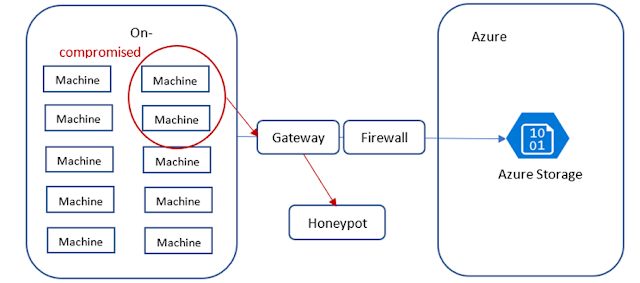
Second case study: Identifying potential malware infection from virtual machines
Sunday, 14 March 2021
Built-in backup management at scale with Backup center
During this period of the pandemic-disrupted workplace, we have seen unprecedented growth in cloud adoption and dependence on the cloud for data protection to address business continuity and ensure resilience. We understand that protecting your data from increased ransomware attacks, adapting to increased scale with demand surges, managing costs more efficiently, and driving optimizations in overall management are top of mind for you. Azure Backup helps you achieve this by providing built-in capabilities to safeguard your data so that you can recover in the event of accidental deletion, corruption, or ransomware. In our conversations with customers, we realized that it is important for you to be able to manage data protection for an increasing cloud estate in a scalable manner.
More Info: AZ-600: Configuring and Operating a Hybrid Cloud with Microsoft Azure Stack
Traditionally, at-scale data protection activities like governance, monitoring, operating, and optimizing backup while possible, required leveraging various individual solutions like Azure Policies or Azure Backup’s vault management, monitoring, and reports. This past week at Microsoft Ignite, we announced the general availability of Backup center, a centralized backup management interface built into Azure for all your backup management needs. Backup center simplifies data protection management at-scale by enabling you to discover, govern, monitor, operate, and optimize backup management, all from one unified console, enabling you to drive operational efficiency with Azure.
Discover backup capabilities, samples, and guidance
Govern your backup estate in a unified manner
Monitor and operate
Optimize
Thursday, 17 September 2020
Azure NetApp Files cross region replication and new enhancements in preview
As businesses continue to adapt to the realities of the current environment, operational resilience has never been more important. As a result, a growing number of customers have accelerated a move to the cloud, using Microsoft Azure NetApp Files to power critical pieces of their IT infrastructure, like Virtual Desktop Infrastructure, SAP applications, and mission-critical databases.
Today, we release the preview of Azure NetApp Files cross region replication. With this new disaster recovery capability, you can replicate your Azure NetApp Files volumes from one Azure region to another in a fast and cost-effective way, protecting your data from unforeseeable regional failures. We’re also introducing important new enhancements to Azure NetApp Files to provide you with more data security, operational agility, and cost-saving flexibility.
Azure NetApp Files cross region replication
Azure NetApp Files cross region replication leverages NetApp SnapMirror® technology therefore, only changed blocks are sent over the network in a compressed, efficient format. This proprietary technology minimizes the amount of data required to replicate across the regions, therefore saving data transfer costs. It also shortens the replication time so you can achieve a smaller Restore Point Objective (RPO).
Over the next few months of Azure NetApp Files cross region replication preview you can expect:
◉ Multiple replication frequency options: you can replicate an Azure NetApp Files, NFS, or SMB volume across regions with replication frequency choice of every 10 minutes, every hour, or once a day.
◉ Read from secondary: you can read from the secondary volume during active replication.
◉ Failover on-demand: you can failover to the secondary volume at a time of your choice. After a failover, you can also resynchronize the primary volume from the secondary volume at a time of your choice.
◉ Monitoring and alerting: you can monitor the health of volume replication and the health of the secondary volume through Azure NetApp Files metrics and receive alerts through Azure Monitor.
◉ Automation: you can automate the configuration and management of Azure NetApp Files volume replication through standard Azure Rest API, SDKs, command-line tools, and ARM templates.
Supported region pairs
Azure NetApp Files cross region replication is available in popular regions from US, Canada, AMEA, and Asia at the start of public preview.
Getting started
Once your subscription is enabled for the preview, you can find the feature from the portal (Figure 1) and within a few clicks, you'll be able to configure your first Azure NetApp Files cross region replication (Figure 2).
Volume snapshot policy
Dynamic volume tier change
Simultaneous dual-protocol (NFS v3 and SMB) access
NFS v4.1 Kerberos encryption in transit
Azure Government regions
Tuesday, 11 August 2020
Run high scale workloads on Blob storage with new 200 TB object sizes
Increasing file size support for Blob storage
Customers that have workloads on-premises today utilize files that are limited by the filesystem used with file size maximums up to exabytes in size. Most usage would not go up to the filesystem limit but do scale up to the tens of terabytes in size for specific workloads that make use of large files. We recently announced the preview of our new maximum blob size of 200 TB (specifically 209.7 TB), increasing our current limit of 5TB in size, which is a 40x increase! The increased size of over 200TB per object is much larger than other vendors that provide a 5TB max object size. This increase allows workloads that currently require multi-TB size files to be moved to Azure without additional work to break up these large objects.
This increase in object size limit will unblock workloads, including seismic analysis, backup files, media and entertainment (video rendering and processing), and others which include scenarios where multi-TB object size is used. As an example, a media company which is trying to move from a private datacenter to Azure can now do so with our ability to support files up to 200TB in size. Increasing our object size removes the need to carefully inventory existing file sizes as part of a plan to migrate a workload to Azure. Given many on-premises solutions can store files in the ten to hundreds of terabytes in size, removing this gap simplifies migration to Azure.
With large file size support, being able to break up an object into blocks to ease upload and download is critical. Every Azure Blob is made up of up to 50,000 blocks. This allows a multi-terabyte object to be broken down into manageable pieces for write. The previous maximum of 5 TB (4.75TiB) was based on a max block size of 100 MiB x 50,000 blocks. The preview increases the block size to 4,000 MiB and keeps 50,000 blocks per object for a maximum object size of 4,000 MiB x 50,000 = 190.7 TiB. Conceptually in your application (or within the utility or SDK), the large file is broken into blocks, each block is written to Azure Storage, and, after all, blocks have successfully been uploaded, the entire file (object) is committed.
As an example of the overall relationship within a storage account, the following diagram shows a storage account, Contososa, which contains one container with two blobs. The first is a large blob made up of 50,000 blocks. The second is a small blob made of a single block.
◉ .Net.
◉ Java.
◉ JavaScript.
◉ Python.
◉ REST.
Saturday, 20 June 2020
Achieve higher performance and cost savings on Azure with virtual machine bursting
Get short-term, higher performance with no additional steps or costs
VM bursting, which is enabled by default, offers you the ability to achieve higher throughput for a short duration on your virtual machine instance with no additional steps or cost. Currently available on all Lsv2-series VMs in all supported regions, VM bursting is great for a wide range of scenarios like handling unforeseen spiky disk traffic smoothly, or processing batched jobs with speed. With VM bursting, you can see up to 8X improvement in throughput when bursting. Additionally, you can combine both VM and disk bursting (generally available in April) to get higher performance on your VM or disks without overprovisioning. If you have workloads running on-premises with unpredictable or cyclical disk traffic, you can migrate to Azure and take advantage of our VM bursting support to improve your application performance.
Bursting flow
VM bursting is regulated on a credit-based system. Your VM starts with a full amount of credits and these credits allow you to burst for 30 minutes at the maximum burst rate. Bursting credits accumulate when your VM instance is running under their performance disk storage limits. Bursting credits are consumed when your VM instance is running over their performance limits.
Benefits of virtual machine bursting
◉ Cost savings: If your daily peak performance time is less than the burst duration, you can use bursting VMs or disks as a cost-effective solution. You can build your VM and disk combination so the bursting limits match the required peak performance and the baseline limits match the average performance.
◉ Preparedness for traffic spikes: Web servers and their applications can experience traffic surges at any time. If your web server is backed by VMs or disks using bursting, the servers are better equipped to handle traffic spikes.
◉ Handling batch jobs: Some application’s workloads are cyclical in nature and require a baseline performance for most of the time and require higher performance for a short period of time. An example of this would be an accounting program that processes transactions daily that require a small amount of disk traffic, but at the end of the month does reconciling reports that need a much higher amount of disk traffic.
Get started with disk bursting
Create new virtual machines on the burst supported virtual machines using the Azure portal, PowerShell, or command-line interface (CLI) now. Bursting comes enabled by default on VMs that support it, so you don't need to do anything but deploy the instance to get the benefits. Any of your exisiting VMs that support bursting will have the capability enabled automatically. You can find the specifications of burst eligible virtual machines in the table below. Bursting feature is available in all regions where Lsv2-series VMs are available.
| Size | Uncached data disk throughput (MB/s) | Max burst uncached data disk throughput (MB/s) |
| Standard_L8s_v2 | 160 | 1280 |
| Standard_L16s_v2 | 320 | 1280 |
| Standard_L32s_v2 | 640 | 1280 |
| Standard_L48s_v2 | 960 | 2000 |
| Standard_L64s_v2 | 1280 | 2000 |
| Standard_L80s_v2 | 1400 | 2000 |