Showing posts with label MYSQL. Show all posts

Wednesday, 6 March 2019

Scaling out read workloads in Azure Database for MySQL

For read-heavy workloads that you are looking to scale out, you can use read replicas, which are now generally available to all Azure Database for MySQL users. Read replicas make it easy to horizontally scale out beyond a single database server. This is useful in workloads such as BI reporting and web applications, which tend to have more read operations than write.

The feature supports continuous asynchronous replication of data from one Azure Database for MySQL server (the “master” server) to up to five Azure Database for MySQL servers (the “read replica” servers) in the same region. Read-heavy workloads can be distributed across the replica servers according to your preference. Replica servers are read-only except for writes replicated from data changes on the master.

What’s supported with read replicas?


You can create or delete replica servers based on your workload’s needs. A master server can support up to five replica servers within the same Azure region. Stopping replication to any replica server makes it a standalone read-write server.

You can easily manage your replica servers using the Azure portal and Azure CLI.

From the Azure portal:
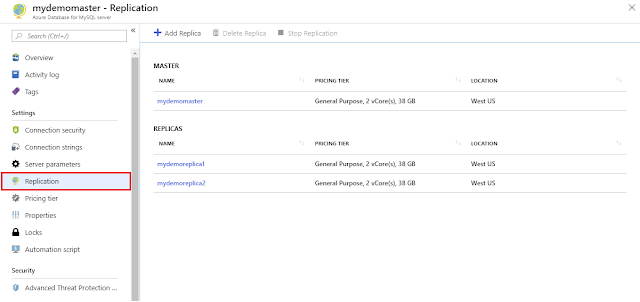
Microsoft Tutorial and Material, Azure Certifications, Azure Learning, Azure Guides

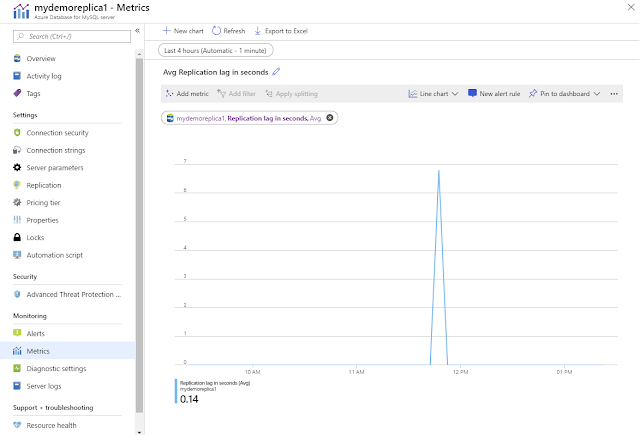
Use Azure Monitor to track replication with the “replication lag in seconds” metric:

Microsoft Tutorial and Material, Azure Certifications, Azure Learning, Azure Guides

From the Azure CLI:

az mysql server replica create -n mydemoreplica1 -g myresourcegroup -s mydemomaster

Below are some application patterns used by our customers and partners that leverage read replicas for scaling workloads.

BI reporting


Data from disparate data sources is processed every few minutes and loaded into the master server. The master server is dedicated for loads and processing, not directly exposing it to BI users for reporting or analytics to ensure predictable performance. The reporting workload is scaled out across multiple read replicas to manage high user concurrency with low latency.

Microsoft Tutorial and Material, Azure Certifications, Azure Learning, Azure Guides

Microservices


In this architecture pattern, the application is broken into multiple microservices, with data modification APIs connecting to the master server while reporting APIs connect to read replicas. The data modification APIs are prefixed with “Set-”, while reporting APIs are prefixed with “Get-“. The load balancer is used to route the traffic based on the API prefix.

Microsoft Tutorial and Material, Azure Certifications, Azure Learning, Azure Guides

Tuesday, 4 December 2018

Modernize your Java Spring Boot application with Azure Database for MySQL

Spring is a well-known Java-based framework for building web and enterprise applications addressing the modern business needs. One of the advantages of using the Spring Boot framework is that it simplifies the data access from relational and NoSQL data stores. Spring Boot framework with MySQL Database backend is one of the established patterns to meet the online transactional processing needs of business applications. The modern business applications are built and deployed on cloud native microservice platforms like Azure Kubernetes service (AKS) moving away from traditional monolithic design to meet the elastic scale and portability needs. The databases on the other hand have more stateful requirements with atomicity, consistency, durability, resiliency, and zero data loss across failures. It is therefore more suited to run databases outside of Kubernetes environment on managed database services like Azure Database for MySQL service which meets these requirements.

Developers and customers can easily build and deploy their Java Spring Boot microservices application in Azure platform thereby improving developer productivity and enabling businesses to achieve more with the following solutions.

◈ Azure DevOps, a developer platform to build automated and robust CI/CD pipelines.
◈ Azure Kubernetes Service, a managed Kubernetes platform.
◈ Azure Container Instance, a serverless container platform for running containerized solutions on Azure.
◈ Azure Database for MySQL, a fully managed, enterprise ready community MySQL database as a service, .

The following is a functional architecture sample of a Java Spring Boot microservices application called po-service on Azure. This Spring Boot application demonstrates how to build and deploy a purchase order microservice as a containerized application on Azure Kubernetes Service (AKS). The deployed microservice supports all CRUD operations on purchase orders.

Azure Study Materials, Azure Guides, Azure Certification, Azure Tutorial and Materials

To enable and integrate the microservices application running on Azure Kubernetes services with the database running on Azure Database for MySQL service, developers can utilize and leverage Open Service Broker for Azure together with Kubernetes Service Catalog.

We have published detailed step-by-step instructions to build and deploy the above architecture in our GitHub repository. The overall goal of this step-by-step guide is:

◈ To demonstrate the use of Open Service Broker for Azure to provision, deploy, and integrate Azure Database for MySQL from Azure Kubernetes Service seamlessly using the DevOps pipeline.
◈ To demonstrate the use of Helm (CLI) for deploying containerized applications on Kubernetes (AKS). Helm is a package manager for Kubernetes and is a part of CNCF. Helm is used for managing Kubernetes packages called Charts.
◈ To demonstrate how to secure a microservice (REST API) end-point using SSL/TLS (HTTPS transport) and expose it through the Ingress Controller addon on AKS.
◈ To demonstrate the serverless container solution by deploying the microservice on Azure Container Instances (ACI).

Monday, 26 November 2018

Best practices for alerting on metrics with Azure Database for MySQL monitoring

Whether you are a developer, database administrator, site reliability engineer, or a DevOps professional, monitoring databases is an important part of maintaining the reliability, availability, and performance of your MySQL server. There are various metrics available for you in Microsoft Azure Database for MySQL to get insights on the behavior of the server. You can also set alerts on these metrics using the Azure portal or Azure CLI.

Azure Study Materials, Azure Guides, Azure Certification, Azure Tutorial and Material

With modern applications evolving from a traditional on-premises approach to becoming more hybrid or cloud-native, there is also a need to adopt some best practices for a successful monitoring strategy on a hybrid and public cloud. Here are some example best practices on how you can use monitoring data on your MySQL server, and areas you can consider improving based on these various metrics.

Active connections


Sample threshold (percentage or value): 80 percent of total connection limit for greater than or equal to 30 minutes, checked every five minutes.

Things to check:

◈ If you notice that active connections are at 80 percent of the total limit for the past half hour, verify if this is expected based on the workload.
◈ If you think the load is expected, active connections limit can be increased by upgrading the pricing tier or vCores. You can check active connection limits for each SKU.

Azure Study Materials, Azure Guides, Azure Certification, Azure Tutorial and Material

Failed connections


Sample threshold (percentage or value): 10 failed connections in the last 30 minutes, checked every five minutes.

Things to check:

◈ If you see connection request failures over the last half hour, verify if this is expected by checking the logs for failure reasons.


◈ If this is a user error, take the appropriate action. For example, if there is an authentication failed error, check your username/password.

◈ If the error is SSL related, check the SSL settings and input parameters are properly configured.
     ◈  Example: mysql "sslmode=verify-ca sslrootcert=root.crt host=mydemoserver.postgre.database.azure.com dbname=postgres user=mylogin@mydemoserver"

CPU percent or memory percent


Sample threshold (percentage or value): 100 percent for five minutes or 95 percent for more than two hours.

Things to check:

◈ If you have hit 100 percent CPU or memory usage, check your application telemetry or logs to understand the impact of the errors.
◈ Review the number of active connections. Check for connection limits. If your application has exceeded the maximum connections or is reaching the limits, then consider scaling up computing.

IO percent


Sample threshold (percentage or value): 90 percent usage for greater than or equal to 60 minutes.

Things to check:

◈ If you see that IOPS is at 90 percent for one hour or more, verify if this is expected based on the application workload.
◈ If you expect a high load, then increase the IOPS limit by increasing storage. Storage to IOPS mapping is below for reference.

Storage


The storage you provision is the amount of storage capacity available to your Azure Database for MySQL server. The storage is used for the database files, temporary files, transaction logs, and the MySQL server logs. The total amount of storage you provision also defines the I/O capacity available to your server.

Basic General purpose  Memory optimized 
Storage type Azure Standard Storage  Azure Premium Storage  Azure Premium Storage 
Storage size  5GB TO 1TB  5GB to 4TB  5GB to 4TB 
Storage increment size  1GB  1GB  1GB
IOPS  Variable  3IOPS/GB
Min 100 IOPS
Max 6000 IOPS 
3IOPS/GB
Min 100 IOPS
Max 6000 IOPS

You can add additional storage capacity during and after the creation of the server. The Basic tier does not provide an IOPS guarantee. In the General purpose and Memory optimized pricing tiers, the IOPS scale with the provisioned storage size in a three to one ratio.

Storage percent


Sample threshold (percentage or value): 80 percent

Things to check:

◈ If your server is reaching provisioned storage limits, it will soon be out of space and set to read-only.
◈ Please monitor your usage and you can also provision for more storage to continue using the server without deleting any files, logs, and more.

Saturday, 2 June 2018

VNet service endpoints for Azure database services for MySQL and PostgreSQL in preview

We recently made Azure database services for MySQL and PostgreSQL generally available. These services offer the community versions of MySQL and PostgreSQL with built-in high availability, a 99.99% availability SLA, elastic scaling for performance, and industry leading security and compliance on Azure. Since general availability, we have continued to bring new features and capabilities like increased storage and availability across more regions worldwide.

We are excited to announce the public preview of Virtual Network (VNet) service endpoints for Azure Database for MySQL and PostgreSQL in all regions where the service is available. Visit region expansion for MySQL and PostgreSQL for service availability. VNet service endpoints enable you to isolate connectivity to your logical server from only a given subnet or set of subnets within your virtual network. The traffic to Azure Database for MySQL and/or PostgreSQL from your VNet always stays within the Azure backbone network. Preference for this direct route is over any specific ones that route Internet traffic through virtual appliances or on-premises.

There is no additional billing for virtual network access through service endpoints. The current pricing model for Azure Database for MySQL and PostgreSQL applies as is.

Announcements, Azure Networking, Database, MYSQL, Virtual Networks, Azure Certifications

Using firewall rules and VNet service endpoints together


Turning on VNet service endpoints does not override firewall rules that you have provisioned on your Azure Database for MySQL or PostgreSQL. Both continue to be applicable.

VNet service endpoints don’t extend to on-premises. To allow access from on-premises, firewall rules can be used to limit connectivity only to your public (NAT) IPs.

To enable VNet protection, visit these articles for Azure Database for MySQL and PostgreSQL.

Turning on service endpoints for servers with pre-existing firewall rules


When you connect to your server with service endpoints turned on, the source IP of database connections switches to the private IP space of your VNet. Configuration is via the “Microsoft.Sql” shared service tag for all Azure Databases including Azure Database for MySQL, PostgreSQL, Azure SQL Database Managed Instance, and Azure SQL Data Warehouse. If at present, your server or database firewall rules allow specific Azure public IPs, then the connectivity breaks until you allow the given VNet/subnet by specifying it in the VNet firewall rules. To ensure connectivity, you can preemptively specify VNet firewall rules before turning on service endpoints by using IgnoreMissingServiceEndpoint flag.

Announcements, Azure Networking, Database, MYSQL, Virtual Networks, Azure Certifications

Support for App Service Environment


As part of the public preview, we support service endpoints for App Service Environment (ASE) subnets deployed into your VNets.

Wednesday, 31 January 2018

Using the MySQL sys schema to optimize and maintain a database

Microsoft Tutorials and Materials, Microsoft Guides, Microsoft Azure Certifications

The MySQL sys schema, which is fully enabled in Azure Database for MySQL 5.7, provides a powerful collection of user friendly views in a read-only database. Building on the MySQL Performance and Information Schemas, you can use the MySQL sys schema to troubleshoot performance issues and manage resources efficiently.

The MySQL Performance Schema, first available in MySQL 5.5, provides instrumentation for many vital server resources such as memory allocation, stored programs, metadata locking, etc. However, the Performance Schema contains more than 80 tables, and getting the necessary information often requires joining tables within the Performance Schema, as well as tables from the Information Schema. Let’s look more closely at how to use the MySQL sys schema.

Microsoft Tutorials and Materials, Microsoft Guides, Microsoft Azure Certifications

There are 52 views in the sys schema, and each view is prefixed by one of the following:

◉ Host_summary or IO: I/O related latencies.
◉ Innodb: Innodb buffer status and locks.
◉ Memory: Memory usage by the host and users.
◉ Schema: Schema related information, such as auto increment, indexes, etc.
◉ Statement: Information on SQL statements; this can be statements that resulted in a full table scan or long query time.
◉ User: Resources consumed and grouped by users. Examples are file I/Os, connections, and memory.
◉ Wait: Wait events, grouped by host or user.

Performance tuning


◉ IO is the most expensive operation in the database. We can find out the average IO latency by querying the sys.user_summary_by_file_io view. With the default 125GB of provisioned storage, my IO latency is about 15 seconds.

Microsoft Tutorials and Materials, Microsoft Guides, Microsoft Azure Certifications

Because Azure Database for MySQL scales IO with respect to storage, after I increase my provisioned storage to 1TB, my IO latency reduces to 571ms, representing a 26X performance increase!

Microsoft Tutorials and Materials, Microsoft Guides, Microsoft Azure Certifications

◉ Despite careful planning, many queries still result in full table scans. Full table scans are resource intensive and degrade your database performance. The quickest way to find tables with full table scan is to query the sys.schema_tables_with_full_table_scans view.

Microsoft Tutorials and Materials, Microsoft Guides, Microsoft Azure Certifications

◉ To troubleshoot database performance issues, it may be beneficial to identify the events happening inside of your database, and using the sys.user_summary_by_statement_type view may just do the trick.

Microsoft Tutorials and Materials, Microsoft Guides, Microsoft Azure Certifications

In this example, Azure Database for MySQL spent 53 minutes flushing the slog query log 44,579 times. That’s a long time and a lot of IOs. You can reduce this activity by either disabling your slow query log or decreasing the frequency of slow query log in Azure portal.

Database maintenance


◉ The InnoDB buffer pool resides in memory and is the main cache mechanism between the DBMS and storage. The size of the InnoDB buffer pool is tied to the performance tier and cannot be changed unless a different product SKU is chosen. As with memory in your operating system, old pages are swapped out to make room for fresher data. To find out which tables consume most of the InnoDB buffer pool memory, you can query the sys.innodb_buffer_stats_by_table view.

Microsoft Tutorials and Materials, Microsoft Guides, Microsoft Azure Certifications

In the graphic above, it is apparent that other than system tables and views, each table in the mysqldatabase033 database, which hosts one of my WordPress sites, occupies 16KB, or 1 page, of data in memory.

◉ Indexes are great tools to improve read performance, but they incur additional costs for inserts and storage. Sys.schema_unused_indexes and sys.schema_redundant_indexes provide insights into unused or duplicate indexes.

Microsoft Tutorials and Materials, Microsoft Guides, Microsoft Azure Certifications

Microsoft Tutorials and Materials, Microsoft Guides, Microsoft Azure Certifications

In summary, the sys schema is a great tool for both performance tuning and database maintenance. Make sure to take advantage of this feature in your Azure Database for MySQL.