Showing posts with label Cloud Computing. Show all posts

Saturday, 17 October 2026

AZ-104 Syllabus Everything for Azure Administrators

A focused Azure Administrator interacting with a holographic display of Azure cloud architecture, featuring a digital overlay of the AZ-104 syllabus roadmap.

Embarking on a journey to become a certified Microsoft Azure Administrator is a strategic move for any IT professional looking to thrive in the cloud era. The AZ-104 syllabus forms the bedrock of this essential certification, providing a clear roadmap to mastering the core skills required to manage Azure resources effectively. This comprehensive guide will dissect every aspect of the AZ-104 curriculum, ensuring you understand not just what to study, but why each topic is crucial for your career growth as an Azure Administrator.

In today's fast-paced digital landscape, organizations are increasingly leveraging cloud platforms like Microsoft Azure to drive innovation, enhance scalability, and optimize operational efficiency. This demand has created a significant need for skilled professionals who can confidently deploy, manage, and monitor Azure environments. The Microsoft Certified - Azure Administrator Associate certification, backed by the AZ-104 exam, validates these critical capabilities, distinguishing you as an expert in the field.

This long-form article is designed to be your ultimate study companion, offering practical insights and a career-mapped perspective on the AZ-104 exam topics. We'll delve deep into each domain, providing context, highlighting key concepts, and offering a practical lens on how these skills translate into real-world administrative tasks. Whether you're planning your study schedule or simply seeking a detailed overview of what is covered in AZ-104 exam, you've come to the right place.

What is the AZ-104 Certification?

The AZ-104: Microsoft Azure Administrator exam is the cornerstone for earning the Microsoft Certified - Azure Administrator Associate certification. This credential is specifically designed for individuals who implement, manage, and monitor identity, governance, storage, virtual networks, and compute resources in a cloud environment. Candidates for this exam should have at least six months of hands-on experience administering Azure, along with a strong understanding of core Azure services, Azure workloads, security, and governance.

As an Azure Administrator, your daily responsibilities might include provisioning virtual machines, configuring virtual networks, managing storage accounts, implementing backup and disaster recovery solutions, and ensuring the security and compliance of Azure resources. The AZ-104 exam topics are meticulously crafted to mirror these real-world job functions, ensuring that certified professionals are well-equipped to handle the complexities of Azure administration.

This certification serves as a testament to your ability to operate within the Microsoft Azure ecosystem, demonstrating proficiency in cloud service management and infrastructure operations. It's not just about passing an exam; it's about gaining the practical skills that make you an invaluable asset to any organization utilizing Microsoft Azure. The MCA Azure Administrator certification is a significant step in validating your expertise and advancing your career.

The exam assesses your ability to perform technical tasks such as managing Azure subscriptions and resources, implementing and managing storage, deploying and managing Azure compute resources, implementing and managing virtual networking, and monitoring and backing up Azure resources. Each of these domains represents a critical area of Azure administration, requiring both theoretical understanding and practical application of Azure services.

Understanding the full scope of the detailed Azure Administrator exam syllabus overview is essential for effective preparation. It acts as your guide, ensuring that your study efforts are focused on the areas most relevant to the exam and, more importantly, to your future role as an Azure administrator.

Why Pursue the Microsoft Certified - Azure Administrator Associate Certification?

Earning the Microsoft Certified - Azure Administrator Associate certification, often referred to as the MCA Azure Administrator, offers a multitude of benefits that extend beyond simply adding a credential to your resume. This certification is a powerful validator of your skills in managing Microsoft Azure environments, positioning you for enhanced career opportunities and professional growth.

Career Advancement and Job Opportunities

The demand for cloud professionals is soaring, and Azure Administrators are at the forefront of this growth. Companies across various industries are actively seeking individuals who can skillfully manage their Azure infrastructure. Holding the AZ-104 certification signals to employers that you possess the practical, hands-on experience and theoretical knowledge necessary to perform key administrative tasks efficiently. This can open doors to roles such as Azure Administrator, Cloud Administrator, Systems Administrator, or Cloud Engineer, making you a highly desirable candidate in the competitive IT job market.

Increased Earning Potential

One of the most compelling reasons to pursue the AZ-104 certification is the potential for increased earning potential. Certified professionals often command higher salaries compared to their non-certified counterparts. Your expertise in Microsoft Azure, validated by this certification, makes you a valuable asset, justifying a premium for your skills. According to data available on average Systems Administrator salaries, cloud-focused roles frequently see higher compensation levels, and the AZ-104 directly contributes to this specialized skill set.

Validation of Expertise

The AZ-104 certification is a robust validation of your technical proficiency in the Microsoft Azure ecosystem. It demonstrates your ability to not only understand Azure concepts but also to implement and manage them effectively. This level of demonstrated expertise builds confidence, both for yourself and for your potential employers, establishing you as a credible and capable professional in the cloud domain. It showcases your commitment to continuous learning and staying updated with the latest cloud technologies, a hallmark of a true Microsoft Certified Professional.

Stay Competitive in the Cloud Market

The cloud computing market is dynamic and ever-evolving. To remain competitive and relevant, IT professionals must continuously update their skill sets. The AZ-104 certification ensures that your knowledge aligns with current industry best practices and the latest features of Microsoft Azure. It provides a structured learning path that keeps you at the cutting edge of cloud administration, preparing you for future challenges and innovations in the cloud landscape.

Foundation for Advanced Certifications

The Microsoft Certified - Azure Administrator Associate certification serves as an excellent foundation for pursuing more advanced Azure certifications. Once you master the core administration skills, you can branch out into specialized areas such as Azure DevOps, Azure Security, Azure Solutions Architecture, or Azure Data Engineering. The AZ-104 is often a prerequisite or a highly recommended starting point for many of these advanced tracks, setting you up for a long and prosperous career in the Microsoft Azure product-version ecosystem.

Breaking Down the AZ-104 Syllabus

The AZ-104 exam curriculum is meticulously structured to cover the breadth of an Azure Administrator's responsibilities. It is divided into five key functional domains, each with a specific weighting that indicates its importance in the exam. Understanding this breakdown is crucial for your AZ-104 exam preparation roadmap.

Manage Azure identities and governance (20-25%)

This domain is foundational, focusing on how identities are managed and how organizational policies are enforced within Azure. It's about securing access and ensuring compliance across all your cloud resources.

Manage Azure Active Directory (Azure AD) objects

  • Creating and managing users and groups: Understanding how to provision new user accounts, assign them to groups for easier management, and manage their properties. This includes working with different user types, such as guest users, and understanding the implications of various group types.
  • Managing device identities: Registering and joining devices to Azure AD, configuring device settings, and understanding the role of hybrid Azure AD join for on-premises devices. This is critical for endpoint management and conditional access.
  • Configuring password policies: Setting up password complexity requirements, expiration policies, and password protection features like smart lockout. Also, implementing self-service password reset (SSPR) to reduce administrative overhead.

Manage role-based access control (RBAC)

  • Creating custom roles: Defining permissions at a granular level beyond built-in roles to meet specific organizational requirements and follow the principle of least privilege.
  • Assigning roles at different scopes: Applying RBAC assignments at the subscription, resource group, and individual resource levels. Understanding how inheritance works and how to troubleshoot access issues.
  • Interpreting effective permissions: Analyzing multiple role assignments to determine the cumulative access a user or group has to a resource. This is a critical skill for security auditing and access management.

Manage subscriptions and governance

  • Configuring Azure policies: Creating and assigning policies to enforce standards, regulate resource deployment, and ensure compliance. This includes understanding policy definitions, assignments, and initiatives.
  • Configuring resource locks: Implementing read-only or delete locks on subscriptions, resource groups, or resources to prevent accidental modification or deletion, especially for critical infrastructure.
  • Managing resource groups: Organizing resources logically for management, cost reporting, and policy application. Understanding the lifecycle of resource groups and their role in resource deployment.
  • Working with Azure Blueprints: Orchestrating the deployment of various resource templates, policies, and role assignments to ensure compliance with organizational standards from the start. This allows for repeatable deployment of compliant environments.
  • Configuring management groups: Structuring subscriptions into hierarchical groups for efficient policy and access management across multiple subscriptions. This is vital for large enterprises with many Azure subscriptions.

Implement and manage storage (15-20%)

Data is at the heart of most applications, and this domain covers everything from choosing the right storage type to securing and managing your data effectively in Azure.

Manage Azure storage accounts

  • Creating and configuring storage accounts: Understanding different storage account types (General-purpose v2, BlobStorage, FileStorage, BlockBlobStorage) and their appropriate use cases. Configuring performance tiers, replication options (LRS, GRS, RA-GRS, ZRS, GZRS, RAGZRS), and network connectivity (public endpoints, service endpoints, private endpoints).
  • Configuring Blob storage: Managing containers, uploading/downloading blobs, setting access tiers (Hot, Cool, Archive), and implementing lifecycle management policies to optimize costs and data retention.
  • Configuring Azure Files: Creating file shares, configuring SMB/NFS protocols, and connecting to file shares from various operating systems. Understanding the use of Azure File Sync for hybrid scenarios.
  • Implementing storage security: Configuring shared access signatures (SAS) for delegated access, role-based access control (RBAC) on storage accounts, and encryption for data at rest and in transit. Using Azure Key Vault for managing encryption keys.

Manage data in Azure Storage

  • Exporting from Azure Storage: Using tools like AzCopy, Azure Storage Explorer, and PowerShell to export data from storage accounts.
  • Copying data by using AzCopy: Performing efficient bulk data transfers to and from Azure Storage. Understanding syntax and common scenarios for AzCopy.
  • Implementing Azure Storage replication: Choosing the right replication strategy for high availability and disaster recovery based on RPO/RTO requirements (LRS, GRS, ZRS, etc.).

Configure Azure backup

  • Creating a Recovery Services vault: Setting up the central management point for backups and replication.
  • Configuring Azure Backup for Azure VMs: Implementing backup policies, scheduling backups, and performing restores for virtual machines. Understanding instant restore and soft delete features.
  • Configuring Azure Backup for Azure File shares: Protecting your Azure File shares with integrated backup solutions.
  • Configuring backup for on-premises workloads: Using the Azure Backup Agent for Windows servers and configuring System Center Data Protection Manager (DPM) or Azure Backup Server for more complex hybrid scenarios.

Deploy and manage Azure compute resources (20-25%)

Compute resources are the workhorses of any cloud environment, and this domain focuses on deploying, configuring, and managing virtual machines, containers, and serverless options.

Create and configure Azure Virtual Machines (VMs)

  • Planning for VM deployment: Choosing appropriate VM sizes, operating systems, and disk types (Standard HDD, Standard SSD, Premium SSD). Understanding availability sets, availability zones, and fault domains for high availability.
  • Deploying VMs: Creating VMs using the Azure portal, Azure CLI, Azure PowerShell, and ARM templates. Configuring network interfaces, public IP addresses, and network security groups.
  • Configuring VM disks: Attaching and detaching data disks, configuring disk caching, and understanding managed disks versus unmanaged disks. Implementing disk encryption using Azure Disk Encryption.
  • Managing VM availability: Implementing Azure Spot VMs for cost optimization, configuring VM scale sets for automatic scaling, and using Azure Site Recovery for disaster recovery.

Automate deployment of VMs

  • Modifying Azure Resource Manager (ARM) templates: Customizing ARM templates for automated and repeatable VM deployments. Understanding parameters, variables, and outputs.
  • Configuring cloud-init for Linux VMs: Using cloud-init to customize Linux VMs upon first boot, including installing packages, running scripts, and creating users.
  • Configuring Azure Custom Script Extension for Windows VMs: Running PowerShell scripts or other commands on Windows VMs during or after deployment.

Create and configure containers

  • Creating Azure Container Instances (ACI): Deploying individual containers without managing the underlying VMs. Configuring container groups, networking, and storage.
  • Creating Azure Container Registry (ACR): Storing and managing Docker container images privately. Configuring replication and security for ACR.
  • Implementing Azure Kubernetes Service (AKS): Understanding the basic concepts of AKS, including clusters, nodes, pods, and deployments. While the AZ-104 doesn't require deep Kubernetes expertise, familiarity with its role in Azure compute is beneficial.

Create and configure Azure App Service

  • Creating App Service plans: Understanding different pricing tiers (Free, Shared, Basic, Standard, Premium, Isolated) and their capabilities.
  • Configuring App Service: Deploying web apps, API apps, and mobile apps. Configuring deployment slots for staged deployments, custom domains, SSL certificates, and scaling (manual and autoscaling).
  • Implementing serverless computing: Understanding Azure Functions for event-driven, serverless execution of code snippets. Configuring triggers, bindings, and monitoring for functions.

Implement and manage virtual networking (15-20%)

Networking is the backbone of any cloud infrastructure. This domain covers how to design, implement, and manage secure and efficient network connectivity in Azure.

Implement and manage virtual networks

  • Creating and configuring virtual networks (VNets): Designing IP address spaces, creating subnets, and understanding the implications of network segmentation.
  • Configuring network security groups (NSGs): Creating security rules to filter network traffic to and from Azure resources. Understanding inbound and outbound rules, priorities, and default rules.
  • Configuring application security groups (ASGs): Grouping VMs logically by application or workload for easier NSG rule management.
  • Configuring DNS: Implementing Azure DNS for custom domain names and configuring private DNS zones for name resolution within VNets.
  • Configuring service endpoints and private endpoints: Understanding how to secure access to Azure services by routing traffic directly through the Azure backbone (service endpoints) or through a private IP address in your VNet (private endpoints).

Configure name resolution

  • Configuring Azure DNS: Creating public and private DNS zones, managing DNS records (A, CNAME, MX, TXT, SRV), and linking private DNS zones to virtual networks.
  • Configuring custom DNS settings: Specifying custom DNS servers for your virtual networks to integrate with existing on-premises DNS solutions.

Implement VNet connectivity

  • Configuring VNet peering: Connecting virtual networks within the same region or across regions for seamless communication between resources.
  • Implementing VPN Gateway: Creating and configuring site-to-site VPN connections for hybrid connectivity between your on-premises network and Azure VNets. Understanding different VPN types (Policy-based, Route-based) and SKUs.
  • Implementing ExpressRoute: Understanding the concepts and benefits of ExpressRoute for private, high-bandwidth connections to Azure. While not deep configuration, understanding its role is key.

Implement Azure Load Balancer and Azure Application Gateway

  • Implementing Azure Load Balancer: Distributing incoming network traffic across multiple backend servers to improve application scalability and availability. Understanding public and internal load balancers, health probes, and load balancing rules.
  • Implementing Azure Application Gateway: Providing application-level load balancing (Layer 7) with features like URL-based routing, SSL termination, and web application firewall (WAF) capabilities.

Monitor and maintain Azure resources (10-15%)

Maintaining a healthy, secure, and cost-effective Azure environment requires robust monitoring and management practices. This domain focuses on these crucial operational aspects.

Monitor resources by using Azure Monitor

  • Configuring monitoring tools in Azure: Using Azure Monitor to collect, analyze, and act on telemetry data from your Azure resources.
  • Configuring Azure alerts: Setting up alert rules based on metrics, logs, or activity logs to notify administrators of critical events or performance issues.
  • Configuring action groups: Defining a set of notification preferences (email, SMS, push, voice) and actions (Azure Functions, Logic Apps, webhooks) to be triggered when an alert fires.
  • Configuring Log Analytics workspaces: Collecting and analyzing log data from various Azure resources, VMs, and custom sources. Using Kusto Query Language (KQL) to query logs.
  • Configuring Network Watcher: Using Network Watcher tools like IP flow verify, next hop, and connection troubleshoot to diagnose network connectivity issues.

Implement Azure governance

  • Configuring and managing Azure Cost Management: Monitoring, analyzing, and optimizing Azure spending. Setting up budgets, cost alerts, and reviewing cost analysis reports to ensure fiscal responsibility.
  • Configuring Azure Advisor: Utilizing Azure Advisor to get personalized recommendations for optimizing costs, improving performance, enhancing security, and increasing operational excellence.
  • Configuring health alerts: Setting up alerts based on Azure Service Health and Resource Health to stay informed about potential service issues and impact on your resources.

Implement backup and recovery

  • Configuring Azure Site Recovery: Implementing disaster recovery for Azure VMs to another Azure region. Understanding replication policies, recovery plans, and performing drill tests.
  • Performing backup and restore operations: Utilizing Azure Backup for VMs, file shares, and other workloads to ensure data recoverability. Understanding restore points and performing various types of restores.

This comprehensive overview of the Microsoft Azure AZ-104 skills measured should give you a solid foundation for your study plan. Each section is designed to align with the real-world demands of an Azure Administrator, ensuring your preparation is both thorough and practical.

AZ-104 Exam Details at a Glance

Before diving deep into your study materials, it's beneficial to have a clear understanding of the logistics surrounding the AZ-104 exam. Knowing these details will help you prepare more effectively and manage your expectations for the test day.

  • Exam Name: Microsoft Certified - Azure Administrator Associate
  • Exam Code: AZ-104
  • Exam Price: $165 (USD) - *Note: Pricing can vary by country/region. Always check the official Microsoft certification page for the most current information.*
  • Duration: 120 mins
  • Number of Questions: 40-60 questions. These can include multiple-choice, drag-and-drop, case studies, and lab simulations.
  • Passing Score: 700 / 1000. This means you need to achieve at least 70% to pass the exam.

Familiarizing yourself with the exam format and scoring will allow you to strategize your time during the exam and approach different question types with confidence. The AZ-104 certification path is a rewarding journey, and understanding these details is an important first step.

Preparing for the AZ-104 Exam

Effective preparation is key to successfully passing the AZ-104 exam and becoming a certified Microsoft Azure Administrator. Here's a practical guide to help you structure your study plan and leverage available resources.

Official Microsoft Learning Resources

Microsoft provides an abundance of free and paid resources designed to help you master the AZ-104 exam topics. Start with the official documentation and learning paths on Microsoft Learn. These modules cover each syllabus topic in detail, often including hands-on labs and knowledge checks. Consider the official AZ-104T00-A: Microsoft Azure Administrator training course for a structured learning experience.

Hands-on Practice with Azure

The AZ-104 is a practical exam, meaning theoretical knowledge alone won't suffice. It is crucial to get hands-on experience with Azure. Set up a free Azure account and practice deploying, managing, and monitoring resources for each domain outlined in the az-104 syllabus. This direct experience will solidify your understanding and help you grasp the nuances of Azure administration. Experiment with different services, configure various settings, and troubleshoot common issues.

Practice Tests and Assessments

Utilizing practice tests is an excellent way to gauge your readiness and identify areas that require more attention. Many reputable platforms offer AZ-104 practice exams that simulate the real exam environment. These tests help you become familiar with the question formats, manage your time effectively, and reduce exam-day anxiety. Microsoft also offers a practice assessment on the official Microsoft Azure Administrator Associate certification page.

Study Groups and Communities

Engaging with other learners can significantly enhance your study experience. Join online forums, Discord servers, or local study groups dedicated to Azure certifications. Sharing knowledge, discussing challenging topics, and asking questions can provide new perspectives and clarify complex concepts. Community support can be invaluable for motivation and problem-solving.

Time Management and Consistency

The AZ-104 study guide topics are extensive. Develop a realistic study schedule and stick to it consistently. Break down the syllabus into manageable chunks and allocate dedicated time for each domain. Regular, focused study sessions are more effective than cramming. Ensure you allocate time for review and hands-on labs.

Understanding Common Pitfalls

Many candidates face similar challenges or misunderstand certain concepts that lead to issues in the exam. Understanding common misconceptions about the AZ-104 exam can give you an edge by allowing you to focus on frequently tested areas and avoid common errors.

Who is the AZ-104 For?

The AZ-104 certification is ideal for IT professionals who are ready to take on the challenge of cloud administration and management. Specifically, it targets:

  • Experienced IT Professionals: Those with a background in on-premises IT infrastructure management (servers, networking, storage) looking to transition or expand their skills into the cloud.
  • Current Cloud Administrators: Individuals already working with other cloud platforms (e.g., AWS, GCP) who wish to add Microsoft Azure to their expertise.
  • Azure Professionals Seeking Validation: Those who already have some hands-on experience with Azure but need a formal certification to validate their skills for career advancement.
  • System Administrators and Network Engineers: Professionals whose roles are evolving to include cloud resource management and who need to acquire a comprehensive understanding of Azure.
  • Individuals Aiming for Advanced Azure Roles: The AZ-104 is an excellent stepping stone for those aspiring to become Azure Solutions Architects, DevOps Engineers, or Security Engineers, as it provides a solid administrative foundation.

If your career path involves deploying, managing, and maintaining cloud resources, then the AZ-104 certification is a direct, career-mapped investment in your future.

Frequently Asked Questions About the AZ-104 Exam

1. What prerequisites are there for the AZ-104 exam?

While there are no formal prerequisites to take the AZ-104 exam, Microsoft recommends candidates have at least six months of hands-on experience administering Azure. A good understanding of core Azure services, Azure workloads, security, and governance is also highly beneficial.

2. How long does the AZ-104 certification remain valid?

Microsoft Azure certifications are valid for one year from the date you earn them. To maintain your certification, you must renew it annually by passing a free online assessment on Microsoft Learn, which tests your knowledge on the latest updates to the exam objectives.

3. Are there lab questions in the AZ-104 exam?

Yes, the AZ-104 exam often includes performance-based lab questions where you are required to perform actual tasks within a simulated Azure environment. These labs are crucial for testing your practical skills, reinforcing the importance of hands-on experience during your study.

4. What is the best way to study for the AZ-104?

The most effective study strategy combines official Microsoft Learn modules, extensive hands-on practice in an Azure environment, and practice exams. Creating a structured study plan, joining study groups, and reviewing the detailed AZ-104 syllabus regularly will also significantly aid your preparation.

5. Where can I schedule the AZ-104 exam?

You can schedule the AZ-104 exam through the Pearson VUE website, which is Microsoft's official testing partner. You will need a Microsoft account to register and select a testing center or choose to take the exam online with a proctor.

Conclusion

The AZ-104: Microsoft Azure Administrator certification is more than just a credential; it's a testament to your ability to navigate and master the dynamic landscape of Microsoft Azure. This deep dive into the AZ-104 syllabus has provided a comprehensive overview of the knowledge and skills required, from managing identities and governance to deploying compute resources, implementing networking, and monitoring operations.

By understanding each domain and its sub-topics, you can craft a focused and effective study plan that not only prepares you for the exam but also equips you with the practical expertise needed for a successful career as an Azure Administrator. The insights shared here aim to guide you through the complexities, transforming what might seem daunting into an achievable and rewarding endeavor.

Remember, consistent hands-on practice, leveraging official Microsoft resources, and active engagement with the Azure community are your greatest assets. The investment in pursuing the Microsoft Certified - Azure Administrator Associate certification will undoubtedly pay dividends in career advancement, increased earning potential, and a robust skill set that is highly valued in today's cloud-centric world. Begin your journey today and unlock your potential as a certified Azure Administrator. For further expert insights on acing your AZ-104, be sure to check out this detailed guide on exam strategies.

Saturday, 13 June 2026

AZ-900 Azure Fundamentals Is Your Essential Cloud Foundation

A focused professional engaging with a holographic cloud architecture display, with 'AZ-900' visibly integrated as its foundational base, conveying strategic career planning and future readiness in Microsoft Azure.

In today's rapidly evolving digital landscape, cloud computing isn't just a trend; it's the backbone of modern IT infrastructure. For anyone looking to embark on a successful career in technology, or for seasoned professionals aiming to upskill and stay relevant, understanding cloud fundamentals is paramount. The Microsoft Certified - Azure Fundamentals (AZ-900) certification serves as the perfect entry point, establishing a robust foundation in Microsoft Azure, one of the leading cloud platforms globally.

The AZ-900 Azure Fundamentals certification is more than just an exam; it's your essential cloud foundation. It validates your foundational knowledge of cloud services and how those services are provided with Microsoft Azure. This guide will walk you through everything you need to know about the AZ-900 exam, from its benefits and syllabus to effective preparation strategies and the career opportunities it unlocks. Prepare to elevate your professional journey with a certification that speaks volumes about your commitment to mastering cloud technology.

Why AZ-900 Azure Fundamentals Matters for Your Career

Obtaining the AZ-900 Azure Fundamentals certification offers a multitude of benefits, solidifying its position as a critical stepping stone for both aspiring and experienced IT professionals. This certification isn't merely a piece of paper; it's a testament to your understanding of fundamental cloud concepts and Microsoft Azure services, opening doors to various growth opportunities.

Establish Foundational Cloud Knowledge

The AZ-900 exam is meticulously designed to cover core cloud concepts, including scalability, elasticity, agility, fault tolerance, and disaster recovery. It introduces you to the global infrastructure of Azure, its core services, security, privacy, compliance, and support. This foundational knowledge is crucial, as it provides a common language and understanding necessary for engaging in cloud discussions and projects, regardless of your role.

Boost Your Professional Credibility and Marketability

In a competitive job market, certifications act as powerful differentiators. Earning the Microsoft Certified - Azure Fundamentals credential signals to employers that you possess a verified understanding of cloud principles and Azure capabilities. This can significantly enhance your resume, making you a more attractive candidate for a wide range of roles, from technical support and sales to project management and entry-level cloud engineering positions. Many organizations are actively seeking individuals with verified cloud skills.

Pave the Way for Advanced Azure Certifications

The AZ-900 Azure Fundamentals certification is explicitly designed as the first step on the Microsoft Azure Fundamentals certification path. It provides the prerequisite knowledge for more advanced role-based certifications, such as Azure Administrator Associate (AZ-104), Azure Developer Associate (AZ-204), or Azure Data Engineer Associate (DP-203). Starting with AZ-900 ensures you have a solid understanding of the basics before delving into more complex topics and specialized roles within the Azure ecosystem.

Understand Cloud Economics and Management

Beyond technical concepts, the AZ-900 also covers crucial aspects of cloud economics, including pricing models, cost management, and service level agreements (SLAs). This understanding is invaluable for businesses looking to optimize their cloud spend and for professionals who need to justify cloud investments. Grasping these concepts helps you appreciate the business value of cloud solutions and contribute more strategically to your organization's cloud adoption.

Broaden Career Opportunities with AZ-900 Certification

The demand for cloud-skilled professionals continues to soar across industries. According to data from the U.S. Bureau of Labor Statistics, employment in computer and information technology occupations is projected to grow much faster than the average for all occupations. The AZ-900 certification can open doors to various career trajectories, including Cloud Specialist, IT Administrator, Technical Support Engineer, or even a stepping stone to Cloud Architect roles. It equips you with the fundamental understanding needed to engage effectively in cloud projects, enhancing your versatility in the tech industry. To learn more about the broader outlook for IT professions, visit the Bureau of Labor Statistics website.

Understanding the AZ-900 Exam: Details and Logistics

Before diving into preparation, it's crucial to understand the specifics of the AZ-900 Azure Fundamentals exam. Knowing the format, cost, and registration process will help you plan your study schedule and approach the certification with confidence.

Exam Overview: What to Expect

The Microsoft Azure Fundamentals (AZ-900) exam is designed to test your understanding of cloud concepts, Azure services, Azure workloads, security and privacy in Azure, and Azure pricing and support. It validates your ability to articulate the benefits of cloud computing and how Microsoft Azure provides those benefits. This exam is ideal for candidates with non-technical backgrounds, such as those involved in selling or purchasing cloud-based solutions and services, or those with a technical background who need to validate their foundational knowledge of Azure.

  • Exam Name: Microsoft Certified - Azure Fundamentals
  • Exam Code: AZ-900
  • Exam Price: $99 (USD) – Note that pricing may vary by country or region.
  • Duration: Approximately 65 minutes
  • Number of Questions: Typically between 40-60 questions. These can include multiple-choice, multiple-response, drag-and-drop, and scenario-based questions.
  • Passing Score: 700 / 1000. It's important to understand that this is a scaled score, not a raw percentage.

Scheduling Your AZ-900 Exam

The AZ-900 exam can be taken online with a proctor or at a local testing center. To schedule your exam, you will typically register through Pearson VUE, Microsoft's official exam delivery partner. The process involves creating an account, selecting the AZ-900 exam, choosing your preferred testing method (at home or a test center), and selecting a convenient date and time. For detailed information and to schedule your exam, you can visit the Pearson VUE Microsoft scheduling page.

Exam Retake Policy

Microsoft has a specific retake policy for its certification exams. If you do not pass the AZ-900 exam on your first attempt, you must wait at least 24 hours before re-taking it. If you fail a second time, there's a 14-day waiting period before you can attempt it again. This policy encourages thorough preparation and helps candidates focus on areas where they need improvement.

For comprehensive details on the AZ-900 exam syllabus and objectives, including a detailed breakdown of what to expect on test day, you can refer to the official Microsoft Azure Fundamentals exam syllabus page.

Deep Dive into the AZ-900 Syllabus Topics Explained

The AZ-900 Azure Fundamentals exam covers three main domains, each carrying a specific weight in the overall exam score. Understanding these domains and their relative importance is key to structuring your study plan effectively. This section will break down the AZ-900 syllabus topics, providing clarity on what you need to focus on to learn Microsoft Azure Fundamentals for beginners.

Describe Cloud Concepts (25-30%)

This section lays the groundwork for understanding cloud computing in general, not just Azure. It focuses on the fundamental principles that underpin all cloud services. Mastering these Azure cloud concepts for AZ-900 is essential for building a strong foundation.

  • Cloud Computing Benefits: Understand the economic and operational benefits, such as high availability, scalability, elasticity, agility, disaster recovery, and global reach.
  • Types of Cloud Models: Differentiate between public, private, and hybrid cloud models, recognizing their unique characteristics and use cases.
  • Types of Cloud Services: Grasp the distinctions between Infrastructure as a Service (IaaS), Platform as a Service (PaaS), and Software as a Service (SaaS), along with their respective responsibilities.
  • Serverless Computing: Basic understanding of serverless concepts, including Azure Functions and Logic Apps.

Describe Azure Architecture and Services (35-40%)

This is the largest section of the exam and delves into the core components and services offered by Microsoft Azure. It requires a solid grasp of how Azure infrastructure is structured and the various services available to build and deploy solutions.

  • Core Azure Architectural Components: Understand regions, availability zones, resource groups, subscriptions, and management groups. Know the role of resource groups and subscriptions in organizing resources.
  • Core Azure Compute and Networking Services: Familiarize yourself with virtual machines (VMs), Azure App Service, Azure Container Instances (ACI), Azure Kubernetes Service (AKS), virtual networks, VPN Gateway, ExpressRoute, and DNS.
  • Core Azure Storage Services: Learn about Azure Blob Storage, Azure Disk Storage, Azure File Storage, and storage tiers. Understand data redundancy options.
  • Azure Database Services: Get acquainted with Azure SQL Database, Azure Cosmos DB, Azure Database for MySQL, Azure Database for PostgreSQL, and Azure Database for MariaDB.
  • Azure Marketplace and IoT: Understand the Azure Marketplace, and basic concepts of IoT Hub and IoT Central.
  • Big Data and Analytics: Awareness of Azure Synapse Analytics, HDInsight, and Azure Databricks.
  • AI and Machine Learning: Basic understanding of Azure Machine Learning and Azure Cognitive Services.
  • Serverless Computing: Detailed knowledge of Azure Functions and Logic Apps.

Describe Azure Management and Governance (30-35%)

This section focuses on how to manage and govern your Azure resources, ensuring security, compliance, and cost-effectiveness. It covers the tools and services used for monitoring, identity management, and policy enforcement.

  • Azure Security Features: Understand network security groups (NSGs), Azure Firewall, Azure DDoS Protection, Azure Security Center, and Azure Sentinel.
  • Azure Identity, Governance, Privacy, and Compliance Features: Learn about Azure Active Directory (AAD), multi-factor authentication (MFA), Azure Policy, Azure Blueprints, resource locks, and the Trust Center.
  • Azure Cost Management and Support: Understand Azure Cost Management and Billing, service level agreements (SLAs), and various Azure support plans.
  • Monitoring and Tools: Familiarize yourself with Azure Monitor, Azure Service Health, and the Azure Portal, Azure Cloud Shell, and Azure PowerShell/CLI.

Effective AZ-900 Azure Fundamentals Exam Preparation Tips

Passing the AZ-900 Azure Fundamentals exam requires a structured approach and consistent effort. Here are some Azure Fundamentals exam preparation tips and strategies to help you succeed, including where to find the best study material for AZ-900.

Leverage Official Microsoft Learning Resources

Microsoft provides an extensive array of free learning paths and modules specifically designed for the AZ-900 exam. These resources are comprehensive and directly align with the exam objectives, making them the best study material for AZ-900. Start with the "AZ-900T00-A: Introduction to Cloud Infrastructure" course which is publicly available on Microsoft Learn. This is an excellent way to learn Microsoft Azure Fundamentals for beginners directly from the source. You can access the official training course here: AZ-900T00-A: Introduction to Cloud Infrastructure.

Additionally, Microsoft offers a free practice assessment on their official certification page, which is invaluable for identifying areas where you need more study. Ensure you review the official exam objectives on the Microsoft Certified - Azure Fundamentals official page to ensure your study plan covers all required topics.

Hands-on Experience with Azure

While the AZ-900 is a foundational exam, practical experience can significantly enhance your understanding. Consider signing up for a free Azure account. This allows you to explore the Azure portal, create simple resources like virtual machines or storage accounts, and get a feel for the environment. Even basic navigation and resource deployment can solidify theoretical concepts.

Utilize High-Quality AZ-900 Study Guides and Practice Questions

Beyond official resources, many reputable platforms offer AZ-900 study guides and practice questions and answers. These can help reinforce your knowledge and expose you to the types of questions you might encounter on the exam. Look for study guides that are frequently updated to reflect any changes in the exam curriculum. Engaging with diverse practice questions is a crucial aspect of how to pass the AZ-900 exam effectively.

For those looking to deepen their understanding of exam preparation, exploring resources focused on unlocking the potential of practice tests can be highly beneficial.

Join Study Groups and Online Communities

Connecting with other individuals preparing for the AZ-900 exam can be a powerful motivator and resource. Join online forums, LinkedIn groups, or local study groups. Sharing insights, asking questions, and discussing challenging topics with peers can provide new perspectives and clarify difficult concepts. Many communities also share helpful tips and resources for Azure Fundamentals exam preparation.

Create a Structured Study Plan

Break down the AZ-900 syllabus topics into manageable chunks. Allocate specific time slots each day or week for studying, focusing on one domain at a time. Use flashcards for key definitions and concepts, and regularly review what you've learned. A consistent and disciplined approach is crucial for retaining information and building confidence.

Focus on Understanding, Not Just Memorization

While some facts need to be memorized (like the different cloud service models or core Azure services), the exam often tests your understanding of concepts and their application. Focus on why certain services are used in specific scenarios and how they relate to the broader cloud principles. This deeper understanding will not only help you pass the exam but also apply your knowledge in real-world situations.

Beyond Certification: Career Opportunities with AZ-900

The Microsoft Certified - Azure Fundamentals (AZ-900) certification is more than an entry-level credential; it's a launchpad for diverse career opportunities in the burgeoning cloud computing industry. While it doesn't qualify you for advanced architectural roles directly, it significantly enhances your employability and provides a clear pathway for professional growth within the Azure ecosystem.

Entry-Level Cloud Roles

Individuals with the AZ-900 certification are well-suited for a variety of entry-level positions where foundational cloud knowledge is valued. These can include:

  • IT Support Specialist: Providing first-line support for cloud-based applications and services, requiring an understanding of cloud concepts and basic Azure services.
  • Technical Sales/Marketing: Explaining the benefits and functionalities of Azure services to potential clients, where a fundamental grasp of cloud principles and Azure offerings is essential.
  • Project Coordinator/Manager: Working on cloud adoption projects, understanding the terminology and core concepts to effectively communicate with technical teams.
  • Business Analyst: Analyzing business requirements and understanding how cloud services can meet those needs.

Stepping Stone to Specialized Roles

As the initial certification in the Microsoft Azure Fundamentals certification path, AZ-900 sets you up for further specialization. With this foundation, you can pursue more advanced role-based certifications that lead to highly sought-after positions:

  • Azure Administrator: After obtaining the AZ-900, you might pursue the Azure Administrator Associate (AZ-104) certification, preparing you for roles managing Azure environments.
  • Azure Developer: For those interested in building cloud-native applications, the Azure Developer Associate (AZ-204) is a natural next step.
  • Data Engineer/Scientist: Certifications like Azure Data Engineer Associate (DP-203) or Azure Data Scientist Associate (DP-100) are accessible after understanding the basics.
  • Security Engineer: The Azure Security Engineer Associate (AZ-500) builds on foundational security knowledge covered in AZ-900.

The demand for cloud professionals is consistently high, making the AZ-900 a strategic investment in your future career. It shows employers that you are proactive in acquiring in-demand skills and are committed to professional development in the cloud space.

Frequently Asked Questions (FAQs)

Here are some common questions about the AZ-900 Azure Fundamentals certification.

1. What is Azure Fundamentals certification?

The Azure Fundamentals certification (AZ-900) is an entry-level credential from Microsoft that validates foundational knowledge of cloud concepts, Azure services, Azure workloads, security and privacy in Azure, and Azure pricing and support. It's designed for individuals beginning their journey in cloud computing.

2. Is the AZ-900 exam difficult to pass?

The AZ-900 is considered one of Microsoft's easier certifications, designed for beginners. However, it still requires dedicated study and understanding of the core concepts. With proper preparation using official resources and practice tests, it is highly achievable.

3. How long should I study for the AZ-900 exam?

The study time for the AZ-900 exam varies depending on your prior experience with IT and cloud concepts. Many recommend 1-3 weeks of focused study, dedicating a few hours each day. Those completely new to IT might need a bit longer.

4. Does the AZ-900 certification expire?

No, the AZ-900 Azure Fundamentals certification does not expire. Once earned, it remains valid indefinitely. However, Microsoft continuously updates its services, so ongoing learning is recommended to stay current with the latest Azure features and best practices.

5. What kind of jobs can I get with an AZ-900 certification?

While AZ-900 is foundational, it prepares you for entry-level roles such as IT Support Specialist, Technical Sales Representative, Cloud Project Coordinator, or Business Analyst. It also serves as a critical first step towards more advanced roles like Azure Administrator, Developer, or Security Engineer by providing the necessary prerequisite knowledge for further certifications.

Conclusion

The AZ-900 Azure Fundamentals certification is undoubtedly your essential cloud foundation. In an era where cloud proficiency is non-negotiable, this credential offers a structured and recognized path to understanding the core principles of cloud computing and the powerful capabilities of Microsoft Azure. It's a strategic investment in your professional development, providing the clarity and confidence needed to navigate the cloud landscape.

Whether you're a student, a career changer, or an experienced professional looking to pivot into cloud technologies, the benefits of AZ-900 certification are clear: enhanced marketability, a solid knowledge base, and a defined path for future specialization. Don't underestimate the crucial role of practice exams in cementing your knowledge before the big day. Embrace this opportunity to build your cloud career, starting with the AZ-900. Your journey towards becoming a proficient cloud professional begins here. Take the first step today and unlock a world of possibilities in the cloud.

Saturday, 1 January 2022

Introduction to Microsoft Azure | A cloud computing service

Microsoft Azure, Cloud Computing Service, Microsoft Azure Exam Prep, Microsoft Azure Guides, Microsoft Azure Certification, Microsoft Azure Learn, Microsoft Azure Skills, Microsoft Azure Jobs, Microsoft Azure Career

What is Azure?

Azure is Microsoft’s cloud platform, just like Google has it’s Google Cloud and Amazon has it’s Amazon Web Service or AWS.000. Generally, it is a platform through which we can use Microsoft’s resource. For example, to set up a huge server, we will require huge investment, effort, physical space and so on. In such situations, Microsoft Azure comes to our rescue. It will provide us with virtual machines, fast processing of data, analytical and monitoring tools and so on to make our work simpler. The pricing of Azure is also simpler and cost-effective. Popularly termed as “Pay As You Go”, which means how much you use, pay only for that.

Azure History

Microsoft unveiled Windows Azure in early October 2008 but it went to live after February 2010. Later in 2014, Microsoft changed its name from Windows Azure to Microsoft Azure. Azure provided a service platform for .NET services, SQL Services, and many Live Services. Many people were still very skeptical about “the cloud”. As an industry, we were entering a brave new world with many possibilities. Microsoft Azure is getting bigger and better in coming days. More tools and more functionalities are getting added. It has two releases as of now. It’s famous version Micorosft Azure v1 and later Microsoft Azure v2. Microsoft Azure v1 was more like JSON script driven then the new version v2, which has interactive UI for simplification and easy learning. Microsoft Azure v2 is still in the preview version.

How Azure can help in business?

Azure can help in our business in the following ways -

Read More: DP-900: Microsoft Azure Data Fundamentals

◉ Capitaless: We don’t have to worry about the capital as Azure cuts out the high cost of hardware. You simply pay as you go and enjoy a subscription-based model that’s kind to your cash flow. Also, to set up an Azure account is very easy. You simply register in Azure Portal and select your required subscription and get going.

◉ Less Operational Cost: Azure has low operational cost because it runs on its own servers whose only job is to make the cloud functional and bug-free, it’s usually a whole lot more reliable than your own, on-location server.

◉ Cost Effective: If we set up a server on our own, we need to hire a tech support team to monitor them and make sure things are working fine. Also, there might be a situation where the tech support team is taking too much time to solve the issue incurred in the server. So, in this regard is way too pocket-friendly.

◉ Easy Back Up and Recovery options: Azure keep backups of all your valuable data. In disaster situations, you can recover all your data in a single click without your business getting affected. Cloud-based backup and recovery solutions save time, avoid large up-front investment and roll up third-party expertise as part of the deal.

◉ Easy to implement: It is very easy to implement your business models in Azure. With a couple of on-click activities, you are good to go. Even there are several tutorials to make you learn and deploy faster.

◉ Better Security: Azure provides more security than local servers. Be carefree about your critical data and business applications. As it stays safe in the Azure Cloud. Even, in natural disasters, where the resources can be harmed, Azure is a rescue. The cloud is always on.

◉ Work from anywhere: Azure gives you the freedom to work from anywhere and everywhere. It just requires a network connection and credentials. And with most serious Azure cloud services offering mobile apps, you’re not restricted to which device you’ve got to hand.

◉ Increased collaboration: With Azure, teams can access, edit and share documents anytime, from anywhere. They can work and achieve future goals hand in hand. Another advantage of the Azure is that it preserves records of activity and data. Timestamps are one example of the Azure’s record keeping. Timestamps improve team collaboration by establishing transparency and increasing accountability.

Microsoft Azure Services

Some following are the services of Microsoft Azure offers:

1. Compute: Includes Virtual Machines, Virtual Machine Scale Sets, Functions for serverless computing, Batch for containerized batch workloads, Service Fabric for microservices and container orchestration, and Cloud Services for building cloud-based apps and APIs.

2. Networking: With Azure you can use variety of networking tools, like the Virtual Network, which can connect to on-premise data centers; Load Balancer; Application Gateway; VPN Gateway; Azure DNS for domain hosting, Content Delivery Network, Traffic Manager, ExpressRoute dedicated private network fiber connections; and Network Watcher monitoring and diagnostics

3. Storage: Includes Blob, Queue, File and Disk Storage, as well as a Data Lake Store, Backup and Site Recovery, among others.

4. Web + Mobile: Creating Web + Mobile applications is very easy as it includes several services for building and deploying applications.

5. Containers: Azure has a property which includes Container Service, which supports Kubernetes, DC/OS or Docker Swarm, and Container Registry, as well as tools for microservices.

6. Databases: Azure has also includes several SQL-based databases and related tools.

7. Data + Analytics: Azure has some big data tools like HDInsight for Hadoop Spark, R Server, HBase and Storm clusters

8. AI + Cognitive Services: With Azure developing applications with artificial intelligence capabilities, like the Computer Vision API, Face API, Bing Web Search, Video Indexer, Language Understanding Intelligent.

9. Internet of Things: Includes IoT Hub and IoT Edge services that can be combined with a variety of machine learning, analytics, and communications services.

10. Security + Identity: Includes Security Center, Azure Active Directory, Key Vault and Multi-Factor Authentication Services.

11. Developer Tools: Includes cloud development services like Visual Studio Team Services, Azure DevTest Labs, HockeyApp mobile app deployment and monitoring, Xamarin cross-platform mobile development and more.

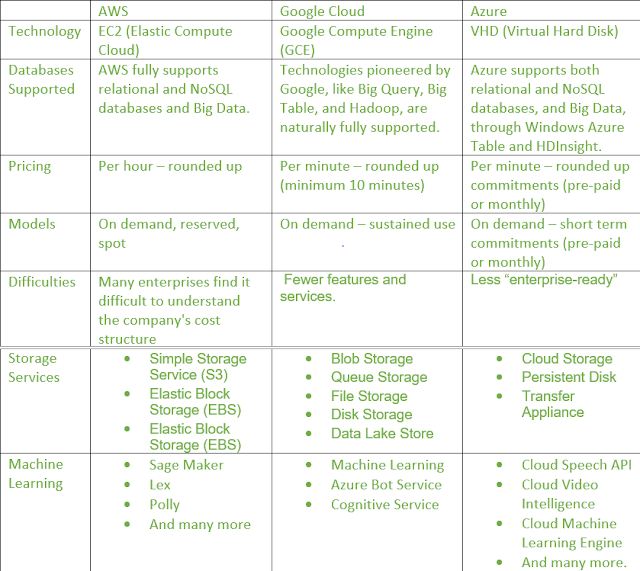
Difference between AWS (Amazon Web Services), Google Cloud and Azure

Microsoft Azure, Cloud Computing Service, Microsoft Azure Exam Prep, Microsoft Azure Guides, Microsoft Azure Certification, Microsoft Azure Learn, Microsoft Azure Skills, Microsoft Azure Jobs, Microsoft Azure Career

Source: geeksforgeeks.org

Thursday, 2 November 2017

Windows 10 Update: How Microsoft is thinking differently about hardware and software

If you buy into Microsoft's telling of the story, the two were designed hand-in-hand (along with the latest Office ProPlus release).

Credit: Microsoft

When crafting the Surface Book 2, which Microsoft announced today, October 17, the Windows and Devices Group worked with the Office team to create a platform that would appeal to "creators" of all kinds, from coders, to data scientists, to gamers, to productivity workers, according to company officials.

How and why did they do that?

Microsoft execs said they know from telemetry data that the Surface Book is Microsoft's device where Office is used most per week. So in crafting Surface Book 2, Microsoft wanted to make sure the newest Surface device would include lots of ways to bring the pen to life for productivity workers.

Another example: Because performance matters a lot to those trying to harness and process big data, the Windows and Devices Group made sure to maximize processing capability of Surface Book 2. Ditto for professional engineers, gamers and those interested in crafting mixed-reality solutions.

(Now that "Fall Creators Update" name for Windows 10 makes a tiny bit more sense.)

"We designed the Surface Book 2 for creators," said Panos Panay, the head of hardware in Microsoft's Windows and Devices Group. "This is a laptop for people who want to create the future."

Microsoft is building Windows and hardware these days in a fundamentally different way than it has previously, Panay told a bunch of us reporters last week during a briefing on the company's new Surface Book 2. He said the team thinks about its hardware as "building a stage for the software," as Microsoft CEO Satya Nadella likes to say.

Unsurprisingly, Panay and his team pooh-poohed recent industry analyst and OEM claims that Microsoft is readying its exit from the hardware business within the next couple of years. They said Microsoft execs are all-in with the idea that companies need to control the end-to-end hardware/software experience.

I believe that Microsoft is using its Surface devices and Office software to try to keep Windows a relevant and revenue-making part of the company. The underlying concept seems to be: Find markets where people still want and need to use PCs, not tablets or phones, for certain computing tasks and cater to them.

Because Microsoft execs want to push the message that the company is a leader in machine learning, they talk about Surface Book 2 running Windows 10 as the ideal machine-learning workhorse. Because gaming remains a key focus for the company, Surface 2 also can be users' souped-up gaming PC, officials stressed during our briefing. Want a PC that's ideal for creating/consuming mixed reality? Ta-da: Windows Mixed Reality headsets plus the Surface Book 2.

This new way of working inside the company didn't just start with the Surface Book 2 and Fall Creators Update. Microsoft's Surface Studio all-in-one launched in tandem with the original Windows 10 Creators Update. The Studio is a device optimized for design professionals, Apple's core audience.

And those first Surface Pro LTE Connected' PCs coming by the end of 2017? They seem like the perfect devices to be designated "Microsoft 365-powered," to me.

This joint design approach may help those of us in the Microsoft-watching business predict some of the new form factors coming from the company, going forward. Once we know the type of new features Microsoft is going to push hardest with "Redstone 4" coming in the Spring, we might be able to narrow down what type of new Surface device(s) may come along for the ride.

I'm putting in an an early vote for "Windows 10 Spring Productivity Update" for Redstone 4....

Tuesday, 31 October 2017

How Microsoft computer scientists and researchers are working to “solve” cancer

Scientists at Microsoft’s research labs are trying to use computer science to solve one of the most complex and deadly challenges humans face: Cancer.

And, for the most part, they are doing so with algorithms and computers instead of test tubes and beakers.

Artificial Intelligence, Cloud Computing, computer vision, Data Visualization, Machine Learning, Microsoft Research

One team of researchers is using machine learning and natural language processing to help oncologists figure out the most effective, individualized cancer treatments for their patients.

Another is pairing machine learning with computer vision to give radiologists a more detailed understanding of how their patients’ tumors are progressing.

Yet another group of researchers has created powerful algorithms that help scientists understand how cancers develop and what treatments will work best to fight them.

And another team is working on moonshot efforts that could one day allow scientists to program cells to fight diseases, including cancer.

While the individual projects vary widely, they share the core philosophy that success depends on both biologists and computer scientists bringing their expertise to the problem.

“The collaboration between biologists and computer scientists is actually key to making this work,” said Jeannette M. Wing, Microsoft’s corporate vice president in charge of the company’s basic research labs.

To learn about these efforts to solve cancer with the help of algorithms and computers, read the full story.