Tuesday, 1 August 2023
Always learning, always adapting: Unpacking Azure’s continuous cybersecurity evolution
Thursday, 16 February 2023
Microsoft Azure Security expands variant hunting capacity at a cloud tempo
Leveraging lessons to identify anti-patterns and enhance security
Azure Security's layered approach to protecting against server-side threats
Saturday, 11 February 2023
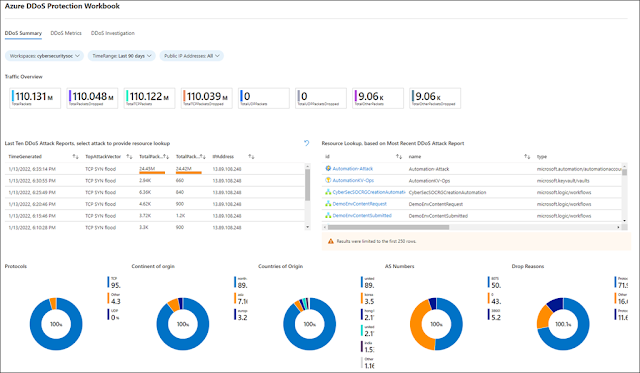
Automate your attack response with Azure DDoS Protection solution for Microsoft Sentinel
Using Microsoft Sentinel as the glue for attack remediation
Automated detection and remediation of sophisticated attacks
Get started with Azure DDoS protection today
Thursday, 6 October 2022
Azure Firewall Basic now in preview
Cost-effective, enterprise-grade security built for SMBs
Key features of Azure Firewall Basic
Choosing the right Azure Firewall SKU to meet your needs
Azure Firewall Basic pricing
Saturday, 14 May 2022
Customize your secure VM session experience with native client support on Azure Bastion
Azure Bastion overview
More flexibility to choose how you connect to your VMs
Simplify your login experience with Azure AD-based authentication
File upload and download to a VM using a native client
Tuesday, 3 May 2022
Announcing new investments to help accelerate your move to Azure
As businesses adapt to new ways of operating, IT leaders are presented with increasing challenges to achieving sustainable growth. Ensuring your business continues to run without interruptions while adapting and transforming can be paramount. If your company is looking for options to migrate your server estate to the cloud, we have news for you.
Outstanding offers
Microsoft has great offers for Windows Server and SQL Server customers looking to move to the cloud. Azure offers free Extended Security Updates for SQL Server 2012 and Windows Server 2012/2012 R2, giving you more time to modernize supported applications for three additional years beyond the 10 years granted by Microsoft Support. Microsoft also allows customers to save significantly when running their workloads in Azure Virtual Machines with Azure Hybrid Benefit, which combined with reserved instances can enable up to 85 percent savings when compared to other cloud services.
To help support your migration and modernization to the cloud, mitigating potential unforeseen risks and costs, Microsoft is expanding the Azure Migration and Modernization Program (AMMP). In the past years, AMMP has helped thousands of customers like Jotun unlock the value of the cloud, bringing together the right mix of resources and best practices at every stage of their journey. We’re now investing significantly more to support your largest Windows/SQL Server migration and modernization projects—up to 2.5 times larger based on project eligibility. This investment will help with your migration in two ways: partner assistance with planning and moving your workloads, and Azure credits that offset transition costs during your move to Azure SQL Managed Instance and Azure SQL Database.
Unparalleled innovation
Unlock your SQL Server and Windows Server’s greatest potential in Azure, with unique capabilities and more options for true hybrid cloud flexibility. With Microsoft you can choose the option that aligns best to your business needs, migrating and modernizing servers with solutions like Windows Server and SQL Server running in virtual machines (VMs), Azure SQL managed databases, and hybrid management through Azure Arc.
When you have your VMs in Azure, management becomes simplified with dedicated solutions such as Azure Automanage and Windows Admin Center in the Azure portal. Azure SQL allows you to spend more time innovating and less time patching, updating, and backing up your databases, as Azure is the only cloud with evergreen SQL that automatically applies the latest updates and patches so that your databases are always up to date, eliminating end-of-support hassles. Azure SQL also features built-in AI that automatically tunes databases ensuring peak performance for every database, delivering leading price-performance.
Unmatched security
Security is foundational for Azure. If your company is running SQL Server 2012 and Windows Server 2012/2012 R2, this is the time to consider assessing those environments as they reach the end of support on July 12, 2022 and October 10, 2023 respectively. Not having support means the end of security updates, which may leave your business exposed to security risks and compliance concerns. Azure offers three years of extended security updates.
Multilayered security is provided across physical datacenters, infrastructure, and operations with cyber security experts actively monitoring to protect your Windows Server and SQL Server, including in hybrid deployments with Azure Arc. Microsoft has more than 3,500 cybersecurity professionals and spends $1 billion annually on security to help protect, detect, and respond to threats, so you can grow a safe and secure business. The Azure platform is a leader in compliance coverage with 90 plus compliance offers that allow you to proactively safeguard your data and streamline compliance. Our commitment to privacy is uncompromising. Our core privacy principle is, you own your data. We will never use it for marketing or advertising purposes, in turn providing you confidence around data storage and security.
Source: microsoft.com
Sunday, 1 May 2022
Meet PCI compliance with credit card tokenization
In building and running a business, the safety and security of your and your customers' sensitive information and data is a top priority, especially when storing financial information and processing payments are concerned. The Payment Card Industry Data Security Standard (PCI DSS) defines a set of regulations put forth by the largest credit card companies to help reduce costly consumer and bank data breaches.
In this context, PCI compliance refers to meeting the PCI DSS’ requirements for organizations and sellers to help safely and securely accept, store, process, and transmit cardholder data during credit card transactions, to prevent fraud and theft.
Towards confidential computing
In June 2021, the Monetary Authority of Singapore (MAS) issued an advisory circular on addressing the technology and cyber security risks associated with public cloud adoption. The paper describes a set of risk management principles and best practice standards to guide financial institutions in implementing appropriate data security measures to help protect the confidentiality and integrity of sensitive data in the public cloud, taking into consideration data-at-rest, data-in-motion, and data-in-use where applicable. Specifically, at section 21, reported below, for data that is being used or processed in the public cloud, financial institutes (FIs) may implement confidential computing solutions if available from the cloud service provider. Confidential computing solutions protect data by isolating sensitive data in a protected, hardware-based computing enclave.
Data security and cryptographic key management
FIs should implement appropriate data security measures to protect the confidentiality and integrity of sensitive data in the public cloud, taking into consideration data-at-rest, data-in-motion and data-in-use where applicable.
◉ For data-at-rest, that is, data in cloud storage, FIs may implement additional measures e.g. data object encryption, file encryption or tokenization in addition to the encryption provided at the platform level.
◉ For data-in-motion, that is, data that traverses to and from, and within the public cloud, FIs may implement session encryption or data object encryption in addition to the encryption provided at the platform level.
◉ For data-in-use, that is, data that is being used or processed in the public cloud, FIs may implement confidential computing solutions if available from the CSPs. Confidential computing solutions protect data by isolating sensitive data in a protected, hardware-based computing enclave during processing.
Confidential virtual machines
On these premises, FIs can leverage Azure confidential computing for building an end-to-end data and code protection solution on the latest technology for hardware-based memory encryption. The solution presented in this article for processing credit card payments makes use of confidential virtual machines (CVMs) running on AMD Secure Encrypted Virtualization (SEV)—Secure Nested Paging (SNP) technology.
AMD introduced SEV to isolate virtual machines from the hypervisor. Hypervisors are typically considered trusted components in the virtualization security model, and many customers have requested a VM trust model which reduces the exposure to vulnerabilities in the infrastructure. With SEV, individual VMs are assigned a unique encryption key wired in the CPU, used for automatically encrypting the memory allocated by the hypervisor to run a VM.
The latest generation of SEV technology includes SNP capability. SNP adds new hardware-based security by providing strong memory integrity protection from potential attacks to the hypervisor, including data replay and memory re-mapping.
Azure confidential computing offers confidential VMs based on AMD processors with SEV-SNP technology. Confidential VMs are for tenants with high security and confidentiality requirements. You can use confidential VMs for migrations without making changes to your code, with the platform help protect your VM’s state from being read or modified. Benefits of confidential VMs include:
◉ Robust hardware-based isolation between virtual machines, hypervisor, and host management code.
◉ Attestation policies to ensure the host’s compliance before deployment.
◉ Cloud-based full-disk encryption before the first boot.
◉ VM encryption keys that the platform or the customer (optionally) owns and manages.
◉ Secure key release with cryptographic binding between the platform’s successful attestation and the VM’s encryption keys.
◉ Dedicated virtual Trusted Platform Module (TPM) instance for attestation and protection of keys and secrets in the virtual machine.
The provisioning of a confidential VM in Azure is as simple as any other regular virtual machine, using your preferred tool, either manually via the Azure Portal, or by scripting with Azure command-line interface (CLI). Figure 2 shows the process of creating a virtual machine in the Azure Portal, with specific attention to the “Security type” attribute. For provisioning a confidential VM based on AMD SEV-SNP technology, you have to select that specific entry in the dropdown list. At the time of writing (March 2022), confidential VMs are in preview in Azure, and thus limited in availability across regions. As this service enters general availability, more regions will be available for deployment.
Credit card tokenization
Thursday, 17 March 2022
Secure your APIs with Private Link support for Azure API Management
Azure API Management is a fully managed service that enables customers to publish, secure, transform, maintain, and monitor APIs. With a few clicks in the Azure portal, you can create an API facade that acts as a “front door” through which external and internal applications can access data or business logic implemented by your custom-built backend services, running on Azure, for example on Azure App Service or Azure Kubernetes Service, or hosted outside of Azure, in a private datacenter or on-premises. Azure API Management handles all the tasks involved in mediating API calls, including request authentication and authorization, rate limit and quota enforcement, request and response transformation, logging and tracing, and API version management.
Azure API Management helps you in:
◉ Unlocking legacy assets—APIs are used to abstract and modernize legacy backends and make them accessible from new cloud services and modern applications. APIs allow innovation without the risk, cost, and delays of migration.
◉ Create API-centric app integration—APIs are easily consumable, standards-based, and self-describing mechanisms for exposing and accessing data, applications, and processes. They simplify and reduce the cost of app integration.
◉ Enable multi-channel user experiences—APIs are frequently used to enable user experiences such as web, mobile, wearable, or Internet of Things (IoT applications. Reuse APIs to accelerate development and return on investment (ROI).
◉ Business-to-business (B2B) integration—APIs exposed to partners and customers lower the barrier to integrate business processes and exchange data between business entities. APIs eliminate the overhead inherent in point-to-point integration. Especially with self-service discovery and onboarding enabled, APIs are the primary tools for scaling B2B integration.
We are happy to announce the preview of Azure Private Link support for Azure API Management service. If you are not familiar with Azure API Management, when you deploy this service, you get three main components: Azure portal, gateway, and management plane. With Azure Private Link we can create a private endpoint for the gateway component, which will be exposed through a private IP within your virtual network. This will allow inbound traffic coming to the private IP to reach Azure API Management gateway.
Azure Private Link
With Azure Private Link, communications between your virtual network and the Azure API Management gateway travel over the Microsoft backbone network privately and securely, eliminating the need to expose the service to public internet.
Key benefits of Azure Private Link
Through this functionality we will provide the same consistent experience found in other PaaS services with private endpoints:
◉ Private access from Azure Virtual Network resources, peered networks, and on-premises networks.
◉ Built-in data exfiltration protection for Azure resources.
◉ Predictable private IP addresses for PaaS resources.
◉ Consistent and unified experience across PaaS services.
Private endpoints and public endpoints
How to decide which networking model to use with Azure API Management?
|
Network model |
Supported tiers | Supported components | Supported traffic |
| Virtual network—external | Developer and Premium. | Azure portal, gateway, management plane, and Git repository. | Inbound and outbound traffic can be allowed to internet, peered virtual networks, Express Route, and VPN S2S connections. |
| Virtual network—internal | Developer and Premium. | Developer portal, Gateway, Management Plane, and Git repository. | Inbound and outbound traffic can be allowed to peered virtual networks, Express Route, and VPN S2S connections. |
| Private endpoint connection (preview) | Developer, Basic, Standard, and Premium. | Gateway only (managed gateway supported, self-hosted gateway not supported). | Only inbound traffic can be allowed to internet, peered virtual networks, Express Route, and VPN S2S connections. |
Preview limitations
Tuesday, 8 March 2022
Microsoft DDoS protection response guide
Receiving Distributed Denial of Service (DDoS) attack threats?
DDoS threats have seen a significant rise in frequency lately, and Microsoft stopped numerous large-scale DDoS attacks last year. This guide provides an overview of what Microsoft provides at the platform level, information on recent mitigations, and best practices.
Microsoft DDoS platform
⇒ Microsoft provides robust protection against layer three (L3) and layer four (L4) DDoS attacks, which include TCP SYN, new connections, and UDP/ICMP/TCP floods.
⇒ Microsoft DDoS Protection utilizes Azure’s global deployment scale, is distributed in nature, and offers 60Tbps of global attack mitigation capacity.
⇒ All Microsoft services (including Microsoft365, Azure, and Xbox) are protected by platform level DDoS protection. Microsoft's cloud services are intentionally built to support high loads, which help to protect against application-level DDoS attacks.
⇒ All Azure public endpoint VIPs (Virtual IP Address) are guarded at platform safe thresholds. The protection extends to traffic flows inbound from the internet, outbound to the internet, and from region to region.
⇒ Microsoft uses standard detection and mitigation techniques such as SYN cookies, rate limiting, and connection limits to protect against DDoS attacks. To support automated protections, a cross-workload DDoS incident response team identifies the roles and responsibilities across teams, the criteria for escalations, and the protocols for incident handling across affected teams.
⇒ Microsoft also takes a proactive approach to DDoS defense. Botnets are a common source of command and control for conducting DDoS attacks to amplify attacks and maintain anonymity. The Microsoft Digital Crimes Unit (DCU) focuses on identifying, investigating, and disrupting malware distribution and communications infrastructure to reduce the scale and impact of botnets.
Recent incidents
At Microsoft, despite the evolving challenges in the cyber landscape, the Azure DDoS Protection team was able to successfully mitigate some of the largest DDoS attacks ever, both in Azure and in the course of history.
⇒ Last October 2021, Microsoft reported on a 2.4 terabit per second (Tbps) DDoS attack in Azure that we successfully mitigated. Since then, we have mitigated three larger attacks.
⇒ In November 2021, Microsoft mitigated a DDoS attack with a throughput of 3.47 Tbps and a packet rate of 340 million packets per second (pps), targeting an Azure customer in Asia. As of February 2022, this is believed to be the largest attack ever reported in history. It was a distributed attack originating from approximately 10,000 sources and from multiple countries across the globe, including the United States, China, South Korea, Russia, Thailand, India, Vietnam, Iran, Indonesia, and Taiwan.
Protect your applications in Azure against DDoS attacks in three steps:
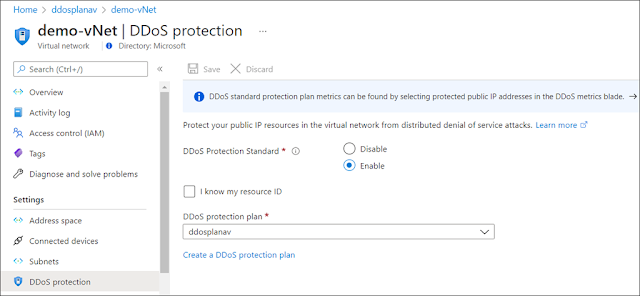
Customers can protect their Azure workloads by onboarding to Azure DDoS Protection Standard. For web workloads it is recommended to use web application firewall in conjunction with DDoS Protection Standard for extensive L3-L7 protection.
1. Evaluate risks for your Azure applications. This is the time to understand the scope of your risk from a DDoS attack if you haven’t done so already.
a. If there are virtual networks with applications exposed over the public internet, we strongly recommend enabling DDoS Protection on those virtual networks. Resources in a virtual network that requires protection against DDoS attacks are Azure Application Gateway and Azure Web Application Firewall (WAF), Azure Load Balancer, virtual machines, Bastion, Kubernetes, and Azure Firewall. Review “DDoS Protection reference architectures” to get more details on reference architectures to protect resources in virtual networks against DDoS attacks.
Best practices to be followed
When to contact Microsoft support
Thursday, 3 February 2022
Announcing the public preview of Microsoft Azure Payment HSM service
The growing trend for running payment workloads in the cloud
Momentum is building as financial institutions move some or all their payment applications to the cloud. This entails a migration from the legacy on-premises applications and hardware security modules (HSM) to a cloud-based infrastructure that is not generally under their direct control. Often it means a subscription service rather than perpetual ownership of physical equipment and software. Corporate initiatives for efficiency and a scaled-down physical presence are the drivers for this. Conversely, with cloud-native organizations, the adoption of cloud-first without any on-premises presence is their fundamental business model. End-users of a cloud-based payment infrastructure expect reduced IT complexity, streamlined security compliance, and flexibility to scale their solution seamlessly as their business grows.
Potential challenges
Cloud offers significant benefits. Yet, there are challenges when migrating a legacy on-premises payment application (involving payment HSM) to the cloud that must be addressed. Some of these are:
◉ Shared responsibility and trust—what potential loss of control in some areas is acceptable?
◉ Latency—how can an efficient, high-performance link between the application and HSM be achieved?
◉ Performing everything remotely—what existing processes and procedures may need to be adapted?
◉ Security certifications and audit compliance—how will current stringent requirements be fulfilled?
The Azure Payment HSM service addresses these challenges and delivers a compelling value proposition to the users of the service.
Introducing the Microsoft Azure Payment HSM
Today, we are excited to announce that Azure Payment HSM is in preview in East US and North Europe.
The Azure Payment HSM is a “BareMetal” service delivered using Thales payShield 10K payment HSMs to provide cryptographic key operations for real-time, critical payment transactions in the Azure cloud. Azure Payment HSM is designed specifically to help a service provider and an individual financial institution accelerate their payment system’s digital transformation strategy and adopt the public cloud. It meets stringent security, audit compliance, low latency, and high-performance requirements by the Payment Card Industry (PCI).
HSMs are provisioned and connected directly to users’ virtual network, and HSMs are under users’ sole administration control. HSMs can be easily provisioned as a pair of devices and configured for high availability. Users of the service utilize Thales payShield Manager for secure remote access to the HSMs as part of their Azure subscription. Multiple subscription options are available to satisfy a broad range of performance and multiple application requirements that can be upgraded quickly in line with end-user business growth. Azure Payment HSM offers the highest performance level 2,500 CPS.
Enhanced security and compliance
End-users of the service can leverage Microsoft security and compliance investments to increase their security posture. Microsoft maintains PCI DSS and PCI 3DS compliant Azure data centers, including those which house Azure Payment HSM solutions. The Azure Payment HSM can be deployed as part of a validated PCI P2PE and PCI PIN component or solution, helping to simplify ongoing security audit compliance. Thales payShield 10K HSMs deployed in the security infrastructure are certified to FIPS 140-2 Level 3 and PCI HSM v3.
*The Azure Payment HSM service is currently undergoing PCI DSS and PCI 3DS audit assessment.
Manage your Payment HSM in Azure
The Azure Payment HSM service offers complete administrative control of the HSMs to the customer. This includes exclusive access to the HSMs. The customer could be a payment service provider acting on behalf of multiple financial institutions or a financial institution that wishes to directly access the Azure Payment HSM. Once the HSM is allocated to a customer, Microsoft has no access to customer data. Likewise, when the HSM is no longer required, customer data is zeroized and erased as soon as the HSM is released to Microsoft to maintain complete privacy and security. The customer is responsible for deploying and configuring HSMs for high availability, backup and disaster recovery requirements, and to achieve the same performance available on their on-premises HSMs.
Accelerate digital transformation and innovation in cloud
The Azure Payment HSM solution offers native access to a payment HSM in Azure for ‘lift and shift’ with low latency. The solution offers high-performance transactions for mission-critical payment applications. Thales payShield customers can utilize their existing remote management solutions (payShield Manager and payShield TMD together) to work with the Azure Payment HSM service. Customers new to payShield can source the hardware accessories from Thales or one of its partners before deploying their Payment HSM.
Typical use cases
With benefits including low latency and the ability to quickly add more HSM capacity as required, the cloud service is a perfect fit for a broad range of use cases which include:
Payment processing:
◉ Card and mobile payment authorization
◉ PIN and EMV cryptogram validation
◉ 3D-Secure authentication
Payment credential issuing:
◉ Cards
◉ Mobile secure elements
◉ Wearables
◉ Connected devices
◉ Host card emulation (HCE) applications
Securing keys and authentication data:
◉ POS, mPOS, and SPOC key management
◉ Remote key loading (for ATM, POS, and mPOS devices)
◉ PIN generation and printing
◉ PIN routing
Sensitive data protection:
◉ Point to point encryption (P2PE)
◉ Security tokenization (for PCI DSS compliance)
◉ EMV payment tokenisation
Suitable for both existing and new payment HSM users
The solution provides clear benefits for both payment HSM users with a legacy on-premises HSM footprint, and those new payment ecosystem entrants with no legacy infrastructure to support and who may choose a cloud-native approach from the outset.
Benefits for existing on-premises HSM users:
◉ Requires no modifications to payment applications or HSM software to migrate existing applications to the Azure solution.
◉ Enables more flexibility and efficiency in HSM utilization.
◉ Simplifies HSM sharing between multiple teams geographically dispersed.
◉ Reduces physical HSM footprint in their legacy data centers.
◉ Improves cash flow for new projects.
Benefits for new payment participants:
◉ Avoids introduction of on-premises HSM infrastructure.
◉ Lowers upfront investment via the Azure subscription model.
◉ Offers access to the latest certified hardware and software on-demand.
Source: microsoft.com