Showing posts with label Azure Firewall. Show all posts

Thursday, 11 May 2023

Secure your cloud environment with Cloud Next-Generation Firewall by Palo Alto Networks, an Azure Native ISV Service—now in preview

To support our customers in accelerating their digital transformation journey and protecting their cloud environment against threats, Microsoft is committed to giving customers the best possible options for securing their applications. To accelerate that commitment, we are excited to announce the preview of Cloud Next-Generation Firewall (NGFW) for Azure.

Cloud NGFW for Azure is Palo Alto Networks NGFW delivered as a managed service on Microsoft Azure. It enables you to easily utilize Palo Alto Networks best-in-class network security capabilities on Azure, and you can manage it using either Palo Alto Networks Panorama policy management solution or directly from the Azure portal. Cloud NGFW for Azure combines the scalability and reliability of Microsoft Azure with Palo Alto Networks deep expertise in network security.

“At Microsoft, we are dedicated to ensuring that Microsoft Azure is the most trusted and secure cloud platform. With the preview release of the Palo Alto Networks Cloud NGFW for Azure, we are pleased to expand our ecosystem of native ISV solutions and provide customers and developers with more options to meet their security needs. This collaboration between Palo Alto Networks and Microsoft combines the scalability and reliability of Azure with Palo Alto Networks expertise to help safeguard our customers against the latest threats.”—Julia Liuson President, Microsoft Developer Division at Microsoft.

“More and more of our customers are running their business critical applications in Azure and are looking to us to help keep those workloads secure. With Cloud NGFW for Azure we are excited to combine Palo Alto Networks best-in-class security with the scalability and reliability of Azure to provide our mutual customers the ability to run their applications with confidence. As a managed Azure Native ISV service, we are proud to deliver the ease of use customers expect from a cloud native experience.”—Lee Klarich, Chief Product Officer, Palo Alto Networks.

Palo Alto Networks Next-Generation Firewall is available on Azure


Palo Alto Networks is a leader in cloud security and provides next-generation cybersecurity to thousands of customers globally, across all sectors. With the integration of Cloud NGFW for Azure into the Azure ecosystem we are delivering an integrated experience and empowering a growing ecosystem of developers and customers to help protect their organizations on Azure.

Cloud NGFW for Azure is offered through Azure Marketplace and offers many of the same capabilities as Palo Alto Networks hardware firewalls and virtualized next-generation firewalls as a managed service, making it easily scalable for cloud environments.

We are excited to work with Palo Alto Networks to provide powerful capabilities to Azure customers, including:

  • Security: Palo Alto Networks provides a rich set of security features thanks to its unique machine learning (ML) powered NGFW. Cloud NGFW for Azure uses AI and ML behind the scenes to detect and stop known, unknown, and zero-day threats, enabling customers to stay ahead of sophisticated adversaries. This advanced technology has allowed Palo Alto Networks to block nearly 5 billion events each day, demonstrating the effectiveness of this solution in providing robust security to customers.
  • Ease of Use: Cloud NGFW for Azure is designed to be incredibly easy to use, thanks to its Azure-native ISV Service architecture. This enables customers to procure and deploy the solution directly from the Azure portal in just a few minutes, providing instant protection against cyber threats. The solution is also very easy to operate as Palo Alto Networks takes care of scaling, resilience, and software updates. Furthermore, Cloud NGFW for Azure integrates seamlessly with Azure Virtual wide area network (WAN) deployments, enabling customers to protect traffic across their entire network. This integration provides customers with the agility and flexibility they need to manage their cloud security while focusing on their core business objectives.
  • Consistent Management from On-Prem to Cloud: Cloud NGFW for Azure is integrated with their Panorama policy management solution. This combination offers a host of benefits to our mutual customers. Firstly, it enables seamless security policy extension from on-prem to Azure, simplifying operations and reducing administrative workload and total cost of ownership. More importantly, this integration enforces the same high standards of security in the cloud, ensuring that customers’ cloud environments are secure and protected against cyber threats. Additionally, integration provides centralized visibility, providing valuable insights into the threats on their network from on-prem environments to the cloud. This enables customers to manage their security policies through their existing Panorama console, streamlining management, allowing their cloud teams to focus on application migration and new application development. 

Do more with less


We have invested in a deeply integrated experience with Palo Alto Networks on Azure including some of the key capabilities listed below to help you do more with less.

Seamless end user experience


We collaborated closely with Palo Alto Networks to develop Cloud NGFW for Azure, and tested it with our joint customers. Cloud NGFW for Azure provides a seamless and simplified end user experience for Cloud NGFW for Azure by integrating the deployment, management, billing, and support of the Palo Alto Networks solution on Azure, available via Azure Marketplace.

Cloud NGFW for Azure also provides integrated billing with Azure subscription invoicing, deep integrations with Azure services for role-based access control (RBAC) and identity management, and a unified support model. This service gives the user consistency in performance and security across their portfolio of on-prem and Azure cloud apps by using the same security solution and configurations everywhere. 

Deploy in minutes

Palo Alto Networks Cloud NGFW is deeply integrated into the Azure ecosystem. Through this deep integration, users can provision a new Palo Alto Networks Next-Generation Firewall in a matter of minutes, so they can quickly secure their Azure applications.

Run where you want

Palo Alto Networks Cloud NGFW for Azure can be deployed into both Virtual Networks and Virtual WAN hubs, and integrated with Azure Key Vault so even encrypted communications can be inspected for security. Cloud NGFW for Azure can be deployed into your Virtual Network automatically using a custom solution via service injection, and user-defined routing can be applied to route traffic to-and-from Cloud NGFW for Azure for inspection.

Customers who want a fully managed network-as-a-service with powerful routing can also choose to deploy the solution in a Virtual WA. Virtual WAN abstracts and simplifies the complexity of routing within a large hybrid network that spans on-premises and Azure at-scale. Configuring routing in Virtual WAN to send traffic to Cloud NGFW for Azure as a bump-in-the-wire solution requires just a single click with the Virtual WAN’s intelligent routing engine handling the rest of the routing.

Cloud Next-Generation, Firewall by Palo Alto Networks, Azure Native, ISV Service, Cloud Next-Generation Firewall (NGFW), Microsoft Azure, Azure Career, Azure Skills, Azure Jobs, Azure Tutorial and Material

Getting started with Cloud NGFW for Azure


Discovery and procuring: Azure customers can find the Palo Alto Networks service listed on Azure Marketplace, review the different purchasing plans offered, and procure it directly with single billing enabled:

Cloud Next-Generation, Firewall by Palo Alto Networks, Azure Native, ISV Service, Cloud Next-Generation Firewall (NGFW), Microsoft Azure, Azure Career, Azure Skills, Azure Jobs, Azure Tutorial and Material

Provisioning the Palo Alto Networks resources: Within several clicks, you can deploy Palo Alto Networks service in your desired subscription and datacenter regions with your preferred plan.

Cloud Next-Generation, Firewall by Palo Alto Networks, Azure Native, ISV Service, Cloud Next-Generation Firewall (NGFW), Microsoft Azure, Azure Career, Azure Skills, Azure Jobs, Azure Tutorial and Material

Source: microsoft.com

Thursday, 17 November 2022

Announcing new capabilities for Azure Firewall

We are happy to share several key Azure Firewall capabilities that are now generally available as well as updates on recent important releases into general availability (GA) and preview.

◉ New GA regions in Qatar central, China East, and China North
◉ IDPS Private IP ranges now generally available.
◉ Single Click Upgrade/Downgrade now in preview.
◉ Enhanced Threat Intelligence now in preview.
◉ KeyVault with zero internet exposure now in preview.

Azure Firewall is a cloud-native firewall as a service offering that enables customers to centrally govern and log all their traffic flows using a DevOps approach. The service supports both application and network-level filtering rules and is integrated with the Microsoft Threat Intelligence feed to filter known malicious IP addresses and domains. Azure Firewall is highly available with built-in auto-scaling.

New GA regions in Qatar central, China East, and China North


We are happy to announce that Azure Firewall Standard, Azure Firewall Premium, and Azure Firewall Manager are now generally available in three new regions: Qatar Central, China East, and China North.

With these three new regions, Azure Firewall is now available in 38 regions worldwide!

IDPS Private IP ranges now GA


A network intrusion detection and prevention system (IDPS) allow you to monitor network activities for malicious activity, log information about this activity, report it, and optionally attempt to block it.

In Azure Firewall Premium IDPS, Private IP address ranges are used to identify traffic direction (inbound, outbound, or internal) to allow accurate matches with IDPS signatures. By default, only ranges defined by Internet Assigned Numbers Authority (IANA) RFC 1918 are considered private IP addresses. To modify your private IP addresses, you can now easily edit, remove, or add ranges as needed.

Azure Firewall, Azure Exam Prep, Azure Learning, Azure Prep, Azure Tutorial and Materials

Single Click Upgrade/Downgrade (preview)


With this new capability, customers can easily upgrade their existing Firewall Standard SKU to Premium SKU as well as downgrade from Premium to Standard SKU. The process is fully automated and has zero service downtime.
In the upgrade process, users can select the policy to be attached to the upgraded Premium SKU. Either by using an existing Premium Policy or by utilizing their existing Standard Policy. Customers can utilize their existing Standard policy and let the system automatically duplicate, upgrade to Premium Policy, and attach it to the newly created Premium Firewall.

This new capability is available through the Azure portal as seen in the screenshot below, as well as via PowerShell and Terraform.

Azure Firewall, Azure Exam Prep, Azure Learning, Azure Prep, Azure Tutorial and Materials

Enhanced Threat Intelligence (preview)


Threat Intelligence is information an organization uses to understand the threats that have, will, or are currently targeting the organization. This info is used to prepare, prevent, and identify cyber threats looking to take advantage of valuable resources. Azure Firewall Threat intelligence information is sourced from the Microsoft Threat Intelligence feed, which includes multiple sources including the Microsoft Cyber Security team.

Threat Intelligence-based filtering can be enabled for your firewall to alert and deny traffic from/to known malicious IP addresses and FQDNs. With the new enhancement, Azure Firewall Threat Intelligence has more granularity for filtering based on malicious URLs. This means that customers may have access to a certain domain through a specific URL in this domain will be denied by Azure Firewall if identified as malicious.

For optimal granularity, customers can utilize Threat Intelligence allow list to bypass threat intelligence validation on trusted FQDNs, IP addresses, ranges, and subnets.

In HTTPS, the URL is encrypted, thus customers can utilize Azure Firewall Premium TLS inspection to allow URL-based Threat Intelligence also for their encrypted traffic.

With Azure Firewall IDPS, Threat Intelligence, and TLS inspection, customers can improve their security posture to become better protected against future threats.

KeyVault with zero internet exposure (preview)


In Azure Firewall Premium TLS inspection, customers are required to deploy their intermediate CA certificate in Azure KeyVault. Now that Azure firewall is listed as a trusted Azure KeyVault service, customers can eliminate any internet exposure of their Azure KeyVault.

At Microsoft, we are constantly evolving Azure Firewall to meet our customers’ needs and help them strengthen their security and gain efficiencies. Last month, we announced the preview of Policy Analytics for Azure Firewall, which helps improve your security posture by providing critical insights and recommendations for optimizing firewall rules. We also recently announced the preview of Azure Firewall Basic, a new SKU of Azure Firewall designed to meet the needs of SMBs by providing enterprise-grade protection of their cloud environment at an affordable price point. We plan to share further enhancements to Azure Firewall very soon, including new troubleshooting capabilities. Please stay tuned!

Source: microsoft.com

Thursday, 6 October 2022

Azure Firewall Basic now in preview

Organizations are experiencing an increase in both the volume and sophistication of cyberattacks with the acceleration of digital transformation and the increase in hybrid work. While organizations of all sizes face similar security risks, cybersecurity is rapidly becoming a top concern for small and medium businesses (SMBs) with the shift to remote work and new digital business models. SMBs are particularly vulnerable as they are faced with budget constraints and gaps in specialized security skills. In a recent research study, over 60 percent of small businesses experienced a cyberattack and were left unable to operate.

Microsoft is constantly innovating to help secure customers’ digital assets in an evolving threatened landscape and help SMB customers with their cloud adoption journey. Today, we are excited to announce the preview of Azure Firewall Basic.

Azure Firewall Basic is a new SKU of Azure Firewall designed to meet the needs of SMBs by providing enterprise-grade protection of their cloud environment at an affordable price point. It is a cloud-native, highly available, stateful firewall as a service offering that enables customers to centrally govern and log all of their traffic flows with essential capabilities at scale.

Cost-effective, enterprise-grade security built for SMBs


Azure Firewall Basic includes Layer 3–Layer 7 filtering and alerts on malicious traffic with built-in threat intelligence from Microsoft Threat Intelligence. With tight integration with other Azure services, such as Azure Monitor, Azure Events Hub, Microsoft Sentinel, and Microsoft Defender for Cloud, you can gain more visibility into your environment and identify and respond to threats quicker.

Key features of Azure Firewall Basic


Comprehensive, cloud-native network firewall security.

◉ Network and application traffic filtering.
◉ Threat intelligence to alert on malicious traffic.
◉ Built-in high availability.
◉ Seamless integration with other Azure services.

Simple setup and easy to use.

◉ Set up in just a few minutes.
◉ Automate deployment (deploy as code).
◉ Zero maintenance with automatic updates.
◉ Central management via Azure Firewall Manager.

Cost-effective.

◉ Designed to deliver essential, cost-effective Firewall protection for your resources within your virtual network.

Azure Firewall Basic, Azure Exam, Azure Career, Azure Skill, Azure Jobs, Azure Tutorial and Materials

Choosing the right Azure Firewall SKU to meet your needs


Azure Firewall now supports three different SKUs to cater to a wide range of customer use cases and preferences.

◉ Azure Firewall Premium is recommended to secure highly sensitive applications (such as payment processing). It supports advanced threat protection capabilities like malware and TLS inspection.

◉ Azure Firewall Standard is recommended for customers looking for Layer 3–Layer 7 firewall and needs auto-scaling to handle peak traffic periods of up to 30 Gbps. It supports enterprise features like threat intelligence, DNS proxy, custom DNS, and web categories.

◉ Azure Firewall Basic is recommended for SMB customers with throughput needs of less than 250 Mbps.

Let’s take a closer look at the features across the three Azure Firewall SKUs.


Azure Firewall Basic pricing


Similar to the Standard and Premium SKUs, Azure Firewall Basic pricing includes both deployment and data processing charges.

Source: microsoft.com

Saturday, 12 February 2022

Improve your security defenses for ransomware attacks with Azure Firewall

Azure Firewall, Azure Firewall Premium, Security, Networking, Management

To ensure customers running on Azure are protected against ransomware attacks, Microsoft has invested heavily in Azure security and has provided customers with the security controls needed to protect their Azure cloud workloads.

A comprehensive overview of best practices and recommendations can be found in the "Azure Defenses for Ransomware Attack" e-book.

Here, we would like to zoom into network security and understand how Azure Firewall can assist you with protecting against ransomware.

Ransomware is basically a type of malicious software designed to block access to your computer system until a sum of money is paid. The attacker usually exploits an existing vulnerability in your system to penetrate your network and execute the malicious software on the target host.

Ransomware is often spread through phishing emails that contain malicious attachments or through drive-by downloading. Drive-by downloading occurs when a user unknowingly visits an infected website and then malware is downloaded and installed without the user’s knowledge.

Here Azure Firewall Premium comes into help. With its intrusion detection and prevention system (IDPS) capability, every packet will be inspected thoroughly, including all its headers and payload to identify malicious activity and to prevent it from penetrating your network. IDPS allows you to monitor your network for malicious activity, log information about this activity, report it, and optionally attempt to block it.

The IDPS signatures are applicable for both application and network-level traffic (Layers 4-7), they are fully managed and contain more than 65,000 signatures in over 50 different categories to keep them up to date with the dynamic ever-changing attack landscape:

1. Azure Firewall is getting early access to vulnerability information from Microsoft Active Protections Program (MAPP) and Microsoft Security Response Center (MSRC).

2. Azure Firewall is releasing 30 to 50 new signatures each day.

Nowadays, modern encryption, such as Secure Sockets Layer (SSL) or Transport Layer Security (TLS), is used globally to secure internet traffic. Attackers are using encryption to carry their malicious software into the victim network. Therefore, customers must inspect their encrypted traffic just like any other traffic.

Azure Firewall Premium IDPS allows you to detect attacks in all ports and protocols for non-encrypted traffic. However, when HTTPS traffic needs to be inspected, Azure Firewall can use its TLS inspection capability to decrypt the traffic and accurately detect malicious activities.

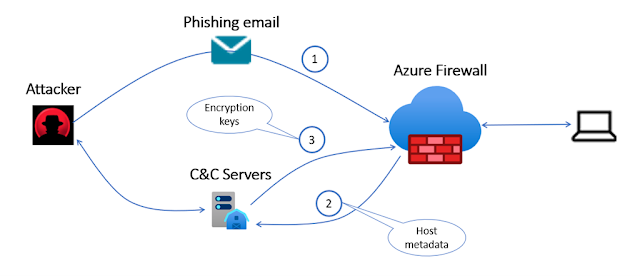
After the ransomware is installed on the target machine, it may try to encrypt the machine’s data, therefore it requires using an encryption key and may use the Command and Control (C&C) to get the encryption key from the C&C server hosted by the attacker. CryptoLocker, WannaCry, TeslaCrypt, Cerber, and Locky are some of the ransomware using C&C to fetch the required encryption keys.

Azure Firewall Premium has hundreds of signatures that are designed to detect C&C connectivity and block it to prevent the attacker from encrypting customers’ data.

Azure Firewall, Azure Firewall Premium, Security, Networking, Management
Figure 1: Firewall protection against ransomware attack using command and control channel

Taking a comprehensive approach to fend off ransomware attacks


Taking a holistic approach to fend off ransomware attacks is recommended. Azure Firewall operates in a default deny mode and will block access unless explicitly allowed by the administrator. Enabling Threat Intelligence (TI) feature in alert/deny mode will block access to known malicious IPs and domains. Microsoft Threat Intel feed is updated continuously based on new and emerging threats.

Firewall policy can be used for the centralized configuration of firewalls. This helps with responding to threats rapidly. Customers can enable Threat Intel and IDPS across multiple firewalls with just a few clicks. Web categories let administrators allow or deny user access to web categories such as gambling websites, social media websites, and others. URL filtering provides scoped access to external sites and can cut down risk even further. In other words, Azure Firewall has everything necessary for companies to defend comprehensively against malware and ransomware.

Detection is equally important as prevention. Azure Firewall solution for Microsoft Sentinel gets you both detection and prevention in the form of an easy-to-deploy solution. Combining prevention and detection allows you to ensure that you both prevent sophisticated threats when you can, while also maintaining an “assume breach mentality” to detect and quickly respond to cyberattacks.

Source: microsoft.com

Tuesday, 1 February 2022

New performance and logging capabilities in Azure Firewall

Azure Firewall, Azure Exam Prep, Azure Learning, Azure Preparation, Azure Career, Azure Skills, Azure Jobs, Azure Preparation

Organizations are speeding up workload migration to Azure to take advantage of the growing set of innovative cloud services, scale, and economic benefits of the public cloud. Applications migration to the cloud consequently increases the network traffic throughput demand. This puts pressure on network elements and more specifically on Azure Firewall which is in the critical path of most network traffic. Currently, Azure Firewall supports 30 Gbps which is sufficient to meet current throughput demands for many of our customers. However, we are seeing some organizations require even more throughput and towards this, we are announcing new Azure Firewall capabilities as well as updates for January 2022:

◉ Azure Firewall network rule name logging.

◉ Azure Firewall premium performance boost.

◉ Performance whitepaper.

Azure Firewall network rule name logging

We have heard your feedback and are happy to announce the rule name availability in the Network logs. Like application rules, network rule name is now available in the logs.

Previously, the event of a network rule hit would show the source, destination IP/port, and the action, allow or deny. With the new functionality, the event logs for network rules will also contain the policy name, Rule Collection Group, Rule Collection, and the rule name hit.

After enabling the feature, the following information will be provided for a network rule hit event in the logs:

Azure Firewall, Azure Exam Prep, Azure Learning, Azure Preparation, Azure Career, Azure Skills, Azure Jobs, Azure Preparation
Figure 1: Network rule event in the logs after enabling the “network rule name logging” feature.

Note: For Classic Firewalls (those not managed by an Azure Firewall policy), only the rule name will be visible.

To enable the network rule name logging feature, follow the instructions.

Azure Firewall Premium performance boost


As more applications are moved to the cloud, the performance of network elements might become a bottleneck. The firewall as the central piece of any network design needs to be able to support all those workloads. Hence, we are happy to announce that the Azure Firewall Premium performance boost functionality is going to preview to allow more scalability for those deployments.

This feature increases the maximum throughput of the Azure Firewall Premium by more than 300 percent (to 100Gbps). See the performance whitepaper section below for more details.

To enable the Azure Firewall Premium performance boost feature, follow the instructions.

*Make sure to also check out the comprehensive testing done by Andrew Myers for a detailed analysis and as a reference to build your own test environment.

Azure Firewall Performance whitepaper


Reliable firewall performance is essential to operate and protect your virtual networks in Azure. Not only should Azure Firewall handle the current traffic on a network, but it should also be ready for potential traffic growth. To provide customers with a better visibility into the expected performance of Azure Firewall, we are releasing the Azure Firewall Performance documentation.

As we are always working to improve the Azure Firewall service, the metrics highlighted in the document will be updated to reflect the latest performance results you could expect from the Azure Firewall. So, make sure to bookmark the page to stay up to date with the latest information.

Source: microsoft.com

Thursday, 22 July 2021

Next-generation firewall capabilities with Azure Firewall Premium

We are announcing the general availability release of Microsoft Azure Firewall Premium.

Key features in this release include:

1. TLS inspection: Azure Firewall Premium terminates outbound and east-west transport layer security (TLS) connections. Inbound TLS inspection is supported in conjunction with Azure Application Gateway allowing end-to-end encryption. Azure Firewall performs the required value-added security functions and re-encrypts the traffic which is sent to the original destination.

2. IDPS: Azure Firewall Premium provides signature-based intrusion detection and prevention system (IDPS) to allow rapid detection of attacks by looking for specific patterns, such as byte sequences in network traffic or known malicious instruction sequences used by malware.

3. Web categories: Allows administrators to filter outbound user access to the internet based on categories (for example, social networking, search engines, gambling, and so on), reducing the time spent on managing individual fully qualified domain names (FQDNs) and URLs. This capability is also available for Azure Firewall Standard based on FQDNs only.

4. URL filtering: Allow administrators to filter outbound access to specific URLs, not just FQDNs. This capability works for both plain text and encrypted traffic if TLS inspection is enabled.

Azure Firewall Premium benefits

Azure Firewall Premium provides advanced threat protection that meets the needs of highly sensitive and regulated environments, such as the payment and healthcare industries. Organizations can leverage Premium stock-keeping unit (SKU) features like IDPS and TLS inspection to prevent malware and viruses from spreading across networks in both lateral and horizontal directions. To meet the increased performance demands of IDPS and TLS inspection, Azure Firewall Premium utilizes a more powerful Virtual Machine SKU. Like Standard SKU, the Premium SKU can seamlessly scale up to 30 Gbps and integrates with availability zones to support the service level agreement (SLA) of 99.99 percent. The Premium SKU complies with Payment Card Industry Data Security Standard (PCI DSS) environment needs.

To simplify migration for Standard SKU customers, we used a common configuration approach using Azure Firewall Policy. This approach allows reusing existing API integration with minimal changes and continues managing Azure Firewall using Firewall Manager. Customers using firewall rules (Classic) will take an additional step for the migration to Azure Firewall Policy first. Azure Firewall Policy offers several advantages such as sharing common configuration across multiple firewalls, grouping rules using rule collection groups, and managing rules over time using policy analytics (Private Preview).

The Azure Firewall Premium SKU is optimally priced to provide the best value for state-of-the-art cloud-native firewall service. Premium SKU, with its advanced threat protection capabilities, offers compelling reasons to migrate on-premise high-security perimeter networks to the cloud. This approach helps avoid latency incurred back-hauling internet traffic to on-premises perimeter networks.

Azure Firewall Premium, Azure Tutorial and Material, Azure Preparation, Azure Certification, Azure Guides, Azure Career
Figure 1: Azure Firewall Premium capabilities.

Migration from Azure Firewall Standard to Premium


As part of this general availability release, we are offering two new capabilities to allow smooth migration:

1. Convert the existing Azure Firewall rules (Classic) to Azure Firewall Policy.

Azure Firewall Premium, Azure Tutorial and Material, Azure Preparation, Azure Certification, Azure Guides, Azure Career
Figure 2: Migrate classic rules to Azure Firewall Policy.

2. Create a new Azure Firewall Premium and associate it to an existing policy.

Azure Firewall Premium, Azure Tutorial and Material, Azure Preparation, Azure Certification, Azure Guides, Azure Career
Figure 3: Create a new Azure Firewall Premium and associate an Azure Policy.

After exporting the Azure Firewall configuration and decommissioning your existing Azure Firewall Standard, you can deploy a new Azure Firewall Premium while associating to it the standard firewall configuration and maintaining its public IP.

Azure Firewall Premium pricing


Like the Standard SKU, Azure Firewall Premium pricing includes both deployment and data processing charges.

The deployment charge is 40 percent higher than Azure Firewall Standard and the data processing charge remains the same as Azure Firewall Standard.

Source: microsoft.com

Tuesday, 2 March 2021

Azure Firewall Premium now in preview

Announcing the preview release of Azure Firewall Premium.

Azure Firewall Premium provides next-generation firewall capabilities that are required for highly sensitive and regulated environments.

Also Read: 70-745: Microsoft Implementing a Software-Defined Datacenter

With this Azure Firewall Premium release, you can now use the following new capabilities:

TLS Inspection: Azure Firewall Premium terminates outbound and east-west TLS connections. Inbound TLS inspection is supported in conjunction with Azure Application Gateway allowing end-to-end encryption. Azure Firewall performs the required value-added security functions and re-encrypts the traffic which is sent to the original destination.

IDPS: Azure Firewall Premium provides signature-based intrusion detection and prevention system (IDPS) to allow rapid detection of attacks by looking for specific patterns, such as byte sequences in network traffic, or known malicious instruction sequences used by malware.

Web Categories: Allows administrators to filter outbound user access to the internet based on categories. For example, social networking, search engines, gambling, and so on, reducing the time spent on managing individual FQDNs and URLs. This capability is also available for Azure Firewall Standard based on FQDNs only.

URL Filtering: Allows administrators to filter outbound access to specific URLs, not just FQDNs. This capability works for both plain text and encrypted traffic if TLS inspection is enabled.

Azure Firewall Premium uses Firewall Policy, a global resource that can be used to centrally manage your firewalls using Azure Firewall Manager. Starting with this release, all new features can be configured with Firewall Policy only. This includes TLS Inspection, IDPS, URL Filtering, Web categories, and more. Firewall Rules (Classic) continues to be supported and can be used for configuring existing features of Standard Firewall. Firewall Policy can be managed independently or using Azure Firewall Manager. A firewall policy associated with a single firewall has no charge.

Creating a new premium firewall

To enjoy these new premium capabilities, a new premium firewall must be created. This can be done from the Azure portal as shown in Figure 1 below:

Azure Firewall, Azure Exam Prep, Azure Learning, Azure Tutorial and Material, Azure Certification, Azure Preparation, Azure Prep
Figure 1 – Create a new premium firewall.

You can decide whether to create a new policy for this firewall or use an existing firewall policy and attach it to the firewall. Premium Firewall is fully compatible with both Standard and Premium policies. However, you must use a Premium policy if you want to use the new premium capabilities such as TLS Inspection, IDPS, and so on.

TLS Inspection

Transport Layer Security (TLS), previously known as Secure Sockets Layer (SSL), is the standard security technology to establish an encrypted link between a client and a server. This link ensures that all data passed between the client and server remain private and encrypted.

Azure Firewall Premium intercepts and inspects TLS connections via full decryption of network communication, it performs the required value-added security functions and re-encrypts the traffic which is sent to the original destination.

There are several advantages of performing TLS Inspection with Azure Firewall Premium:

1. Enhanced visibility: logs and metrics are available for all decrypted traffic.

2. URL Filtering: A URL, as opposed to an FQDN, is not accessible to the Firewall when traffic is encrypted. URLs provide stricter outbound traffic filtering for domains that are common for different customers (for example, OneDrive.live.com).

3. IDPS: while some detections can be done for encrypted traffic, TLS inspection is important to utilize the best of IDPS.

Azure Firewall Premium TLS inspection capability is an ideal solution for the following use cases:

1. Outbound TLS termination.

2. Spoke to Spoke TLS termination (East-West).

3. Inbound TLS termination is available on Application Gateway. Firewall can be deployed behind Application Gateway and inspect decrypted traffic. When Application Gateway is configured with end-to-end encryption, Firewall can decrypt traffic received from Application Gateway for further inspection and re-encrypt before forwarding to the target web server.

These use cases allow customers to embrace a zero trust model and complete network segmentation in their deployments via end-to-end encryption.

To enable TLS inspection in your Premium Firewall, select the Enable radio button, select your CA certificate in Azure Key Vault, and configure the Azure Firewall Policy as shown in Figure 2 below:

Azure Firewall, Azure Exam Prep, Azure Learning, Azure Tutorial and Material, Azure Certification, Azure Preparation, Azure Prep
Figure 2 – Enable TLS inspection.

Azure Key Vault is a platform-managed secret store that you can use to safeguard secrets, keys, and TLS/SSL certificates. Azure Firewall Premium supports integration with Key Vault for server certificates that are attached to a Firewall Policy.

You can either create or reuse an existing user-assigned managed identity, which Azure Firewall uses to retrieve certificates from Key Vault on your behalf. 

In a typical deployment, three types of certificates can be used:

1. Root CA Certificate (Root Certificate). A self-signed certificate authority that can issue multiple intermediate CA certificates which in turn can issue multiple certificates in the form of a tree structure. A root certificate is the top-most certificate of the tree.

2. Intermediate CA Certificate (CA Certificate). When a server presents a certificate to a client, for example, your web browser, during the SSL/TLS handshake, the client attempts to verify the signature against a list of ‘known good’ signers. Web browsers normally come with lists of CAs that they implicitly trust to identify hosts. If the authority is not in the list, as with some sites that sign their own certificates, the browser alerts the user that the certificate is not signed by a recognized authority and asks the user if they wish to continue communications with the unverified site.

3. Server Certificate (Website certificate). A certificate associated with a specific domain name. If a website has a valid certificate, it means that a certificate authority has taken steps to verify that the web address belongs to that organization. When you type a URL or follow a link to a secure website, your browser checks the certificate for the following characteristics:

◉ The website address matches the address on the certificate.
◉ The certificate is signed by a certificate authority that the browser recognizes as a "trusted" authority.

As shown in Figure 3, Azure Firewall Premium can intercept outbound HTTP/S traffic and auto-generate a server certificate for www.website.com. This certificate is generated using the Intermediate CA certificate provided by the customer. End-user browser and client applications must trust your organization's Root CA certificate or intermediate CA certificate for this procedure to work.

Azure Firewall, Azure Exam Prep, Azure Learning, Azure Tutorial and Material, Azure Certification, Azure Preparation, Azure Prep
Figure 3 – Enable TLS inspection.

Once TLS Inspection configuration is done, you can define new application rules where TLS inspection will take place, as seen in Figure 4 below.

Azure Firewall, Azure Exam Prep, Azure Learning, Azure Tutorial and Material, Azure Certification, Azure Preparation, Azure Prep
Figure 4 – Enabling TLS inspection in application rules.

IDPS


A network intrusion detection and prevention system (IDPS) allow you to monitor network activities for malicious activity, log information about this activity, report it, and optionally attempt to block it.

Azure Firewall Premium provides signature-based IDPS to allow rapid detection of attacks by looking for specific patterns, such as byte sequences in network traffic, or known malicious instruction sequences used by malware. This capability works for all ports and protocols. When dealing with outbound HTTPS traffic, it is best utilized with TLS termination enabled. For inbound HTTPS traffic, consider using it in conjunction with Azure WAF.

To setup IDPS in your Premium Firewall, turn it on by selecting the required mode as shown in Figure 5 below. You can further customize the IDPS mode per signature ID to disable noisy signatures or move them to alert only. You can also configure a bypass list to skip detection for specific network segments if required by your organization.

Azure Firewall, Azure Exam Prep, Azure Learning, Azure Tutorial and Material, Azure Certification, Azure Preparation, Azure Prep
Figure 5 – Configure IDPS mode.

Web Categories


Web Categories in Azure Firewall Policy allow administrators to allow or deny user access to the internet based on categories. For example, social networking, search engines, gambling, and so on, reducing the time spent on managing individual FQDNs and URLs.

You can use Web Categories as an application rule destination type in both the Azure Firewall Standard and Azure Firewall Premium SKUs. The primary difference is that Premium SKU is more fine-tuned to categorize traffic based on the full URL via TLS inspection whereas the Standard SKU categorizes traffic based on the FQDN. Administrators can use Web Categories for logging and visibility into an organization’s Internet traffic usage. This feature is also useful for work from home scenarios and client-based internet browsing such as Windows Virtual Desktop, or Remote Desktop Protocol (RDP).

Figure 6 below shows Azure Firewall policy application rules utilizing Web Categories as a destination type.

Azure Firewall, Azure Exam Prep, Azure Learning, Azure Tutorial and Material, Azure Certification, Azure Preparation, Azure Prep
Figure 6 – Allow outbound access based on web categories.

URL Filtering


With URL filtering administrators can filter outbound access to specific URLs, not just FQDNs. This capability works for both plain text and encrypted traffic if TLS termination is enabled.

This functionality can also be used in conjunction with Web Categories to “extend” a given category by adding more URLs explicitly when needed or to allow/deny access to URLs within your organization's intranet.

When a URL is used as a destination type, you can use the asterisk as a wildcard on the left and right side of the URL, but not in the middle, as shown in the following examples:

1. URL=*.contoso.com will match both www.contoso.com and any.contoso.com

2. URL=www.contoso.com/test/* will match www.contoso.com/test/anything

Azure Firewall, Azure Exam Prep, Azure Learning, Azure Tutorial and Material, Azure Certification, Azure Preparation, Azure Prep
Figure 7 – Configure URL filtering in application rules.

Firewall Policy Updates


This release introduces a new firewall policy tier for Firewall Premium configuration as well as an integrated experience in the Azure Firewall resource page.

Firewall policy comes in two tiers: Standard and Premium. By default, all policies created prior to this release are Standard. Standard tier policies can be associated with Azure Firewall Standard and can be inherited by Premium tier policies. Inheritance facilitates sharing configurations between both Azure Firewall Standard and Azure Firewall Premium deployments.

You can now create and associate a Firewall Policy at the time you create Azure Firewall in the portal. Firewall Classic rules continue to be supported and can be used for configuring features released prior to this release. However, it's recommended that you migrate to Firewall Policy to take advantage of the new preview capabilities. Azure Firewalls configured by classic rules can be easily migrated to Firewall Policy with the Migrate to Firewall Policy option from the Azure Firewall resource page. Migrating to Firewall Policy does not incur any downtime but it is recommended that you migrate during maintenance hours. Firewall Policy Standard tier is Generally Available and provides a full SLA. When associated with a single deployment, Firewall Policy is free of charge.

In addition to supporting premium configuration, there are several benefits provided by Firewall Policy including centralized management with Firewall Manager, reuse configuration through inheritance, and associating policy to more than one Azure firewall, custom RBAC for CI/CD pipeline integration, and many more. 

Azure Firewall, Azure Exam Prep, Azure Learning, Azure Tutorial and Material, Azure Certification, Azure Preparation, Azure Prep
Figure 8 – Migrate classic rules to Firewall Policy.