Showing posts with label Azure Networking. Show all posts

Saturday, 11 May 2024

Bringing generative AI to Azure network security with new Microsoft Copilot integrations

Bringing generative AI to Azure network security with new Microsoft Copilot integrations

Today we are excited to announce the Azure Web Application Firewall (WAF) and Azure Firewall integrations in the Microsoft Copilot for Security standalone experience. This is the first step we are taking toward bringing interactive, generative AI-powered capabilities to Azure network security.

Copilot empowers teams to protect at the speed and scale of AI by turning global threat intelligence (78 trillion or more security signals), industry best practices, and organizations’ security data into tailored insights. With the growing cost of security breaches, organizations need every advantage to protect against skilled and coordinated cyber threats. To see more and move faster, they need generative AI technology that complements human ingenuity and refocuses teams on what matters.

  • Experienced security analysts were 22% faster with Copilot.
  • They were 7% more accurate across all tasks when using Copilot.
  • And, most notably, 97% said they want to use Copilot the next time they do the same task.

Generative AI for Azure network security


Azure WAF and Azure Firewall are critical security services that many Microsoft Azure customers use to protect their network and applications from threats and attacks. These services offer advanced threat protection using default rule sets as well as detection and protection against sophisticated attacks using rich Microsoft threat intelligence and automatic patching against zero-day vulnerabilities. These systems process huge volumes of packets, analyze signals from numerous network resources, and generate vast amounts of logs. To reason over terabytes of data and cut through the noise to detect threats, analysts spend several hours if not days performing manual tasks. In addition to the scale of data there is a real shortage of security expertise. It is difficult to find and train cybersecurity talent and these staff shortages slow down responses to security incidents and limit proactive posture management. 

With our announcement of Azure WAF and Azure Firewall integrations in Copilot for Security, organizations can empower their analysts to triage and investigate hyperscale data sets seamlessly to find detailed, actionable insights and solutions at machine speeds using a natural language interface with no additional training. Copilot automates manual tasks and helps upskill Tier 1 and Tier 2 analysts to perform tasks that would otherwise be reserved for more experienced Tier 3 or Tier 4 professionals, redirecting expert staff to the hardest challenges, thus elevating the proficiency of the entire team. Copilot can also easily translate threat insights and investigations into natural language summaries to quickly inform colleagues or leadership. The organizational efficiency gained by Copilot summarizing vast data signals to generate key insights into the threat landscape enables analysts to outpace adversaries in a matter of minutes instead of hours or days.

Bringing generative AI to Azure network security with new Microsoft Copilot integrations
How Copilot for Security works with the Azure Firewall and Azure WAF plugins.

Azure Web Application Firewall integration in Copilot


Today, Azure WAF generates detections for a variety of web application and API security attacks. These detections generate terabytes of logs that are ingested into Log Analytics. While the logs give insights into the Azure WAF actions, it is a non-trivial and time-consuming activity for an analyst to understand the logs and gain actionable insights.

The Azure WAF integration in Copilot for Security helps analysts perform contextual analysis of the data in minutes. Specifically, it synthesizes data from Azure Diagnostics logs to generate summarization of Azure WAF detections tailored to each customer’s environment. The key capabilities include investigation of security threats—including analyzing WAF rules triggered, investigating malicious IP addresses, analyzing SQL Injection (SQLi) and Cross-site scripting (XSS) attacks blocked by WAF, and natural language explanations for each detection.

By asking a natural-language question about these attacks, the analyst receives a summarized response that includes details about why that attack occurred and equips the analyst with enough information to investigate the issue further. In addition, with the assistance of Copilot, analysts can retrieve information on the most frequently offending IP addresses, identify top malicious bot attacks, and pinpoint the managed and custom Azure WAF rules that have been triggered most frequently within their environment.

Bringing generative AI to Azure network security with new Microsoft Copilot integrations
A sneak peek at the Azure WAF integration in Copilot for Security.

Azure Firewall integration in Copilot


Azure Firewall intercepts and blocks malicious traffic using the intrusion detection and prevention system (IDPS) feature today. However, when analysts need to perform a deeper investigation of the threats that Azure Firewall catches using this feature, they need to do this manually—which is a non-trivial and time-consuming task. The Azure Firewall integration in Copilot helps analysts perform these investigations with the speed and scale of AI.

The first step in an investigation is to pick a specific Azure Firewall and see the threats it has intercepted. Analysts today spend hours writing custom queries or navigating through several manual steps to retrieve threat information from Log Analytics workspaces. With Copilot, analysts just need to ask about the threats they’d like to see, and Copilot will present them with the requested information.

The next step is to better understand the nature and impact of these threats. Today, analysts must retrieve additional contextual information such as geographical location of IPs, threat rating of a fully qualified domain name (FQDN), details of common vulnerabilities and exposures (CVEs) associated with an IDPS signature, and more manually from various sources. This process is slow and involves a lot of effort. Copilot pulls information from the relevant sources to enrich your threat data in a fraction of the time.

Once a detailed investigation has been performed for a single Azure Firewall and single threat, analysts would like to determine if these threats were seen elsewhere in their environment. All the manual work they performed for an investigation for a single Azure Firewall is something they would have to repeat fleet wide. Copilot can do this at machine speed and help correlate this information with other security products integrated with Copilot to better understand how attackers are targeting their entire infrastructure.

Bringing generative AI to Azure network security with new Microsoft Copilot integrations
A sneak peek at the Azure Firewall integration in Copilot for Security.

Looking forward


The future of technology is here, and users will increasingly expect their network security products to be AI enabled; and Copilot positions organizations to fully leverage the opportunities presented by the emerging era of generative AI. The integrations announced today combine Microsoft’s expertise in security with state-of-the-art generative AI packaged together in a solution built with security, privacy, and compliance at its heart to help organizations better defend themselves from attackers while keeping their data completely private.

Getting access


We look forward to continuing to integrate Azure network security into Copilot to make it easier for our customers to be more productive and be able to quickly analyze threats and mitigate vulnerabilities ahead of their adversaries. These new capabilities in Copilot for Security are already being used internally by Microsoft and a small group of customers. Today, we’re excited to announce the upcoming public preview. We expect to launch the preview for all customers for Azure WAF and Azure Firewall at Microsoft Build on May 21, 2024. In the coming weeks, we’ll continuously add new capabilities and make improvements based on your feedback.

Source: microsoft.com    

Thursday, 7 March 2024

Azure multicloud networking: Native and partner solutions

Azure multicloud networking: Native and partner solutions

Enterprise customers are increasingly adopting multiple cloud providers—per a recent Gartner Survey, By 2027, over 90% of enterprises will adopt multicloud models, up from 80% in 2023, for differentiated capabilities and interoperability and to mitigate vendor lock-in risks. The intentional drivers for this trend include data sovereignty, which refers to the legal requirement to store data within a specific geographic location, and cost optimization, which allows businesses to select the most cost-effective cloud provider for each workload. The other intentional drivers include product selection, geographical reach, while the unintentional drivers include shadow IT, line of business (LOB) owner-driven cloud selection, and mergers and acquisitions.

This multicloud strategy demands enterprise cloud architects to design and enable hybrid clouds that can connect, operate, and govern multiple cloud environments securely and efficiently.

Microsoft Azure has long anticipated such an evolution and has been building and evolving its networking services, such as Azure ExpressRoute and Azure Virtual WAN and management and orchestration solutions, such as Azure Arc, to provide seamless, multicloud connectivity as well as centralized management of multicloud resources.

With Azure’s multicloud enabled networking and management services, Azure enterprise customers can evolve their enterprise cloud network architecture from hybrid cloud to hybrid multicloud and with Azure as their “hub” cloud while the other connected clouds as their “spoke” clouds.

Azure Arc for multicloud orchestration and management


Azure Arc is a hybrid and multicloud management solution, enabling customers to take advantage of Azure management services (Microsoft Defender for Cloud, Update Management, Azure Monitor, and more) no matter where the environment is running. Since its launch in November 2019, Azure Arc is being leveraged by thousands of enterprises to manage their servers, Kubernetes clusters, databases, and applications across on-premises, multicloud, and edge environments, providing customers with a single way to manage their infrastructure.

Microsoft is investing more in this space with the goal of making it easy for customers to discover, visualize, and manage their multicloud estate. These additional Azure Arc multicloud capabilities are leveraged by other services such as Azure Virtual WAN and Defender for Cloud, so customers can easily connect and secure their multicloud environments.

Azure networking services for enabling multicloud connectivity


Azure networking services span the full breadth of cloud networking capabilities, features, and functions, covering cloud network virtualization and segmentation, private, high-performance hybrid networking, secure application delivery, and network security, and they serve as the important building block for an enterprise cloud architecture and means for enterprise cloud consumption.

While these services help enterprises optimally leverage Azure with highest security, performance, and reliability, enterprises can now leverage Azure’s network services and management tools to access, interconnect, and consume workloads across other clouds.

For connectivity to and from other CSPs (AWS, GCP, OCI, Alibaba), Azure offers three fundamental services offered with a wide range of speeds and feeds.

1. Direct internet peering
2. Azure VPN and Virtual WAN
3. Azure ExpressRoute

Azure multicloud networking: Native and partner solutions
Figure 1: Azure as a hub cloud

Direct internet peering with other CSPs


Many workloads depend on cross cloud connectivity over Public IP. Microsoft operates one of the largest wide area networks in the world. With more than 200 edge point of presence (PoPs) and more than 40,000 peering connections, Microsoft is deeply connected to other clouds and service providers providing best in class Public IP to Public IP connectivity. Microsoft connects to AWS and GCP in 50 different locations across the world with multiple terabits of capacity in some locations. All the traffic between other clouds and Microsoft is carried within Microsoft global backbone until it is handed off or back to the destination CSPs network. Traffic between other clouds and Microsoft goes via dedicated private network interconnect (PNI). This private network interconnect is built on high availability architecture, providing both low latency and higher reliability.

Microsoft is also working with other cloud and service providers to build next-generation solutions, which would increase the capacity significantly, reduce the time to provision capacity, and remove the single location dependency. Recently we announced our partnership with Lumen on Exa-Switch program. This technology is built to deliver high-capacity networks while reducing the time to deliver the capacity between clouds and service providers.

Azure VPN and Virtual WAN for multicloud connectivity


One of the most common and prevalent ways to interconnect resources between public clouds is over the internet using a site-to-site VPN. All public cloud providers offer IPSec VPN gateway as a service and this service is widely used by Azure customers  to set up a private cloud-to-cloud connection. As an example, interconnecting resources in Azure Virtual Networks using Azure VPN Gateway and AWS Virtual Private Cloud (VPCs) using AWS virtual private gateway is described in this how to guide by Azure.

Azure Virtual WAN is an Azure native networking service that brings many networking, security, and routing functionalities together to provide a single operational interface for Azure customers to build a managed global transit cloud network, interconnecting and securing customers’ Azure Virtual Networks and on-premises sites using various network connectivity services such as site-to-site and point-to-site VPN, virtual network (VNet) connections, ExpressRoute, and Azure Firewall.

Using Azure Virtual WAN’s site-to-site VPN, Azure customers can connect VPCs in other CSPs to the Azure Virtual WAN Hub. While this type of VPN connection currently needs to be set up manually, Azure Virtual WAN is extending and enhancing this site-to-site VPN connection service to enable managed multicloud VPN connections for VWAN hub.

In addition, Azure Virtual WAN integrates and supports many independent software vendors (ISV) partners’ software defined wide area network (SDWAN) and VPN services under the Network Virtual Appliance (NVA) in VWAN hub partner program and the combined solutions can be used to build multicloud connections between Azure and other CSPs such as AWS and GCP. Some of these partner offers are described in the multicloud partners solution section below.

Azure ExpressRoute service for multicloud


Azure ExpressRoute lets you extend your on-premises networks into the Microsoft Cloud over a private connection via a connectivity provider (ExpressRoute Provider Model) or directly (ExpressRoute Direct model). ExpressRoute has a constantly growing ecosystem of connectivity providers and systems integrator partners. 

Azure currently offers a native multicloud connectivity service to interconnect Azure and Oracle Clouds. While this native service was built to support Azure customers that want highspeed, secure connections between their Oracle applications on Oracle Cloud and Azure Cloud, this type of native multicloud highspeed interconnection service to other CSPs is currently being planned.

Meanwhile, many of the ExpressRoute partners offer innovative multicloud interconnect service offers such that Azure customers could cross-connect Azure ExpressRoute with other CSP’s highspeed private connection services. Some of these partner offers are described below by the partners themselves.

Azure partner solutions for enabling multicloud connectivity


Alongside Azure native network services there are a number of Azure Networking ISV, Cloud Exchange Platform (CXP), and Marketplace Partners that offer many innovative services that are able to fulfill the diverse multicloud networking needs of our enterprise customers.

While this blog does not cover all of the ISV and CXP partners (Azure marketplace for a full list of multicloud ISV and CXP solutions), here are some partners in no particular order, that offer  multicloud networking solutions that are leveraged by a number of our customers to build connectivity between their workloads in Azure and workloads in other CSPs.

Aviatrix

The Aviatrix Secure Cloud Networking Platform enables Azure customers to securely interconnect workloads in Azure with workloads in other CSPs and on-premises workloads. Aviatrix solves common customer challenges around optimizing cloud costs for data transfer, accelerating M&A customer onboarding, and providing distributed security enforcement with consistent policies across multicloud environments. 

Alkira

For customers using Azure, Alkira offers an elegant approach for onboarding cloud applications onto their network. Alkira achieves this through its Cloud Exchange Point (CXP) hosted in Azure, which not only helps onboarding VNETs in Azure but it can also onboard workloads running in other CSPs.

Prosimo

Prosimo’s Full Stack Cloud Transit is built for enterprises to connect networks, applications, platform as a service (PaaS), and users into a unified network fabric across public and private clouds. The solution provides a transformative set of tools to rapidly adopt native services from cloud service providers and elevate them to meet the sophisticated requirements for enterprises with advanced networking features such as overlapping IP addresses, service insertion, and namespace segmentation. The solution is delivered as a service yet under the enterprise’s own control, with an elastic scaling approach that meets their operational flexibility and compliance needs.

Arrcus

Azure cloud customers can use Arrcus FlexMCN solution to build secure connectivity with micro-segmentation between their workloads in Azure VNets to other CSPs such as AWS and ensure a consistent network policy across clouds. Arrcus FlexMCN solution allows segment routing-based traffic engineering (SR-TE) to deliver application aware performance and route optimization.

Cisco Systems

Cisco enables control and security while driving agility and innovation across multicloud and hybrid environments.  Catalyst SD-WAN’s Cloud OnRamp simplifies, automates, and optimizes cloud connectivity while ensuring secure connections to Azure. It leverages built-in automation with Azure Virtual WAN for interregional, branch to cloud, and hybrid-cloud/mulitcloud connectivity.

Equinix

Equinix Fabric Cloud Router makes it easy to connect applications and data across different clouds—solving the hard problems enterprises face today.

Cloud-to-cloud—gain the performance benefits of a private network without the hassle and costs of a physical router, spin up routing virtually with reliable, high bandwidth connections between multiple cloud providers and avoid backhauling traffic.

Megaport

The Megaport platform enables private access from Azure to hundreds of services across the globe including AWS, Oracle, Google, and IBM Cloud. Common multicloud architectures for Azure include connectivity to your private data center environments, as well as cloud-to-cloud peering with other hyperscalers and cloud service providers. Easily connect at one of more than 850 Megaport-enabled data center locations to ensure your network is no longer a cumbersome but necessary evil, but a simple and flexible way to drive innovation across your business.

Azure’s multicloud networking services


In conclusion, as enterprises increasingly adopt a multicloud strategy, Azure, along with its ecosystem partners, provides flexible solutions for connecting and consuming cloud resources from other CSPs. Azure’s multicloud networking services, such as ExpressRoute, Virtual WAN, and Azure Arc, enable seamless, secure, and high-performance connections between Azure and other CSPs. Additionally, Azure’s partner solutions offer innovative services to meet the diverse multicloud networking requirements of enterprise customers. By using Azure as the hub cloud of their enterprise cloud architecture, customers can benefit from Azure’s multicloud capable networking and management services to transform their enterprise cloud network architecture from hybrid cloud to hybrid multicloud.

Source: microsoft.com

Saturday, 17 February 2024

Continued innovation with Azure VMware Solution

Continued innovation with Azure VMware Solution

Over the past three years, Microsoft and VMware have worked together closely to deliver our Azure VMware Solution (AVS) to customers in more than 30 Azure regions around the globe. It is a fully managed Microsoft service, based on VMware Cloud Foundation technologies, running on VMware validated Azure infrastructure. Azure VMware Solution enables customers to migrate or extend VMware workloads to the cloud seamlessly. Organizations can maintain existing VMware skills and operational processes and leverage Azure cloud services to modernize their applications, including innovation with AI.


Supporting customers on their cloud journey


Customers like Hastings Direct have migrated to Azure VMware Solution to serve their four million customers. They boosted application performance by 1.6 times with Azure, adjusting customer quotes four to five times faster and gaining a market edge. According to Hastings, “We wouldn’t have been able to move our business without Azure VMware Solution. I don’t think enough companies realize that they can use it to take a legacy environment and bring it directly to the cloud.” Now they are primed for further innovation using cloud services from the Azure AI portfolio.

I am excited to continue this partnership with VMware by Broadcom. Our shared commitment to delivering Azure VMware Solution to customers is as strong as ever. We are actively working together to continue supporting our common customers, regardless of where they are on their cloud journey. Over the past year, we have delivered an abundance of Azure VMware Solution innovations, and we will continue to deliver innovation and enhancements. Some examples in the coming months include availability in new regions (Italy North and United Arab Emirates) and new features like Azure Elastic Storage Area Network (SAN) for Azure VMware Solution.

Azure continues to be the best cloud for customers to run their Windows Server and SQL Server workloads and that includes Azure VMware Solution. VMware customers facing end-of-support for Windows Server 2012 or SQL Server 2012 get extended security updates for free when they migrate their VMware workload to Azure VMware Solution. Additionally, customers can enjoy significant savings when they apply Azure Hybrid Benefit to their existing Windows Server and SQL Server licenses running on Azure VMware Solution. As always, customers have the option to use multi-year Reserved Instances to secure their Azure VMware Solution pricing with Microsoft.

Source: microsoft.com

Tuesday, 29 August 2023

Upgrade to App Service Environment v3 today and unlock new capabilities

Azure Exam, Azure Certification, Azure Tutorial and Materials, Azure Guides, Azure Learning, Azure Tutorial

Azure has announced that App Service Environment versions 1 and 2 will reach end of life on August 31, 2024. If you’ve not already upgraded to App Service Environment v3, we want to remind you of the many technical resources and benefits that should help you to plan the migration right away. Remember, the end of life is dependent on phasing out of the underlying Cloud Service (classic) infrastructure, which means your services may no longer run after the deadline.

We’ve published a range of tools and resources to give your development and IT teams the help they need to confidently upgrade and unlock the new capabilities. In addition to the technical documentation we review later, we highly recommend the Learn Live session with Azure FastTrack Architects, now available on demand, that gives viewers a comprehensive overview of the steps to complete the migration.

An App Service Environment is an Azure App Service feature that provides a fully isolated and dedicated environment for running App Service apps securely at high scale. App Service Environment v3 is the latest version of App Service Environment. It’s easier to use, runs on more powerful infrastructure that can go up to 64 cores and 256-GB RAM with faster scaling speeds for both Windows and Linux, and has simpler network topology. In this article, let us review some of the advantages of App Service Environment v3 and the many ways your team can begin the upgrade process today.

Azure Exam, Azure Certification, Azure Tutorial and Materials, Azure Guides, Azure Learning, Azure Tutorial

App Service Environment v3 gives you better performance for less cost


App Service Environment v3 delivers a host of enhancements that redefine the way developers and architects design, deploy, and manage their applications.

◉ Improved performance and scaling: App Service Environment v3 runs on the latest Virtual Machine Scale Sets infrastructure, giving it the best performing and fastest scaling times across all versions. Front-end scaling is managed by the platform and scaling operations do not block other operations, unlike previous versions.

◉ Enhanced security: App Service Environment v3 is designed to eliminate networking dependencies on the customer’s virtual network, a big improvement over previous versions. Management and dependency traffic stays within the Azure backbone, and the only traffic that traverses your virtual network is the application traffic to and from your apps.

◉ Higher resiliency: In Azure regions enabled with Availability zones, an App Service Environment v3 can be configured to withstand a zonal failure within a region. This capability provides higher availability for deployed applications and automatically deploy instances across multiple zones for mission-critical apps.

◉ Cost savings: App Service Environment v3 is often cheaper than previous versions due to the removal of the stamp fee and larger instance sizes. You also get to take advantage of commitment-based offerings to reduce cost for resources using reserved instance pricing and Azure savings plans for compute, which are not available in the older versions.

Tools and resources for completing a smooth upgrade


The App Service Environment v3 upgrade landing page is your one-stop shop to learn more about the features, benefits, and migration resources related to App Service Environment v3. Customers have successfully completed the migration of hundreds of clusters on their own using the free, automated migration tool. You can run a pre-flight check to determine if your environment meets the prerequisites to automate your upgrade using the migration feature, otherwise you can follow the detailed instructions for a manual upgrade.

In addition, Microsoft Learn has collected walkthroughs, tutorials, and links to help you get familiar with the options for upgrading to App Service Environment v3. The Microsoft developer community is a vibrant space where experts and peers gather to share insights, experiences, and solutions. By participating in these forums, developers can seek help and gain valuable insights from others who have already upgraded to App Service Environment v3.

Free whitepaper on use in compliance-oriented industries


Companies in compliance-oriented industries sometimes need cloud-based services within an isolated, policy-based environment while simplifying application lifecycle management. In an in-depth analysis, GigaOM found that the single-tenant App Service Environment v3 complements the public multi-tenant service to deliver the latest generation of Azure platform-as-a-service (PaaS) offering, reducing overheads of building and managing the services required by modern, digital-first applications. The platform extends these principles to applications in compliance-oriented organizations, providing valuable time saving in regulatory industries. 

Source: microsoft.com

Thursday, 8 June 2023

Azure Virtual WAN now supports full mesh secure hub connectivity

In May 2023, we announced the general availability of Routing intent and routing policies for all Virtual WAN customers. This feature is powered by the Virtual WAN routing infrastructure and enables Azure Firewall customers to set up policies for private and internet traffic. We are also extending the same routing capabilities to all Firewall solutions deployed within Azure Virtual WAN including Network Virtual Appliances and software-as-a-service (SaaS) solutions that provide Firewall capabilities.

Routing Intent also completes two secured hub use cases wherein users can secure traffic between Virtual WAN hubs as well as inspect traffic between different on-premises (branch/ExpressRoute/SD-WAN) that transits through Virtual WAN hubs.

Azure Virtual WAN (vWAN), networking-as-a-service, brings networking, security, and routing functionalities together to simplify networking in Azure. With ease of use and simplicity built in, vWAN is a one-stop shop to connect, protect, route traffic, and monitor your wide area network.

In this blog, we will first describe routing intent use cases, product experiences, and summarize with some additional considerations and resources for using routing intent with Virtual WAN.

Use cases for Virtual WAN


You can use Routing Intent to engineer traffic within Virtual WAN in multiple ways. Here are the main use cases:

Apply routing policies for Virtual Networks and on-premises


Customers implementing hub-and-spoke network architectures with large numbers of routes often find their networks hard to understand, maintain, and troubleshoot. In Virtual WAN, these routes can be simplified for traffic between Azure Virtual Networks and on-premises (ExpressRoute, VPN, and SD-WAN).

Virtual WAN makes this easier for customers by allowing customers to configure simple and declarative private routing policies. It is assumed that private routing policies will be applied for all Azure Virtual Networks and on-premises networks connected to Virtual WAN. Further customizations for Virtual Network and on-premises prefixes are currently not supported. Private routing policies instruct Virtual WAN to program the underlying Virtual WAN routing infrastructure to enable transit between two different on-premises (1) via a security solution deployed in the Virtual Hub. It also enables traffic transiting between two Azure Virtual Networks (2) or between an Azure Virtual Network and an on-premises endpoint (3) via a security solution deployed in the Virtual Hub. The same traffic use cases are supported for Azure Firewall, Network Virtual Appliances, and software-as-a-service solutions deployed in the hub.

Azure, Azure Career, Azure Skills, Azure Jobs, Azure Prep, Azure Preparation, Azure Tutorial and Materials, Azure Guides, Azure Learning, Azure Certifications
Figure 1: Diagram of a Virtual Hub showing sample private traffic flows (between on-premises and Azure).

Apply routing policies for internet traffic


Virtual WAN lets you set up routing policies for internet traffic in order to advertise a default (0.0.0.0/0) route to your Azure Virtual Networks and on-premises. Internet traffic routing configurations allow you to configure Azure Virtual Networks and on-premises networks to send internet outbound traffic (1) to security appliances in the hub. You can also leverage Destination-Network Address Translation (DNAT) features of your security appliance if you want to provide external users access to applications in an Azure Virtual Network or on-premises (2).

Azure, Azure Career, Azure Skills, Azure Jobs, Azure Prep, Azure Preparation, Azure Tutorial and Materials, Azure Guides, Azure Learning, Azure Certifications
Figure 2: Diagram of a Virtual Hub showing internet outbound and inbound DNAT traffic flows.

Apply routing policies for inter-hub cross-region traffic


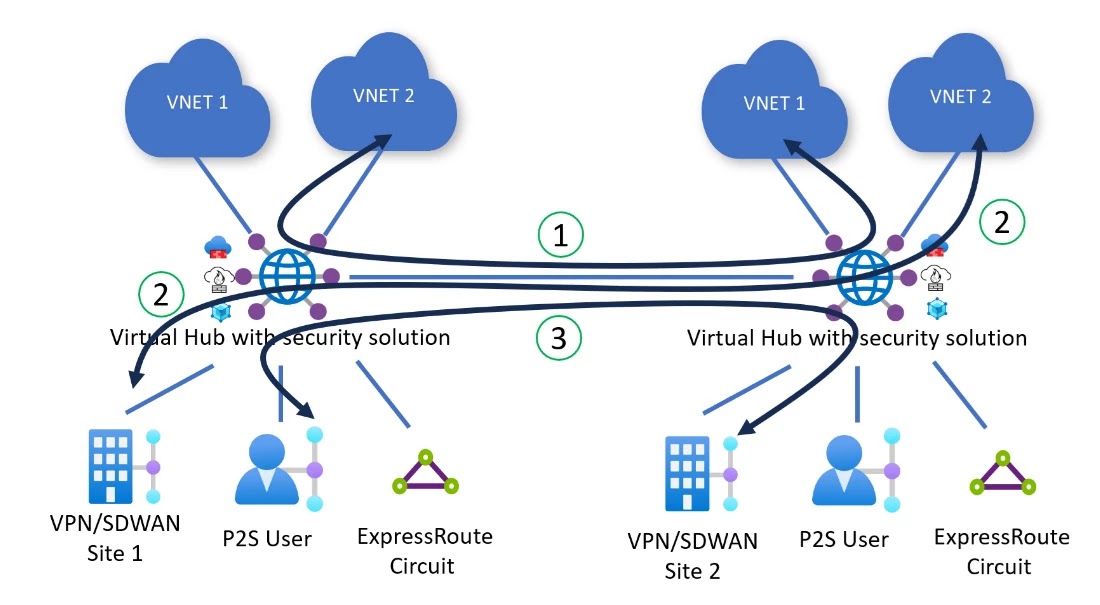
Virtual WAN automatically deploys all Virtual Hubs across your Virtual WAN in a full mesh, providing zero-touch any-to-any connectivity region-to-region and hub-to-hub using the Microsoft global backbone. Routing policies program Virtual WAN to inspect inter-hub and inter-region traffic between two Azure Virtual Networks (1), between two on-premises (2), and between Azure Virtual Networks and on-premises (3) connected to different hubs. Every packet entering or leaving the hub is routed to the security solution deployed in the Virtual Hub before being routed to its final destination.

Azure, Azure Career, Azure Skills, Azure Jobs, Azure Prep, Azure Preparation, Azure Tutorial and Materials, Azure Guides, Azure Learning, Azure Certifications
Figure 3: Diagram of inter-region and inter-hub traffic flows inspected by security solutions in the hub.

User experience for routing intent


To use routing intent, navigate to your Virtual WAN hub. Under Routing, select Routing Intent and routing policies.

Configure an Internet or Private Routing Policy to send traffic to a security solution deployed in the hub by selecting the next hop type (Azure Firewall, Network Virtual Appliance, or SaaS solution) and corresponding next hop resource.

Azure, Azure Career, Azure Skills, Azure Jobs, Azure Prep, Azure Preparation, Azure Tutorial and Materials, Azure Guides, Azure Learning, Azure Certifications
Figure 4: Example configuration of routing intent with both Private and Internet routing policy in Virtual WAN Portal.

Azure Firewall customers can also configure routing intent using Azure Firewall Manager by enabling the ‘inter-hub’ setting.

Azure, Azure Career, Azure Skills, Azure Jobs, Azure Prep, Azure Preparation, Azure Tutorial and Materials, Azure Guides, Azure Learning, Azure Certifications
Figure 5: Enabling Routing Intent through Azure Firewall Manager.

After configuring routing intent, you can view the effective routes of the security solution by navigating to your Virtual Hub, then select Routing, and click Effective Routes. The effective routes of the security solution provide additional visibility to troubleshoot how Virtual WAN routes traffic that has been inspected by the Virtual hub’s security solution.

Azure, Azure Career, Azure Skills, Azure Jobs, Azure Prep, Azure Preparation, Azure Tutorial and Materials, Azure Guides, Azure Learning, Azure Certifications
Figure 6: View of getting the effective routes on a security solution deployed in the hub.

Before you get started with this feature, here are some key considerations:

1. The feature caters to users that consider Virtual Network and on-premises traffic as private traffic. Virtual WAN applies private routing policies to all Virtual Networks and on-premises traffic.

2. Routing intent is mutually exclusive with custom routing and static routes in the ‘defaultRouteTable’ pointing to Network Virtual Appliance (NVA) deployed in a Virtual Network spoke connected to Virtual WAN. As a result, use cases where users are using custom route tables or NVA-in-spoke use cases are not applicable.

3. Routing Intent advertises prefixes corresponding to all connections to Virtual WAN towards on-premises networks. Users may use Route Maps to summarize and aggregate routes and filter based on defined match conditions.

Source: microsoft.com

Saturday, 27 May 2023

Defend against DDoS attacks with Azure DDoS IP Protection

Distributed denial of service (DDoS) attacks continue to rise as new threats and attack techniques emerge. With DDoS attacks becoming more frequent, it’s important for organizations of all sizes to be proactive and stay protected all year round. Small and medium businesses (SMBs) face the same risks as larger organizations though are more vulnerable as they often lack resources and specialized expertise.

We are committed to providing security solutions to all our customers. We are announcing the general availability of Azure DDoS IP Protection SKU, a new SKU of Azure DDoS Protection designed to meet the needs of SMBs.

Enterprise-grade DDoS protection at an affordable price point


Azure DDoS IP Protection provides enterprise-grade DDoS protection at an affordable price point. It offers the same essential capabilities as Azure DDoS Network Protection (previously known as Azure DDoS Protection Standard) to protect your resources and applications against evolving DDoS attacks. Customers also have the flexibility to enable protection on individual public IP addresses.

“DDoS protection is a must have today for critical websites. Azure DDoS Protection provides comprehensive protection though the existing DDoS Network Protection SKU did not fit the price point for smaller organizations. We are happy that the DDoS IP Protection SKU provides the same level of protection as the Network Protection SKU at an affordable price point and the flexibility to protect individual public IPs.”—Derk van der Woude, CTO, Nedscaper.

“We are excited that the DDoS IP Protection SKU provides enterprise-grade, cost effective DDoS protection for customers with smaller cloud environments with only a few public IP endpoints in the cloud.”—Markus Lintuala, Senior Technical Consultant, Elisa.

Key features of Azure DDoS IP Protection


◉ Massive mitigation capacity and scale—Defend your workloads against the largest and most sophisticated attacks with cloud scale DDoS protection backed by Azure’s global network. This ensures that we can mitigate the largest attacks reported in history and thousands of attacks daily.

◉ Protection against attack vectors—DDoS IP Protection mitigates volumetric attacks that flood the network with a substantial amount of seemingly legitimate traffic. They include UDP floods, amplification floods, and other spoofed-packet floods. DDoS IP Protection mitigates these potential multi-gigabyte attacks by absorbing and scrubbing them, with Azure’s global network scale, automatically. It also protects against protocol attacks that may render a target inaccessible, by exploiting a weakness in the layer 3 and layer 4 protocol stack. They include SYN flood attacks, reflection attacks, and other protocol attacks. DDoS IP Protection mitigates these attacks, differentiating between malicious and legitimate traffic, by interacting with the client, and blocking malicious traffic. Resource (application) layer attacks target web applications and include HTTP/S floods and low and slow attacks. Use Azure Web Application Firewall to defend against these attacks.

◉ Native integration into Azure portal—DDoS IP Protection is natively integrated into the Azure portal for easy setup and deployment. This level of integration enables DDoS IP Protection to identify your Azure resources and their configuration automatically.

◉ Seamless protection—DDoS IP Protection seamlessly safeguards your resources. There’s no need to deploy anything in your Azure Virtual Network (VNet), or to change your current networking architecture. DDoS is deployed as an overlay on top of your current networking services.

◉ Adaptive tuning—Protect your apps and resources while minimizing false-negatives with adaptive tuning tuned to the scale and actual traffic patterns of your application. Applications running in Azure are inherently protected by the default infrastructure-level DDoS protection. However, the protection that safeguards the infrastructure has a much higher threshold than most applications have the capacity to handle, so while a traffic volume may be perceived as harmless by the Azure platform, it can be devastating to the application that receives it. Adaptive tuning guarantees your applications are protected when application-targeted attacks are undetected by Azure’s DDoS infrastructure-level protection offered to all Azure customers.

◉ Attack analytics, metrics, and logging—Monitor DDoS attacks near real-time and respond quickly to attacks with visibility into attack lifecycle, vectors, and mitigation. With DDoS IP Protection, customers can monitor when the attack is taking place, collect statistics on mitigation, and view the detection thresholds assigned by the adaptive tuning engine to make sure they align with expected traffic baselines. Diagnostic logs offer a deep-dive view on attack insights, allowing customers to investigate attack vectors, traffic flows, and mitigations to support them in their DDoS response strategy.

◉ Integration with Microsoft Sentinel and Microsoft Defender for Cloud– Strengthen your security posture with rich attack analytics and telemetry integrated with Microsoft Sentinel. We offer a Sentinel solution that includes comprehensive analytics and alert rules to support customers in their Security Orchestration, Automation, and Response (SOAR) strategy. Customers can setup and view security alerts and recommendations provided by Defender for Cloud.

DDoS Attacks, Azure DDoS IP Protection, Azure Exam, Azure Tutorial and Materials, Azure Career, Azure Skills, Azure Jobs, Azure Prep, Azure Preparation

Choosing the right Azure DDoS protection SKU for your needs


Azure DDoS protection is available in two SKUs:

◉ DDoS IP Protection is recommended for SMB customers with a few public IP resources who need a comprehensive DDoS protection solution that is fully managed, easy to deploy, and monitor.

◉ DDoS Network Protection is recommended for larger enterprises and organizations looking to protect their entire deployment that spans multiple virtual networks and includes many public IP addresses. It also offers additional features like cost protection, DDoS Rapid Response, and discounts on Azure Web Application Firewall.

Let’s see a detailed comparison between these two SKUs:

DDoS Attacks, Azure DDoS IP Protection, Azure Exam, Azure Tutorial and Materials, Azure Career, Azure Skills, Azure Jobs, Azure Prep, Azure Preparation

Get started


DDoS IP Protection can be enabled from the public IP address resource Overview blade.

DDoS Attacks, Azure DDoS IP Protection, Azure Exam, Azure Tutorial and Materials, Azure Career, Azure Skills, Azure Jobs, Azure Prep, Azure Preparation

Protection status in the Properties tab shows if the resource is DDoS protected, and what is the protection type (either Network or IP Protection).

DDoS Attacks, Azure DDoS IP Protection, Azure Exam, Azure Tutorial and Materials, Azure Career, Azure Skills, Azure Jobs, Azure Prep, Azure Preparation

Azure DDoS IP Protection pricing


With DDoS IP Protection, you only pay for the public IP resources protected. The cost is a fixed monthly amount for each public IP resource protected with no additional variable costs.

Source: microsoft.com

Thursday, 18 May 2023

Optimize performance and strengthen security with Policy Analytics for Azure Firewall

Network security policies are a critical component of modern IT environments, especially with the increasing adoption of cloud workloads. As workloads move to the cloud, network security policies like Azure Firewall policies evolve and adapt to the changing demands of the infrastructure. These policies can be updated multiple times a week, making it challenging for IT security teams to optimize the Firewall rules.

As the number of network and application rules grow over time, they can become suboptimal, resulting in degraded firewall performance and security. For instance, high volume and frequently hit rules may be unintentionally deprioritized, leading to potential performance gaps. Similarly, after migrating an application to a different network, firewall rules referencing older networks may not be deleted, creating security risks.

Optimizing Azure Firewall policies is a challenging task for any IT team, particularly for large, geographically dispersed organizations. It can be a manual and complex process, involving multiple teams across the world. Any updates to these policies can be risky and potentially impact critical production workloads, causing serious downtime. At Microsoft, we strive to help enterprises to manage and secure their environments at scale.

Today, we are excited to announce the general availability of Policy Analytics for Azure Firewall to help IT teams manage the rules in the Azure Firewall policy over time. This feature provides critical insights and surfaces recommendations for optimizing Azure Firewall policies to strengthen security posture. Policy Analytics can detect suboptimal rules and suggest changes to improve performance and security. It can also detect and recommend the deletion of rules referencing older networks that are no longer in use.

Optimize Azure Firewall rules with Policy Analytics


Policy Analytics helps IT teams address these challenges by providing visibility into traffic flowing through the Azure Firewall. Key capabilities available in the Azure portal include:

Policy insight panel: Aggregates policy insights and highlights policy recommendations to optimize your Azure Firewall policies.

Firewall flow logs: Displays all traffic flowing through the Azure Firewall alongside hit rate and network and application rule match. This view helps identify top flows across all rules. You can filter flows matching specific sources, destinations, ports, and protocols.

Rule analytics: Displays traffic flows mapped to destination network address translation (DNAT), network, and application rules. This provides enhanced visibility of all the flows matching a rule over time. You can analyze rules across both parent and child policies.

Single-rule analysis: The single-rule analysis experience analyzes traffic flows matching the selected rule and recommends optimizations based on those observed traffic flows.

Deep dive into network rule hits


Let’s look into the network rule hits. Here we have selected to analyze the hits of our network rules. The time granularity on the right-hand side (highlighted in red) can be set from one day to 30 days. We can expand the rules to see the top 10 flows based on the hit count or drill down on the number of matching flows to see all the flows.

In the below example, we see rule “DefendTheFlag” had 1,500 unique flows in the last seven days, with a total of 152,167 hits. To get visibility into the top flows that generated the traffic, we can expand the rule and continue looking deeper to uncover additional insights. You can review the flows to decide if they must be continued to be allowed or blocked and update the rules appropriately.

Announcements, Networking, Security, Azure Exam, Azure Exam Prep, Azure Tutorial and Materials, Azure Certification, Azure Learning, Azure Guides
Figure 1: Network rule hits.

Deep dive into single-rule analysis


Let’s investigate single-rule analysis. Here we select a rule of interest to analyze the matching flows and optimize thereof. Users can analyze Azure Firewall rules with a few easy clicks.

Announcements, Networking, Security, Azure Exam, Azure Exam Prep, Azure Tutorial and Materials, Azure Certification, Azure Learning, Azure Guides
Figure 2: Start by selecting single-rule analysis.

With Policy Analytics for Azure Firewall, you can perform rule analysis by picking the rule of interest. You can pick a rule to optimize, for instance, you may want to analyze rules with a wide range of open ports or a large number of sources and destinations.

Announcements, Networking, Security, Azure Exam, Azure Exam Prep, Azure Tutorial and Materials, Azure Certification, Azure Learning, Azure Guides
Figure 3: Select a rule and Run analysis.

Policy Analytics surfaces the recommendations based on the actual traffic flows. You can review and apply the recommendations, including deleting rules which don’t match any traffic or prioritizing them lower. Alternatively, you can lock down the rules to specific ports, IPs, fully qualified domain names (FQDNs), or URLs matching traffic.

Announcements, Networking, Security, Azure Exam, Azure Exam Prep, Azure Tutorial and Materials, Azure Certification, Azure Learning, Azure Guides
Figure 4: Review the results and apply selected changes.

Pricing


Policy analytics is a priced feature, with new pricing in effect for general availability. The number of firewalls attached to the policy does not affect the pricing for Policy Analytics.

Source: microsoft.com

Thursday, 11 May 2023

Secure your cloud environment with Cloud Next-Generation Firewall by Palo Alto Networks, an Azure Native ISV Service—now in preview

To support our customers in accelerating their digital transformation journey and protecting their cloud environment against threats, Microsoft is committed to giving customers the best possible options for securing their applications. To accelerate that commitment, we are excited to announce the preview of Cloud Next-Generation Firewall (NGFW) for Azure.

Cloud NGFW for Azure is Palo Alto Networks NGFW delivered as a managed service on Microsoft Azure. It enables you to easily utilize Palo Alto Networks best-in-class network security capabilities on Azure, and you can manage it using either Palo Alto Networks Panorama policy management solution or directly from the Azure portal. Cloud NGFW for Azure combines the scalability and reliability of Microsoft Azure with Palo Alto Networks deep expertise in network security.

“At Microsoft, we are dedicated to ensuring that Microsoft Azure is the most trusted and secure cloud platform. With the preview release of the Palo Alto Networks Cloud NGFW for Azure, we are pleased to expand our ecosystem of native ISV solutions and provide customers and developers with more options to meet their security needs. This collaboration between Palo Alto Networks and Microsoft combines the scalability and reliability of Azure with Palo Alto Networks expertise to help safeguard our customers against the latest threats.”—Julia Liuson President, Microsoft Developer Division at Microsoft.

“More and more of our customers are running their business critical applications in Azure and are looking to us to help keep those workloads secure. With Cloud NGFW for Azure we are excited to combine Palo Alto Networks best-in-class security with the scalability and reliability of Azure to provide our mutual customers the ability to run their applications with confidence. As a managed Azure Native ISV service, we are proud to deliver the ease of use customers expect from a cloud native experience.”—Lee Klarich, Chief Product Officer, Palo Alto Networks.

Palo Alto Networks Next-Generation Firewall is available on Azure


Palo Alto Networks is a leader in cloud security and provides next-generation cybersecurity to thousands of customers globally, across all sectors. With the integration of Cloud NGFW for Azure into the Azure ecosystem we are delivering an integrated experience and empowering a growing ecosystem of developers and customers to help protect their organizations on Azure.

Cloud NGFW for Azure is offered through Azure Marketplace and offers many of the same capabilities as Palo Alto Networks hardware firewalls and virtualized next-generation firewalls as a managed service, making it easily scalable for cloud environments.

We are excited to work with Palo Alto Networks to provide powerful capabilities to Azure customers, including:

  • Security: Palo Alto Networks provides a rich set of security features thanks to its unique machine learning (ML) powered NGFW. Cloud NGFW for Azure uses AI and ML behind the scenes to detect and stop known, unknown, and zero-day threats, enabling customers to stay ahead of sophisticated adversaries. This advanced technology has allowed Palo Alto Networks to block nearly 5 billion events each day, demonstrating the effectiveness of this solution in providing robust security to customers.
  • Ease of Use: Cloud NGFW for Azure is designed to be incredibly easy to use, thanks to its Azure-native ISV Service architecture. This enables customers to procure and deploy the solution directly from the Azure portal in just a few minutes, providing instant protection against cyber threats. The solution is also very easy to operate as Palo Alto Networks takes care of scaling, resilience, and software updates. Furthermore, Cloud NGFW for Azure integrates seamlessly with Azure Virtual wide area network (WAN) deployments, enabling customers to protect traffic across their entire network. This integration provides customers with the agility and flexibility they need to manage their cloud security while focusing on their core business objectives.
  • Consistent Management from On-Prem to Cloud: Cloud NGFW for Azure is integrated with their Panorama policy management solution. This combination offers a host of benefits to our mutual customers. Firstly, it enables seamless security policy extension from on-prem to Azure, simplifying operations and reducing administrative workload and total cost of ownership. More importantly, this integration enforces the same high standards of security in the cloud, ensuring that customers’ cloud environments are secure and protected against cyber threats. Additionally, integration provides centralized visibility, providing valuable insights into the threats on their network from on-prem environments to the cloud. This enables customers to manage their security policies through their existing Panorama console, streamlining management, allowing their cloud teams to focus on application migration and new application development. 

Do more with less


We have invested in a deeply integrated experience with Palo Alto Networks on Azure including some of the key capabilities listed below to help you do more with less.

Seamless end user experience


We collaborated closely with Palo Alto Networks to develop Cloud NGFW for Azure, and tested it with our joint customers. Cloud NGFW for Azure provides a seamless and simplified end user experience for Cloud NGFW for Azure by integrating the deployment, management, billing, and support of the Palo Alto Networks solution on Azure, available via Azure Marketplace.

Cloud NGFW for Azure also provides integrated billing with Azure subscription invoicing, deep integrations with Azure services for role-based access control (RBAC) and identity management, and a unified support model. This service gives the user consistency in performance and security across their portfolio of on-prem and Azure cloud apps by using the same security solution and configurations everywhere. 

Deploy in minutes

Palo Alto Networks Cloud NGFW is deeply integrated into the Azure ecosystem. Through this deep integration, users can provision a new Palo Alto Networks Next-Generation Firewall in a matter of minutes, so they can quickly secure their Azure applications.

Run where you want

Palo Alto Networks Cloud NGFW for Azure can be deployed into both Virtual Networks and Virtual WAN hubs, and integrated with Azure Key Vault so even encrypted communications can be inspected for security. Cloud NGFW for Azure can be deployed into your Virtual Network automatically using a custom solution via service injection, and user-defined routing can be applied to route traffic to-and-from Cloud NGFW for Azure for inspection.

Customers who want a fully managed network-as-a-service with powerful routing can also choose to deploy the solution in a Virtual WA. Virtual WAN abstracts and simplifies the complexity of routing within a large hybrid network that spans on-premises and Azure at-scale. Configuring routing in Virtual WAN to send traffic to Cloud NGFW for Azure as a bump-in-the-wire solution requires just a single click with the Virtual WAN’s intelligent routing engine handling the rest of the routing.

Cloud Next-Generation, Firewall by Palo Alto Networks, Azure Native, ISV Service, Cloud Next-Generation Firewall (NGFW), Microsoft Azure, Azure Career, Azure Skills, Azure Jobs, Azure Tutorial and Material

Getting started with Cloud NGFW for Azure


Discovery and procuring: Azure customers can find the Palo Alto Networks service listed on Azure Marketplace, review the different purchasing plans offered, and procure it directly with single billing enabled:

Cloud Next-Generation, Firewall by Palo Alto Networks, Azure Native, ISV Service, Cloud Next-Generation Firewall (NGFW), Microsoft Azure, Azure Career, Azure Skills, Azure Jobs, Azure Tutorial and Material

Provisioning the Palo Alto Networks resources: Within several clicks, you can deploy Palo Alto Networks service in your desired subscription and datacenter regions with your preferred plan.

Cloud Next-Generation, Firewall by Palo Alto Networks, Azure Native, ISV Service, Cloud Next-Generation Firewall (NGFW), Microsoft Azure, Azure Career, Azure Skills, Azure Jobs, Azure Tutorial and Material

Source: microsoft.com

Thursday, 27 April 2023

Choose the best global distribution solution for your applications with Azure

As part of your cloud journey, critical applications need to be deployed in multiple Azure regions to ensure high availability for your global customer base. When reviewing Azure’s various global traffic distribution solutions, ask yourself, “Which option is the best one for my application?”.

In this blog, you will learn about each global traffic distribution solution Azure offers, and which solution is the best one for your internet-facing cloud architecture. Currently, Azure offers different options for distributing global traffic. Microsoft Azure Front Door is a content delivery network (CDN) service with application layer load balancing capabilities. Azure cross-region Load Balancer is a global network layer load balancer. Finally, Azure Traffic Manager is a domain name service (DNS)-based traffic distribution solution. 

Choosing the right global traffic distribution solution


You will learn about three example companies—Contoso1, Contoso2, and Contoso3. For each company, we will dive into their application’s scenario and decide which global traffic distribution solution is the best one for them.

Customer scenario 1—wholesale distributor

Contoso1 is a large wholesale distributor that has locations all over the globe. Contoso1 has been going through a large technological transformation and has been migrating services to Azure. One of the applications being moved to Azure is their backend inventory management software. This application is responsible for providing users with information about inventory status and updating inventory records after a transaction has occurred. As part of their migration the team at Contoso1 has strict requirements that need to be met by a global distribution solution.

◉ First, all traffic type will be layer 4 and must be served with ultra-low latency. In addition, the application requires a regional redundancy with automatic traffic fail-over in the event a region is down, to ensure high availability.
◉ Second, the application requires a static IP address that the application’s frontend will consistently ping.
◉ Finally, any updates made to regional deployments shouldn’t have an impact on the overall backend inventory application.

Given all the requirements laid out by Contoso1’s, Azure cross-region Load Balancer is a perfect solution for their application. Azure cross-region Load Balancer is highly optimized at serving layer-4 traffic with ultra-low latency. Furthermore, cross-region load balancer provides geo-proximity routing, which means all Contoso1’s stores traffic will be forwarded to the closest regional deployment to them. Azure cross-region Load Balancer also provides automatic failover. In the event one of Contoso1’s regional deployment is unhealthy, all traffic will be serviced by the next healthy regional deployment. In addition, cross-region load balancers provide users with a static globally anycast IP address, in which Contoso1 doesn’t have to worry about their IP address changing. Finally, Azure cross-region Load Balancer will allow Contoso1 to update its regional deployments behind a single global endpoint without any impact on its end users.

Azure Career, Azure Skills, Azure Jobs, Azure Prep, Azure Preparation, Azure Certification, Azure Skills, Azure Jobs, Azure Materials

Customer scenario 2—social media company

Contoso2 is a global social media platform. As a social media site, they need to serve both interactive and static content to their users around the globe as quickly and reliably as possible. Most recently, due to Contoso2’s prominent status as a social media platform, they have experienced an outage with their on-premises hosted website because of a DDoS attack. That said, Contoso2 has the following strict requirements as they migrate to Azure:

◉ A platform that can deliver both static and dynamic content to their consumers around the globe with the utmost performance and reliability.
◉ Ability to route content to both their mobile and desktop users as quickly as possible.
◉ Easily integrate with Azure’s DNS, Web Application, Storage, and Application Gateway products.
◉ DDoS protection.
◉ Reduce secure sockets layer (SSL) load on Contoso2’s application servers, and instead process SSL requests on the edge for faster user experience for Contoso2’s global clients.

Azure Front Door is an ideal solution to enable accelerated and highly resilient web application performance for optimal delivery of static and dynamic content around the globe:

◉ Static Content—Contoso2’s cached static content can be served from Azure Front Door’s 185 global edge points of presence (PoP) locations. To ensure the utmost performance and resiliency, Azure Front Door utilizes the Anycast protocol to make sure the Contoso2’s client’s requests are served from the nearest global edge locations.

◉ Dynamic Content—Azure Front Door has an arsenal of traffic acceleration features. Client to Azure Front Door PoP traffic is again optimized via the Anycast protocol. Although as it specifically pertains to dynamic workloads, edge PoP to customer’s origin connections are optimized via split TCP. This technique enables the traffic to terminate the TCP connection to the nearest edge PoP and uses long living connections over Microsoft’s global private wide area network (WAN) to reduce the round-trip-time (RTT). Additionally, in the event Cotoso2 deployed multiregional origin deployments, Azure Front Door utilizes health probes to fetch content from the least latent origin.

Moreover, Azure Front Door also has SSL offload capabilities which can improve performance further. In addition, Azure Front Door is highly optimized for HTTP and web-based applications. With Azure Front Door, customers are equipped with various layer 7 routing features. These features allow customers to apply business routing and advanced routing within Azure Front Door. For example, Azure Front Door can route requests to mobile or desktop versions of Contoso2’s web application based on the client device type. Additional examples include SSL offload, path-based routing, fast failover, caching, and more.

Today Azure provides end-to-end solutions for every aspect of application management. Azure Front Door provides seamless integration with other Azure services such as DNS, Web App, and Storage. These integrations allow customers to easily create powerful web applications built using the integration of multiple Azure services.

Finally, Azure Front Door provides built-in support for various security products to help protect customers’ web applications. For example, customers can secure their origins with layer 3, 4, and 7 DDOS mitigation, and seamlessly enable Azure Web Application Firewall protection.

Azure Career, Azure Skills, Azure Jobs, Azure Prep, Azure Preparation, Azure Certification, Azure Skills, Azure Jobs, Azure Materials

Customer scenario 3—sustainable fashion retailor

Contoso3 is a large retail store focused on sustainable fashion items. Contoso3 has a large online presence and has historically been hosting all their applications on-premises. However, given the advantage of the cloud and Azure, Contoso3 has begun migrating their applications to Azure. One of these applications is their online store platform. As the team at Contoso3 is evaluating different Azure global traffic distribution solutions, they have outlined several requirements that must be addressed.

◉ First, the team at Contoso3 will be doing a rolling migration where part of their application will remain on-premises and the other part will be hosted on Azure. Any viable solution should be able to direct traffic to on-premises servers to support this rolling migration plan.
◉ Second, latency is critical for Contoso3 and client traffic needs to be routed to healthy endpoints in a timely manner. 
◉ Finally, the solution needs to be able to direct users to the correct backend type based on their geographical location. Contoso3 caters to a wide range of customers and often has clothing items specific to certain geographical areas.

With all the requirements stated prior, Azure Traffic Manager would be the optimal solution for Contoso3. With Azure Traffic Manager, users can add on-premises servers in the backend to support burst-to-cloud, failover-to-cloud, and migrate-to-cloud scenarios. In addition, Azure Traffic Manager provides automatic failover and multi-region support, which all result in traffic being served with low latency. DNS name resolution is fast, and results are cached. The speed of the initial DNS lookup depends on the DNS servers the client uses for name resolution. Typically, a client can complete a DNS lookup within approximately 50 ms. The results of the lookup are cached for the duration of the DNS time-to-live (TTL). The default TTL for Traffic Manager is 300 seconds (about five minutes). The Traffic Manager can also help Contoso3 with their geofencing needs, specifically with the geographic routing feature. This feature will allow Contoso3 to direct users to the correct backend instance based on their geographical location.

Azure Career, Azure Skills, Azure Jobs, Azure Prep, Azure Preparation, Azure Certification, Azure Skills, Azure Jobs, Azure Materials

Source: microsoft.com