Friday, 15 December 2017

Conversational Bots Deep Dive – What’s new with the General Availability of Azure Bot Service and Language Understanding

Microsoft brings the latest advanced chatbot capabilities to developers' fingertips, allowing them to create apps that see, hear, speak, understand, and interpret users’ needs -- using natural communication styles and methods.

Today, we’re excited to announce we’re making generally available Microsoft Cognitive Services Language Understanding service (LUIS) and Azure Bot Service, two top notch AI services to create digital agents that interact in natural ways and make sense of the surrounding environment.

Think about the possibilities: all developers regardless of expertise in data science able to build conversational AI that can enrich and expand the reach of applications to audiences across a myriad of conversational channels. The app will be able to understand natural language, reason about content and take intelligent actions. Bringing intelligent agents to developers and organizations that do not have expertise in data science is disruptive to the way humans interact with computers in their daily life and the way enterprises run their businesses with their customers and employees.

Through our preview journey in the past two years, we have learned a lot from interacting with thousands of customers undergoing digital transformation. We highlighted some of our customer stories (such as UPS, Equadex, and more) in our general availability announcement. This post covers conversational AI in a nutshell using Azure Bot Service and LUIS, what we’ve learned so far, and dive into the new capabilities. We will also show how easy it is to get started in building a conversational bot with natural language.

Conversational AI with Azure Bot Service and LUIS


Azure Bot Service provides a scalable, integrated bot development and hosting environment for conversational bots that can reach customers across multiple channels on any device. Bots provide the conversational interface that accepts user input in different modalities including text, speech, cards, or images. The Azure Bot Service offers a set of fourteen channels to interact with users including Cortana, Facebook Messenger, Skype, etc. Intelligence is enabled in the Azure Bot Service through the cloud AI services forming the bot brain that understands and reasons about the user input. Based on understanding the input, the bot can help the user complete some tasks, answer questions, or even chit chat through action handlers. The following diagram summarizes how conversational AI applications are enabled through the Azure Bot Service and the Cloud AI services including language understanding, speech recognition, Q&A Maker, etc.

Microsoft Guides, Microsoft Tutorials and Materials, Microsoft Live

Language Understanding (LUIS) is the key part of the bot brain that allows the bot to understand natural language input and reason about it to take the appropriate action. As customization is critical for every business scenario, Language Understanding helps build custom models for your business vertical with little effort and without prior expertise in data science. Designed to identify valuable information in conversations, it interprets user goals (intents) and distills valuable information from sentences (entities), for a high quality, nuanced language model.

With the General Availability of Language Understanding and Azure Bot Service, we're also introducing new capabilities to help you achieve more and delight your users

Language Understanding:
  • With an updated user interface, we’re providing Language Understanding service (LUIS) users more intents and entities than ever: expanding up to 500 intents (task or action identified in the sentence) and 100 entities (relevant information extracted, from the sentence, to complete the task or action associated to the intent) per application.
  • Language Understanding is now available in 7 new regions (South Central US, East US, West US 2, East Asia, North Europe, Brazil South, Australia East) on top of the 5 existing regions (West Europe, West US, East US2, West central US, South east Asia). This will help customers to improve network latency and bandwidth.
  • The Language Understanding service is also supporting more languages for its various features, in addition to English.
    • The prebuilt entities (representing common concepts like numbers, date, time) previously available in English are now available in French and Spanish.
    • Prebuilt domains (off-the-shelf collections of intents and entities grouped by domain that you can directly add and use in your application) are now also available in Chinese.
    • Phrase suggestions that help the developer customize your LUIS domain vocabulary are available in 7 new languages Chinese, Spanish, Japanese, French, Portuguese, German, and Italian.
Azure Bot Service:
  • Speed bot development by providing an integrated environment with the Microsoft Bot Framework channels, development tools and hosting solutions.
  • Connect with your audience with no code modifications via our supported channels on the Bot Service; Office 365 Email, GroupMe, Facebook Messenger, Kik, Skype, Slack, Microsoft Teams, Telegram, text/SMS, Twilio, Cortana, Skype for Business – or provide a custom experience in your app or website.
  • Bot Service is now integrated into the Azure portal; easy access to 24x7 support, monitoring capabilities, integrated billing and more in the trusted Azure ecosystem.
  • Now generally available in 9 different regions namely West US, East US, West Europe, and Southeast Asia including new deployments in North Europe, Australia Southeast, Australia East, Brazil South, and East Asia regions.
  • We are also announcing Premium Channels including webchat and directline.  Premium channels offer unique capabilities over the standard channels:
    • Communicate with your users on your website or in your application instead of sharing that data with public chat services.
    • Open Source webchat and directline clients enabling advanced customization opportunities.
    • 99.9% availability guarantees for premium channels
Developers can connect to other Azure services to enrich their bots as well as add Cognitive Services to enable your bots to see, hear, interpret, and interact in more human ways. For example, on top of language, the Computer Vision and Face APIs can enable bots to understand images and faces passed to the bot.

Learning through our customer’s experiences


For several years now, Microsoft has been leading the charge into the application of AI to build new intelligent conversational experiences…everything from proprietary solutions built to target a specific audience on a specific chat service to general purpose API’s that expect the developer to create the rest of the custom solution themselves.  We are still at the beginning of this evolution of the conversational application model; but already we have takeaways that are guiding how we think about the future.

Bots are changing how we do business. We are constantly having great discussions with customers who see bots as a key part of their digital transformation as a business. They see the opportunity to enhance their customer support experiences, provide easy access to information, or even expose their business to an audience that might not otherwise visit their website.

Developers need to have choice in technologies. With the growth in popularity of open source technologies, developers want choice of the technology components they use to build solutions.

Great conversational applications are multi-modal. Our customers are building conversational experiences which accomplish multiple tasks. For example, a customer support bot may have a Q&A search function, a support ticket entry function, a guided dialog to diagnose a problem, and an appointment scheduling function that hands off to a human for final confirmation.

AI platforms must scale to the needs of business. Often as not, business scenarios are based on sets of concepts that are being codified into the bot. Developers require the technologies they depend on to scale to the complexity of their business without arbitrary limits getting in the way.

Conversational app platforms need to be reliable and compliant. In the same way that mobile app platforms have needed to provide robust and secure platforms to enable great productivity scenarios, so too will conversational application platforms; they must be certifiably secure, reliable, compliant and privacy aware. In addition, the platform should to make it easy for developers building to it to build compliant solutions as well.

Businesses are global and multi-lingual. Businesses need to talk to customers world-wide 24/7 in their language of choice.

There is art in building a great conversational application. Much in the same way the 80’s and 90’s cemented what we now think of as common controls for native apps, and the 2000’s for web and mobile, the industry is still defining what it means to be a great conversational application.

Key design considerations


Given the learnings we’ve had, we’ve anchored our design on the following six points to shape the Azure Bot Service and Language Understanding (LUIS) capabilities:

Code-first approach: Azure Bot Service is built on top of the BotBuilder SDK V3 (in Node.js) that takes a code-first approach to enable developers to have full control over their bots’ conversational capabilities. Available for both Node.JS and C#, the open source SDK’s provides multiple dialog types and conversational orchestration tools to help the developer with various tasks like slot filling, dialog management and card representation.

Different dialog management flavors: developers build bots that range from simple question answer bots to multi-turn solutions that span ten or fifteen turns to complete a task. We provide a rich set of dialog management flavors to cover the different task types a bot developer might wish to expose. You can create bots that utilize a mix of prompts, form filling, natural language, and your own dialog management system with the ability to reuse some of the components like prompts.

Open bot platform: Building on Azure's commitment to open source technologies, applications using our SDK and LUIS can be deployed on any connected infrastructure and consumed from any device anywhere targeting your audience on multiple chat channels. This open design allows the offering to be integrated with different deployment platforms including public cloud or on-premise infrastructure.

Global and multi-lingual: We have put considerable effort into making our services highly available and as close to customers as possible as part of the Azure cloud.  Azure Bot Service and Language Understanding support a growing list of languages for understanding conversations.

Getting started quickly: While bots can be deployed anywhere, with Azure we provide rich connected cloud services for hosting your bot and AI applications with a single click.  The Azure Bot Service and LUIS get you a running bot that can converse with users in a natural way in minutes. Azure Bot Service takes care of provisioning all of the Azure resources you need so that developers can focus on their business logic. LUIS provides customizable pre-built apps and entity dictionaries, such as Calendar, Music, and Devices, so you can build and deploy a solution more quickly. Dictionaries are mined from the collective knowledge of the web and supply billions of entries, helping your model to correctly identify valuable information from user conversations.

Custom models with little effort: as customization is critical for every business scenario, LUIS capitalizes on the philosophy of machine teaching to help non-expert machine learning developers build effective custom language understanding models. While machine learning focuses on creating new algorithms and improving the accuracy of “learners”, the machine teaching discipline focuses on the efficacy of the “teachers”. Machine teaching as a discipline is a paradigm shift that follows and extends principles of software engineering and programming languages. It provides the developer with a set of tools to build machine learning models by transferring the developer domain knowledge to the machine learning algorithms. This contrasts with Machine Learning which is about creating useful models from this knowledge. Developer knowledge is expressed in LUIS through schema (what intents and entities are in the LUIS application) and labeled examples.  It supports a wide variety of techniques for reliably recognizing entities with normalization to allow them to be easily consumed in a program.

Always monitor, learn and improve: Azure Bot Service and LUIS use Azure monitoring tools to help developers monitor the performance of their bots including the quality of the language understanding models and the bot usage. Once the model starts processing input, LUIS begins active learning, allowing you to constantly update and improve the model. It helps you pick the most informative utterances from your real bot traffic to add to your model and continuously improve. This intelligent selection of examples to add to the training data of the LUIS model helps developers build cost effective models that don’t require a lot of data and yet perform with high accuracy.

Getting started with the Bot Service and Language Understanding


In this section, we’ll create a bot using the Azure Bot Service that uses Language Understanding (LUIS) to understand the user. When creating a bot using natural language, the bot determines what a user wants to do by identifying their intent. This intent is determined from spoken or textual input, or utterances, which in turn can be mapped to actions that Bot developers has coded. For example, a note-taking bot recognizes a Notes. Create intent to invoke the functionality for creating a note. A bot may also need to extract entities, which are important words in utterances. In the example of a note-taking bot, the Notes. Title entity identifies the title of each note.

Create a Language Understanding bot with Bot Service


To create your bot; log in the Azure portal, select Create new resource in the menu blade and select AI + Cognitive Services.

Microsoft Guides, Microsoft Tutorials and Materials, Microsoft Live

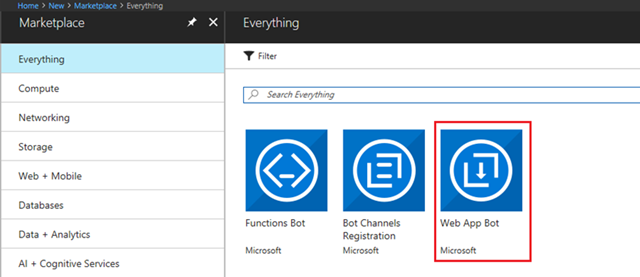
You can browse through the suggestions, or search for Web App Bot.

Microsoft Guides, Microsoft Tutorials and Materials, Microsoft Live

Once selected, the Bot Service blade should appear; which will be familiar to users of Azure services. For those that aren’t, here you can specify information about your service for the Bot Service to use in creating your bot such as where it will live, what subscription in and so forth. In the Bot Service blade, provide the required information, and click Create. This creates and deploys the bot service and LUIS app to Azure. Some interesting fields:
  • Set App name to your bot’s name. The name is used as the subdomain when your bot is deployed to the cloud (for example, mynotesbot.azurewebsites.net). This name is also used as the name of the LUIS app associated with your bot. Copy it to use later, to find the LUIS app associated with the bot.
  • Select the subscription, resource group, hosting plan, and location.
  • For pricing, you can choose the free pricing tier. You can go back and change that at any time if you need more.
  • For this sample, select the Language understanding (C#) template for the Bot template field.
  • For the final required field, choose the Azure Storage where you wish to store your bot’s conversation state. Think of this as where the bot keeps track of where each user is in the conversation.

Microsoft Guides, Microsoft Tutorials and Materials, Microsoft Live

Now that you’re complete, you can click Create. Azure will set about creating your bot including the resources it needs to operate your bot and a LUIS account to host your natural language model. Once complete, you’ll receive a notification via the bell in the top right corner of the Azure portal.
Next up, lets confirm that the bot service has been deployed.

◉ Click Notifications (the bell icon that is located along the top edge of the Azure portal). The notification will change from Deployment started to Deployment succeeded.
◉ After the notification changes to Deployment succeeded, click Go to resource on that notification.

Try the bot


So now you should have a working bot. Let’s try it out.

Once the bot is registered, click Test in Web Chat to open the Web Chat pane. Type "hello" in Web Chat.

Microsoft Guides, Microsoft Tutorials and Materials, Microsoft Live

The bot responds by saying "You have reached Greeting. You said: hello". This confirms that the bot has received your message and passed it to a default LUIS app that it created. This default LUIS app detected a Greeting intent.

Note: Occasionally, the first message or two after startup may need to be retried before the bot will answer.

Viola! You have a working bot! The default bot only knows a few things; it recognizes some greetings, as well as help and cancel. In the next section we’ll modify the LUIS app for our bot to add some new intents for our Note taking bot.

Modify the LUIS app


Log in to www.luis.ai using the same account you use to log in to Azure. Click on My apps. If all has gone well, in the list of apps, you’ll find the app with the same name as the App name from the Bot Service blade when you created the Bot Service.

After opening the app, you should see it has four intents: Cancel, Greeting, Help, and None. The first three we already mentioned. None is a special intent in LUIS that captures “everything else”.

For our sample, we’re going to add three intents for the user: Note.Create and Note.ReadAloud. Conveniently, one of the great features about LUIS are the pre-built domains that can be used to bootstrap your application, of which Note is one.
  • Click on Pre-built Domains in the lower left of the page. Find the Note domain and click Add domain.
  • This tutorial doesn't use all the intents included in the Note prebuilt domain. In the Intents page, click on each of the following intent names and then click the Delete Intent button to remove them from your app.
    • Note.ShowNext
    • Note.DeleteNoteItem
    • Note.Confirm
    • Note.Clear
    • Note.CheckOffItem
    • Note.AddToNote
    • Note.Delete
◉ IMPORTANT: The only intents that should remain in the LUIS app are the Note.ReadAloud, Note.Create, None, Help, Greeting, and Cancel intents.  If they’re still there, your app will still work, but may more often behave inconsistently.
As mentioned earlier, the Intents that we’ve now added represent the types of things we expect the user to want the bot to do.  Since these are pre-defined, we don’t have to do any further tuning to the model, so let’s jump right to training and publishing your model.

◈ Click the Train button in the upper right to train your app.  Training takes everything you’ve entered into the model by creating intents and entities, entering utterances and labeling them and generates a machine learned model, all with one click.  You can test your app here in the LUIS portal, or move on to publishing so that it’s available to your bot.

◈ Click PUBLISH in the top navigation bar to open the Publish page. Click the Publish to production slot button. After successful publish, copy the URL displayed in the Endpoint column the Publish App page, in the row that starts with the Resource Name Starter_Key. Save this URL to use later in your bot’s code. The URL has a format similar to this example: https://westus.api.cognitive.microsoft.com/luis/v2.0/apps/xxxxxxxxxxxxxxxxx?subscription-key=xxxxxxxxxxxxxx3&timezoneOffset=0&verbose=true&q=

Your Language Understanding Application is now ready for your Bot. If the user asks to create, delete, or read back a note, Language Understanding will identify that and return the correct intent to the Bot to be acted on. In the next section we’ll add logic to the bot to handle these Intents.

Modify the bot code


The Bot Service is set up to work in a traditional development environment; sync your source code with GIT and work in your favorite dev environment. That said, Azure Bot Service also offers the ability to edit right in the portal; which is great for our experiment. Click Build and then click Open online code editor.


Microsoft Guides, Microsoft Tutorials and Materials, Microsoft Live

First, some preamble. In the code editor, open BasicLuisDialog.cs. It contains the code for handling Cancel, Greeting, Help, and None intents from the LUIS app.

Add the following statement:

using System.Collections.Generic;

Create a class for storing notes


Add the following after the BasicLuisDialog constructor:

private readonly Dictionary<string, Note> noteByTitle = new Dictionary<string, Note>();

private Note noteToCreate;

private string currentTitle;

// CONSTANTS

// Name of note title entity

public const string Entity_Note_Title = "Note.Title";

// Default note title

public const string DefaultNoteTitle = "default";

[Serializable]

public sealed class Note : IEquatable<Note>

{

public string Title { get; set; }

public string Text { get; set; }

public override string ToString()

{

return $"[{this.Title} : {this.Text}]";

}

public bool Equals(Note other)

{

return other != null

&& this.Text == other.Text

&& this.Title == other.Title;

}

public override bool Equals(object other)

{

return Equals(other as Note);

}

public override int GetHashCode()

{

return this.Title.GetHashCode();

}

}

Handle the Note.Create intent


Note.Create intent, add the following code to the BasicLuisDialog class.

[LuisIntent("Note.Create")]

public Task NoteCreateIntent(IDialogContext context, LuisResult result)

{

EntityRecommendation title;

if (!result.TryFindEntity(Entity_Note_Title, out title))

{

// Prompt the user for a note title

PromptDialog.Text(context, After_TitlePrompt, "What is the title of the note you want to create?");

}

else

{

var note = new Note() { Title = title.Entity };

noteToCreate = this.noteByTitle[note.Title] = note;

// Prompt the user for what they want to say in the note

PromptDialog.Text(context, After_TextPrompt, "What do you want to say in your note?");

}

return Task.CompletedTask;

}

private async Task After_TitlePrompt(IDialogContext context, IAwaitable<string> result)

{

EntityRecommendation title;

// Set the title (used for creation, deletion, and reading)

currentTitle = await result;

if (currentTitle != null)

{

title = new EntityRecommendation(type: Entity_Note_Title) { Entity = currentTitle };

}

else

{

// Use the default note title

title = new EntityRecommendation(type: Entity_Note_Title) { Entity = DefaultNoteTitle };

}

// Create a new note object

var note = new Note() { Title = title.Entity };

// Add the new note to the list of notes and also save it in order to add text to it later

noteToCreate = this.noteByTitle[note.Title] = note;

// Prompt the user for what they want to say in the note

PromptDialog.Text(context, After_TextPrompt, "What do you want to say in your note?");

}

private async Task After_TextPrompt(IDialogContext context, IAwaitable<string> result)

{

// Set the text of the note

noteToCreate.Text = await result;

await context.PostAsync($"Created note **{this.noteToCreate.Title}** that says \"{this.noteToCreate.Text}\".");

context.Wait(MessageReceived);

}

Handle the Note.ReadAloud Intent


The bot can use the Note.ReadAloud intent to show the contents of a note, or of all the notes if the note title isn't detected. Paste the following code into the BasicLuisDialog class.

[LuisIntent("Note.ReadAloud")]

public async Task NoteReadAloudIntent(IDialogContext context, LuisResult result)

{

Note note;

if (TryFindNote(result, out note))

{

await context.PostAsync($"**{note.Title}**: {note.Text}.");

}

else

{

// Print out all the notes if no specific note name was detected

string NoteList = "Here's the list of all notes: \n\n";

foreach (KeyValuePair<string, Note> entry in noteByTitle)

{

Note noteInList = entry.Value;

NoteList += $"**{noteInList.Title}**: {noteInList.Text}.\n\n";

}

await context.PostAsync(NoteList);

}

context.Wait(MessageReceived);

}

public bool TryFindNote(string noteTitle, out Note note)

{

// TryGetValue returns false if no match is found.

bool foundNote = this.noteByTitle.TryGetValue(noteTitle, out note);

return foundNote;

}

public bool TryFindNote(LuisResult result, out Note note)

{

note = null;

string titleToFind;

EntityRecommendation title;

if (result.TryFindEntity(Entity_Note_Title, out title))

{

titleToFind = title.Entity;

}

else

{

titleToFind = DefaultNoteTitle;

}

// TryGetValue returns false if no match is found.

return this.noteByTitle.TryGetValue(titleToFind, out note);

}

Build the bot


Now that the cut and paste part is done, you can right-click on build.cmd in the code editor and choose Run from Console. Your bot will be built and deployed from within the online code editor environment.

Test the bot


In the Azure Portal, click on Test in Web Chat to test the bot. Try type messages like "Create a note", "read my notes", and "delete notes".  Because you’re using natural language you have more flexibility on how you state your request, and in turn, Language Understanding’s Active Learning feature can be used such that you can open your Language Understanding application and it can make suggestions about things you said which it didn’t understand and might make your app more effective.

Microsoft Guides, Microsoft Tutorials and Materials, Microsoft Live

Tip: If you find that your bot doesn't always recognize the correct intent or entities, improve your Language Understanding app's performance by giving it more example utterances to train it. You can retrain your Language Understanding app without any modification to your bot's code.

Wednesday, 13 December 2017

Announcing Azure Database for PostgreSQL Preview

PostgreSQL is one of the fastest growing open source relational database engines that is being widely embraced by developers. The Azure cloud is a first-class platform for open source technologies that allow you to bring the tools you love and skills you already have, and deploy any applications. Given Microsoft’s love for open source and the goal to provide developers with choices, I am happy to share with you that earlier today, at the Microsoft Build 2017 conference in Seattle, Scott Guthrie announced the preview for managed database service for PostgreSQL, Azure Database for PostgreSQL.

Azure Database, Microsoft Guides, Microsoft Certifications

The service uses the community edition of PostgreSQL and provides app developers with expanded choices to use their favorite database on Azure, without the complexity of managing and administering the databases. In this blog, I will give you a deeper overview of Azure Database for PostgreSQL service and discuss what this announcement means to app developers and the thinking that went behind delivering value that we believe is unique in the industry.

What is Azure Database for PostgreSQL?


Azure Database for PostgreSQL is a managed database service that makes it easier to build apps without the management and administration burden. The service uses community edition of PostgreSQL and seamlessly works with native tools, drivers and libraries. At the start of preview, we are offering support for PostgreSQL versions 9.5 and 9.6.

Many managed database service offerings out there from different cloud providers promise to reduce database management complexity, but each one follows a different approach which forces customers to make several tradeoffs. We believe our approach to managed database services and particularly Azure Database for PostgreSQL is unique in the industry and one that addresses the core pain points of an app developer and much more. I will be elaborating more on this below – keep reading!

PostgreSQL database for App developers


Most app developers love doing what they do – i.e., build great apps rapidly that become popular and widely adopted. One of the complex components of any app development process is planning for database infrastructure and then the ongoing care and feeding of the database. PostgreSQL, over the years has grown to become a popular open source relational database amongst developers, thanks to it being highly robust, customizable and extendable along with rich database features and technologies. However, while app developers love the features PostgreSQL has to offer, many do not enjoy the complexity of managing the infrastructure. A key benefit of managed database service is that the developer does not need to worry about managing the operating system and database patching, perform manual database backups, orchestrate recovery, etc. Most managed services provide these basic capabilities freeing developers from spending their vital resources on those tasks.

When we looked at offering managed PostgreSQL service for developers, we of course wanted to address those basic managed service capabilities such as automated patching, backup and restore capability, monitoring, alerting, logging, etc. However, talking to customers we learnt that there is a unique opportunity for Microsoft to do something more and better than other cloud providers, specifically in areas such as reliability, security and elasticity and making it simple and worry free for developers. We have therefore in many ways redefined the value creation with managed database service.

Benefits of Azure Database for PostgreSQL


As I dig deeper into explaining the benefits of the managed PostgreSQL service, I would like to highlight that our primary focus for the service was attention to fundamentals, such as availability, elasticity and security besides making sure that native tools, extensions, drivers and libraries work seamlessly. This is exactly what we have done in this installment of the Azure Database for PostgreSQL. Let me elaborate further on each of these topics.

Built-in high availability


Azure Database for PostgreSQL offers built-in high availability feature out-of-the-box. You got it right – no additional setup, configuration or extra costs! This means as a developer you do not have to setup additional VMs and configure replication to ensure high availability for your PostgreSQL database. While in preview, the service is not backed up with a specific SLA. However, at general availability, all databases will have an SLA of 99.99%.

Security bolted-in


The service has security baked in. What does this mean? All data including backups are encrypted on disk by default. No additional switch or planning required to secure your database! Furthermore, the service has SSL enabled by default which makes all data in-transit encrypted. Optionally, if your client application does not support SSL connectivity, we created an option to disable it as well. We are committed to working broadly across the open source communities to ensure these security gaps are addressed over time.

Scale on the fly


Elasticity is one of the foundational attribute of the cloud. It is hard for any developer to figure out how much compute and storage is required at the time of deploying your app, since who can predict how popular the app will become and pre-plan for peaks and valleys? While most cloud service providers allow you to scale the instance sizes, you are out of luck in terms of impacting availability of your app unless you have another VM with replication for which you have to pay for additional replicas. Further it also means additional monitoring, setting alerts and ensuring that the secondary replica is consistent with the primary. The Azure Database for PostgreSQL allows you to scale compute on the fly without application downtime in one step. The following is a simple Azure CLI command that you will use to scale PostgreSQL database servers up or down.

Azure Database, Microsoft Guides, Microsoft Certifications

Automated backups and point-in-time restore


Most managed database services provide automated backup with ability to point-in-time restore, in case for oops recovery. The differentiating factor for our service is that the user does not need to separately manage storage for backups. The service provides up to 35 days of retention for automated backups to be able to recover. This means, developers are now free from having to monitor, manage capacity and configure alerts on backup storage capacity. You will never have to worry about managing backups ever again! These backups are geo-redundantly backed up as well.

Azure Database, Microsoft Guides, Microsoft Certifications

Monitoring, alerting and server logs


The service provides monitoring on metrics via integration with Azure Monitor service for up to 30 days, define alerting on those metrics, and configure server log retention period up to 7 days. In addition, users have the option to customize log verbosity parameter so you can debug easily when developing and then tune it appropriately for production use. Further these metrics are integrated with many 3rd party tools. You get all of this for no additional costs!

Azure Database, Microsoft Guides, Microsoft Certifications

Configurability and Extensibility


Azure Database for PostgreSQL allows you to configure database server parameters. This provides the flexibility to customize based on your application requirements. The service, at preview currently supports over 18 popular PostgreSQL extensions (including PostGIS) with a roadmap to enable more based on user feedback.

Integrated


Azure Database for PostgreSQL is tightly integrated with Azure Web Apps. We have enabled an integrated experience to deploy Azure Web App with managed PostgreSQL making app development simple and easy!

Azure Database, Microsoft Guides, Microsoft Certifications

All-inclusive pricing


The above summarizes the major areas where we focused the most to provide unique managed service value with PostgreSQL. Further we made database patching automatic, which means developers do not have to worry about managing this. We also made sure the business model and pricing is as simple as it can get. All the value I mentioned above is included in one inclusive price, which means no surprises on your bill! You choose a starting performance tier based on compute and storage requirements and then flexibly scale compute and storage independently.

Seamless migration with customer evidence


Azure Database for PostgreSQL also allows seamless migration from on-premise or any cloud service to managed PostgreSQL service on Azure. Developers can accomplish this using native tools such as pg_dump and pg_restore. Further, whether you want to develop using Python, node.js, Java, PHP or any programming language of your choice, use your favorite open source frameworks such as Djnago, Flask, etc., the service will work seamlessly.

Saturday, 9 December 2017

Performance best practices for using Azure Database for PostgreSQL

Microsoft announced of Azure Database services for PostgreSQL and MySQL at Build 2017 which is a simple, fully managed database service for PostgreSQL and MySQL that removes the complexities around infrastructure management, data availability, protection, and scale. The service has seen tremendous growth and we have had customers reaching out to us regarding best practices for achieving optimal query performance on the service. This post outlines an approach for troubleshooting performance while using Azure Database for PostgreSQL as the backend database.

Based on the usage patterns, we see two common deployment patterns:

◉ An application server exposing a web endpoint on an application server, which connects to the database.
◉ A client-server architecture where the client directly connects to the database.

Azure Database, Azure Tutorials and Material, Azure Certifications

The performance issues for an application or service using Azure Database for PostgreSQL service can be classified broadly into the following categories. Pleas refer numbers in the bulleted section below for more details.

1. Resource contention (CPU, Memory, and Disk) on the client – The machine/server serving as the client could be having a resource constraint which can be identified in the task manager, the Azure portal, or CLI if the client machine is running on Azure.

Azure Database, Azure Tutorials and Material, Azure Certifications

2. Resource contention (CPU, Memory, and Disk) – The machine/server acting as the application server could cause a resource constraint, which can be identified in the task manager, the Azure portal, or CLI if the application server/service VM is running on Azure. If the application server is an Azure service or virtual machine, then Azure metrics can help with determining the resource contention.

3. Resource contention on Azure Database for PostgreSQL – The database service could be experiencing performance bottlenecks related to CPU, memory, and storage which can be determined from the Azure Metrics for the database service instance. Please see below for more details

Azure Database, Azure Tutorials and Material, Azure Certifications

4. Network latency – One of the common issues we encounter while troubleshooting performance is the network latency between the client and the database service instance. A quick check before starting any performance benchmarking run is to determine the network latency between the client and database using a simple SELECT 1 query. We have seen customers report improved throughput when the SELECT 1 timing for a query is <2ms when using a remote client hosted on Azure in the same region and resource group as the Azure Database for PostgreSQL server.

Commands to get SELECT 1 timing using psql:

\timing
SELECT;
\watch 1

We have observed that customers are able to significantly increase the application throughput by creating the application server and database service in the same region, resource group, and using accelerated networking for the application server/client machine, where applicable. Accelerated networking enables single root I/O virtualization (SR-IOV) to a VM, greatly improving its networking performance. This high-performance path bypasses the host from the datapath reducing latency, jitter, and CPU utilization for use with the most demanding network workloads on supported VM types.

Database performance


Once you have eliminated resource contention as a possible root cause, you will need to determine the queries on the database server which are contributing to the highest duration. This can be done using pg_stat_statements module. Since we maintain parity with community PostgreSQL, any native queries that you used to troubleshoot query performance on PostgreSQL will apply on our service as well.

You will be able to execute the below query on an Azure Database for PostgreSQL server to get the top 5 duration queries executed during your performance/benchmarking run:

SELECT query, calls, total_time, rows, 100.0 * shared_blks_hit/           
nullif(shared_blks_hit + shared_blks_read, 0) AS hit_percent
FROM pg_stat_statements
ORDER BY total_time
DESC LIMIT 5

It is recommended to reset the pg_stat_statements using the query below to ensure that you only capture the statements from your performance/benchmarking run:

SELECT pg_stat_statements_reset()

Quick tips


If CPU usage for an Azure Database for PostgreSQL server is saturated at 100%, then select the next higher level of Compute Units to get more CPU. For example, if the CPU usage is hovering around 100% continuously during business hours for a Standard 100, then it might be worthwhile to consider Standard 200.

A common issue that we notice is the use of the default included storage size for the database, which is 125GB. The default storage size of 125GB is limited to 375 IOPs. If your application requires higher IOPs, then it is recommended that you create an Azure Database for PostgreSQL server with a higher storage size to get more IOPs so that your application performance is not impacted by storage throttling.

If IO waits are observed from MySQL/PostgreSQL performance troubleshooting, then increasing the storage size should be considered for higher IO throughput. For example, if you observe WALWriteLock as the wait event type for maximum requests using pg_stat_activity, then it would be beneficial to use a server with a higher storage size as storage performance scales with the allocated storage size.

Query to determine the number of waits on WALWriteLock which signifies an IO bottleneck associated with Write Ahead Log writes:

select wait_event, wait_event_type, count(*) as counts
from pg_stat_activity
group by wait_event, wait_event_type;

We recommend having the application server/client machine in the same region and resource group in Azure to reduce between the client/application server and the database.

If you are using pgbench for testing performance, then it is advisable to use a scale factor which is higher than at least the number of connections to ensure that your performance benchmarking is not bottlenecked on update contention. For example, if you are using 100 connections to run pgbench3, then you should at least use a scale factor of 100 or higher.

If there is a resource contention associated with memory or CPU usage on the virtual machine acting as the application server, and all possible optimizations on the application has been implemented, it is recommended to increase the virtual machine size to increase the compute and memory available on the virtual machine.

If there are IO related bottlenecks observed on the virtual machine acting as the application server, it is recommended to increase the disk size hosting the application files and possibly evaluating the use of Premium Managed Disks.

Thursday, 7 December 2017

Announcing the new Azure Marketplace experience

Azure Marketplace provides a rich catalog of thousands of products and solutions from independent software vendors (ISVs) that have been certified and optimized to run on Azure. While customers love the breadth of our offerings, which range from open source to enterprise applications, one piece of feedback we’ve heard consistently was that navigating through such a huge catalog is difficult. Today, we are excited to announce a new interactive experience for the Azure Marketplace that makes it easy to navigate the product catalog and find the right solution for your cloud application without having to login to the Azure portal.

Launch the new Azure Marketplace. Let’s go over a couple of scenarios.

Find and deploy your favorite product


Let’s say you are looking for a specific product. For example, you may be a blogger who wants a WordPress environment. You can start typing “WordPress” in the top search button and pick the WordPress option that best suits you from the list.

Microsoft Tutorials and Materials, Microsoft Guides, Microsoft Azure, Big Data, Security

Click on “Get It Now” which will prompt you to login to the Azure portal. Follow the instructions, and you can have your WordPress environment up and running in a few minutes.

Discover and deploy a new product


Let’s say you are looking for a solution, but you aren’t sure which product best fits your needs.  For example, you need a storage appliance for your cloud application, but you want to look at the available options and learn about the products before deciding.

Discover new products - The categories in Azure Marketplace are a good place to start. You can click on the Storage category (notice that categories are consistent with the Azure portal) to see the top recommended products or filter to a subcategory such as Backup and Recovery.

Microsoft Tutorials and Materials, Microsoft Guides, Microsoft Azure, Big Data, Security

But in this case, you are looking for appliances, and it isn’t a subcategory. Don’t worry; you can type Appliances in the search area to filter for appliances within the storage offerings. The search result shows you the brief description and the starting price for each available appliance. 

Microsoft Tutorials and Materials, Microsoft Guides, Microsoft Azure, Big Data, Security

Deep dive to learn more – So, now you know the storage appliances available in Marketplace, but you need more information on the products to make your decision. The new product pages make it easier and more convenient to deep dive into a product. Let’s look at the NetApp and SoftNAS product pages. Click on the product tiles to open the product pages. You will see two sections. The Overview section contains the detailed technical documentation, product features, screenshots, etc.

Microsoft Tutorials and Materials, Microsoft Guides, Microsoft Azure, Big Data, Security

Microsoft Tutorials and Materials, Microsoft Guides, Microsoft Azure, Big Data, Security

The Plans + Pricing contains the different SKU’s, pricing options, and publisher recommendations.

Microsoft Tutorials and Materials, Microsoft Guides, Microsoft Azure, Big Data, Security

Microsoft Tutorials and Materials, Microsoft Guides, Microsoft Azure, Big Data, Security

You will notice that while the pages have product-specific information, the fields that are important for your decision making are prominent and consistent across product pages. These fields include:

◉ Select a software plan -Shows the available pricing plans. Also, the Download table as CSV option enables you to export the pricing plan.
◉ Publisher recommendations – Tells you the recommended VM’s to use to deploy a product based on the region.

Test drive the products - Now that you have gone through the potential candidates, wouldn’t it be great to try out some of these appliances before making your final decision? Azure Marketplace Test Drives let you do just that. Test Drives are ready to go environments that allow you to experience a product for free without even needing an Azure subscription. You can access a Test Drive from the product page itself or by clicking on Test Drives on the left navigation pane. Both SoftNAS and NetApp products offer Test Drives – so go ahead test drive them to get a hands-on experience before deciding.

Microsoft Tutorials and Materials, Microsoft Guides, Microsoft Azure, Big Data, Security

The new marketplace experience makes it seamless to find and deploy your favorite product. We hope that the consistent and easy-to-use navigation structure along with the hands-on experience of Test Drives will make finding and learning about new products a fun experience.

Wednesday, 6 December 2017

ADL Tools for Visual Studio Code (VSCode) supports Python & R Programming

We are thrilled to introduce support for Azure Data Lake (ADL) Python and R extensions within Visual Studio Code (VSCode). This means you can easily add Python or R scripts as custom code extensions in U-SQL scripts, and submit such scripts directly to ADL with one click. For data scientists who value the productivity of Python and R, ADL Tools for VSCode offers a fast and powerful code editing solution. VSCode makes it simple to get started and provides easy integration with U-SQL for data extract, data processing, and data output.

With ADL Tools for VSCode, you can choose your preferred language and use already familiar techniques to build your custom code. For example, developers using Python can now use REFERENCE ASSEMBLY to bring in the needed Python libraries and leverage built-in reducers to run Python code on each job execution vertex. You can also embed your Python code, which accepts a pandas DataFrame as input and returns a pandas DataFrame as output, into your U-SQL script. For data scientist using R, you can perform massively parallel execution of R code for data science scenarios such as merging various data files, parallel feature engineering, partitioned data model building, and so on.  To facilitate code clarity and reuse, the tools also allow to write code behind using different languages for a U-SQL file.

Key customer benefits


◉ Local editor authoring and execution experience for Python Code-Behind to support distributed analytics.
◉ Local editor authoring and execution experience for R Code-Behind to support distributed analytics.
◉ Flexible mechanism to allow you to write single or multiple Python, R, and C# Code-Behind as part of a single U-SQL file.
◉ Dynamic Code-Behind to embed Python and R script into your U-SQL script.
◉ Integration with Azure Data Lake for Python and R with easy U-SQL job submissions.

How to develop U-SQL with Python and R


◉ Right-click the U-SQL script file, select ADL: Generate Python Code Behind File, and a xxx.usql.py file is generated in your working folder. Then write your Python code.

ADL, Microsoft Guides, Microsoft Tutorials and Materials, Azure Microsoft

ADL, Microsoft Guides, Microsoft Tutorials and Materials, Azure Microsoft

◉ Right-click the U-SQL script file, select ADL: Generate R Code Behind File, and a xxx.usql.r file is generated in your working folder. Then write your R code. 

ADL, Microsoft Guides, Microsoft Tutorials and Materials, Azure Microsoft

ADL, Microsoft Guides, Microsoft Tutorials and Materials, Azure Microsoft

How to install or update


First, install Visual Studio Code and download Mono 4.2.x (for Linux and Mac). Then get the latest Azure Data Lake Tools by going to the VSCode Extension repository or the VSCode Marketplace and searching “Azure Data Lake Tools”.

ADL, Microsoft Guides, Microsoft Tutorials and Materials, Azure Microsoft

Second, please complete the one-time set up to register Python and R extensions assemblies for your ADL account.

Friday, 1 December 2017

Azure Analysis Services integration with Azure Diagnostic Logs

We are pleased to announce that Azure Analysis Services is integrated with Azure Monitor Resource Diagnostic Logs. Diagnostic logging is a key feature for IT owned BI implementations. We have taken steps to ensure you can confidently run diagnostic logging on production Azure Analysis Services servers without a performance penalty.

Various scenarios are supported, including the following:

◉ Auditing
◉ Monitoring of server health
◉ Derivation of usage metrics
◉ Understanding which user groups are using which datasets and when
◉ Detection of long-running or problematic queries
◉ Detection of users experiencing errors

Traditionally, customers have used SSAS Extended Events (xEvents) on premises. This normally involved xEvent session management, output to a binary XEL file, use of special system functions in SQL Server to access the data within the files, and complex parsing of XML output. Having done all that, the data could be stored somewhere and subsequently consumed for analysis. It was often not automatically integrated with other usage data such as performance counter metrics and logs from other components of the architecture. Azure diagnostic logging makes this process simpler and easier for Azure Analysis Services.

Set up diagnostic logging


To set it up, select the “Diagnostic logs” blade for an Azure Analysis Services server in the Azure portal. Then click the add diagnostic setting link.

Azure, Microsoft Guides, Microsoft Learning, Microsoft Tutorials and Materials

The diagnostic settings blade is displayed.

Azure, Microsoft Guides, Microsoft Learning, Microsoft Tutorials and Materials

Here you can define up to 3 targets for diagnostic logs.

1. Archive to a storage account: Log files are stored in JSON format (not XEL files).

2. Stream to an event hub: This allows broad integration with, for example, big-data systems.

3. Send to Log Analytics: This leverages the particularly useful Azure Log Analytics, which provides built in analysis, dashboarding and notification capabilities.
The following log categories are available for selection.

◉ The engine category instructs Azure Analysis Services to log the following xEvents. Unlike xEvents in SSAS, it is not possible to select individual xEvents. The Log Analytics model assumes it is relatively inexpensive to log all the events and ask questions later. We have had feedback from the community that these are the most valuable xEvents, and we have excluded verbose events that can affect server performance. Further xEvents may of course be added in the future, especially when releasing new features.

(XEvent) Category
Event Name
Security Audit
Audit Login
Security Audit
Audit Logout
Security Audit 
Audit Server Starts And Stops
Progress Reports
Progress Report Begin
Progress Reports
Progress Report End
Progress Reports 
Progress Report Current
Queries
Query Begin
Queries 
Query End
Commands
Command Begin
Commands 
Command End
Errors & Warnings
Error
Discover
Discover End
Notification
Notification
Session
Session Initialize
Locks
Deadlock
Query Processing
VertiPaq SE Query Begin
Query Processing 
VertiPaq SE Query End
Query Processing 
VertiPaq SE Query Cache Match
Query Processing 
Direct Query Begin
Query Processing 
Direct Query End

◉ The service category includes the following service-level events.

Operation name
Occurs when
CreateGateway
User configures a gateway on server
ResumeServer
Resume a server
SuspendServer
Pause a server
DeleteServer
Delete a server
RestartServer
Delete a server
GetServerLogFiles
User exports server log through PowerShell
ExportModel
User exports model in Azure Portal. For example, "Open in Power BI Desktop", "Open in Visual Studio"

◉ The All Metrics category logs events for metric readings. These are the same metrics displayed in the Metrics blade of the Azure portal for an Azure Analysis Services server.

Azure, Microsoft Guides, Microsoft Learning, Microsoft Tutorials and Materials

Metrics and server events are integrated with xEvents in Log Analytics for side-by-side analysis. Log Analytics can also be configured to receive events from a range of other Azure services providing a holistic view of diagnostic logging data across customer architectures. Adding the diagnostic setting can be done from PowerShell using the Set-AzureRmDiagnosticSetting cmdlet.

Consume diagnostic logs in Log Analytics


With some log data already generated, navigate to the Log Analytics section of the Azure portal and select the target “OMS workspace”. Then click on Log Search.

Azure, Microsoft Guides, Microsoft Learning, Microsoft Tutorials and Materials

Click on all collected data to get started.

Azure, Microsoft Guides, Microsoft Learning, Microsoft Tutorials and Materials

Then, click on AzureDiagnostics and Apply. AzureDiagnostics includes engine and service events.

Azure, Microsoft Guides, Microsoft Learning, Microsoft Tutorials and Materials

Notice that a Log Analytics query is being constructed on the fly. The EventClass_s field contains xEvent names, which may look familiar if you have used xEvents on premises. Click EventClass_s or one of the event names and Log Analytics will continue constructing a query based on interaction in the user interface. Log Analytics has the ability to save searches for later reuse.

This post describes only the tip of the iceberg regarding consuming Log Analytics data. For example, Operations Management Suite provides a website with enhanced query, dashboarding, and alerting capabilities on Log Analytics data.

Search query sample


The following sample query returns queries submitted to Azure Analysis Services that took over 5 minutes (300,000 miliseconds) to complete. The generic xEvent columns are normally stored as strings and therefore end with the “_s” suffix. In order to filter on the queries that took over 5 minutes, it is necessary to cast Duration_s to a numeric value. This can be achieved using the toint() syntax.

search * | where ( Type == "AzureDiagnostics" ) | where ( EventClass_s == "QUERY_END" ) | where toint(Duration_s) > 300000

Query scale out


When using scale out, you can identify read-only replicas because the ServerName_s field values have the replica instance number appended to the name. The resource field contains the Azure resource name, which matches the server name that the users see. Additionally, the IsQueryScaleoutReadonlyInstance_s field equals true for replicas.

Azure, Microsoft Guides, Microsoft Learning, Microsoft Tutorials and Materials

Consume diagnostic logs in Power BI


The feature that probably unlocks Log Analytics data for most BI professionals is the Power BI button. Simply click to download a text file that contains an M expression, which can be pasted into a blank query in Power BI Desktop. The expression contains the current Log Analytics query and consumes from the Log Analytics REST API.

Azure, Microsoft Guides, Microsoft Learning, Microsoft Tutorials and Materials

This enables a variety of analytical reports such as the following one, showing the information below.

◉ The S4 server is not hitting the 100 GB memory limit.

◉ During the time range, the QPU is maxed out. S4 servers are limited to 400 QPUs.

◉ Long running queries were taking place during processing/data refresh operations.

◉ Users received timeout errors due to contention between long running queries and processing operations.

◉ The server may be a good candidate for query scale out.

Azure, Microsoft Guides, Microsoft Learning, Microsoft Tutorials and Materials

We hope you’ll agree that Azure Analysis Services integration with Azure Monitor Resource Diagnostic Logs provides a rich capability for auditing and monitoring, side-by-side analysis of xEvent data with other data such as metrics data, and is easier to set up than xEvents on premises.