Saturday, 17 February 2018

ExpressRoute monitoring with Network Performance Monitor (NPM) is now generally available

We are excited to share the general availability of ExpressRoute monitoring with Network Performance Monitor (NPM). Since then, we’ve seen lots of users monitor their Azure ExpressRoute private peering connections, and working with customers we’ve gathered a lot of great feedback. While we’re not done working to make ExpressRoute monitoring best in class, we’re ready and eager for everyone to get their hands on it. In this post, I’ll take you through some of the capabilities that ExpressRoute Monitor provides.

Monitor connectivity to Azure VNETs, over ExpressRoute


NPM can monitor the packet loss and network latency between your on-premises resources (branch offices, datacenters, and office sites) and Azure VNETs connected through an ExpressRoute. You can setup alerts to get proactively notified whenever the loss or latency crosses the threshold. In addition to viewing the near real-time values and historical trends of the performance data, you can use the network state recorder to go back in time to view particular network state in order to investigate the difficult-to-catch transient issues.

Get end-to-end visibility into the ExpressRoute connections


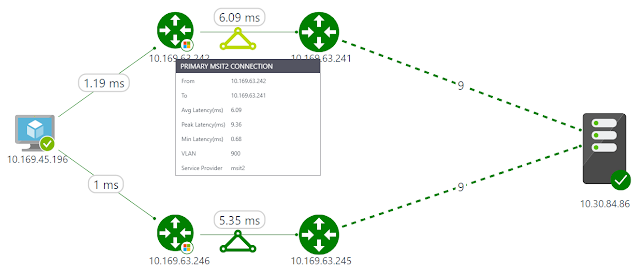
Since an ExpressRoute connection comprises of various components, it is extremely difficult to identify the bottleneck when high latency is experienced while connecting to an Azure workload. Now, you can get the required end-to-end visibility through NPM’s interactive topology view. You can not only view all the constituent components, your on-premises network, circuit provider edge, ExpressRoute circuit, Microsoft edge, and Azure VMs, but also the latency contributed by each hop to help you identify the troublesome segment.

The following snippet illustrates a topology view where the Azure VM on the left is connected to the on-premises VM on the right, over primary and secondary ExpressRoute connections. The Microsoft router at the Azure edge and the service provider router at the customer edge are also depicted. The nine on-premises hops (depicted by dashed lines) are initially compressed.
Azure Tutorials and Materials, Azure Certified, Azure Guides, Azure Certifications, Azure Learning

You can also choose to expand the map to view all the on-premises hops and understand the latency contributed by each hop.

Azure Tutorials and Materials, Azure Certified, Azure Guides, Azure Certifications, Azure Learning

Understand bandwidth utilization


This capability lets you view the bandwidth utilization trends for both the primary and secondary ExpressRoute circuits, and as a result, helps you in capacity planning. Not only can you view the aggregated bandwidth utilization for all the private peering connections of the ExpressRoute circuit, but you can also drill-down to understand the bandwidth utilization trend for each VNET. This will help you identify the VNETs that are consuming most of your circuit bandwidth.

Azure Tutorials and Materials, Azure Certified, Azure Guides, Azure Certifications, Azure Learning

You can also setup alerts to notify when the bandwidth consumed by a VNET crosses the threshold.

Azure Tutorials and Materials, Azure Certified, Azure Guides, Azure Certifications, Azure Learning

Diagnose ExpressRoute connectivity issues


NPM helps you diagnose several circuit connectivity issues. Below are examples of possible issue.

Circuit is down - NPM notifies you as soon as the connectivity between your on-premises resources and Azure VNETs is lost. This will help you take proactive action before receiving user escalations and reduce the downtime.

Azure Tutorials and Materials, Azure Certified, Azure Guides, Azure Certifications, Azure Learning

Traffic not flowing through intended circuit - NPM can notify you whenever the traffic is unexpectedly not flowing through the intended ExpressRoute circuit. This can happen if the circuit is down and the traffic is flowing through the backup route, or if there is a routing issue. This information will help you proactively manage any configuration issues in your routing policies and ensure that the most optimal and secure route is used.

Azure Tutorials and Materials, Azure Certified, Azure Guides, Azure Certifications, Azure Learning

Traffic not flowing through primary circuit - The capability notifies you when the traffic is flowing through the secondary ExpressRoute circuit. Even though you will not experience any connectivity issues in this case, proactively troubleshooting the issues with the primary circuit will make you better prepared.

Azure Tutorials and Materials, Azure Certified, Azure Guides, Azure Certifications, Azure Learning

Degradation due to peak utilization - You can correlate the bandwidth utilization trend with the latency trend to identify whether the Azure workload degradation is due to a peak in bandwidth utilization, or not, and take action accordingly.

Azure Tutorials and Materials, Azure Certified, Azure Guides, Azure Certifications, Azure Learning

Friday, 16 February 2018

Announcing Virtual Network integration for Azure Storage and Azure SQL

We are glad to announce the public preview of Virtual Network (VNet) Service Endpoints for Azure Storage and Azure SQL.

For many of our customers moving their business-critical data to the cloud, data breaches remain a top concern. Various Azure services that store or process the business data have Internet-reachable IP addresses. Leaked credentials or malicious insiders with administrative privileges gaining access to the data, from anywhere in the world, is an increasing concern to our customers.

To protect against these threats, private connectivity to Azure services is becoming essential to moving more critical workloads to the cloud. Most customers want to limit access to their critical resources to only their private environments, i.e. their Azure Virtual Networks and on-premises.

While some of the Azure services can be directly deployed into VNets, many others still remain public. With VNet service endpoints, we are expanding Virtual Network support to more multi-tenant Azure services.

Service endpoints extend your VNet private address space and identity to the Azure services, over a direct connection. This allows you to secure your critical service resources to only your virtual networks, providing private connectivity to these resources and fully removing Internet access.

Configuring service endpoints is very simple with a single click on a subnet in your VNet. Direct route to the services is auto-configured for you. There are no NAT or gateway devices required to set up the endpoints. You also no longer need reserved, public IP addresses in your VNets to secure Azure resources through IP firewall. Service endpoints makes it easy to configure and maintain network security for your critical resources.

Step1: Set up service endpoints once on your Virtual Network. Network administrators can turn this setting independently, allowing for separation of duties.

Azure Tutorials and Materials, Azure Certifications, Azure Learning, Azure Guides

Step 2: Secure your new or existing Azure service resources to the VNet, with a simple click. Set up once for the Storage account or SQL server and automatically applies to any access to child resources. Data administrators can set up independently (optional).

Azure Tutorials and Materials, Azure Certifications, Azure Learning, Azure Guides


Azure Tutorials and Materials, Azure Certifications, Azure Learning, Azure Guides

Service endpoints is available in preview for below services and regions:

Azure Storage: WestUS, EastUS, WestCentralUS, WestUS2, AustraliaEast, and AustraliaSouthEast

Azure SQ: EastUS, WestCentralUS, WestUS2

We will be expanding the feature to more regions soon.

We are very excited to bring enhanced network security for your Azure service resources. This is only a beginning for our roadmap for tightening security for Azure services. We will expand the service endpoints to more Azure services. In addition to service endpoints, we are also very committed to giving you private connectivity to your Azure resources, from your firewalls and on-premises. Service tags is yet another investment in this direction, for your Network Security Groups (NSGs) to selectively open access only to Azure services from your VNets. Service tags is also available in preview now.

Wednesday, 14 February 2018

Azure Network Security

In this blog, I will focus on security from a network perspective and describe how you can use Azure network capabilities to build highly secure cloud services. Four distinct areas highlight how we provide a secure network to customers:

◈ The foundation is Azure Virtual Network to provide a secure network fabric that provides an isolation boundary for customer networks.
◈ Virtual Network configuration and policies protect cloud applications.
◈ Active monitoring systems and tools provide security validation.
◈ An underlying physical network infrastructure with built-in advanced security hardening protects the entire global network.

Isolating customer networks in single shared physical network


To support the tremendous growth of our cloud services and maintain a great networking experience, Microsoft owns and operates one of the largest dark fiber backbones in the world—it connects our datacenters and customers. In Azure, we run logical overlay networks on top of the shared physical network to provide isolated private networks for customers.

Azure Network Security, Azure Security, Azure Certifications, Azure Guides, Azure Learning

Figure 2. Isolated customer virtual networks run on the same physical network

The overlay networks are implemented by Azure’s software defined networking (SDN) stack. Each overlay network is specifically created on demand for a customer via an API invocation. All configuration for building such networks is performed in software—this is why Azure can scale up to create thousands of overlay networks in seconds. Each overlay network is its own Layer 3 routing domain that comprises the customer’s Virtual Network (VNet).

Azure Virtual Network


Azure Virtual Network is a secure, logical network that provides network isolation and security controls that you treat like your on-premises network. Each customer creates their own structure by using: subnets—they use their own private IP address range, configure route tables, network security groups, access control lists (ACLs), gateways, and virtual appliances to run their workloads in the cloud. 

Figure 3 shows an example of two customer virtual networks. Customer 1’s VNet has connectivity to an on premises corporate network, while Customer 2’s VNet can be accessed only via Remote Desktop Protocol (RDP). Network traffic from the Internet to virtual machines (VMs) goes through the Azure load balancer and then to the Windows Server host that’s running the VM. Host and guest firewalls implement network port blocking and ACL rules.

Azure Network Security, Azure Security, Azure Certifications, Azure Guides, Azure Learning

Figure 3. Customer isolation provided by Azure Virtual Network

The VMs deployed into the VNet can communicate with one another using private IP addresses. You control the IP address blocks, DNS settings, security policies, and routing tables. Benefits include:

◈ Isolation: VNets can be isolated from one another, so you can create separate networks for development, testing, and production. You can also allow your VNets to communicate with each other.
◈ Security: By using network security groups, you can control the traffic entering and exiting the subnets and VMs.
◈ Connectivity: All resources within the VNet are connected. You can use VNet peering to connect with other Virtual Networks in the same region. You can use virtual private network (VPN) gateways to enable IPsec connectivity to VNets via the Internet from on-premises sites and to VNets in other regions. ExpressRoute provides private network connectivity to VNets that bypasses the Internet.
◈ High availability: Load balancing is a key part of delivering high availability and network performance to customer applications. All traffic to a VM goes through the Azure Load Balancer.

Securing your applications


A December 2016 survey of security professionals showed that their biggest year-over-year drop in confidence was in “the security of web applications, [which was] down 18 points from 80 percent to 62 percent.” Microsoft addresses potential vulnerabilities by building security into our applications and providing features and services to help customers enhance the security of their cloud-hosted applications from the development phase all the way to controlling access to the service.

Azure has a rich set of networking mechanisms that customers can use to secure their applications. Here are some examples.

Network ACLs can be configured to restrict access on public endpoint IP addresses. ACLs on the endpoint further restrict the traffic to only specific sources IP addresses.

Network Security Groups (NSGs) control network access to VMs in your VNet. This collection of network ACLs allows a full five-tuple (source IP address, source port, destination IP address, destination port, protocol) set of rules to be applied to all traffic that enters or exits a subnet or a VM’s network interface. The NSGs, associated to a subnet or VM, are enforced by the SDN stack.

Network virtual appliances (NVAs) bolster VNet security and network functions, and they’re available from numerous vendors via the Azure Marketplace. NVAs can be deployed for highly available firewalls, intrusion prevention, intrusion detection, web application firewalls (WAFs), WAN optimization, routing, load balancing, VPN, certificate management, Active Directory, and multifactor authentication.

Many enterprises have strict security and compliance requirements that require on-premises inspection of all network packets to enforce specific polices. Azure provides a mechanism called forced tunneling that routes traffic from the VMs to on premises by creating a custom route or by Border Gateway Protocol (BGP) advertisements through ExpressRoute or VPN.

Figure 4 shows an example of using NSG rules on segregated subnets and an NVA to protect the front end subnet. 

Azure Network Security, Azure Security, Azure Certifications, Azure Guides, Azure Learning

Figure 4. A perimeter network architecture built using Network Security Groups

Azure Application Gateway, our Layer 7 load balancer, also provides Web Application Firewall (WAF) functionality to protect against the most common web vulnerabilities.

Securely connecting from on-premises to Azure can be achieved via the Internet using IPsec to access our VPN Gateway service or with a private network connection using ExpressRoute. Figure 4 illustrates a perimeter network–style enhanced security design where Virtual Network access can be restricted using NSGs with different rules for the front end (Internet-facing) web server and the back-end application servers.

Azure Network Security, Azure Security, Azure Certifications, Azure Guides, Azure Learning

Figure 5. A secured VNet connected to an Internet front-end and back-end connected to on-premises

Security validation


Azure offers many tools to monitor, prevent, detect, and respond to security events. Customers have access to the Azure Security Center, which gives you visibility and control over the security of your Azure resources. It provides integrated security monitoring and policy management, helps detect threats, and works with a broad ecosystem of security solutions.

We also provide Network Watcher to monitor, diagnose, and gain insights into your Azure network. With diagnostic and visualization tools to monitor your network’s security and performance, you can identify and resolve network issues. For example, to view information about traffic coming into and going out of an NSG, Network Watcher provides NSG flow logs. You can verify that the NSGs are properly deployed, and see which unauthorized IPs are attempting to access your resources.

Azure Network Security, Azure Security, Azure Certifications, Azure Guides, Azure Learning

Figure 6. Capture NSG Flow Logs using Network Watcher

Azure Network Security, Azure Security, Azure Certifications, Azure Guides, Azure Learning

Network infrastructure security hardening


According to a 2015 Ponemon study, for businesses, the average cost per security breach is $15 million. To help protect your organization’s assets, Microsoft Cloud datacenters are protected by layers of defense-in-depth security, including perimeter fencing, video cameras, security personnel, secure entrances, real-time communications networks, and all physical servers are monitored. These regularly audited security measures help Azure achieve our strong portfolio of compliance certifications. 

For many years, we’ve used encryption in our products and services to protect our customers from online criminals and hackers. We don’t want to take any chances with customer data being breached and are addressing this issue head on. We have a comprehensive engineering effort to strengthen the encryption of customer data across our networks and services. This effort will provide protection across the full lifecycle of customer-created content.

Azure traffic between our datacenters stays on our global network and does not flow over the Internet. This includes all traffic between Microsoft Azure public cloud services anywhere in the world. For example, within Azure, traffic between VMs, storage, and SQL stays on the Microsoft network, regardless of the source and destination region. Intra-region VNet-to-VNet, as well as cross-region VNet-to-VNet traffic, stays on the Microsoft network.

Distributed denial of service (DDoS) attacks are a continually rising threat. Protecting against the growing scale and complexity of such attacks requires significant infrastructure deployed at global scale. Azure has a built-in DDoS protection system to shield all Microsoft cloud services. Therefore, all Azure public IPs fall under this protection deployed across all Azure datacenters. Our DDoS system uses dynamic threat detection algorithms to prevent common DDoS volumetric attacks (such as UDP floods, SYN-ACK attacks, or reflection attacks). We monitor hundreds of daily mitigated attack attempts and continually expand our protection.

Azure itself is also protected through active monitoring and intelligence gathering across the Internet. We continuously perform threat intelligence research into the dark web to identify and mitigate potential risks and attacks. This knowledge is applied to our protection techniques and mitigations. The Microsoft Cyber Defense Operations Center, highlighting our commitment, responds to security incidents.

Putting these investments together, we provide a layered security model, as shown in Figure 8 to protect your services running in Azure.

Azure Network Security, Azure Security, Azure Certifications, Azure Guides, Azure Learning

Figure 8. A layered approach to securing Azure

Secure Azure Networking


Azure has made significant investments in security. Customers can use Virtual Networks and our other security features and services to design, configure, and monitor their cloud applications. We aggressively monitor and continually harden our global infrastructure to address the ever-changing landscape of new cyber threats.

Microsoft continues to be a leader in the prevention of network security attacks. With our global footprint and experience running the most popular cloud services, we have both scale and a breadth of inputs to secure our network and help you secure your services. We will continue to invest in network security technologies so that you can safely—and in a compliant manner—build, deploy, monitor, and run your services in Azure.

Sunday, 11 February 2018

OMS Monitoring solution for Azure Backup using Azure Log analytics

We are pleased to let you know that you can leverage the same workflow to build your own Microsoft Operations Management Suite (OMS) monitoring solution for Azure Backup in the upgraded OMS workspace. The OMS monitoring solution allows you to monitor key backup parameters such as backup and restore jobs, backup alerts, and cloud storage usage across Recovery Services vaults and subscriptions. You can then utilize OMS log analytics capabilities to raise further alerts for events that you deem important for the business to be notified of. You could even open tickets through webhooks or ITSM integration using the OMS log analytics capabilities.

Here’s how you do it…

Configuring Diagnostic settings


You can open the diagnostic setting window from the Azure Recovery services vault, or you can open the diagnostic setting window by logging into Azure portal. First, click “Monitor” service followed by “Diagnostic settings” in settings section. You can then specify the relevant Subscription, Resource Group, and Recovery Services Vault. In the Diagnostic settings window, as shown below, you can select “Send data to log analytics” and then select the relevant OMS workspace. You can choose any existing log analytics workspace, such that all vaults pump the data to the same workspace

Please select the relevant log, “AzureBackupReport” in this case, to be sent to the log analytics workspace. Click “Save” to save the setting.

Azure Tutorials and Materials, Azure Certifications, Azure Learning, Azure Guides

After you have completed the configuration, you should wait for 24 hours for initial data push to complete.

Deploying solution to Azure OMS


The OMS monitoring solution template for Azure Backup is a community driven project where you can deploy the base template to Azure and then customize it to fit your needs.

Monitoring Azure Backup data


The overview tile in the dashboard reflects the key parameter, which is the backup jobs and their status.

Azure Tutorials and Materials, Azure Certifications, Azure Learning, Azure Guides

Clicking on the overview tile will take you to the dashboard where the solution has information categorized into jobs and alerts status, and active machines and their storage usage.

Azure Tutorials and Materials, Azure Certifications, Azure Learning, Azure Guides

Azure Tutorials and Materials, Azure Certifications, Azure Learning, Azure Guides

MAKE SURE YOU SELECT THE RIGHT DATE RANGE AT THE TOP OF THE SCREEN to filter the data for the required time interval.

Azure Tutorials and Materials, Azure Certifications, Azure Learning, Azure Guides

Log search capabilities


You can click on each tile to get more details about the queries used to create the tile and configure it to meet your requirement. Clicking further on values appearing in the tiles will lead you to the Log Analytics screen where you can raise alerts for configurable event thresholds and automate actions to be performed when those thresholds are met/crossed.

Azure Tutorials and Materials, Azure Certifications, Azure Learning, Azure Guides

Friday, 9 February 2018

Build email notifications for SQL Database Automatic tuning recommendations

You will be able to build your own custom email notifications for SQL Database Automatic tuning recommendations. We have listened to our customers requesting this functionality and have created a custom solution based on readily available technologies on Azure.

SQL Database performance tuning recommendations are generated by Azure SQL Database Automatic tuning. This solution provides peak performance and stable workloads through continuous database performance tuning utilizing Artificial Intelligence (AI).

Tuning recommendations are provided for each individual SQL database on Azure subscription for which Automatic tuning is enabled. Recommendations are related to index creation, index deletion, and optimization of query execution plans. Tuning recommendations are provided only in cases when AI considers them as beneficial to database performance.

Email notifications for Automatic tuning


Some of our customers have indicated a need to receive automated email notifications with suggested SQL Database Automatic tuning recommendations to be able to view and build automated alerts. For example, when the solution recommends that an index should be dropped to improve database performance, some customers would prefer to be notified of such event. Another customer scenario is, for example, emailing automated tuning recommendations to different database administrators in charge of different database assets they are looking over.

The solution we have devised consists of automating execution of a PowerShell script retrieving tuning recommendations using Azure Automation, and automation of scheduling email delivery job using Microsoft Flow.

Azure Automation enables scheduling of your scripts on Azure that could be used in many ways. In our example, it is used for scheduling the retrieval of automatic tuning recommendations from SQL databases on your Azure subscription.

The below is a screenshot of executing automated PowerShell script to retrieve SQL Database Automatic tuning recommendations using Azure Automation. The automation allows users on-screen display of script inputs, outputs, log files, errors and warnings for monitoring and troubleshooting purposes.

Microsoft SQL Database, Microsoft Tutorials and Materials, Microsoft Learning

Microsoft Flow is used as a readily available out of the box solution to schedule and automate email delivery job for forwarding the retrieved database tuning recommendations using Office 365 integration. The automated schedule can be set to run in increments anywhere from each minute, hour, day, to a week, depending on your needs and preferences.

With further customization of the provided PowerShell script and Microsoft Flow workflows, you can customize the solution to automate emailing of tuning recommendations to various individuals and for different SQL Databases.

Microsoft Flow provides on-screen stats on execution of the automated jobs, i.e. showing success of email notifications sent out. See the example from our solution in the screenshot below.

Microsoft SQL Database, Microsoft Tutorials and Materials, Microsoft Learning

Microsoft Flow analytics is helpful for monitoring as well as for troubleshooting the automation flows. Please note that in case of troubleshooting, you also might want to examine the PowerShell script execution log accessible through the Azure Automation app.

The final output of the automated email notification will look similar to the following email received after building and running this solution:

Microsoft SQL Database, Microsoft Tutorials and Materials, Microsoft Learning

By further customizing the sample PowerShell script provided, you can adjust the output and formatting of the automated email to suit your needs.

The solution we have provided for you is the starting point from which you can build further and customize for your own scenarios. Some of the possible custom scenarios are for example, creating notifications based on the type of tuning recommendation received, sending emails to multiple recipients, or perhaps to different database owners.

Summary


With the solution provided, you will be able to automate sending of email notifications for Azure SQL Database Automatic tuning recommendations. The solution is using PowerShell script to retrieve tuning recommendations and Azure Automation to run it. The flow of automating recurring email delivery job with outputs from the PowerShell script was built using Microsoft Flow.

You might further customize the solution to build email notifications based on a specific tuning event, to multiple recipients, for multiple subscriptions, or databases depending on your custom scenarios.

If you are inclined to programming, please note there are also alternative ways through which automatic tuning recommendations can be retrieved from SQL Database, for example, through REST API calls, or by using T-SQL, alongside with PowerShell commands.

Please let us know how are you using this solution, and perhaps examples of how you have customized it for your needs? Please leave your feedback and questions in the comments.

Sunday, 4 February 2018

Virtual Network Service Endpoints and Firewalls for Azure Storage now generally available

Today we are announcing the general availability of Firewalls and Virtual Networks (VNets) for Azure Storage along with Virtual Network Service Endpoints. Azure Storage Firewalls and Virtual Networks uses Virtual Network Service Endpoints to allow administrators to create network rules that allow traffic only from selected VNets and subnets, creating a secure network boundary for their data. These features are now available in all Azure public cloud regions and Azure Government. As part of moving to general availability it is now backed by the standard SLAs. There is no additional billing for virtual network access through service endpoints. The current pricing model for Azure Storage applies as is today.

Customers often prefer multiple layers of security to help protect their data. This includes network-based access control protections as well as authentication and authorization-based protections. As part of the general availability of Firewalls and Virtual Networks for Storage and VNet Service Endpoints we enable network-based access control. These new network focused features allow the customer to define network access-based security ensuring that only requests coming from approved Azure VNets or specified public IP ranges will be allowed to a specific storage account. Customers can combine existing authorization mechanisms with the new network boundaries to better secure their data.

Azure Tutorials and Materials, Azure Guides, Azure Certifications, Microsoft Azure

To enable VNet protection, first enable service endpoints for storage in the VNet. Virtual Network Service Endpoints allow you to secure your critical Azure service resource to only your virtual network. Service endpoints also provide optimal routing for Azure traffic over the Azure backbone in scenarios where Internet traffic is routed through virtual appliances or on-premises.

Azure Tutorials and Materials, Azure Guides, Azure Certifications, Microsoft Azure

On the storage account you can select to allow access to one or more VNets. You may also configure to allow access to one or more public IP ranges. A detailed explanation on how to enable the network functionality can be found at Configure Azure Storage Firewalls and Virtual Networks.

Azure Tutorials and Materials, Azure Guides, Azure Certifications, Microsoft Azure

Thursday, 1 February 2018

Lambda Architecture using Azure CosmosDB: Faster performance, Low TCO, Low DevOps

Microsoft Database, Microsoft Azure Guides, Microsoft Tutorial and Materials

Azure Cosmos DB provides a scalable database solution that can handle both batch and real-time ingestion and querying and enables developers to implement lambda architectures with low TCO. Lambda architectures enable efficient data processing of massive data sets. Lambda architectures use batch-processing, stream-processing, and a serving layer to minimize the latency involved in querying big data.

To implement a lambda architecture, you can use a combination of the following technologies to accelerate real-time big data analytics:

◈ Azure Cosmos DB, the industry's first globally distributed, multi-model database service.
◈ Apache Spark for Azure HDInsight, a processing framework that runs large-scale data analytics applications
◈ Azure Cosmos DB change feed, which streams new data to the batch layer for HDInsight to process
◈ The Spark to Azure Cosmos DB Connector

We wrote a detailed article that describes the fundamentals of a lambda architecture based on the original multi-layer design and the benefits of a "rearchitected" lambda architecture that simplifies operations.

What is a lambda architecture?


Microsoft Database, Microsoft Azure Guides, Microsoft Tutorial and Materials

The basic principles of a lambda architecture are depicted in the figure above:

1. All data is pushed into both the batch layer and speed layer.
2. The batch layer has a master dataset (immutable, append-only set of raw data) and pre-computes the batch views.
3. The serving layer has batch views for fast queries.
4. The speed layer compensates for processing time (to the serving layer) and deals with recent data only.
5. All queries can be answered by merging results from batch views and real-time views or pinging them individually.

Speed layer


For speed layer, you can utilize the Azure Cosmos DB change feed support to keep the state for the batch layer while revealing the Azure Cosmos DB change log via the Change Feed API for your speed layer.

Microsoft Database, Microsoft Azure Guides, Microsoft Tutorial and Materials

What’s important in these layers:

1. All data is pushed only into Azure Cosmos DB, thus you can avoid multi-casting issues.
2. The batch layer has a master dataset (immutable, append-only set of raw data) and pre-computes the batch views.
3. The serving layer is discussed in the next section.
4. The speed layer utilizes HDInsight (Apache Spark) to read the Azure Cosmos DB change feed. This enables you to persist your data as well as to query and process it concurrently.
5. All queries can be answered by merging results from batch views and real-time views or pinging them individually.

Batch and serving layers


Since the new data is loaded into Azure Cosmos DB (where the change feed is being used for the speed layer), this is where the master dataset (an immutable, append-only set of raw data) resides. From this point onwards, you can use HDInsight (Apache Spark) to perform the pre-compute functions from the batch layer to serving layer, as shown in the following figure:

Microsoft Database, Microsoft Azure Guides, Microsoft Tutorial and Materials

What’s important in these layers:

1. All data is pushed only into Azure Cosmos DB (to avoid multi-cast issues).
2. The batch layer has a master dataset (immutable, append-only set of raw data) stored in Azure Cosmos DB. Using HDI Spark, you can pre-compute your aggregations to be stored in your computed batch views.
3. The serving layer is an Azure Cosmos DB database with collections for the master dataset and computed batch view.
4. The speed layer is discussed later in this article.
5. All queries can be answered by merging results from the batch views and real-time views or pinging them individually.

For code example, 

◈ Lambda Architecture Rearchitected - Batch Layer HTML | ipynb
◈ Lambda Architecture Rearchitected - Batch to Serving Layer HTML | ipynb

Speed layer


As previously noted, using the Azure Cosmos DB Change Feed Library allows you to simplify the operations between the batch and speed layers. In this architecture, use Apache Spark (via HDInsight) to perform the structured streaming queries against the data. You may also want to temporarily persist the results of your structured streaming queries so other systems can access this data.

Microsoft Database, Microsoft Azure Guides, Microsoft Tutorial and Materials

To do this, create a separate Azure Cosmos DB collection to save the results of your structured streaming queries. This allows you to have other systems access this information not just Apache Spark. As well with the Azure Cosmos DB Time-to-Live (TTL) feature, you can configure your documents to be automatically deleted after a set duration.

Lambda Architecture using Azure Cosmos DB: Faster performance, Low TCO, Low DevOps


As noted above, you can simplify the original lambda architecture (with batch, serving, and speed layers) by using Azure Cosmos DB, Azure Cosmos DB Change Feed Library, Apache Spark on HDInsight, and the native Spark Connector for Azure Cosmos DB.

Microsoft Database, Microsoft Azure Guides, Microsoft Tutorial and Materials

This simplifies not only the operations but also the data flow.

1. All data is pushed into Azure Cosmos DB for processing
2. The batch layer has a master dataset (immutable, append-only set of raw data) and pre-computes the batch views
3. The serving layer has batch views of data for fast queries.
4. The speed layer compensates for processing time (to the serving layer) and deals with recent data only.
5. All queries can be answered by merging results from batch views and real-time views.
