Saturday, 13 April 2019

How to accelerate DevOps with Machine Learning lifecycle management

DevOps is the union of people, processes, and products to enable the continuous delivery of value to end users. DevOps for machine learning is about bringing the lifecycle management of DevOps to Machine Learning. Utilizing Machine Learning, DevOps can easily manage, monitor, and version models while simplifying workflows and the collaboration process.

Effectively managing the Machine Learning lifecycle is critical for DevOps’ success. And the first piece to machine learning lifecycle management is building your machine learning pipeline(s).

What is a Machine Learning Pipeline? 


DevOps for Machine Learning includes data preparation, experimentation, model training, model management, deployment, and monitoring while also enhancing governance, repeatability, and collaboration throughout the model development process. Pipelines allow for the modularization of phases into discrete steps and provide a mechanism for automating, sharing, and reproducing models and ML assets. They create and manage workflows that stitch together machine learning phases. Essentially, pipelines allow you to optimize your workflow with simplicity, speed, portability, and reusability.

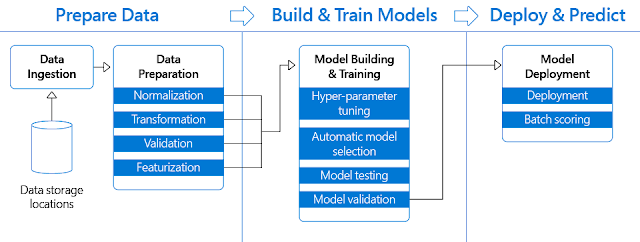
There are four steps involved in deploying machine learning that data scientists, engineers and IT experts collaborate on:

1. Data Ingestion and Preparation
2. Model Training and Retraining
3. Model Evaluation
4. Deployment
Azure Certifications, Azure Learning, Azure Tutorial and Material, Azure Guides, Azure All Certifications

“Using distinct steps makes it possible to rerun only the steps you need, as you tweak and test your workflow. A step is a computational unit in the pipeline. As shown in the preceding diagram, the task of preparing data can involve many steps. These include, but aren't limited to, normalization, transformation, validation, and featurization. Data sources and intermediate data are reused across the pipeline, which saves compute time and resources.”

4 benefits of accelerating Machine Learning pipelines for DevOps


1. Collaborate easily across teams


◈ Data scientists, data engineers, and IT professionals using machine learning pipelines need to collaborate on every step involved in the machine learning lifecycle: from data prep to deployment.

◈ Azure Machine Learning service workspace is designed to make the pipelines you create visible to the members of your team. You can use Python to create your machine learning pipelines and interact with them in Jupyter notebooks, or in another preferred integrated development environment.

2. Simplify workflows


◈ Data prep and modeling can last days or weeks, taking time and attention away from other business objectives.

◈ The Azure Machine Learning SDK offers imperative constructs for sequencing and parallelizing the steps in your pipelines when no data dependency is present. You can also templatize pipelines for specific scenarios and deploy them to a REST endpoint, so you can schedule batch-scoring or retraining jobs. You only need to rerun the steps you need, as you tweak and test your workflow when you rerun a pipeline.

3. Centralized Management


◈ Tracking models and their version histories is a hurdle many DevOps teams face when building and maintaining their machine learning pipelines.

◈ The Azure Machine Learning service model registry tracks models, their version histories, their lineage and artifacts. Once the model is in production, the Application Insights service collects both application and model telemetry that allows the model to be monitored in production for operational and model correctness. The data captured during inferencing is presented back to the data scientists and this information can be used to determine model performance, data drift, and model decay, as well as the tools to train, manage, and deploy machine learning experiments and web services in one central view.

◈ The Azure Machine Learning SDK also allows you to submit and track individual pipeline runs. You can explicitly name and version your data sources, inputs, and outputs instead of manually tracking data and result paths as you iterate. You can also manage scripts and data separately for increased productivity. For each step in your pipeline. Azure coordinates between the various compute targets you use, so that your intermediate data can be shared with the downstream compute targets easily. You can track the metrics for your pipeline experiments directly in the Azure portal.

4. Track your experiments easily


◈ DevOps capabilities for machine learning further improve productivity by enabling experiment tracking and management of models deployed in the cloud and on the edge. All these capabilities can be accessed from any Python environment running anywhere, including data scientists’ workstations. The data scientist can compare runs, and then select the “best” model for the problem statement.

◈ The Azure Machine Learning workspace keeps a list of compute targets that you can use to train your model. It also keeps a history of the training runs, including logs, metrics, output, and a snapshot of your scripts. Create multiple workspaces or common workspaces to be shared by multiple people.

Friday, 12 April 2019

How do teams work together on an automated machine learning project?

Azure Certifications, Azure Tutorial and Material, Azure Certifications, Azure Guides

When it comes to executing a machine learning project in an organization, data scientists, project managers, and business leads need to work together to deploy the best models to meet specific business objectives. A central objective of this step is to identify the key business variables that the analysis needs to predict. We refer to these variables as the model targets, and we use the metrics associated with them to determine the success of the project.

We’ll see how a data scientist, project manager, and business lead at a retail grocer can leverage automated machine learning and Azure Machine Learning service to reduce product overstock. Azure Machine Learning service is a cloud service that you use to train, deploy, automate, and manage machine learning models, all at the broad scale that the cloud provides. Automated machine learning within Azure Machine Learning service is the process of taking training data with a defined target feature, and iterating through combinations of algorithms and feature selections to automatically select the best model for your data based on the training scores.

Excess stock quickly becomes a liquidity problem, as it is not converted back to cash unless margins are reduced by means of discounts and promotions or, even worse, when it accumulates to be sent to other channels such as outlets, delaying its sale. Identifying in advance which products will not have the level of rotation they expect and controlling replenishment with stock cover that is aligned with sales forecasts are key factors in helping retailers achieve ROI on their investments. Let’s see how the team goes about solving this problem and how automated machine learning enables the democratization of artificial intelligence across the company.

Identify the right business objective for the company


Strong sales and profits are the result of having the right product mix and level of inventory. Achieving this ideal mix requires having current and accurate inventory information. Manual processes not only take time, causing delays in producing current and accurate inventory information, but also increase the likelihood of errors. These delays and errors are likely to cause lost revenue due to inventory overstocks, understocks, and out-of-stocks.

Overstock inventory can also take valuable warehouse space and tie up cash that ought to be used to purchase new inventory. But selling it in liquidation mode can cause its own set of problems, such as tarnishing your reputation and cannibalizing sales of other current products.

The project manager, being the bridge between data scientists and business operations, reaches out to the business lead to discuss the possibilities of using some of their internal and historical sales to solve their overstock inventory problem. The project manager and the business lead define project goals by asking and refining tangible questions that are relevant for the business objective.

There are two main tasks addressed in this stage:

◈ Define objectives: The project manager and the business lead need to identify the business problems and, most importantly, formulate questions that define the business goals that the data science techniques can target.
◈ Identify data sources: The project manager and data scientist need to find relevant data that helps answer the questions that define the objectives of the project.

Look for the right data and pipeline


It all starts with data. The project manager and the data scientist need to identify data sources that contain known examples of answers to the business problem. They look for the following types of data:

◈ Data that is relevant to the question. Do they have measures of the target and features that are related to the target?
◈ Data that is an accurate measure of their model target and the features of interest.

There are three main tasks that the data scientist needs to address in this stage:

1. Ingest the data into the target analytics environment
2. Explore the data to determine if the data quality is adequate to answer the question
3. Set up a data pipeline to score new or regularly refreshed data

After setting up the process to move the data from the source locations to the target locations where it’s possible to run analytics operations, the data scientist starts working on raw data to produce a clean, high-quality data set whose relationship to the target variables is understood. Before training machine learning models, the data scientist needs to develop a sound understanding of the data and create a data summarization and visualization to audit the quality of the data and provide the information needed to process the data before it's ready for modeling.

Finally, the data scientist is also in charge of developing a solution architecture of the data pipeline that refreshes and scores the data regularly.

Forecast orange juice sales with automated machine learning


The data scientist and project manager decide to use automated machine learning for a few reasons: automated machine learning empowers customers, with or without data science expertise, to identify an end-to-end machine learning pipeline for any problem, achieving higher accuracy while spending far less of their time. And it also enables a significantly larger number of experiments to be run, resulting in faster iteration toward production-ready intelligent experiences.

Let’s look at how their process using automated machine learning for orange juice sales forecasting delivers on these benefits.

After agreeing on the business objective and what type of internal and historical data should be used to meet that objective, the data scientist creates a workspace. This workspace is the top-level resource for the service and provides data scientists with a centralized place to work with all the artifacts they need to create. When a workspace is created in an AzureML service, the following Azure resources are added automatically (if they are regionally available):

◈ Azure Container Registry
◈ Azure Storage
◈ Azure Application Insights
◈ Azure Key Vault

To run automated machine learning, the data scientist also needs to create an Experiment. An Experiment is a named object in a workspace that represents a predictive task, the output of which is a trained model and a set of evaluation metrics for the model.

The data scientist is now ready to load the historical orange juice sales data and loads the CSV file into a plain pandas DataFrame. The time column in the CSV is called WeekStarting, so it will be specially parsed into the datetime type.

Each row in the DataFrame holds a quantity of weekly sales for an orange juice brand at a single store. The data also includes the sales price, a flag indicating if the orange juice brand was advertised in the store that week, and some customer demographic information based on the store location. For historical reasons, the data also includes the logarithm of the sales quantity.

The task is now to build a time series model for the Quantity column. It’s important to note that this data set is comprised of many individual time series; one for each unique combination of Store and Brand. To distinguish the individual time series, we thus define the grain—the columns whose values determine the boundaries between time series.

After splitting the data into a training and a testing set for later forecast evaluation, the data scientist starts working on the modeling step for forecasting tasks, and automated machine learning uses pre-processing and estimation steps that are specific to time series. Automated machine learning will undertake the following pre-processing steps:

◈ Detect the time series sample frequency (e.g., hourly, daily, weekly) and create new records for absent time points to make the series regular. A regular time series has a well-defined frequency and has a value at every sample point in a contiguous time span.

◈ Impute missing values in the target via forward-fill and feature columns using median column values.

◈ Create grain-based features to enable fixed effects across different series.

◈ Create time-based features to assist in learning seasonal patterns.

◈ Encode categorical variables to numeric quantities.

The AutoMLConfig object defines the settings and data for an automated machine learning training job. Below is a summary of automated machine learning configuration parameters that were used for training the orange juice sales forecasting model:

Azure Certifications, Azure Tutorial and Material, Azure Certifications, Azure Guides

Each iteration runs within an experiment and stores serialized pipelines from the automated machine learning iterations until they retrieve the pipeline with the best performance on the validation data set.

Once the evaluation has been performed, the data scientist, project manager, and business lead meet again to review the forecasting results. It’s the project manager and business lead’s job to make sense of the outputs and choose practical steps based on those results. The business lead needs to confirm that the best model and pipeline meet the business objective and that the machine learning solution answers the questions with acceptable accuracy to deploy the system to production for use by their internal sales forecasting application.

Microsoft invests in Automated Machine Learning


Automated machine learning is based on a breakthrough from the Microsoft Research division. The approach combines ideas from collaborative filtering and Bayesian optimization to search an enormous space of possible machine learning pipelines intelligently and efficiently. It’s essentially a recommender system for machine learning pipelines. Similar to how streaming services recommend movies for users, automated machine learning recommends machine learning pipelines for data sets.

As you’ve seen here, Automated machine learning empowers customers, with or without data science expertise, to identify an end-to-end machine learning pipeline for any problem and save time while increasing accuracy. It also enables a larger number of experiments to be run and faster iterations. How could automated machine learning benefit your organization? How could your team work more closely on using machine learning to meet your business objectives?

Thursday, 11 April 2019

Azure Stack IaaS – part seven

It takes a team


Most apps get delivered by a team. When your team delivers the app through virtual machine (VMs), it is important to coordinate efforts. Born in the cloud to serve teams from all over the world, Azure and Azure Stack have some handy capabilities to help you coordinate VM operations across your team.

Identity and single sign-on


The easiest identity to remember is the one you use every day to sign in to your corporate network and check your email. If you are using Azure Active Directory, or your own active directory, your login to Azure Stack will be the same. This is something your admin sets up when the Azure Stack was deployed so you don’t have to learn and remember different credentials.

Role-based access control


In the virtualization days my team typically coordinated operations through credentials to VMs and the management tools. The Azure Resource Manager include a very robust role-based access control (RBAC) system that not only allows you to identify who can access the system, but allows you to assign people to roles and set a scope of control to define what they are allowed to do to what.

Azure Stack IaaS, Azure Tutorial and Material, Azure Guides, Azure Certifications, Azure Learning

More than just people in my organization


When you work in the cloud, you may need to collaborate with people from other organizations. As more and more things become automated, you might have to give a process, not a person, access to a resource. Azure and Azure Stack have you covered. The image below shows a VM where I have given access both to three applications (service principals) and a user from an external domain (foreign principal). 

Azure Stack IaaS, Azure Tutorial and Material, Azure Guides, Azure Certifications, Azure Learning

Service principal


When an application needs access to deploy or configure VMs, or other resource in your Azure Stack, you can create a service principal which is a credential for the application. You can then delegate only the necessary permissions to that service principal.

As an example, you may have a configuration management tool that inventories VMs in your subscription. In this scenario, you can create a service principal, grant the reader role to that service principal, and limit the configuration management tool to read-only access.

Foreign principal


A foreign principal is the identity of a person that is managed by another authority. For example, the team at Contoso.com might need to allow access to a VM for a contractor or a partner from Fabrikam.com. In the virtualization days we would create a user account in our domain for that user, but that was a management headache. With Azure and Azure Stack you can allow users that sign in with their corporate credentials to access your VMs.

Activity logs


When your VM runs around the clock, you will have teams in at all times of the day. Fortunately, Azure and Azure Stack include an activity log that allows to track all changes that have been made to the VM and who initiated the action.

Azure Stack IaaS, Azure Tutorial and Material, Azure Guides, Azure Certifications, Azure Learning

Locks


Sometimes people make errors, like deleting a production VM by mistake. A nice feature you will find in Azure and Azure Stack is the “lock.” A lock can be used to prevent any change or deletion on a VM or any other resource. When attempted, the user will get an error message until they manually remove the lock.

Azure Stack IaaS, Azure Tutorial and Material, Azure Guides, Azure Certifications, Azure Learning

Tags


The best place to store additional data about your VM is in the tool you manage the VM from. Azure and Azure Stack provide you that ability to add additional information about your VM through the Tags feature. You can use Tags to help your team keep track of the deployment environment, support contacts, cost center, or anything else important. You can even search for these tags in the portal to find the right resources quickly.

Azure Stack IaaS, Azure Tutorial and Material, Azure Guides, Azure Certifications, Azure Learning

Work as a team, not individuals


The team features in Azure and Azure Stack allows your team to elevate its game to deliver the best virtual machine operations. Managing an Infrastructure-as-a-Service (IaaS) VM is more than stop, start, and login. The Azure platform powering Azure Stack IaaS allows you to organize, delegate, and track your team’s operations so you can deliver a better experience to your users.

Tuesday, 9 April 2019

Azure Security Center exposes crypto miner campaign

Azure Security Center discovered a new cryptocurrency mining operation on Azure customer resources.
This operation takes advantage of an old version of known open source CMS, with a known RCE vulnerability (CVE-2018-7600) as the entry point, and then after using the CRON utility for persistency, it mines “Monero” cryptocurrency using a new compiled binary of the “XMRig” open-source crypto mining tool.

Azure Security Center (ASC) spotted the attack in real-time, and alerted the affected customer with the following alerts:

◈ Suspicious file download – Possible malicious file download using wget detected

◈ Suspicious CRON job – Possible suspicious scheduling tasks access detected

◈ Suspicious activity – ASC detected periodic file downloads and execution from the suspicious source

◈ Process executed from suspicious location

Azure Security Center, Azure Certifications, Azure Learning, Azure Guides, Azure Tutorial and Material

The entry point


Following the traces the attacker left behind, we were able to track the entry point of this malware and conclude it was originated by leveraging a remote code execution vulnerability of a known open source CMS - CVE-2018-7600.

This vulnerability is exposed in an older version of this CMS and is estimated to impact a large number of websites that are using out of date versions. The cause of this vulnerability is insufficient input validation within an API call.

The first suspicious command line we noticed on the effected Linux machines was:

Azure Security Center, Azure Certifications, Azure Learning, Azure Guides, Azure Tutorial and Material

Decoding the base64 part of the command line reveals a logic of download and execution of a bash script file periodically, using the CRON utility:

Azure Security Center, Azure Certifications, Azure Learning, Azure Guides, Azure Tutorial and Material

The URL path also includes reference to the CMS name - another indication for the entry point (and for a sloppy attacker as well).

We also learned, from the telemetries collected from the harmed machines, that this first command line executes within “apache” user context, and within the relative CMS working directory.

We did an examination on the affected resources and discovered that all of them were running with an unpatched version of the relative CMS, which is exposed to a highly critical security risk that allows an attacker to run malicious code on the exposed resource.

Malware analysis


The malware uses the CRON utility (Unix job scheduler) for persistency by adding the following line to the CRON table file:

Azure Security Center, Azure Certifications, Azure Learning, Azure Guides, Azure Tutorial and Material

This results with the download and execution of a bash script file at every minute and allows the attacker to command and control using bash scripts.

Azure Security Center, Azure Certifications, Azure Learning, Azure Guides, Azure Tutorial and Material

The bash file (as we captured it in this time) downloads the binary file and executes it (As seen in the image above).
The binary check if the machine is already compromised, and downloads using the HTTP 1.1 POST method, or another binary file depending on the number of processors the machine has.

Azure Security Center, Azure Certifications, Azure Learning, Azure Guides, Azure Tutorial and Material

On first sight, the second binary seems to be more difficult to investigate since it’s clearly obfuscated. Luckily, the attacker chose to use UPX packer which focuses on compression and not on obfuscation.

Azure Security Center, Azure Certifications, Azure Learning, Azure Guides, Azure Tutorial and Material

After de-packing the binary, we found a compilation of the open-source cryptocurrency miner “XMRig” in version 2.6.3. The miner compiles with the configuration inside it, and pulls the mining jobs from the mining proxy server, therefore we were unable to estimate the number of clients and earnings of the attacker.

Azure Security Center, Azure Certifications, Azure Learning, Azure Guides, Azure Tutorial and Material

The big picture


By analyzing the behavior of several crypto miners, we have noticed 2 strong indicators for crypto miner driven attacks:

1. Killing competitors – Many crypto-attacks assume that the machine is already compromised, and try to kill other computing power competitors. It does this by observing the process list, focusing on:

a. Process name - From popular open source miners to less known mining campaigns
b. Command line arguments such as known pool domains, crypto hash algorithms, mining protocol, etc.
c. CPU usage consumption

Another common method we identified is to reset the CRON tab – which in many cases is in use as a persistence method for other compute power competitors.

2. Mining pools ­- Crypto mining jobs are being managed by the mining pool, which is responsible for gathering multiple clients to contribute and share the revenue across the clients. Most of the attackers use public mining pools which are simple to deploy and use, but once the attacker is exposed, his account might be blocked. Lately we noticed an increasing number of cases where attackers used their own proxy mining server. This technique helps the attacker stay anonymous, both from detection by a security product within the host (such as Azure Security Center Threat detection for Linux) and from detection by the public mining pool.

Saturday, 6 April 2019

Azure Front Door Service is now generally available

Every internet facing web application, whether serving a large audience or a small set of users in a single region, is by default a global application.  Whether you are running a large news website with millions of users across the globe, running a B2B application for managing your sales channels or a local pastry shop in a city – your users are distributed/roaming across multiple locations, or your application demands deployment into multiple locations for high availability or disaster recovery scenarios.  As a global application, your distributed users and/or application deployments place demands on you to maximize performance for your end users and ensure the application is always-on across failures and attacks.

Today I am excited to announce the general availability of Azure Front Door Service (AFD) which we launched in preview last year – a scalable and secure entry point for fast delivery of your global applications. AFD is your one stop solution for your global website/application and provides:

◈ Application and API acceleration with anycast and using Microsoft’s massive private global network to directly connect to your Azure deployed backends means your app runs with lower latency and higher throughput to your end users.
◈ Global HTTP load balancing enables you to build your application resiliently across regions, fail-over instantly and offer your users an “always-on” web site availability experience either at a domain or microservice (URL path) level.
◈ SSL offload at a massive scale enables you to maintain security and scale to a rapidly growing or expanding user base, all while reducing latency.
◈ WAF @ Edge offering application security against DDoS attacks or malicious users at the edge providing protection at scale without sacrificing on performance.

Built atop Microsoft’s massive global network, Azure Front Door currently supports Microsoft’s biggest web workloads deliver high quality, highly performant services. Global brands such as Bing, Office 365, Xbox Live, MSN, LinkedIn and Azure DevOps leverage AFD’s competitive performance, enterprise grade reliability and massive scalability to deliver consistent, low latency, high throughput user and application experiences. Today AFD provides global coverage in over 35 countries across 65 metros and quickly growing.

Azure Certifications, Azure Guides, Azure Learning, Azure Tutorial and Material

Figure 1: Azure Front Door’s global footprint and Microsoft's Network

Use case scenarios


Customers come to AFD today focused on their core business needs to improve performance, scale their application, enable instant failover, or enable complex application architectures like IaaS and PaaS, on-prem + cloud, or multi-cloud hybrid experiences.  AFD can be quickly and easily integrated into your application’s existing or new architecture and starts working out of the box.  Adding AFD in front of your application or API also enables your customers to gain the benefit of our constant improvements and optimizations at the edge such as TCP Fast Open, WAN optimizations and improvements to SSL such as SSL session resumption.   This means your users get optimized connectivity experiences day 1 with Front Door.

Below is a sample reference architecture outlining how an application can be designed for improved page load times, SSL offload and API routing. AFD runs at the Edge of Microsoft’s global network, performing TCP and SSL terminations close to end user, thereby improving performance of client access to applications.  Traffic from AFD instances running at the Edge to application backends is routed on Microsoft’s private global network providing high reliability and optimized routing to the destination.

Azure Certifications, Azure Guides, Azure Learning, Azure Tutorial and Material

Figure 2: Sample architecture for accelerated and scalable web application

Another core Azure Front Door use case for building highly scalable apps is utilizing AFD’s smart load balancing algorithm to route traffic to the fastest available backend. Unlike the typical DNS-based load balancing systems, Azure Front Door delivers near instant failover across your application backends and with more granular control to even failover specific microservices. Our smart and efficient load balancing algorithms support both active-active as well as active-passive deployment configurations.

Azure Certifications, Azure Guides, Azure Learning, Azure Tutorial and Material

Figure 3: Sample architecture of an always-on web application

Azure Front Door Service is now generally available, providing a 99.99 percent availability SLA and a myriad of features including SSL offload, URL redirect and rewrite, HTTP/2, IPv6 support, session affinity, simple domain onboarding with free or custom SSL certs, caching, and much more.

Thursday, 4 April 2019

Extending Azure Security Center capabilities

As more organizations are delivering innovation faster by moving their businesses to the cloud, increased security is critically important for every industry. Azure has built-in security controls across data, applications, compute, networking, identity, threat protection, and security management so you can customize protection and integrate partner solutions. Microsoft Azure Security Center is the central hub for monitoring and protecting against related incidents within Azure.

We love making Azure Security Center richer for our customers, and we are excited to share exciting updates this week at Hannover Messe 2019. We are excited to announce that Advanced Threat Protection for Azure Storage, the Regulatory Compliance Dashboard, Dedicated Hardware Security Module Service (HMS) in UK, Canada, and Australia, Azure disk encryption support for Virtual Machine Scale Sets (VMSS), and support for virtual machine sets are now generally available as part of Azure Security Center.

Advanced Threat Protection for Azure Storage is now generally available


Advanced Threat Protection for Azure Storage helps customers detect and respond to potential threats on their storage account as they occur. This layer of protection allows you to protect and address concerns without needing to be an expert in security. Enabling it is quick and simple. Once enabled, security alerts are triggered when suspicious activity occurs and you can view them listed in Azure Security Center. Security alerts provide details of suspicious activity that was detected and recommended actions to take to investigate and mitigate the potential threat.

The benefits of Advanced Threat Protection for Azure Storage includes:

◈ Detection of anomalous access and data exfiltration activities.

◈ Email alerts with actionable investigation and remediation steps.

◈ Centralized views of alerts for the entire Azure tenant using Azure Security Center.

◈ Easy enablement for many storage accounts using the Azure portal, Azure Policy, or Standard Azure APIs.

Regulatory compliance dashboard in Azure Security Center is generally available


We are pleased to announce that the regulatory compliance dashboard in Azure Security Center is now generally available! The dashboard helps Security Center customers streamline their compliance process by providing insight into their compliance posture for a set of supported standards and regulations.

The compliance dashboard surfaces security assessments and recommendations as they align to specific compliance requirements based on continuous assessments of your Azure and hybrid environments. The dashboard also provides actionable information for how to act on recommendations and reduce risk factors in your environment, and thus improve your overall compliance posture.

Azure Security, Azure Security Center, Azure Tutorial and Materials, Azure Certifications, Azure Guides

The information provided by the regulatory compliance dashboard can be very useful for providing evidence to internal and external auditors on your compliance status with the supported standards. To further facilitate this, you can now generate and download a compliance report directly from the compliance dashboard. The report can be generated for a particular supported compliance standard and depicts a high-level summary of your current compliance status with respect to that standard. In addition, you can now automate compliance processes and manage them at scale using programmatic APIs.

Azure Security Center now supports Virtual Machine Scale Sets


Security Center can now protect your Virtual Machine Scale Sets. You can easily monitor the security posture of your VM Scale Sets with security recommendations to increase overall security, reduce vulnerabilities, and detect threats with Security Center’s advanced threat detection capabilities.

Security Center automatically discovers your VM Scales Sets and recommends that you install the monitoring agent to get better security assessments and enable events-based threat detection.

Azure Security, Azure Security Center, Azure Tutorial and Materials, Azure Certifications, Azure Guides

You can view the security health and recommendations of each VM scale set: 

Azure Security, Azure Security Center, Azure Tutorial and Materials, Azure Certifications, Azure Guides

For every VM scale set instance, you can benefit from a list of recommendations such as:

◈ Install the monitoring agent 

◈ Remediate vulnerabilities in security configuration 

◈ Remediate endpoint protection health failures 

◈ Install endpoint protection solution on virtual machine scale sets

◈ Install system updates 

◈ Enable diagnostics logs in Virtual Machine Scale Sets’

Threat detection alerts are also available for VM scale sets instances for any VM protected by Security Center standard tier.

Note: Pricing of VM scale sets instances is the same as VM.

Announcing Azure Dedicated HSM service availability in UK, Canada, and Australia regions


The Azure Dedicated Hardware Security Module (HSM) service provides cryptographic key storage in Azure and meets the most stringent customer security and compliance requirements. This service is the ideal solution for customers requiring FIPS 140-2 Level 3 validated devices and complete, exclusive control of the HSM appliance. The Dedicated HSM service uses SafeNet Luna Network HSM 7 devices from Gemalto. This device offers the highest levels of performance and cryptographic integration options and makes it simple for you to migrate HSM-protected applications to Azure. The Azure Dedicated HSM is leased on a single-tenant basis.

The Azure Dedicated HSM service was originally announced in 8 Azure public regions on November 28, 2018 and we are now pleased to announce that the service is expanded to the UK, Canada, and Australia. With this new announcement, the Dedicated HSM service is now available in 14 regions namely, East US, West US, South Central US, East US 2, Southeast Asia, East Asia, West Europe, North Europe, UK South, UK West, Canada Central, Canada East, Australia East, and Australia Southwest regions. We plan to continue expanding this service to other Azure regions.

Azure Security, Azure Security Center, Azure Tutorial and Materials, Azure Certifications, Azure Guides

Announcing Azure Disk Encryption general availability for Virtual Machine Scale Sets


Today, we are excited to announce the general availability of Azure Disk Encryption (ADE) for Virtual Machine Scale Sets (VMSS). With this announcement, Azure disk encryption can be enabled for Windows and Linux Virtual Machine Scale Sets in Azure public regions. This enables customers to help protect and safeguard the Virtual Machine Scale Sets data at rest using industry standard encryption technology.

Azure Disk Encryption is a capability that helps you encrypt your Windows and Linux IaaS Virtual Machine Scale Sets disks. Disk Encryption leverages the industry standard BitLocker feature of Windows and the DM-Crypt feature of Linux to provide volume encryption of disks. The solution is integrated with Azure Key Vault to help you control and manage the disk-encryption keys and secrets. The solution also ensures that all data on the VM disks are encrypted at rest in your Azure Storage.

The solution is deployed in all Azure public regions. Additional details on supported and unsupported scenarios, interfaces, and how you can use the disk encryption technology to encrypt your Virtual Machine Scale Sets and validate your scenarios is documented below.

Supported scenarios


1. Virtual Machine Scale Sets encryption is supported only for scale sets created with managed disks, and not supported for native (or unmanaged) disk scale sets.

2. Virtual Machine Scale Sets encryption is supported for OS and Data volumes for Windows Virtual Machine Scale Sets.

3. Disable encryption is supported for OS and data volumes for Windows Virtual Machine Scale Sets.

4. Virtual Machine Scale Sets encryption is supported for data volume for Linux Virtual Machine Scale Sets. Disable encryption is supported for data volumes for Linux Virtual Machine Scale Sets.

5. Virtual Machine Scale Sets reimage and upgrade operations are supported.

6. The key vault to safeguard the encryption must be provisioned with the right access policies in the same subscription and same region as the Virtual Machine Scale Sets.

Unsupported scenarios


1. Virtual Machine Scale Sets encryption is not supported for scale sets created with native (or unmanaged) disk.

2. Virtual Machine Scale Sets encryption is not supported for OS volume for Linux Virtual Machine Scale Sets encryption.

Tuesday, 2 April 2019

Step up your machine learning process with Azure Machine Learning service

Microsoft Study Materials, Azure Tutorial and Material, Azure Guides, Azure Certifications

Everyone’s talking about machine learning (ML). Business decision makers are finding ways to deploy machine learning in their organizations. Data scientists are keeping up with all the advancements, tools, and frameworks available. Media outlets are reporting on awe-inspiring breakthroughs in the artificial intelligence revolution.

We believe the way forward lies in democratizing artificial intelligence and machine learning by proxy. This means making machine learning services available to singular data scientists and developers, small to medium sized businesses, and global organizations–all with the ability to scale their models up and out.

This means offering automated and prebuilt algorithms, as well as the ability to create highly customized models. It also means ensuring they are compatible with open source frameworks.

The challenges of machine learning


As you likely already know, machine learning is a data science technique that allows computers to use existing data to forecast future behaviors, outcomes, and trends. But the promises of machine learning come with challenges. Here are just a few:

◈ There is a lot of manual math, data analysis, programming, training, and experimentation.
◈ There are multiple ways to solve every problem.
◈ Challenges arise in monitoring and evaluating the precision, accuracy, and efficacy of a given model.
◈ Data scientists struggle to find the right development tools, debugging tools, and educational resources.

Azure Machine Learning service


The Azure Machine Learning service provides a cloud-based service you can use to develop, train, test, deploy, manage, and track machine learning models. With Automated Machine Learning and other advancements available, training and deploying machine learning models is easier and more approachable than ever.

Below are three of the key pillars of Azure Machine Learning service that give us an edge. I’ll be going into greater detail about each of these pillars in subsequent blogs, so stay tuned!

These three pillars apply largely to automated machine learning, also provided under Azure Machine Learning service. Automated machine learning helps users of all skill levels accelerate their pipelines, leverage open source frameworks, and scale easily. Automated machine learning, a form of deep machine learning, makes machine learning more accessible across an organization.

1. End-to-end ML lifecycle management


There’s a lot that goes into the machine learning lifecycle. Data preparation, experimentation, model training, model management, deployment, and monitoring traditionally require time and manual effort. Azure Machine Learning service seamlessly integrates with Azure services to provide end-to-end capabilities for the entire machine learning lifecycle, making it simpler and faster than ever. With Azure Machine Learning Service, you can:

◈ Create multiple or common workspaces to collaborate easily across teams.
◈ Centralize management of all model artifacts.
◈ Schedule runs in parallel.
◈ Manage scripts and data separately.
◈ Ensure ease of support and maintenance with CI/CD while driving quality over time and preventing model drift.
◈ Easily track your experiments and version your models.
◈ Manage and monitor your models directly in the Azure portal.

2. Power productivity and ease-of-use with an open platform


Data scientists and developers are empowered to easily build and train highly accurate machine learning and even deep-learning models through the frameworks and tools that they’re familiar with. You can now bring machine learning models to market faster with flexible open tools. With Azure Machine Learning, you can:

◈ Use your favorite open source frameworks.
◈ Use a familiar and rich set of tools, such as Jupyter Notebooks, with the Python extension for Visual Studio Code.
◈ Reduce friction and refocus on building models.
◈ Easily leverage the multi-cloud interoperability with built-in ONNX support.

3. Scale up and out to the cloud or edge easily


Previously, machine learning requires powerful compute capabilities in order to train models quickly. With hardware acceleration (GPUs, containers, etc.), scaling up or out is much easier. With Azure Machine Learning, you can:

◈ Use any data and deploy models anywhere.
◈ Scale out training from your local laptop or workstation to the cloud with compute on-demand.
◈ Get GPU and deep learning framework support.
◈ Distribute training for faster results by running models over a cluster of GPU-equipped computers in tandem.
◈ Feel confident in enterprise-grade security, audit, and compliance.
◈ Have reliable model deployment across cloud and edge.
◈ Get cost effective inferencing with batch prediction and scoring.
◈ Consume real-time scoring for targeted outcomes.

As you can see, Azure Machine Learning service provides an effective solution to a number of top concerns for individuals and organizations seeking to deploy machine learning models and are making an effort to advance machine learning for everyone’s benefit.
