Tuesday, 14 April 2020

Updates to Azure Maps Web SDK includes powerful new features

Today, we are announcing updates to the Azure Maps Web SDK, which adds support for common spatial file formats, introduces a new data driven template framework for popups, includes several OGC services, and much more.

Spatial IO module


With as little as three lines of code this module makes it easy to integrate spatial data with the Azure Maps Web SDK. The robust features in this module allow developers to:

◉ Read and write common spatial data files to unlock great spatial data that already exists without having to manually convert between file types. Supported file formats include: KML, KMZ, GPX, GeoRSS, GML, GeoJSON, and CSV files containing columns with spatial information.

◉ Use new tools for reading and writing Well-Known Text (WKT). Well-Known Text is a standard way to represent spatial geometries as a string and is supported by most GIS systems.

◉ Connect to Open Geospatial Consortium (OGC) services and integrate with Azure Maps web SDK.
     ◉ Overlay Web Map Services (WMS) and Web Map Tile Services (WMTS) as layers on the map.
     ◉ Query data in a Web Feature Service (WFS).

◉ Overlay complex data sets that contain style information and have them render automatically using minimal code. For example, if your data aligns with the GitHub GeoJSON styling schema, many of these will automatically be used to customize how each shape is rendered.

◉ Leverage high-speed XML and delimited file reader and writer classes.

Try out these features in the sample gallery.

Azure Maps, Azure Tutorial and Material, Azure Certification, Azure Learning, Azure Prep, Azure SDK, Azure Maps

WMS overlay of world geological survey.

Popup templates


Popup templates make it easy to create data driven layouts for popups. Templates allow you to define how data should be rendered in a popup. In the simplest case, passing a JSON object of data into a popup template will generate a key value table of the properties in the object. A string with placeholders for properties can be used as a template. Additionally, details about individual properties can be specified to alter how they are rendered. For example, URLs can be displayed as a string, an image, a link to a web page or as a mail-to link. 

Azure Maps, Azure Tutorial and Material, Azure Certification, Azure Learning, Azure Prep, Azure SDK, Azure Maps

A popup template displaying data using a template with multiple layouts.

Additional Web SDK enhancements

◉ Popup auto-anchor — The popup now automatically repositions itself to try and stay within the map view. Previously the popup always opened centered above the position it was anchored to. Now, if the position it is anchored to is near a corner or edge, the popup will adjust the direction it opens so that is stays within the map view. For example, if the anchored position is in the top right corner of the map, the popup would open down and to the left of the position.

◉ Drawing tools events and editing — The drawing tools module now exposes events and supports editing of shapes. This is great for triggering post draw scenarios, such as searching within the area the user just drew. Additionally, shapes also support being dragged as a whole. This is useful in several scenarios, such as copying and pasting a shape then dragging it to a new location. 

◉ Style picker layout options — The style picker now has two layout options. The standard flyout of icons or a list view of all the styles.

Azure Maps, Azure Tutorial and Material, Azure Certification, Azure Learning, Azure Prep, Azure SDK, Azure Maps

Style picker icon layout.

Code sample gallery


The Azure Maps code sample gallery has grown to well over 200 hundred samples. Nearly every single sample was created as a response to a technical query we had from a developer using Azure Maps.

An Azure Maps Government Cloud sample gallery has also been created and contains all the same samples as the commercial cloud sample gallery, ported over to the government cloud.

Here are a few of the more recently added samples:

The Route along GeoJSON network sample loads a GeoJSON file of line data that represent a network of paths and calculates the shortest path between two points. Drag the pins around on the map to calculate a new path. The network can be any GeoJSON file containing a feature collection of linestrings, such as a transit network, maritime trade routes, or transmission line network. 

Azure Maps, Azure Tutorial and Material, Azure Certification, Azure Learning, Azure Prep, Azure SDK, Azure Maps

Map showing shortest path between points along shipping routes.

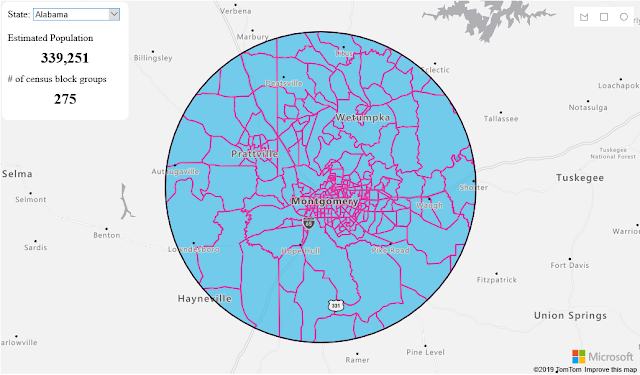
The Census group block analysis sample uses census block group data to estimate the population within an area drawn by the user. Not only does it take into consideration the population of each census block group, but also the amount of overlap they have with the drawn area as well.

Azure Maps, Azure Tutorial and Material, Azure Certification, Azure Learning, Azure Prep, Azure SDK, Azure Maps

Map showing aggregated population data for a drawn area.

The Get current weather at a location sample retrieves the current weather for anywhere the user clicks on the map and displays the details in a nicely formatted popup, complete with weather icon.

Azure Maps, Azure Tutorial and Material, Azure Certification, Azure Learning, Azure Prep, Azure SDK, Azure Maps

Map showing weather information for Paris.

Source: microsoft.com

Saturday, 11 April 2020

Introducing incremental enrichment in Azure Cognitive Search

Incremental enrichment is a new feature of Azure Cognitive Search that brings a declarative approach to indexing your data. When incremental enrichment is turned on, document enrichment is performed at the least cost, even as your skills continue to evolve. Indexers in Azure Cognitive Search add documents to your search index from a data source. Indexers track updates to the documents in your data sources and update the index with the new or updated documents from the data source.

Incremental enrichment is a new feature that extends change tracking from document changes in the data source to all aspects of the enrichment pipeline. With incremental enrichment, the indexer will drive your documents to eventual consistency with your data source, the current version of your skillset, and the indexer.

Indexers have a few key characteristics:

◉ Data source specific.

◉ State aware.

◉ Can be configured to drive eventual consistency between your data source and index.

In the past, editing your skillset by adding, deleting, or updating skills left you with a sub-optimal choice. Either rerun all the skills on the entire corpus, essentially a reset on your indexer, or tolerate version drift where documents in your index are enriched with different versions of your skillset.

With the latest update to the preview release of the API, the indexer state management is being expanded from only the data source and indexer field mappings to also include the skillset, output field mappings knowledge store, and projections.

Incremental enrichment vastly improves the efficiency of your enrichment pipeline. It eliminates the choice of accepting the potentially large cost of re-enriching the entire corpus of documents when a skill is added or updated, or dealing with the version drift where documents created/updated with different versions of the skillset and are very different in shape and/or quality of enrichments.

Indexers now track and respond to changes across your enrichment pipeline by determining which skills have changed and selectively execute only the updated skills and any downstream or dependent skills when invoked. By configuring incremental enrichment, you will be able to ensure that all documents in your index are always processed with the most current version of your enrichment pipeline, all while performing the least amount of work required. Incremental enrichment also gives you the granular controls to deal with scenarios where you want full control over determining how a change is handled.

Azure Cognitive Search, Azure Tutorial and Material, Azure Guides, Azure Certification, Azure Cert Exam, Azure Prep

Indexer cache


Incremental indexing is made possible with the addition of an indexer cache to the enrichment pipeline. The indexer caches the results from each skill for every document. When a data source needs to be re-indexed due to a skillset update (new or updated skill), each of the previously enriched documents is read from the cache and only the affected skills, changed and downstream of the changes are re-run. The updated results are written to the cache, the document is updated in the index and optionally, the knowledge store. Physically, the cache is a storage account. All indexes within a search service may share the same storage account for the indexer cache. Each indexer is assigned a unique cache id that is immutable.

Granular controls over indexing


Incremental enrichment provides a host of granular controls from ensuring the indexer is performing the highest priority task first to overriding the change detection.

◉ Change detection override: Incremental enrichment gives you granular control over all aspects of the enrichment pipeline. This allows you to deal with situations where a change might have unintended consequences. For example, editing a skillset and updating the URL for a custom skill will result in the indexer invalidating the cached results for that skill. If you are only moving the endpoint to a different virtual machine (VM) or redeploying your skill with a new access key, you really don’t want any existing documents reprocessed.

To ensure that that the indexer only performs enrichments you explicitly require, updates to the skillset can optionally set disableCacheReprocessingChangeDetection query string parameter to true. When set, this parameter will ensure that only updates to the skillset are committed and the change is not evaluated for effects on the existing corpus.

◉ Cache invalidation: The converse of that scenario is one where you may deploy a new version of a custom skill, nothing within the enrichment pipeline changes, but you need a specific skill invalidated and all affected documents re-processed to reflect the benefits of an updated model. In these instances, you can call the invalidate skills operation on the skillset. The reset skills API accepts a POST request with the list of skill outputs in the cache that should be invalidated.

Updates to existing APIs


Introducing incremental enrichment will result in an update to some existing APIs.

Indexers

Indexers will now expose a new property:

Cache

◉ StorageAccountConnectionString: The connection string to the storage account that will be used to cache the intermediate results.

◉ CacheId: The cacheId is the identifier of the container within the annotationCache storage account that is used as the cache for this indexer. This cache is unique to this indexer and if the indexer is deleted and recreated with the same name, the cacheid will be regenerated. The cacheId cannot be set, it is always generated by the service.

◉ EnableReprocessing: Set to true by default, when set to false, documents will continue to be written to the cache, but no existing documents will be reprocessed based on the cache data.

Indexers will also support a new querystring parameter:

ignoreResetRequirement set to true allows the commit to go through, without triggering a reset condition.

Skillsets

Skillsets will not support any new operations, but will support new querystring parameter:

disableCacheReprocessingChangeDetection set to true when you want no updates to on existing documents based on the current action.

Datasources

Datasources will not support any new operations, but will support new querystring parameter:

ignoreResetRequirement set to true allows the commit to go through without triggering a reset condition.

Best practices


The recommended approach to using incremental enrichment is to configure the cache property on a new indexer or reset an existing indexer and set the cache property. Use the ignoreResetRequirement sparingly as it could lead to unintended inconsistency in your data that will not be detected easily.

Takeaways


Incremental enrichment is a powerful feature that allows you to declaratively ensure that your data from the datasource is always consistent with the data in your search index or knowledge store. As your skills, skillsets, or enrichments evolve the enrichment pipeline will ensure the least possible work is performed to drive your documents to eventual consistency.

Friday, 10 April 2020

Microsoft MCSA 70-462 Certification: Shape Your Databases Career

70-462, microsoft 70-462, 70-462 exam, exam 70-462, microsoft exam 70-462, microsoft sql certification 70-462, 70-462 certification, 70-462 pdf, 70-462 exam questions, microsoft 70-462 exam, 70-462: sql server database administration (dba), mcsa sql server, mcsa sql server certification, mcsa sql, mcsa exam price, Administering Microsoft SQL Server 2012/2014 Databases, Microsoft MCSA 70-462, Microsoft, MCSA 70-462, Microsoft MCSA, Microsoft MCSA 70-462 Certification, MCSA 70-462 Certification, MCSA 70-462 exam, Microsoft MCSA 70-462 exam
The Microsoft 70-462 certification exam, also recognized as Administering Microsoft SQL Server 2012/2014 Databases, is intended for database professionals who carry out installation, configuration, and support tasks in Information Technology organizations. The 70-462 certification is categorized under the Microsoft Certified Solutions Associate (MCSA), and it is the foundation for many IT professionals who need to become database masters.

The credential aims to prepare the candidates to demonstrate significant expertise in developing and supporting SQL Server, such as Administering and Querying SQL Server 2012/2014 Databases. It also provides them to understand how to implement data warehouses. Professionals taking this 70-462 certification exam will usually have the capacity to set up database systems. They are also responsible for assuring that the database systems function effectively.

In addition to this, the candidates are in the care of backing up data and storing it efficiently regularly. They also guarantee that data is secure from illegal access.

Microsoft MCSA 70-462 Certification Exam in Detail

The 70-462 certification exam is made up of 45 to 55 questions. The number of questions changes from time to time, but generally, you should expect between 45 and 55 questions during the actual test.

The exam form is multiple choice questions and answers, and some times, Microsoft may include several scenario questions in the examination. You want to score a minimum of 700 out of 1000 to pass this Microsoft exam.

Please note that it does not assume that you have to get 70% of the questions accurately to pass the exam. This is because the percentage of each question changes from one test to the other. Therefore, the 700 scores may be less or more than the 70% benchmark. In case you get an answer wrong, be assured that no point will be deducted from your scores.

Also, you are not penalized for making wrong assumptions during the exam. The time-limit for the 70-462 examination is 120 minutes; no second more. You must read the instructions carefully before you start attempting the questions.
For instance, if a particular question needs that you select multiple right answers, you must choose exactly the number of correct answers requested in the question before you can earn the full points for that particular question. Another critical fact to note is that some questions do not add to your total scores. Microsoft sometimes input questions that are designed to compare data for improving the certification exam.

Preparing for Microsoft 70-462 Certification Exam

The Microsoft MCSA 70-462 examination is concentrated on the certification program, Administering Microsoft SQL Server 2012/2014 Databases. Preparing for the exam is majorly about learning new pieces of Microsoft SQL Server 2012/2014. To start your preparation, the first step is to check the exam objectives to understand the skills measured during the test.

In summary, the skills that will be covered during the certification exam are as follows:
  • Implementation of High Availability
  • Installation and Configuration
  • Keeping of Databases and Instances
  • Management of Data
  • Optimization and Troubleshooting
  • Implementation of Security

For all of the exam objectives, it is necessary to first check the topic module in Administering SQL Server 2012: Jump Start. You can obtain this through the Microsoft Virtual Academy. This is a free platform created by Microsoft, where applicants preparing for the Microsoft MCSA 70-462 certification exam can receive training resources in preparation for their tests. It is also essential that you get the Training Kit, which will help you in going through the certification course topics. From the training kit, you can enter the topics, practice questions, case scenarios, and review questions.

In the process of studying for the 70-462 test, you must take the exam questions in the training kit to aid you in knowing your knowledge level. Passing the exam needs proper preparation because the exam itself is a bit complex, except you are a Database Administrator.

Primary Roles of Professionals Taking Microsoft 70-462 Certification Exam

According to Microsoft, individuals that need to take the 70-462 examination must have hands-on experience on the central topics covered in the certification course.

Professionals who are interested in assembling for this Microsoft test must have the following responsibilities in their popular place of work:
  • Configuring SQL Server services and instances
  • Auditing SQL Server
  • Installing SQL Server
  • Implementing migration strategy, column store indexes, and included database
  • Backing up database systems
  • Configuring extra SQL Server modules
  • Deploying Disaster Recovery Solutions and High Availability
  • Importing& Exporting Data
  • Maintaining, database, and indexes
  • Using SQL Server and associated services
  • Maintaining database permission, snapshots, data partitions, logins, and server roles
  • Managing SQL Server Agent jobs, Agent Alerts, Agent Operators, and Instances
  • Managing database and users use
  • Optimizing queries, plan installation, troubleshoot security and restore the database
  • Creating, designing, and maintaining log files

Microsoft MCSA 70-462 Certification: Benefits

First of all, the Microsoft 70-462 certification is associated with the MCSA: SQL Server 2012/2014 credential. Those IT professionals who practice and pass this test and complete the certification program receive professional recognition from working anywhere in the world with Microsoft SQL Server 2012/2014.

Secondly, passing the Microsoft 70-462 test shows that you maintain the required skills. The information that you need involves working with data, creating database objects, changing data, troubleshooting, as well as optimizing queries. Since these skills are always in high demand, showing that you have them will help you quickly get a job.
Microsoft 70-462 Certification: Launch Your Career as Database Experts
After becoming a certified, which occurs after passing the Microsoft 70-462 exam, along with the other two tests, you will become more believable. This will probably increase your IT career. Because you will not only be prepared to show your individual and advanced skills in the workplace but also qualify to proceed with the MCSE: Data Management and Analytics credential, which is an expert-level one.

You should have no worries preparing for the Microsoft 70-462 exam and passing it. Just visit AnalyticsExam.com, and you will get everything you need for this. Many updated practice tests have been uploaded to the site by real testers to help you prepare for 70-462.

Conclusion

The Microsoft MCSA 70-462 certification exam covers a broad scope. It is, therefore, vital that you review the course topics extensively. Although it needs a lot of investment to prepare and pass the exam, the potential of the certification is enormous.

It can be a defining part of your next career level. So, when preparing for the examination, concentrate on the result, and you will be motivated to study harder. Explore the different resources available at your disposal and guarantee you consider them much.

As much as you study, do not neglect to take the practice exam. It will help you in assessing your knowledge level on each of the topics so that you know where to concentrate your study. Take the 70-462 practice exam as many times as potential and be sure you achieve 100% efficiency in the test before your schedule your examination.

Thursday, 9 April 2020

Detect large-scale cryptocurrency mining attack against Kubernetes clusters

Azure Tutorial and Materials, Azure Certification, Azure Guides, Azure Learning

Azure Security Center's threat protection enables you to detect and prevent threats across a wide variety of services from Infrastructure as a Service (IaaS) layer to Platform as a Service (PaaS) resources in Azure, such as IoT, App Service, and on-premises virtual machines.

At Ignite 2019 we announced new threat protection capabilities to counter sophisticated threats on cloud platforms, including preview for threat protection for Azure Kubernetes Service (AKS) Support in Security Center and preview for vulnerability assessment for Azure Container Registry (ACR) images.

Azure Security Center and Kubernetes clusters 


In this blog, we will describe a recent large-scale cryptocurrency mining attack against Kubernetes clusters that was recently discovered by Azure Security Center. This is one of the many examples Azure Security Center can help you protect your Kubernetes clusters from threats.

Crypto mining attacks in containerized environments aren’t new. In Azure Security Center, we regularly detect a wide range of mining activities that run inside containers. Usually, those activities are running inside vulnerable containers, such as web applications, with known vulnerabilities that are exploited.

Recently, Azure Security Center detected a new crypto mining campaign that targets specifically Kubernetes environments. What differs this attack from other crypto mining attacks is its scale: within only two hours a malicious container was deployed on tens of Kubernetes clusters.

The containers ran an image from a public repository: kannix/monero-miner. This image runs XMRig, a very popular open source Monero miner.

The telemetries showed that container was deployed by a Kubernetes Deployment named kube-control.

As can be shown in the Deployment configuration below, the Deployment, in this case, ensures that 10 replicas of the pod would run on each cluster:

Azure Tutorial and Materials, Azure Certification, Azure Guides, Azure Learning

In addition, the same actor that deployed the crypto mining containers also enumerated the cluster resources including Kubernetes secrets. This might lead to exposure of connection strings, passwords, and other secrets which might enable lateral movement.

The interesting part is that the identity in this activity is system:serviceaccount:kube-system:kubernetes-dashboard which is the dashboard’s service account.

This fact indicates that the malicious container was deployed by the Kubernetes dashboard. The resources enumeration was also initiated by the dashboard’s service account.

There are three options for how an attacker can take advantage of the Kubernetes dashboard:

1. Exposed dashboard: The cluster owner exposed the dashboard to the internet, and the attacker found it by scanning.

2. The attacker gained access to a single container in the cluster and used the internal networking of the cluster for accessing the dashboard (which is possible by the default behavior of Kubernetes).

3. Legitimate browsing to the dashboard using cloud or cluster credentials.

The question is which one of the three options above was involved in this attack? To answer this question, we can use a hint that Azure Security Center gives, security alerts on the exposure of the Kubernetes dashboard. Azure Security Center alerts when the Kubernetes dashboard is exposed to the Internet. The fact that this security alert was triggered on some of the attacked clusters implies that the access vector here is an exposed dashboard to the Internet.

Azure Tutorial and Materials, Azure Certification, Azure Guides, Azure Learning

Avoiding cryptocurrency mining attacks

How could this be avoided?

1. Do not expose the Kubernetes dashboard to the Internet: Exposing the dashboard to the Internet means exposing a management interface.

2. Apply RBAC in the cluster: When RBAC is enabled, the dashboard’s service account has by default very limited permissions which won’t allow any functionality, including deploying new containers.

3. Grant only necessary permissions to the service accounts: If the dashboard is used, make sure to apply only necessary permissions to the dashboard’s service account. For example, if the dashboard is used for monitoring only, grant only “get” permissions to the service account.

4. Allow only trusted images: Enforce deployment of only trusted containers, from trusted registries.

Source: azure.microsoft.com

Tuesday, 7 April 2020

Accelerating innovation: Start with Azure Sphere to secure IoT solutions

From agriculture to healthcare, IoT unlocks opportunity across every industry, delivering profound returns, such as increased productivity and efficiency, reduced costs, and even new business models. And with a projected 41.6 billion IoT connected devices by 2025, momentum continues to build.

While IoT creates new opportunities, it also brings new cybersecurity challenges that could potentially result in stolen IP, loss of brand trust, downtime, and privacy breaches. In fact, 97 percent of enterprises rightfully call out security as a key concern when adopting IoT. But when organizations have a reliable foundation of security on which they can build from the start, they can realize durable innovation for their business versus having to figure out what IoT device security requires and how to achieve it.

Read on to learn how you can use Azure Sphere—now generally available—to create and accelerate secure IoT solutions for both new devices and existing equipment. As you look to transform your business, discover why IoT security is so important to build in from the start and see how the integration of Azure Sphere has enabled other companies to focus on innovation.

Microsoft Online Exam, Azure Cert Exam, Azure Tutorial and Material

Defense in depth, silicon-to-cloud security


It’s important to understand on a high level how Azure Sphere delivers quick and cost-effective device security. Azure Sphere is designed around the seven properties of highly secure devices and builds on decades of Microsoft experience in delivering secure solutions. End-to-end security is baked into the core, spanning the hardware, operating system, and cloud, with ongoing service updates to keep everything current.

While other IoT device platforms must rely on costly manual practices to mitigate missing security properties and protect devices from evolving cybersecurity threats, Azure Sphere delivers defense-in-depth to guard against and respond to threats. Add in ongoing security and OS updates to help ensure security over time, and you have the tools you need to stay on top of the shifting digital landscape.

Propel innovation on a secure foundation


Azure Sphere removes the complexity of securing IoT devices and provides a secure foundation to build on. This means that IoT adopters spend less time and money focused on security and more time innovating solutions that solve key business problems, delivering a greater return on investment as well as faster time to market.

Connected coffee with Azure Sphere 

A great example is Starbucks, who partnered with Microsoft to connect its fleet of coffee machines using the guardian module with Azure Sphere. The guardian module helps businesses quickly securely connect existing equipment without any redesign, saving both time and money.

With IoT-enabled coffee machines, Starbucks collects more than a dozen data points such as type of beans, temperature, and water quality for every shot of espresso. They are also able to perform proactive maintenance on the machines to avoid costly breakdowns and service calls. Finally, they are using the solution to transmit new recipes directly to the machines, eliminating manual processes and reducing costs.

Azure Sphere innovation within Microsoft

Here at Microsoft, Azure Sphere is also being used by the cloud operations team in their own datacenters. With the aim of providing safe, fast and reliable cloud infrastructure to everyone, everywhere, it was an engineer’s discovery of Azure Sphere that started to make their goal of connecting the critical environment systems—the walls, the roof, the electrical system, and mechanical systems that house the datacenters—a reality.

Using the guardian module with Azure Sphere, they were able to move to a predictive maintenance model and better prevent issues from impacting servers and customers. Ultimately it is allowing them to deliver better outcomes for customers and utilize the datacenter more efficiently. And even better, Azure Sphere is giving them the freedom to innovate, create and explore—all on a secure, cost-effective platform.

Partner collaborations broaden opportunities


Throughout it all, enabling this innovation, is our global ecosystem of Microsoft partners that enable us to advance capabilities and bring Azure Sphere to a broad range of customers and applications.

Together, we can provide a more extensive range of options for businesses—from the single chip Wi-Fi solution from MediaTek that meets more traditional needs to other upcoming solutions from NXP and Qualcomm. NXP will provide an Azure Sphere certified chip that is optimized for performance power, and Qualcomm will offer the first cellular-native Azure Sphere chip.

Saturday, 4 April 2020

Microsoft powers transformation at NVIDIA’s GTC Digital Conference

The world of supercomputing is evolving. Work once limited to high-performance computing (HPC) on-premises clusters and traditional HPC scenarios, is now being performed at the edge, on-premises, in the cloud, and everywhere in between. Whether it’s a manufacturer running advanced simulations, an energy company optimizing drilling through real-time well monitoring, an architecture firm providing professional virtual graphics workstations to employees who need to work remotely, or a financial services company using AI to navigate market risk, Microsoft’s collaboration with NVIDIA makes access to NVIDIA graphics processing units (GPU) platforms easier than ever.

Microsoft Study Materials, Microsoft Online Exam, Microsoft Learning, Microsoft Tutorial and Material

These modern needs require advanced solutions that were traditionally limited to a few organizations because they were hard to scale and took a long time to deliver. Today, Microsoft Azure delivers HPC capabilities, a comprehensive AI platform, and the Azure Stack family of hybrid and edge offerings that directly address these challenges.

This year during GTC Digital, we’re spotlighting some of the most transformational applications powered by NVIDIA GPU acceleration that highlight our commitment to edge, on-prem, and cloud computing. Registration is free, so sign up to learn how Microsoft is powering transformation.

Visualization and GPU workstations


Azure enables a wide range of visualization workloads, which are critical for desktop virtualization as well as professional graphics such as computer-aided design, content creation, and interactive rendering. Visualization workloads on Azure are powered by NVIDIA’s world-class GPUs and Quadro technology, the world’s preeminent visual computing platform. With access to graphics workstations on Azure cloud, artists, designers, and technical professionals can work remotely, from anywhere, and from any connected device.

Artificial intelligence


We’re sharing the release of the updated execution provider in ONNX Runtime with integration for NVIDIA TensorRT 7. With this update, ONNX Runtime can execute open Open Neural Network Exchange (ONNX) models on NVIDIA GPUs on Azure cloud and at the edge using the Azure Stack Edge, taking advantage of the new features in TensorRT 7 like dynamic shape, mixed precision optimizations, and INT8 execution.

Dynamic shape support enables users to run variable batch size, which is used by ONNX Runtime to process recurrent neural network (RNN) and Bidirectional Encoder Representations from Transformers (BERT) models. Mixed precision and INT8 execution are used to speed up execution on the GPU, which enables ONNX Runtime to better balance the performance across CPU and GPU. Originally released in March 2019, TensorRT with ONNX Runtime delivers better inferencing performance on the same hardware when compared to generic GPU acceleration.

Additionally, the Azure Machine Learning service now supports RAPIDS, a high-performance GPU execution accelerator for data science framework using the NVIDIA CUDA platform. Azure developers can use RAPIDS in the same way they currently use other machine learning frameworks, and in conjunction with Pandas, Scikit-learn, PyTorch, and TensorFlow. These two developments represent major milestones towards a truly open and interoperable ecosystem for AI. We’re working to ensure these platform additions will simplify and enrich those developer experiences.

Edge


Microsoft provides various solutions in the Intelligent Edge portfolio to empower customers to make sure that machine learning not only happens in the cloud but also at the edge. The solutions include Azure Stack Hub, Azure Stack Edge, and IoT Edge.

Whether you are capturing sensor data and inferencing at the Edge or performing end-to-end processing with model training in Azure and leveraging the trained models at the edge for enhanced inferencing operations Microsoft can support your needs however and wherever you need to.

Supercomputing scale


Time-to-decision is incredibly important with a global economy that is constantly on the move. With the accelerated pace of change, companies are looking for new ways to gather vast amounts of data, train models, and perform real-time inferencing in the cloud and at the edge. The Azure HPC portfolio consists of purpose-built computing, networking, storage, and application services to help you seamlessly connect your data and processing needs with infrastructure options optimized for various workload characteristics.

Azure Stack Hub announced preview


Microsoft, in collaboration with NVIDIA, is announcing that Azure Stack Hub with Azure NC-Series Virtual Machine (VM) support is now in preview. Azure NC-Series VMs are GPU-enabled Azure Virtual Machines available on the edge. GPU support in Azure Stack Hub unlocks a variety of new solution opportunities. With our Azure Stack Hub hardware partners, customers can choose the appropriate GPU for their workloads to enable Artificial Intelligence, training, inference, and visualization scenarios.

Azure Stack Hub brings together the full capabilities of the cloud to effectively deploy and manage workloads that otherwise are not possible to bring into a single solution. We are offering two NVIDIA enabled GPU models during the preview period. They are available in both NVIDIA V100 Tensor Core and NVIDIA T4 Tensor Core GPUs. These physical GPUs align with the following Azure N-Series VM types as follows:

◉ NCv3 (NVIDIA V100 Tensor Core GPU): These enable learning, inference and visualization scenarios.

◉ TBD (NVIDIA T4 Tensor Core GPU): This new VM size (available only on Azure Stack Hub) enables light learning, inference, and visualization scenarios.

Hewlett Packard Enterprise is supporting the Microsoft GPU preview program as part of its HPE ProLiant for Microsoft Azure Stack Hub solution.“The HPE ProLiant for Microsoft Azure Stack Hub solution with the HPE ProLiant DL380 server nodes are GPU-enabled to support the maximum CPU, RAM, and all-flash storage configurations for GPU workloads,” said Mark Evans, WW product manager, HPE ProLiant for Microsoft Azure Stack Hub, at HPE. “We look forward to this collaboration that will help customers explore new workload options enabled by GPU capabilities.”

As the leading cloud infrastructure provider1, Dell Technologies helps organizations remove cloud complexity and extend a consistent operating model across clouds. Working closely with Microsoft, the Dell EMC Integrated System for Azure Stack Hub will support additional GPU configurations, which include NVIDIA V100 Tensor Core GPUs, in a 2U form factor. This will provide customers increased performance density and workload flexibility for the growing predictive analytics and AI/ML markets. These new configurations also come with automated lifecycle management capabilities and exceptional support.

Microsoft Study Materials, Microsoft Tutorial and Material, Microsoft Online Exam, Microsoft Cert Exam

Azure Stack Edge preview


We also announced the expansion of our Microsoft Azure Stack Edge preview with the NVIDIA T4 Tensor Core GPU. Azure Stack Edge is a cloud managed appliance that provides processing for fast local analysis and insights to the data. With the addition of an NVIDIA GPU, you’re able to build in the cloud then run at the edge. 

Thursday, 2 April 2020

Announcing general availability of incremental snapshots of Managed Disks

We're announcing the general availability of incremental snapshots of Azure Managed Disks. Incremental snapshots are a cost-effective, point-in-time backup of managed disks. Unlike current snapshots, which are billed for the full size, incremental snapshots are billed for the delta changes to disks since the last snapshot and are always stored on the most cost-effective storage, Standard HDD storage irrespective of the storage type of the parent disks. For additional reliability, incremental snapshots are stored on Zone Redundant Storage (ZRS) by default in regions that support ZRS.

Incremental snapshots provide differential capability, enabling customers and independent solution vendors (ISVs) to build backup and disaster recovery solutions for Managed Disks. It allows you to get the changes between two snapshots of the same disk, thus copying only changed data between two snapshots across regions, reducing time and cost for backup and disaster recovery. Incremental snapshots are accessible instantaneously; you can read the underlying data of incremental snapshots or restore disks from them as soon as they are created. Azure Managed Disk inherit all the compelling capabilities of current snapshots and have a lifetime independent from their parent managed disks and independent of each other.

Examples of incremental snapshots


Let’s look at a few examples to understand how the incremental snapshots help you reduce cost.

If you were using a disk with 100 GiB already occupied and added 20 GiB of data to the disk, you took the first incremental snapshot before 20 GiB of data was added to the disk, making the first copy occupy 100 GiB of data. Then 20 GiB of data was added on the disk before you created the second incremental snapshot. Now with incremental snapshots, the second snapshot occupies only 20 GiB and you’re billed for only 20 GiB compared to the current full snapshots that would have occupied 120 GiB and billed for 120 GiB of data, reducing your cost.

The second incremental snapshot references 100 GiB of data from the first snapshot. When you restore the disk from the second incremental snapshot, the system can restore 120 GiB of data by copying 100 GiB of data from the first snapshot and 20 GiB of data from the second snapshot.

Azure Study Material, Azure Learning, Azure Certifications, Azure Tutorial and Materials, Azure Cert Exam

Let's now understand what happens when 5 GiB of data was modified on the disk before you took the third incremental snapshot. The third snapshot then occupies only 5 GiB of data, references 95 GiB of data from the first snapshot, and references 20 GiB of data from the second snapshot.

Now, if you deleted the first incremental snapshot the second and the third snapshots continue to function normally as incremental snapshots are independent of each other. The system merges the data occupied by the first snapshot with the second snapshot under the hood to ensure that the second and the third snapshots are not impacted due to the deletion of the first snapshot. The second snapshot now occupies 120 GiB of data.

Azure Study Material, Azure Learning, Azure Certifications, Azure Tutorial and Materials, Azure Cert Exam

Since we launched the preview for incremental snapshot in September 2019, our ISVs have used this capability on a wide range of workloads to reduce the cost and time for backup and disaster recovery.

Availability and pricing


You can now create incremental snapshots in all regions, including sovereign regions.

Incremental snapshots are charged per GiB of the storage occupied by the delta changes since the last snapshot. For example, if you're using a managed disk with a provisioned size of 128 GiB, with 100 GiB used, the first incremental snapshot is billed only for the used size of 100 GiB. 20 GiB of data is added on the disk before you create the second snapshot. Now, the second incremental snapshot is billed for only 20 GiB.

Incremental snapshots are always stored on standard storage irrespective of the storage type of parent managed disks and charged as per the pricing of standard storage. For example, incremental snapshots of a Premium SSD Managed Disk are stored on standard storage. They are stored on ZRS by default in regions that support ZRS. Otherwise, they are stored on locally redundant storage (LRS). The per GB pricing of both the LRS and ZRS options is the same.

Incremental snapshots cannot be stored on premium storage. If you are using current snapshots on premium storage to scale up virtual machine deployments, we recommend you use custom images on standard storage in Shared Image Gallery.

Source: microsoft.com