Wednesday, 13 December 2017

Announcing Azure Database for PostgreSQL Preview

PostgreSQL is one of the fastest growing open source relational database engines that is being widely embraced by developers. The Azure cloud is a first-class platform for open source technologies that allow you to bring the tools you love and skills you already have, and deploy any applications. Given Microsoft’s love for open source and the goal to provide developers with choices, I am happy to share with you that earlier today, at the Microsoft Build 2017 conference in Seattle, Scott Guthrie announced the preview for managed database service for PostgreSQL, Azure Database for PostgreSQL.

Azure Database, Microsoft Guides, Microsoft Certifications

The service uses the community edition of PostgreSQL and provides app developers with expanded choices to use their favorite database on Azure, without the complexity of managing and administering the databases. In this blog, I will give you a deeper overview of Azure Database for PostgreSQL service and discuss what this announcement means to app developers and the thinking that went behind delivering value that we believe is unique in the industry.

What is Azure Database for PostgreSQL?


Azure Database for PostgreSQL is a managed database service that makes it easier to build apps without the management and administration burden. The service uses community edition of PostgreSQL and seamlessly works with native tools, drivers and libraries. At the start of preview, we are offering support for PostgreSQL versions 9.5 and 9.6.

Many managed database service offerings out there from different cloud providers promise to reduce database management complexity, but each one follows a different approach which forces customers to make several tradeoffs. We believe our approach to managed database services and particularly Azure Database for PostgreSQL is unique in the industry and one that addresses the core pain points of an app developer and much more. I will be elaborating more on this below – keep reading!

PostgreSQL database for App developers


Most app developers love doing what they do – i.e., build great apps rapidly that become popular and widely adopted. One of the complex components of any app development process is planning for database infrastructure and then the ongoing care and feeding of the database. PostgreSQL, over the years has grown to become a popular open source relational database amongst developers, thanks to it being highly robust, customizable and extendable along with rich database features and technologies. However, while app developers love the features PostgreSQL has to offer, many do not enjoy the complexity of managing the infrastructure. A key benefit of managed database service is that the developer does not need to worry about managing the operating system and database patching, perform manual database backups, orchestrate recovery, etc. Most managed services provide these basic capabilities freeing developers from spending their vital resources on those tasks.

When we looked at offering managed PostgreSQL service for developers, we of course wanted to address those basic managed service capabilities such as automated patching, backup and restore capability, monitoring, alerting, logging, etc. However, talking to customers we learnt that there is a unique opportunity for Microsoft to do something more and better than other cloud providers, specifically in areas such as reliability, security and elasticity and making it simple and worry free for developers. We have therefore in many ways redefined the value creation with managed database service.

Benefits of Azure Database for PostgreSQL


As I dig deeper into explaining the benefits of the managed PostgreSQL service, I would like to highlight that our primary focus for the service was attention to fundamentals, such as availability, elasticity and security besides making sure that native tools, extensions, drivers and libraries work seamlessly. This is exactly what we have done in this installment of the Azure Database for PostgreSQL. Let me elaborate further on each of these topics.

Built-in high availability


Azure Database for PostgreSQL offers built-in high availability feature out-of-the-box. You got it right – no additional setup, configuration or extra costs! This means as a developer you do not have to setup additional VMs and configure replication to ensure high availability for your PostgreSQL database. While in preview, the service is not backed up with a specific SLA. However, at general availability, all databases will have an SLA of 99.99%.

Security bolted-in


The service has security baked in. What does this mean? All data including backups are encrypted on disk by default. No additional switch or planning required to secure your database! Furthermore, the service has SSL enabled by default which makes all data in-transit encrypted. Optionally, if your client application does not support SSL connectivity, we created an option to disable it as well. We are committed to working broadly across the open source communities to ensure these security gaps are addressed over time.

Scale on the fly


Elasticity is one of the foundational attribute of the cloud. It is hard for any developer to figure out how much compute and storage is required at the time of deploying your app, since who can predict how popular the app will become and pre-plan for peaks and valleys? While most cloud service providers allow you to scale the instance sizes, you are out of luck in terms of impacting availability of your app unless you have another VM with replication for which you have to pay for additional replicas. Further it also means additional monitoring, setting alerts and ensuring that the secondary replica is consistent with the primary. The Azure Database for PostgreSQL allows you to scale compute on the fly without application downtime in one step. The following is a simple Azure CLI command that you will use to scale PostgreSQL database servers up or down.

Azure Database, Microsoft Guides, Microsoft Certifications

Automated backups and point-in-time restore


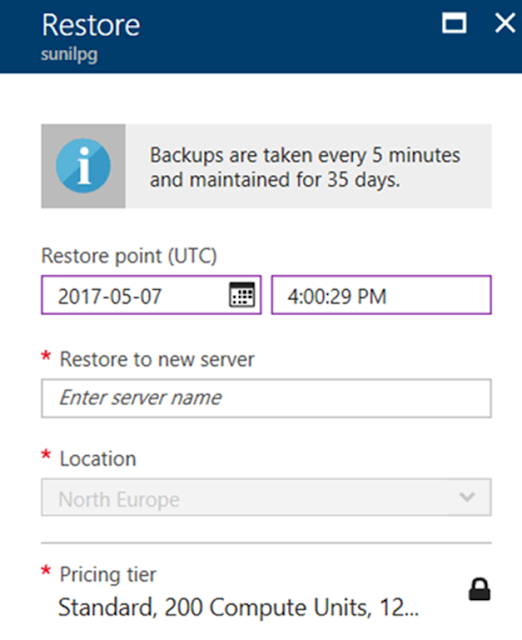
Most managed database services provide automated backup with ability to point-in-time restore, in case for oops recovery. The differentiating factor for our service is that the user does not need to separately manage storage for backups. The service provides up to 35 days of retention for automated backups to be able to recover. This means, developers are now free from having to monitor, manage capacity and configure alerts on backup storage capacity. You will never have to worry about managing backups ever again! These backups are geo-redundantly backed up as well.

Azure Database, Microsoft Guides, Microsoft Certifications

Monitoring, alerting and server logs


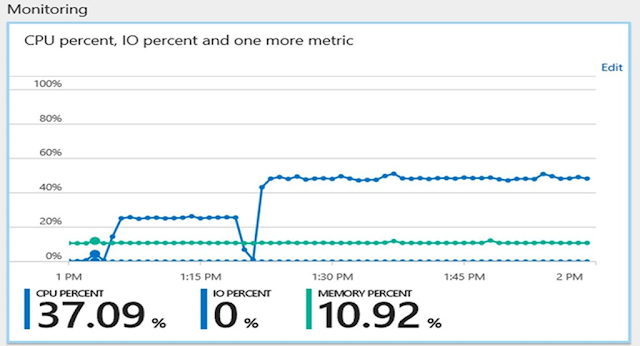
The service provides monitoring on metrics via integration with Azure Monitor service for up to 30 days, define alerting on those metrics, and configure server log retention period up to 7 days. In addition, users have the option to customize log verbosity parameter so you can debug easily when developing and then tune it appropriately for production use. Further these metrics are integrated with many 3rd party tools. You get all of this for no additional costs!

Azure Database, Microsoft Guides, Microsoft Certifications

Configurability and Extensibility


Azure Database for PostgreSQL allows you to configure database server parameters. This provides the flexibility to customize based on your application requirements. The service, at preview currently supports over 18 popular PostgreSQL extensions (including PostGIS) with a roadmap to enable more based on user feedback.

Integrated


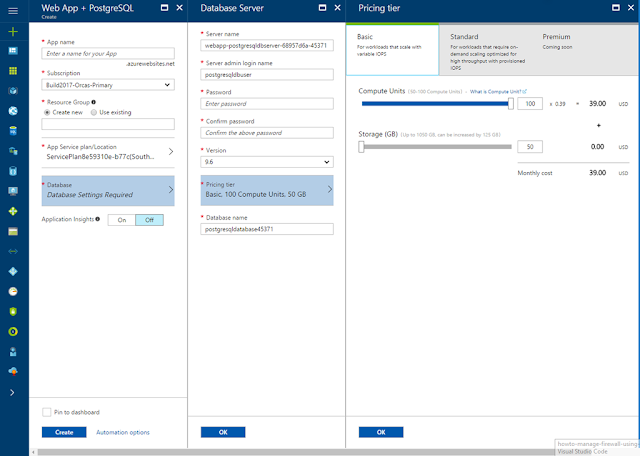
Azure Database for PostgreSQL is tightly integrated with Azure Web Apps. We have enabled an integrated experience to deploy Azure Web App with managed PostgreSQL making app development simple and easy!

Azure Database, Microsoft Guides, Microsoft Certifications

All-inclusive pricing


The above summarizes the major areas where we focused the most to provide unique managed service value with PostgreSQL. Further we made database patching automatic, which means developers do not have to worry about managing this. We also made sure the business model and pricing is as simple as it can get. All the value I mentioned above is included in one inclusive price, which means no surprises on your bill! You choose a starting performance tier based on compute and storage requirements and then flexibly scale compute and storage independently.

Seamless migration with customer evidence


Azure Database for PostgreSQL also allows seamless migration from on-premise or any cloud service to managed PostgreSQL service on Azure. Developers can accomplish this using native tools such as pg_dump and pg_restore. Further, whether you want to develop using Python, node.js, Java, PHP or any programming language of your choice, use your favorite open source frameworks such as Djnago, Flask, etc., the service will work seamlessly.

Saturday, 9 December 2017

Performance best practices for using Azure Database for PostgreSQL

Microsoft announced of Azure Database services for PostgreSQL and MySQL at Build 2017 which is a simple, fully managed database service for PostgreSQL and MySQL that removes the complexities around infrastructure management, data availability, protection, and scale. The service has seen tremendous growth and we have had customers reaching out to us regarding best practices for achieving optimal query performance on the service. This post outlines an approach for troubleshooting performance while using Azure Database for PostgreSQL as the backend database.

Based on the usage patterns, we see two common deployment patterns:

◉ An application server exposing a web endpoint on an application server, which connects to the database.
◉ A client-server architecture where the client directly connects to the database.

Azure Database, Azure Tutorials and Material, Azure Certifications

The performance issues for an application or service using Azure Database for PostgreSQL service can be classified broadly into the following categories. Pleas refer numbers in the bulleted section below for more details.

1. Resource contention (CPU, Memory, and Disk) on the client – The machine/server serving as the client could be having a resource constraint which can be identified in the task manager, the Azure portal, or CLI if the client machine is running on Azure.

Azure Database, Azure Tutorials and Material, Azure Certifications

2. Resource contention (CPU, Memory, and Disk) – The machine/server acting as the application server could cause a resource constraint, which can be identified in the task manager, the Azure portal, or CLI if the application server/service VM is running on Azure. If the application server is an Azure service or virtual machine, then Azure metrics can help with determining the resource contention.

3. Resource contention on Azure Database for PostgreSQL – The database service could be experiencing performance bottlenecks related to CPU, memory, and storage which can be determined from the Azure Metrics for the database service instance. Please see below for more details

Azure Database, Azure Tutorials and Material, Azure Certifications

4. Network latency – One of the common issues we encounter while troubleshooting performance is the network latency between the client and the database service instance. A quick check before starting any performance benchmarking run is to determine the network latency between the client and database using a simple SELECT 1 query. We have seen customers report improved throughput when the SELECT 1 timing for a query is <2ms when using a remote client hosted on Azure in the same region and resource group as the Azure Database for PostgreSQL server.

Commands to get SELECT 1 timing using psql:

\timing
SELECT;
\watch 1

We have observed that customers are able to significantly increase the application throughput by creating the application server and database service in the same region, resource group, and using accelerated networking for the application server/client machine, where applicable. Accelerated networking enables single root I/O virtualization (SR-IOV) to a VM, greatly improving its networking performance. This high-performance path bypasses the host from the datapath reducing latency, jitter, and CPU utilization for use with the most demanding network workloads on supported VM types.

Database performance


Once you have eliminated resource contention as a possible root cause, you will need to determine the queries on the database server which are contributing to the highest duration. This can be done using pg_stat_statements module. Since we maintain parity with community PostgreSQL, any native queries that you used to troubleshoot query performance on PostgreSQL will apply on our service as well.

You will be able to execute the below query on an Azure Database for PostgreSQL server to get the top 5 duration queries executed during your performance/benchmarking run:

SELECT query, calls, total_time, rows, 100.0 * shared_blks_hit/           
nullif(shared_blks_hit + shared_blks_read, 0) AS hit_percent
FROM pg_stat_statements
ORDER BY total_time
DESC LIMIT 5

It is recommended to reset the pg_stat_statements using the query below to ensure that you only capture the statements from your performance/benchmarking run:

SELECT pg_stat_statements_reset()

Quick tips


If CPU usage for an Azure Database for PostgreSQL server is saturated at 100%, then select the next higher level of Compute Units to get more CPU. For example, if the CPU usage is hovering around 100% continuously during business hours for a Standard 100, then it might be worthwhile to consider Standard 200.

A common issue that we notice is the use of the default included storage size for the database, which is 125GB. The default storage size of 125GB is limited to 375 IOPs. If your application requires higher IOPs, then it is recommended that you create an Azure Database for PostgreSQL server with a higher storage size to get more IOPs so that your application performance is not impacted by storage throttling.

If IO waits are observed from MySQL/PostgreSQL performance troubleshooting, then increasing the storage size should be considered for higher IO throughput. For example, if you observe WALWriteLock as the wait event type for maximum requests using pg_stat_activity, then it would be beneficial to use a server with a higher storage size as storage performance scales with the allocated storage size.

Query to determine the number of waits on WALWriteLock which signifies an IO bottleneck associated with Write Ahead Log writes:

select wait_event, wait_event_type, count(*) as counts
from pg_stat_activity
group by wait_event, wait_event_type;

We recommend having the application server/client machine in the same region and resource group in Azure to reduce between the client/application server and the database.

If you are using pgbench for testing performance, then it is advisable to use a scale factor which is higher than at least the number of connections to ensure that your performance benchmarking is not bottlenecked on update contention. For example, if you are using 100 connections to run pgbench3, then you should at least use a scale factor of 100 or higher.

If there is a resource contention associated with memory or CPU usage on the virtual machine acting as the application server, and all possible optimizations on the application has been implemented, it is recommended to increase the virtual machine size to increase the compute and memory available on the virtual machine.

If there are IO related bottlenecks observed on the virtual machine acting as the application server, it is recommended to increase the disk size hosting the application files and possibly evaluating the use of Premium Managed Disks.

Thursday, 7 December 2017

Announcing the new Azure Marketplace experience

Azure Marketplace provides a rich catalog of thousands of products and solutions from independent software vendors (ISVs) that have been certified and optimized to run on Azure. While customers love the breadth of our offerings, which range from open source to enterprise applications, one piece of feedback we’ve heard consistently was that navigating through such a huge catalog is difficult. Today, we are excited to announce a new interactive experience for the Azure Marketplace that makes it easy to navigate the product catalog and find the right solution for your cloud application without having to login to the Azure portal.

Launch the new Azure Marketplace. Let’s go over a couple of scenarios.

Find and deploy your favorite product


Let’s say you are looking for a specific product. For example, you may be a blogger who wants a WordPress environment. You can start typing “WordPress” in the top search button and pick the WordPress option that best suits you from the list.

Microsoft Tutorials and Materials, Microsoft Guides, Microsoft Azure, Big Data, Security

Click on “Get It Now” which will prompt you to login to the Azure portal. Follow the instructions, and you can have your WordPress environment up and running in a few minutes.

Discover and deploy a new product


Let’s say you are looking for a solution, but you aren’t sure which product best fits your needs.  For example, you need a storage appliance for your cloud application, but you want to look at the available options and learn about the products before deciding.

Discover new products - The categories in Azure Marketplace are a good place to start. You can click on the Storage category (notice that categories are consistent with the Azure portal) to see the top recommended products or filter to a subcategory such as Backup and Recovery.

Microsoft Tutorials and Materials, Microsoft Guides, Microsoft Azure, Big Data, Security

But in this case, you are looking for appliances, and it isn’t a subcategory. Don’t worry; you can type Appliances in the search area to filter for appliances within the storage offerings. The search result shows you the brief description and the starting price for each available appliance. 

Microsoft Tutorials and Materials, Microsoft Guides, Microsoft Azure, Big Data, Security

Deep dive to learn more – So, now you know the storage appliances available in Marketplace, but you need more information on the products to make your decision. The new product pages make it easier and more convenient to deep dive into a product. Let’s look at the NetApp and SoftNAS product pages. Click on the product tiles to open the product pages. You will see two sections. The Overview section contains the detailed technical documentation, product features, screenshots, etc.

Microsoft Tutorials and Materials, Microsoft Guides, Microsoft Azure, Big Data, Security

Microsoft Tutorials and Materials, Microsoft Guides, Microsoft Azure, Big Data, Security

The Plans + Pricing contains the different SKU’s, pricing options, and publisher recommendations.

Microsoft Tutorials and Materials, Microsoft Guides, Microsoft Azure, Big Data, Security

Microsoft Tutorials and Materials, Microsoft Guides, Microsoft Azure, Big Data, Security

You will notice that while the pages have product-specific information, the fields that are important for your decision making are prominent and consistent across product pages. These fields include:

◉ Select a software plan -Shows the available pricing plans. Also, the Download table as CSV option enables you to export the pricing plan.
◉ Publisher recommendations – Tells you the recommended VM’s to use to deploy a product based on the region.

Test drive the products - Now that you have gone through the potential candidates, wouldn’t it be great to try out some of these appliances before making your final decision? Azure Marketplace Test Drives let you do just that. Test Drives are ready to go environments that allow you to experience a product for free without even needing an Azure subscription. You can access a Test Drive from the product page itself or by clicking on Test Drives on the left navigation pane. Both SoftNAS and NetApp products offer Test Drives – so go ahead test drive them to get a hands-on experience before deciding.

Microsoft Tutorials and Materials, Microsoft Guides, Microsoft Azure, Big Data, Security

The new marketplace experience makes it seamless to find and deploy your favorite product. We hope that the consistent and easy-to-use navigation structure along with the hands-on experience of Test Drives will make finding and learning about new products a fun experience.

Wednesday, 6 December 2017

ADL Tools for Visual Studio Code (VSCode) supports Python & R Programming

We are thrilled to introduce support for Azure Data Lake (ADL) Python and R extensions within Visual Studio Code (VSCode). This means you can easily add Python or R scripts as custom code extensions in U-SQL scripts, and submit such scripts directly to ADL with one click. For data scientists who value the productivity of Python and R, ADL Tools for VSCode offers a fast and powerful code editing solution. VSCode makes it simple to get started and provides easy integration with U-SQL for data extract, data processing, and data output.

With ADL Tools for VSCode, you can choose your preferred language and use already familiar techniques to build your custom code. For example, developers using Python can now use REFERENCE ASSEMBLY to bring in the needed Python libraries and leverage built-in reducers to run Python code on each job execution vertex. You can also embed your Python code, which accepts a pandas DataFrame as input and returns a pandas DataFrame as output, into your U-SQL script. For data scientist using R, you can perform massively parallel execution of R code for data science scenarios such as merging various data files, parallel feature engineering, partitioned data model building, and so on.  To facilitate code clarity and reuse, the tools also allow to write code behind using different languages for a U-SQL file.

Key customer benefits


◉ Local editor authoring and execution experience for Python Code-Behind to support distributed analytics.
◉ Local editor authoring and execution experience for R Code-Behind to support distributed analytics.
◉ Flexible mechanism to allow you to write single or multiple Python, R, and C# Code-Behind as part of a single U-SQL file.
◉ Dynamic Code-Behind to embed Python and R script into your U-SQL script.
◉ Integration with Azure Data Lake for Python and R with easy U-SQL job submissions.

How to develop U-SQL with Python and R


◉ Right-click the U-SQL script file, select ADL: Generate Python Code Behind File, and a xxx.usql.py file is generated in your working folder. Then write your Python code.

ADL, Microsoft Guides, Microsoft Tutorials and Materials, Azure Microsoft

ADL, Microsoft Guides, Microsoft Tutorials and Materials, Azure Microsoft

◉ Right-click the U-SQL script file, select ADL: Generate R Code Behind File, and a xxx.usql.r file is generated in your working folder. Then write your R code. 

ADL, Microsoft Guides, Microsoft Tutorials and Materials, Azure Microsoft

ADL, Microsoft Guides, Microsoft Tutorials and Materials, Azure Microsoft

How to install or update


First, install Visual Studio Code and download Mono 4.2.x (for Linux and Mac). Then get the latest Azure Data Lake Tools by going to the VSCode Extension repository or the VSCode Marketplace and searching “Azure Data Lake Tools”.

ADL, Microsoft Guides, Microsoft Tutorials and Materials, Azure Microsoft

Second, please complete the one-time set up to register Python and R extensions assemblies for your ADL account.

Friday, 1 December 2017

Azure Analysis Services integration with Azure Diagnostic Logs

We are pleased to announce that Azure Analysis Services is integrated with Azure Monitor Resource Diagnostic Logs. Diagnostic logging is a key feature for IT owned BI implementations. We have taken steps to ensure you can confidently run diagnostic logging on production Azure Analysis Services servers without a performance penalty.

Various scenarios are supported, including the following:

◉ Auditing
◉ Monitoring of server health
◉ Derivation of usage metrics
◉ Understanding which user groups are using which datasets and when
◉ Detection of long-running or problematic queries
◉ Detection of users experiencing errors

Traditionally, customers have used SSAS Extended Events (xEvents) on premises. This normally involved xEvent session management, output to a binary XEL file, use of special system functions in SQL Server to access the data within the files, and complex parsing of XML output. Having done all that, the data could be stored somewhere and subsequently consumed for analysis. It was often not automatically integrated with other usage data such as performance counter metrics and logs from other components of the architecture. Azure diagnostic logging makes this process simpler and easier for Azure Analysis Services.

Set up diagnostic logging


To set it up, select the “Diagnostic logs” blade for an Azure Analysis Services server in the Azure portal. Then click the add diagnostic setting link.

Azure, Microsoft Guides, Microsoft Learning, Microsoft Tutorials and Materials

The diagnostic settings blade is displayed.

Azure, Microsoft Guides, Microsoft Learning, Microsoft Tutorials and Materials

Here you can define up to 3 targets for diagnostic logs.

1. Archive to a storage account: Log files are stored in JSON format (not XEL files).

2. Stream to an event hub: This allows broad integration with, for example, big-data systems.

3. Send to Log Analytics: This leverages the particularly useful Azure Log Analytics, which provides built in analysis, dashboarding and notification capabilities.
The following log categories are available for selection.

◉ The engine category instructs Azure Analysis Services to log the following xEvents. Unlike xEvents in SSAS, it is not possible to select individual xEvents. The Log Analytics model assumes it is relatively inexpensive to log all the events and ask questions later. We have had feedback from the community that these are the most valuable xEvents, and we have excluded verbose events that can affect server performance. Further xEvents may of course be added in the future, especially when releasing new features.

(XEvent) Category
Event Name
Security Audit
Audit Login
Security Audit
Audit Logout
Security Audit 
Audit Server Starts And Stops
Progress Reports
Progress Report Begin
Progress Reports
Progress Report End
Progress Reports 
Progress Report Current
Queries
Query Begin
Queries 
Query End
Commands
Command Begin
Commands 
Command End
Errors & Warnings
Error
Discover
Discover End
Notification
Notification
Session
Session Initialize
Locks
Deadlock
Query Processing
VertiPaq SE Query Begin
Query Processing 
VertiPaq SE Query End
Query Processing 
VertiPaq SE Query Cache Match
Query Processing 
Direct Query Begin
Query Processing 
Direct Query End

◉ The service category includes the following service-level events.

Operation name
Occurs when
CreateGateway
User configures a gateway on server
ResumeServer
Resume a server
SuspendServer
Pause a server
DeleteServer
Delete a server
RestartServer
Delete a server
GetServerLogFiles
User exports server log through PowerShell
ExportModel
User exports model in Azure Portal. For example, "Open in Power BI Desktop", "Open in Visual Studio"

◉ The All Metrics category logs events for metric readings. These are the same metrics displayed in the Metrics blade of the Azure portal for an Azure Analysis Services server.

Azure, Microsoft Guides, Microsoft Learning, Microsoft Tutorials and Materials

Metrics and server events are integrated with xEvents in Log Analytics for side-by-side analysis. Log Analytics can also be configured to receive events from a range of other Azure services providing a holistic view of diagnostic logging data across customer architectures. Adding the diagnostic setting can be done from PowerShell using the Set-AzureRmDiagnosticSetting cmdlet.

Consume diagnostic logs in Log Analytics


With some log data already generated, navigate to the Log Analytics section of the Azure portal and select the target “OMS workspace”. Then click on Log Search.

Azure, Microsoft Guides, Microsoft Learning, Microsoft Tutorials and Materials

Click on all collected data to get started.

Azure, Microsoft Guides, Microsoft Learning, Microsoft Tutorials and Materials

Then, click on AzureDiagnostics and Apply. AzureDiagnostics includes engine and service events.

Azure, Microsoft Guides, Microsoft Learning, Microsoft Tutorials and Materials

Notice that a Log Analytics query is being constructed on the fly. The EventClass_s field contains xEvent names, which may look familiar if you have used xEvents on premises. Click EventClass_s or one of the event names and Log Analytics will continue constructing a query based on interaction in the user interface. Log Analytics has the ability to save searches for later reuse.

This post describes only the tip of the iceberg regarding consuming Log Analytics data. For example, Operations Management Suite provides a website with enhanced query, dashboarding, and alerting capabilities on Log Analytics data.

Search query sample


The following sample query returns queries submitted to Azure Analysis Services that took over 5 minutes (300,000 miliseconds) to complete. The generic xEvent columns are normally stored as strings and therefore end with the “_s” suffix. In order to filter on the queries that took over 5 minutes, it is necessary to cast Duration_s to a numeric value. This can be achieved using the toint() syntax.

search * | where ( Type == "AzureDiagnostics" ) | where ( EventClass_s == "QUERY_END" ) | where toint(Duration_s) > 300000

Query scale out


When using scale out, you can identify read-only replicas because the ServerName_s field values have the replica instance number appended to the name. The resource field contains the Azure resource name, which matches the server name that the users see. Additionally, the IsQueryScaleoutReadonlyInstance_s field equals true for replicas.

Azure, Microsoft Guides, Microsoft Learning, Microsoft Tutorials and Materials

Consume diagnostic logs in Power BI


The feature that probably unlocks Log Analytics data for most BI professionals is the Power BI button. Simply click to download a text file that contains an M expression, which can be pasted into a blank query in Power BI Desktop. The expression contains the current Log Analytics query and consumes from the Log Analytics REST API.

Azure, Microsoft Guides, Microsoft Learning, Microsoft Tutorials and Materials

This enables a variety of analytical reports such as the following one, showing the information below.

◉ The S4 server is not hitting the 100 GB memory limit.

◉ During the time range, the QPU is maxed out. S4 servers are limited to 400 QPUs.

◉ Long running queries were taking place during processing/data refresh operations.

◉ Users received timeout errors due to contention between long running queries and processing operations.

◉ The server may be a good candidate for query scale out.

Azure, Microsoft Guides, Microsoft Learning, Microsoft Tutorials and Materials

We hope you’ll agree that Azure Analysis Services integration with Azure Monitor Resource Diagnostic Logs provides a rich capability for auditing and monitoring, side-by-side analysis of xEvent data with other data such as metrics data, and is easier to set up than xEvents on premises. 

Monday, 27 November 2017

Azure Stream Analytics now available on IoT Edge

We are announcing the public preview of Azure Stream Analytics running on Azure IoT Edge. Azure Stream Analytics on IoT Edge empowers developers to deploy near-real-time analytical intelligence closer to IoT devices so that they can unlock the full value of device-generated data. Designed for customers requiring low latency, resiliency, efficient use of bandwidth and compliance, enterprises can now deploy control logic close to the industrial operations and complement Big Data analytics done in the cloud.


Azure Tutorial and Material, Azure Guides, Microsoft Live

Why put analytics closer to the data?


With Azure Streaming Analytics (ASA) on IoT Edge, enterprises benefit from running Complex Event Processing (CEP) closer to where the data is produced, in the following scenarios:

◉ Low-latency command and control: For example, manufacturing safety systems are required to respond to operational data with ultra-low latency. With ASA on IoT Edge, you can analyze sensor data in near real time and issue commands when you detect anomalies to stop a machine or trigger alerts.

◉ Limited connectivity to the cloud: Mission critical systems, such as remote mining equipment, connected vessels or offshore drilling, need to analyze and react to data even when cloud connectivity is intermittent. With ASA, your streaming logic runs independently of the network connectivity and you can choose what you send to the cloud for further processing or storage.

◉ Limited bandwidth: The volume of data produced by jet engines or connected cars can be so large that data must be filtered or pre-processed before sending it to the cloud. Using ASA, you can filter or aggregate the data that need to be sent to the cloud.

◉ Compliance: Regulatory compliance may require some data to be locally anonymized or aggregated before being sent to the cloud. With ASA, you can aggregate data coming from various sources, or in a given time window, for example.
During the private preview of ASA on IoT Edge, we received positive feedback validating the use of ASA for these scenarios. Hiroyuki Ochiai, Director of the IT platform division for NEC Corporation said, “Azure Stream Analytics on IoT Edge increases the responsiveness of IoT solutions, while ensuring data privacy and sovereignty by processing data locally on IoT Edge. We see great potential to use this service across both our own IoT solutions, and those of our customers who benefit from NEC’s Azure Plus consultancy." 

Move between edge and cloud easily


With ASA on IoT Edge, you can easily use CEP for your IoT scenarios using the same interface and the same SQL-like language for both cloud and edge analytics jobs. This makes it easy to move analytics between edge and cloud. Our SQL language notably enables temporal-based joins, windowed aggregates, temporal filters, and other common operations such as aggregates, projections, and filters.

ASA on IoT Edge offers a cross-platform solution running on Docker containers that can be deployed on multiple platforms (Linux or Windows) and multiple architectures (Intel or ARM CPUs). This allows ASA to run on a large variety of devices, from small-footprint devices such as Raspberry Pi to industrial PCs, dedicated field gateways, or servers.

By leveraging Azure IoT Edge to secure, deploy and manage your IoT solutions from the cloud, you can easily deploy Azure Stream Analytics to thousands of devices.

Get started now


ASA on IoT Edge preview is being deployed and will be enabled to all customers by Friday, November 17, 2017. For more information, refer to the ASA on IoT Edge documentation, or go directly to the Azure portal to create a new ASA job and just select “Edge” as the hosting environment. An end-to-end tutorial is also available for a quick start.

Azure Tutorial and Material, Azure Guides, Microsoft Live

Friday, 24 November 2017

Transforming your VMware environment with Microsoft Azure

Just as each organization is unique, each organization will take a unique path to the cloud. Whether you are transferring data, migrating infrastructure, modernizing applications, or building a new app, Azure allows you to move to the cloud in a way that makes the most sense for your needs.

As part of this journey, one request I hear frequently is the desire to move existing on-premises VMware workloads to Azure. This includes migrating VMware-based applications to Azure, integrating with Azure, and deploying VMware virtualization on Azure hardware.

A frictionless path to Azure for your VMware environment


Today we are announcing new services to help you at every step of your VMware migration to Azure.

◉ Migrate applications with Azure Migrate. On November 27th, Azure Migrate, a free service, will be broadly available to all Azure customers. While most cloud vendors offer single server migration capabilities, Azure Migrate helps you through the journey of migrating an entire multi-server application across the following phases:

Discovery and assessment. Azure Migrate can discover your on-premises VMware-based applications without requiring any changes to your VMware environment. Azure Migrate offers the unique capability to visualize group level dependencies in multi-VM applications, allowing you to logically group and prioritize the entire application for migration. Through utilization discovery of the CPU, memory, disks, and network, Azure Migrate also has built-in rightsizing to offer size and cost guidance so when you migrate, you can save money.

VMware, Microsoft Azure, Microsoft Tutorials and Materials
Uniquely visualize entire application dependencies with Azure Migrate

Migration. Once discovery has completed, with just a few easy clicks, you can migrate your on-premises applications to Azure. Azure Site Recovery (ASR) enables customers to migrate VMware-virtualized Windows Server and Linux workloads with minimal downtime. ASR offers application-centric migration, allowing you to sequence your application servers as they migrate. No other cloud provider offers this built-in multi-tier sequencing. Additionally, Azure Database Migration Service enables customers to migrate their SQL Server and Oracle databases directly into the fully managed Azure SQL Database. For customers who need large volume storage migration, we recently announced Azure Data Box, an appliance designed to simplify data movement to Azure.

Resource & Cost Optimization. Once deployed in Azure, with the free Azure Cost Management service (formerly called Cloudyn), you can easily forecast, track, and optimize your spending. Our calculations show up to 84% TCO savings for certain on-premises VMware to Azure migration scenarios. You can reference this VMware to Azure TCO guide to learn more and even run TCO calculations, yourself. As an example, Capstone Mining has gone through this journey and already saved $6M in capital and operating costs.

◉ Integrate VMware workloads with Azure services. There are many Azure services that you can use together with VMware workloads without any migration or deployment, enabling you to keep your entire environment secure and well-managed across cloud and on-premises. This includes Azure Backup, Azure Site Recovery (for Disaster Recovery), update/configuration management, Azure Security Center and operational intelligence using Azure Log Analytics. You can even manage your Azure resources in the public cloud using the VMware vRealize Automation console. Somerset County Council and Russell Reynolds Associates are example customers who have integrated Azure services with their VMware VMs. 

◉ Host VMware infrastructure with VMware virtualization on Azure. Most workloads can be migrated to Azure easily using the above services; however, there may be specific VMware workloads that are initially more challenging to migrate to the cloud. For these workloads, you may need the option to run the VMware stack on Azure as an intermediate step. Today, we’re excited to announce the preview of VMware virtualization on Azure, a bare-metal solution that runs the full VMware stack on Azure hardware, co-located with other Azure services. We are delivering this offering in partnership with premier VMware-certified partners. General availability is expected in the coming year. Please contact your Microsoft sales representative if you’d like to participate in this preview.  Hosting the VMware stack in public cloud doesn’t offer the same cost savings and agility of using cloud-native services, but this option provides you additional flexibility on your path to Azure.

Here are some resources to help with migration to Azure:

◉ TCO paper that outlines the potential savings for moving from VMware to Azure
◉ Azure Migration Center that includes tools, guidance, and recommended migration technology partners such as Turbonomic, Movere and Cloudamize
◉ Additional information on VMware to Azure migration scenarios 
◉ Free online Azure for VMware vSphere Admins course
◉ Webcast on Nov 28 at 10 AM PST where I will share more information about today’s announcements

Beyond Migration


Many of you are looking to move to the cloud to help your business move faster. Azure provides security, reliability, and global scale to help you deliver and scale your applications. At the same time, we understand that it may not be possible to run your entire business in the cloud. You may have low-latency, regulatory, or compliance requirements that require you to run some of your applications on-premises, in a hybrid way. The reality is, running your VMware virtualization stack in the cloud does not address your hybrid requirements.  For this, you need a broad set of hybrid services and solutions that provide not just connectivity and virtualization, but true consistency across your cloud and on-premises environments.  

Azure is the only true hybrid cloud that enables consistency across application development, management, security, data, and identity. This is made possible with a rich set of offerings like Azure Stack, Azure Backup, Azure Site Recovery, Azure Security Center, SQL Server Stretch DB, Azure Active Directory, and hybrid management with patching, configuration, and monitoring of both cloud and on-premises servers. No other cloud offers this level of comprehensive hybrid capabilities.