Friday, 19 January 2018

How Azure Security Center helps analyze attacks using Investigation and Log Search

Every second counts when you are under attack. Azure Security Center (ASC) uses advanced analytics and global threat intelligence to detect malicious threats, and the new capabilities empower you to respond quickly. This blog post showcases how an analyst can leverage the Investigation and Log Search capabilities in Azure Security Center to determine whether an alert represents a security breach, and to understand the scope of that breach.

Security Center Standard tier users can view a dashboard similar to one pictured below. You can select the Standard tier or the free 90 day trial from the Pricing Tier blade in the Security Center policy. On the below screen click on the Security Alerts graph for a list of alerts. This view will include alerts triggered by Security Center detections as well as integrated alerts from other security solutions. When possible, Security Center combines alerts that are part of chain of an attacker activity into incidents. The three interconnected dots icon highlighted in the screenshot below indicate an incident, while the blue shield icon indicates a single alert.

Azure Security, Azure Guides, Azure Tutorials and Materials, Azure Learning

Clicking on an incident launches the incident details pane showing all the alerts that are part of it. Selecting a particular alert gives more information about that alert. The alert detail blade also includes an Investigate button (highlighted below) that initiates the investigation process for this alert. In the example alert PowerShell is seen using an invoke expression to download a suspicious-looking batch file from Internet. To understand more about this alert and the context of the security incident you can launch an investigation by clicking on the Investigate button. If an investigation has already been started this button will resume that existing investigation.

Azure Security, Azure Guides, Azure Tutorials and Materials, Azure Learning

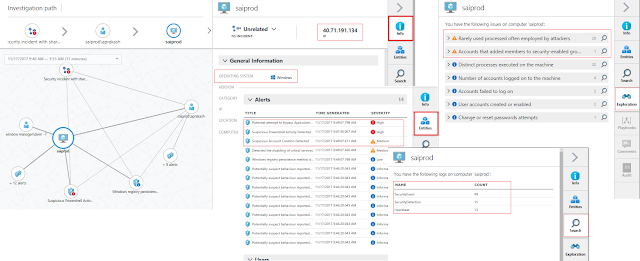
The investigation dashboard contains a visual, interactive graph of entities such as accounts, machines, and other alerts that are related to the initial alert or incident. Selecting an entity will show other related entities. For example, selecting a user account that has logged on to the machine where the alert occurred will show any other machines where that account logged on and any other alerts involving that account. You can navigate through related entities on the graph, exploring context about the entity and tagging anything that appears related to the security breach to build an investigative dossier. At this stage, the graph shows items that are one or two hops away from the initial alert, but as you click on other nodes in the graph, items related to the newly-selected node will appear.

An investigation will usually start by trying to understand the chronology of the incident, focusing on the logical sequence of events that happened around the time the alert was triggered. To set the time period for analysis the time scope selector dropdown is available on the top left side of the graph. You can use this to specify the exact time range in which to focus, using either a preset time range or a custom range. In the current example the first alert triggered around 9:47 AM. A custom time range from say 9:40 to 9:53 would be a good starting range. The selected time range limits alerts and entities that are added to the graph. As you navigate the graph, related entities will only be added if the relationship occurred in this time range. For example, an account that logged on to the host in this time range would be shown. The time range also limits the events queried in the Exploration tab to those occurring inside the current time range.

Azure Security, Azure Guides, Azure Tutorials and Materials, Azure Learning

In this dashboard, relevant information about a selected entity is shown on the right side of the screen (screenshot below) in a series of tabs. The Info tab shows summary information about the entity, for example, selecting a machine shows OS type, IP address, and geographic location. The Entities tab shows entities, alerts, and incidents directly related to the selected item. In our example, selecting the machine identified in the alert (SAIPROD) shows alerts related to suspicious PowerShell activity, suspicious account creation, attempted AppLocker bypass, and disabling of critical services. Clicking on these alerts gives more details about them. The Search tab shows the event logs available that contain events related to the selected entity. For our example host it shows SecurityEvent, SecurityDetection, and Heartbeat.

Although it is possible to do your own searching through the logs from the Search tab, the Exploration tab can give you quicker access to relevant events and speed up the investigation process.

Azure Security, Azure Guides, Azure Tutorials and Materials, Azure Learning

Let's look a little bit more into the Exploration tab in more detail.

The Exploration tab contains a set of queries that highlight some of the most relevant data for an investigation of activity on a given entity, presenting the data in way that is easily consumable. For example, in the screenshot below the Accounts failed to log on query shows two logon attempts where the user name does not exist. You can click on individual items in this list to see more details about the specific event or click the magnifying glass icon to view all of these events in the Log Search screen. Exploration queries are only shown when there is relevant event data. The queries also differ for different entity types, so expect to see different contents to this tab as you navigate between entities in the graph.

We also see data in the rarely used process often employed by attacker. This shows processes and commandlines of operating system executables that are often used by the attackers.

Azure Security, Azure Guides, Azure Tutorials and Materials, Azure Learning

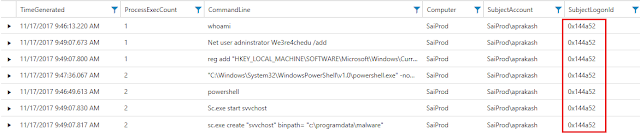
In this case looking at command line activity (above) as displayed by rarely used process we can see the attacker first issues the “whoami” command, which displays who the current logged on user is. We also see a range of other suspicious-looking activity like a user account being added, adding a registry value to the Windows run key, PowerShell being used to download a batch file, and the installation and startup of a Windows service. The tab view for this query may show only a subset of the available data. If there is more data, the View all link is shown at the bottom of the query results. Clicking this will take you to the Log Search and will display all of the data. Click on the TimeGenerated column header to order by time so that you get a true chronological picture.

To return to the investigation graph be sure to click on the Investigation Dashboard breadcrumb item at the top of the Log Search screen. Using the browser Back button will take you out of the investigation altogether.

Azure Security, Azure Guides, Azure Tutorials and Materials, Azure Learning

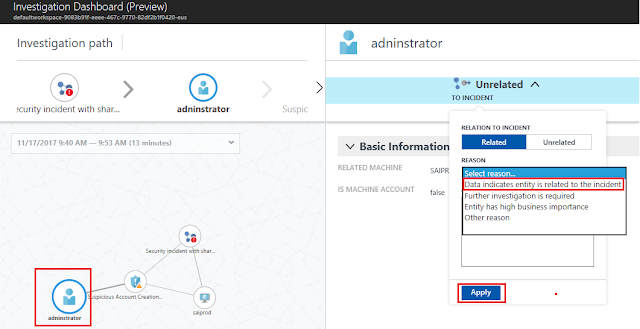
As we find interesting artifacts related to the incident they can also be added to it. For example, the creation of a new user account adninistrator generated an alert around suspicious account creation. Looking at the sequence of command lines, it seems that this is related to the current incident, so we can add these to it as shown in screenshot below. The whole idea being that as we add more artifacts to the incident we get a better summary of how the attack progressed. Adding this account could help you extend the graph to a second virtual machine (VM) in case the attackers used it for lateral movement or if we’d see unusual processes run by that account on other VM’s. All such VM’s found could be added as additional machines to the incident.

Azure Security, Azure Guides, Azure Tutorials and Materials, Azure Learning

One interesting thing that jumps out from this expanded view is that the Logonid (0x144a52) for all attacker command is the same, meaning that all of these commands were executed by the same account in the same logon session. This is a good analysis data point, often used in investigations. Focusing on the activity within the particular logon session from which the alert originated will tell you a lot about what else the attacker was doing or alternatively allows you to quickly determine that the alert might be a false positive in cases where there is no additional suspicious activity.

Azure Security, Azure Guides, Azure Tutorials and Materials, Azure Learning

Log Search


Security Center uses Log Analytics search to retrieve and analyze your security data. Log Analytics includes a query language to quickly retrieve and consolidate data. From Security Center, you can use Log Analytics search to construct queries and analyze collected data. You may find it easier to use one of the exploration queries (clicking on “View All” or the magnifier icon to get to Log Search) as a starting point for your query.

Once in Log Search, you can set the event type to look for. In this case we used “Event ID == 4688” for Windows Process Creation events. These contain the CommandLine data that we are interested in. We narrow this further to show only events where the SubjectLogonId == "0x144a52".  Adding the project command, displays only the field that we are interested in. The search gives you result somewhat like below.

Azure Security, Azure Guides, Azure Tutorials and Materials, Azure Learning

Looking at the search results reveals the following:
  • An attacker tried to login using brute force techniques and succeeded. Please note that this is not shown in the 4688 events, but suggested by the failed logon attempts we saw earlier.
  • Once logged in, the attacker launched a command prompt and issued the “whoami” command, which displays who the current logged on user is. The attacker then ran "systeminfo" to get the detailed configuration information about the host VM. The "qwinsta" command was also issued to get information about RDP sessions and other sessions on the VM.
  • PowerShell was used to run an invoke expression to download a batch file from the Internet. The subsequent commands are likely contained in the batch file which we see executed at 9:49:07 since we can see the execution times of the following processes occurring within the same second.
  • The batch file first disables the firewall. This is a known attacker technique. Once the initial compromise is achieved they often take steps to lower the security settings of a system such as disabling the firewall, Antivirus, and Shared Access.
  • Next, we see the addition of a new user account called 'adninstrator'. The account name closely resembles our standard windows account in order to avoid being noticed by a human administrator.
  • Then a suspicious service called "svvchost" is created and started.
  • The search also shows a registry addition that installs an auto-run command. On closer analysis, this looks like an attempt to bypass AppLocker restrictions. AppLocker can be configured to limit which executables are allowed to run on a Windows system. The command line pattern looks like the attacker is attempting to circumvent AppLocker policy by using regsvr32.exe to execute untrusted code. On hosts where tight AppLocker executable and script rules are enforced, attackers are often seen using regsvr32 and a script file located on Internet to get a script bypass and run their malicious script.

Wednesday, 17 January 2018

Azure Analysis Services new modeling and tooling features

Following the announcement a few weeks ago that 1400 models are now in Azure Analysis Services, we haven’t stopped there! We are pleased to announce the following further features for 1400 models in Azure.

◈ Shared M expressions are shown in the SSDT Tabular Model Explorer, and can be maintained using the Query Editor.
◈ Data Management View (DMV) improvements.
◈ Opening an file with the .MSDAX extension in SSDT enables DAX non-model related IntelliSense.

Shared M expressions


Shared M expressions are shown in the Tabular Model Explorer! By right clicking the Expressions node, you can edit the expressions in the Query Editor. This should seem familiar to Power BI Desktop users.

Azure Analysis Services, Azure Guides, Azure Tutorials and Materials, Azure Learning

DMV improvements

DMVs expose information about server operations and server health, settings and model structure. They are used for server monitoring, model documentation and various other reasons.

DISCOVER_CALC_DEPENDENCY

M expression dependencies are included in DISCOVER_CALC_DEPENDENCY. The following query returns the output shown below. M expressions and structured data sources are included for 1400 models.

SELECT * FROM $System.DISCOVER_CALC_DEPENDENCY

WHERE OBJECT_TYPE = 'PARTITION' OR OBJECT_TYPE = 'M_EXPRESSION';

Azure Analysis Services, Azure Guides, Azure Tutorials and Materials, Azure Learning

The output represents the same information that is shown by the Query Dependencies visual, which is now available in SSDT from the Query Editor. This visual should seem familiar to Power BI Desktop users.

Azure Analysis Services, Azure Guides, Azure Tutorials and Materials, Azure Learning

MDSCHEMA_MEASUREGROUP_DIMENSIONS

This release provides a fix for MDSCHEMA_MEASUREGROUP_DIMENSIONS. This DMV is used by various client tools to show measure dimensionality. For example, the Explore feature in Excel Pivot Tables allows the user to cross-drill to dimensions related to the selected measures.

Azure Analysis Services, Azure Guides, Azure Tutorials and Materials, Azure Learning

Prior to this release, some rows were missing in the output for 1200 models, which meant the Explore feature did not work correctly. This is now fixed for 1200 and 1400 models.

DAX file editing

Opening a file with the .MSDAX extension allows DAX editing with non-model related IntelliSense such as highlighting, statement completion and parameter info. As you can imagine, we intend to use this for interesting features to be released in the future!

Azure Analysis Services, Azure Guides, Azure Tutorials and Materials, Azure Learning

Saturday, 13 January 2018

1400 compatibility level in Azure Analysis Services

We are excited to announce the public preview of the 1400 compatibility level for tabular models in Azure Analysis Services! This brings a host of new connectivity and modeling features for comprehensive, enterprise-scale analytic solutions delivering actionable insights. The 1400 compatibility level will also be available in SQL Server 2017 Analysis Services, ensuring a symmetric modeling capability across on-premises and the cloud.

Here are just some highlights of the new features available to 1400 models.
  • New infrastructure for data connectivity and ingestion into tabular models with support for TOM APIs and TMSL scripting. This enables:
    • Support for additional data sources, such as Azure Blob storage.
    • Data transformation and data mashup capabilities.
  • Support for BI tools such as Microsoft Excel enable drill-down to detailed data from an aggregated report. For example, when end-users view total sales for a region and month, they can view the associated order details.
  • Object-level security to secure table and column names in addition to the data within them.
  • Enhanced support for ragged hierarchies such as organizational charts and chart of accounts.
  • Various other improvements for performance, monitoring and consistency with the Power BI modeling experience.
In SSDT, you can select the new 1400 compatibility level when creating new tabular model projects. Alternatively, you can upgrade an existing tabular model by selecting the Model.bim file in Solution Explorer and setting the Compatibility Level to 1400 in the Properties window. Models at the 1400 compatibility level cannot be downgraded to lower compatibility levels.

Microsoft Guides, Microsoft Tutorials and Materials, Azure Tutorials and Materials

New Infrastructure for Data Connectivity


1400 models introduce a new infrastructure for data connectivity and ingestion into tabular models with support for TOM APIs and TMSL scripting. This is based on similar functionality in Power BI Desktop and Microsoft Excel 2016. At this point, only the following cloud-based data sources are supported with the 1400 compatibility level in Azure Analysis Services. We intend to add support for more data sources soon.

◈ Azure SQL Data Warehouse
◈ Azure SQL Database
◈ Azure Blog Storage

Detail Rows


A much-requested feature for tabular models is the ability to define a custom row set contributing to a measure value. Multidimensional models achieve this by using drillthrough and rowset actions. This allows end-users to view information in more detail than the aggregated level.

For example, the following PivotTable shows Internet Total Sales by year from the Adventure Works sample tabular model. Users can right-click the cell for 2010 and then select the Show Details menu option to view the detail rows.

Microsoft Guides, Microsoft Tutorials and Materials, Azure Tutorials and Materials

By default, all the columns in the Internet Sales table are displayed. This behavior is often not meaningful for the user because too many columns may be shown, and the table may not have the necessary columns to show useful information such as customer name and order information.

Detail Rows Expression Property for Measures

1400 models introduce the Detail Rows Expression property for measures. It allows the modeler to customize the columns and rows returned to the end user. The following example uses the DAX Editor in SSDT to define the columns to be returned for the Internet Total Sales measure.

Microsoft Guides, Microsoft Tutorials and Materials, Azure Tutorials and Materials

With the property defined and the model deployed, the custom row set is returned when the user selects Show Details. It automatically honors the filter context of the cell that was selected. In this example, only the rows for 2010 value are displayed.

Microsoft Guides, Microsoft Tutorials and Materials, Azure Tutorials and Materials

Object-Level Security


Roles in tabular models already support a granular list of permissions, and row-level filters to help protect sensitive data.

1400 models introduce table- and column-level security allowing sensitive table and column names to be protected in addition to the data within them. Collectively these features are referred to as object-level security (OLS).

The current version requires that OLS is set using the JSON-based metadata, Tabular Model Scripting Language (TMSL), or Tabular Object Model (TOM). We plan to deliver SSDT support soon. The following snippet of JSON-based metadata from the Model.bim file secures the Base Rate column in the Employee table of the Adventure Works sample tabular model by setting the MetadataPermission property of the ColumnPermission class to None.

"roles": [

  {

    "name": "General Users",

    "description": "All allowed users to query the model",

    "modelPermission": "read",

    "tablePermissions": [

      {

        "name": "Employee",

        "columnPermissions": [

           {

              "name": "Base Rate",

              "metadataPermission": "none"

           }

        ]

      }

    ]

  }

Unauthorized users cannot access the Base Rate column using client tools like Power BI and Excel Pivot Tables. Additionally, such users cannot query the Base Rate column using DAX or MDX, or measures that refer to it.

Ragged Hierarchies


Tabular models with previous compatibility levels can be used to model parent-child hierarchies. Hierarchies with a differing number of levels are referred to as ragged hierarchies. An example of a ragged hierarchy is an organizational chart. By default, ragged hierarchies are displayed with blanks for levels below the lowest child. This can look untidy to users, as shown by this organizational chart in Adventure Works:

Microsoft Guides, Microsoft Tutorials and Materials, Azure Tutorials and Materials

1400 models introduce the Hide Members property to correct this. Simply set the Hide Members property to Hide blank members.

Microsoft Guides, Microsoft Tutorials and Materials, Azure Tutorials and Materials

With the property set and the model deployed, the more presentable version of the hierarchy is displayed.

Microsoft Guides, Microsoft Tutorials and Materials, Azure Tutorials and Materials

Other Features


Various other features such as the following are also introduced with the 1400 compatibility level. For more information, please refer to the Analysis Services Team blog for what's new in SQL Server 2017 CTP 2.0 and SQL Server vNext on Windows CTP 1.1 for Analysis Services.

◈ Transaction-performance improvements for a more responsive developer experience.
◈ Dynamic Management View improvements enabling dependency analysis and reporting.
◈ Hierarchy and column reuse to be surfaced in more helpful locations in the Power BI field list.
◈ Date relationships to easily create relationships to date dimensions based on date columns.
◈ DAX enhancements to make DAX more accessible and powerful. These include the IN operator and table/row constructors.

Friday, 12 January 2018

Azure Site Recovery now supports Ubuntu

Azure Site Recovery makes business continuity accessible for all your IT applications by letting you use Azure as your recovery site. This offers a solution where you only pay for the resources you consume, alleviating the need to spend on upfront capital investments for a recovery location or resources.

We recognize our customer’s need to have flexibility in the choice of platforms and application stacks they use. That is why Azure Site Recovery supports a wide variety of platforms and operating systems. We’ve now added support for another very popular Linux distribution. Azure Site Recovery now supports disaster recovery and migration to Azure for servers running Ubuntu on Azure virtual machines or in a VMware virtualized environment. Azure Site Recovery currently supports disaster recovery and migration to Azure for applications on Ubuntu Server 14.04 LTS.

Let’s see how easy it is to achieve business continuity objectives for your Ubuntu workloads in the context of the fictional Bellows College.

A business continuity plan for Bellows College


Bellows College’s Moodle learning management system(LMS) is configured in a standard two-tier deployment, with a web server and a MySQL database running on VMware virtual machines running Ubuntu server 14.04 LTS.

Microsoft Tutorials and Materials, Microsoft Certifications, Microsoft Guides, Microsoft Learning

Last year, a faulty surge protector in their datacenter caused an outage to their learning management system. Bellows College’s application and infrastructure administrators scampered to bring the system back up on an alternate storage unit by restoring data from their database backup. This experience taught them a costly lesson and left them with the realization that periodic backups are not a replacement for a business continuity plan.

Realizing they needed a reliable business continuity plan, Bellows College’s CIO decided to use Azure Site Recovery. Going to Azure was an easy choice for them, as they were already planning on migrating some of their applications to Azure to consolidate their datacenter costs.

With a few simple steps, Bellows College setup Azure Site Recovery and got their learning management system protected to Azure.

Microsoft Tutorials and Materials, Microsoft Certifications, Microsoft Guides, Microsoft Learning

Bellows College built a recovery plan to sequence the order in which the various application tiers are brought up during a failover. For example, they specified that the database tier would be brought up before the web tier so that the web server could start serving requests immediately post failover. Within the recovery plan, Bellows College used Azure Automation runbooks to automate some of the common post-failover steps, like assigning an IP address to the failed over web server. By using automation, they were able to achieve a better RTO by avoiding the need to perform this step manually.

Microsoft Tutorials and Materials, Microsoft Certifications, Microsoft Guides, Microsoft Learning

With their Moodle servers protected and the recovery plan setup, it was time to test their recovery plan. They did this using the test failover feature of ASR that lets them test failing over their applications without impacting production workloads or end users.

Microsoft Tutorials and Materials, Microsoft Certifications, Microsoft Guides, Microsoft Learning

The test failover brought the application up in a test network in Azure with all the latest changes, and let them connect to the application in the test environment and validate that the application was working in a few minutes.

Microsoft Tutorials and Materials, Microsoft Certifications, Microsoft Guides, Microsoft Learning

Being able to test the failover of the application to Azure without impacting production gave Bellows College the confidence that their business continuity plan gives them the necessary protection from unplanned events.

Having experienced how simple and cost-effective it is to use Azure Site Recovery to achieve business continuity, Bellows College is now planning to onboard some of their other supporting applications running on Ubuntu.

Azure Site Recovery is an all-encompassing service for your migration and disaster recovery needs. Our mission is to democratize disaster recovery with the power of Microsoft Azure so that you have a disaster recovery plan that covers all of you organization's IT applications.

Wednesday, 10 January 2018

Accelerating the adoption of enterprise blockchain

We have had the pleasure of working with several customers on their business initiatives related to blockchain's technology. During this time, we have been helping them to envision business scenarios, choose the right blockchain protocols and distributed ledgers, and most importantly, develop pilots focused on validating the technology capabilities to provide real value to their organizations.

When to use blockchain?


From the technical perspective, we could apply blockchain to many scenarios. However, not every situation requires blockchain, but there are some scenarios where it creates significant value compared to alternative technologies. Usually, these are shared business processes, with the organization in different industries such as financial services, manufacturing, or retail.

The recommendation to recognize blockchain scenarios is to make sure you are using the core capabilities of blockchain. You should respond positively to four key questions (see below), and there should be a real business case with measurable outcomes. If this is not the case, please consider using other more mature technologies.

Blockchain capabilities

The blockchain is one of the top emerging technologies revolutionizing today’s business models. Fundamentally, blockchain enables participants to exchange value without the need for intermediaries.

Microsoft Tutorials and Materials, Microsoft Guides, Microsoft Certifications

But what is blockchain exactly? And what capabilities make it so attractive for enterprises? The blockchain is a disruptive technology trend that enables a shared, authentic, decentralized ledger:

◈ SECURE: Blockchain uses strong cryptography to create transactions that are impervious to fraud and establishes a shared truth. Also, all the transactions are signed with the digital certificate.
◈ SHARED: The real benefits of blockchain, over conventional technology, are achieved when we use it to link organizations to share information on a distributed ledger.
◈ DISTRIBUTED: A blockchain can be distributed across multiple organizations and becomes more secure as replicas are added.
◈ LEDGER: Every transaction is written into the ledger once and cannot be changed after the fact.

Questions to be answered before developing a blockchain solution


Answering the following four questions can determine if blockchain is appropriate for the identified business scenario.

◈ Do multiple parties share data?
◈ Do multiple parties update data?
◈ Is there a requirement for verification?
◈ Can intermediaries be removed and reduce cost and complexity?

If you answered yes to all of these questions, then you have a potential scenario to apply blockchain.

Public blockchain vs. enterprise blockchain


A public blockchain (i.e., Bitcoin or Ethereum) is an Internet protocol managing the distribution of potential unique data with the following characteristics:

◈ Many, anonymous, or pseudonymous participants
◈ Open read and write by all participants
◈ Consensus by proof of work

Too often organizations fail with blockchain because they try to use public blockchain networks, or their rules, for their enterprise solutions. Instead, the organization should consider the use of Enterprise Blockchain.

What do we mean with enterprise blockchain? An enterprise blockchain (i.e., Hyperlegder, Ethereum Enterprise, Ripple, Quorum, etc.) is a distributed ledger with the following characteristics:

◈ All the participants, and their digital identities, are known from one or many trusted organizations
◈ Writes and read permissions are roles-based and usually requires consensus of several participants
◈ Multiple algorithms are used for consensus

You should know that we have two types of enterprise blockchain:

◈ Private: Usually managed by a single organization. Typically, the network participants are internal business units or divisions. 
◈ Consortium: In this case, the blockchain network is managed by multiple trusted organizations. New participants require a consensus of several participants.

Industries using blockchain


The potential impact of blockchain is significant across all sectors and industries—from banking to government to healthcare and beyond:

◈ Eliminates intermediaries increasing efficiency and speed.
◈ Simplifies operations by reducing cost and time related to reconciliations and disputes.
◈ Potentially enables new business models increasing revenue and savings.

According to top market analysts and leading consulting firms, the top five industries that blockchain will likely disrupt by 2020 are financial services, government, real estate, supply chain management, and media distribution.

Reviewing our historical data, we also see that close to 80% of the customers using blockchain in Microsoft Azure are also financial services institutions, including insurance companies. However, as you can see in the following figure, the trend is changing if we just consider the existing engagement and pipeline.

Microsoft Tutorials and Materials, Microsoft Guides, Microsoft Certifications

On the other hand, double checking the solutions related to banking & capital markets, we had discovered that 60% of the blockchain implementations involved at least one participant from a second industry such as manufacturing, government, or retail. 

Common business patterns 


Just in the last 12 months, we were able to count 76 scenarios across seven industries. The good news is that based on our engagements with customers and partners, we also were able to reduce them in the following eight business patterns.

Microsoft Tutorials and Materials, Microsoft Guides, Microsoft Certifications

By exploring business patterns, our customers can now learn how blockchain can promote operational simplification, reduce the role of intermediaries, and potentially enable new business models. For each pattern, we provide an overview of our common needs and challenges, the potential benefits from applying blockchain, key near-term milestones for initial blockchain applications, and an use case sequence diagram. Using this approach is helping us to define reference architectures, and developing IP to reduce the time-to-market of blockchain solutions.

As an illustrated example, below I’m sharing current blockchain applications and some public references:

◈ Bank of America and Microsoft Treasury using Blockchain in a Trade Finance scenario to improve the process of issuing a Standby Letter of Credit to a customer (SBLC) to a customer. The process has been reduced from 3-5 weeks to just 3-5 days.
◈ Renault Group is working together with Microsoft and VISEO to create the first digital car maintenance book based on Blockchain and using Microsoft Azure capabilities.
◈ Large food manufacturers and distributors are using blockchain to track their premium products journey from source to consumption efficiently, and to have a shared ledger as the single source of truth.

Recommended engagement model


Based on our previous engagements, our experience delivering innovative projects and using our agile approach, we are now ready to help customers understand the potential impact of blockchain technology on their industries, as well as determine whether it is capable of delivering both cost efficiencies and competitive advantage for them.

Microsoft Services provides offers to help our customers have an improved understanding of blockchain, explore the potential of this technology through business scenarios and implement a Minimum Viable Product (MVP) based on Microsoft Azure.

Microsoft Tutorials and Materials, Microsoft Guides, Microsoft Certifications

Supported protocols


To finish, let us share our answer to the most frequently asked questions by our customers. Does Microsoft have its own blockchain ledger? The answer is NO.

Microsoft has been working on blockchain since November 2015 when we were the first major cloud provider to announce a Blockchain as a Service (BaaS). Our vision is to be the worldwide cloud platform leader powering the blockchain-based applications.

Microsoft is working with customers, partners, and the developer community to accelerate blockchain’s enterprise readiness. Our mission is to help companies thrive in this new era of secure multi-party collaboration by delivering open, scalable platforms and services that any company can use to improve shared business processes. Our roadmap is based on the following principles:

◈ Blockchain on your terms: No one-size-fits-all approach — Microsoft’s platform and ecosystem partners make it easy to get started and iterate quickly with the blockchain of your choice, both on-premises and in the cloud.

◈ Integrated with your business: Merge blockchain with the IT assets you already have. Azure lets you integrate blockchain with the cloud services your organization uses to power shared processes.

◈ Ready for the enterprise: With the Coco Framework, Cryptlets, and our Azure services integrations, Microsoft is addressing existing technology gaps with blockchain and helps organizations build durable enterprise-grade applications.

Our active participation in industry consortiums such as R3, Enterprise Ethereum Alliance, and IC3, also help us to understand core industry scenarios, and to continue learning to meet the needs of our customers.

Currently, Microsoft supports the most widely used blockchain and distributed ledger protocols on Azure, including HyperLedger Fabric, R3 Corda, Quorum, Chain Core, and BlockApps. 

Sunday, 7 January 2018

Announcing Azure Files share snapshots public preview

Azure Files offers fully managed cloud file shares, and extends the ability of organizations to share files across on-premises and the cloud. With support for industry standard SMB protocol, this service is truly cross-platform and can support mounting as file share from any client that implements SMB 3.0 with encryption. Some examples are Windows, Mac, and Linux. In addition to native mount, it exposes REST APIs for programmability. With Azure Files, organizations get the added benefit of a storage infrastructure that is highly secure, massively scalable, and globally available. Even with all of these capabilities, what would you do if a user or application accidentally deletes or corrupts files or folders that are stored in Azure Files share?

Today, we are very excited to introduce the public preview of Azure Files share snapshots. Azure Files share snapshots allows you to periodically store read-only versions of your file shares. It also allows you to copy an older version of your content from anywhere for further modification and use.

When a share snapshot is created, the contents of the file share and the share snapshot are exactly the same. However, only the incremental changes are written to the snapshot. This makes snapshot creation faster, space-efficient, and cost-effective.

On Windows, you can leverage the familiar Previous Versions functionality, as shown below in Figure 1, where sharesnapshotdefs is a mounted Azure file share and each entry in the Previous Versions tab is a share snapshot. You can browse the content of the snapshot, right there in your explorer, by selecting “Open” or by copying the contents of that share snapshot back to its original location by selecting “Restore”. The same Previous Versions experience is available for individual directories or files. This means that while snapshots are taken at the share level, data retrieval can be done at both the file share and individual directory/file level.

Azure Guides, Azure Tutorials and Materials, Azure Learning

Figure 1: Azure Files share snapshot experience on Windows – Integrated with “Previous Versions”

On Linux, you can use Azure CLI 2.0 for Azure Files, as shown below in Figure 2. All the same capabilities, including creation of snapshots, are available in Azure CLI 2.0.

Azure Guides, Azure Tutorials and Materials, Azure Learning

Figure 2: Azure Files share snapshot experience on Azure CLI – List Snapshots

In addition to Azure CLI 2.0, snapshots are fully supported by REST and client libraries such as .Net and Python programmatic access. Also, PowerShell support is coming soon. To quickly get started, you can go directly to the Azure Portal today and start creating snapshot.

Azure Guides, Azure Tutorials and Materials, Azure Learning

Figure 3: Azure Files share snapshot experience on Azure Portal

And what more - During our public preview, capacity consumed by snapshots will not be charged!

Azure Files share snapshots will be a key addition to your cloud storage management toolkit. To learn more about snapshots, please visit our documentation.

Friday, 5 January 2018

Azure Data Lake tools integrates with VSCode Data Lake Explorer and Azure Account

If you are a data scientist and want to explore the data and understand what is being saved and what the hierarchy of the folder is, please try Data Lake Explorer in VSCode ADL Tools. If you are a developer and look for easier navigation inside the ADLS, please use Data Lake Explorer in VSCode ADL Tools. The VSCode Data Lake Explorer enhances your Azure login experiences, empowers you to manage your ADLA metadata in a tree like hierarchical way and enables easier file exploration for ADLS resources under your Azure subscriptions. You can also preview, delete, download, and upload files through contextual menu. With the integration of VSCode explorer, you can choose your preferred way to manage your U-SQL databases and your ADLS storage accounts in addition to the existing ADLA and ADLS commands.

If you have difficulties to login to Azure and look for simpler sign in processes, the Azure Data Lake Tools integration with VSCode Azure account enables auto sign in and greatly enhance the integration with Azure experiences. If you are an Azure multi-tenant user, the integration with Azure account unblocks you and empowers you to navigate your Azure subscription resources across tenants.

If your source code is in GitHub, a new command ADL: Set Git Ignore has been added to auto exclude system generated files and folders from your GitHub source repository.

Key Customer Benefits


◉ Support Azure auto sign in and improve sign in experiences via integration with Azure Account extension.
◉ Enable multi-tenants support to allow you to manage your Azure subscription resources across tenants.
◉ Browse ADLA metadata and view metadata schema while performing U-SQL authoring.
◉ Create and delete your U-SQL database objects anytime in a tree like explorer.
◉ Navigate across ADLS storage accounts for file exploration, file preview, file download, file/folder delete, and file/folder upload in a tree like explorer.
◉ Exclude system generated files and folders from the GitHub repository through command.

Summary of new features


◉ Azure Data Lake Analytics integration with Data Lake Explorer

Microsoft Guides, Microsoft Tutorials and Materials, Microsoft Learning

◉ Azure Data Lake Storage integration with Data Lake Explorer 

Microsoft Guides, Microsoft Tutorials and Materials, Microsoft Learning

◉ Set Git Ignore file

Microsoft Guides, Microsoft Tutorials and Materials, Microsoft Learning

Microsoft Guides, Microsoft Tutorials and Materials, Microsoft Learning

How to install or update


Install Visual Studio Code and download Mono 4.2.x (for Linux and Mac). Then get the latest Azure Data Lake Tools by going to the VSCode Extension repository or the VSCode Marketplace and searching Azure Data Lake Tools.

Microsoft Guides, Microsoft Tutorials and Materials, Microsoft Learning