Showing posts with label Cosmos DB. Show all posts

Tuesday, 12 March 2024

Modernize and build intelligent apps with support from Microsoft partner solutions

Modernize and build intelligent apps with support from Microsoft partner solutions

AI transformation drives significant business value, as a recent study of over 2000 business leaders and decision-makers found:

  • For every USD1 a company invests in AI, it realizes an average return of USD3.50.
  • Organizations realize a return on their AI investments within 14 months.
  • 92% of AI deployments take 12 months or less. 
  • 71% of respondents say their companies are already using AI.

Clearly, we’re witnessing rapid expansion of AI wherein organizations globally are unlocking productivity within their businesses, but also bending the curve on innovation by building on an open AI platform and partner ecosystem. These organizations are engaging Microsoft experts to build differentiated, intelligent applications and modernize existing, business-critical applications. These intelligent applications use real-time and historical data to deliver personalized and adaptable digital experiences with meaningful outcomes, that close the gap between the user’s current state and the desired outcome. New or modernized, when built on Microsoft Azure, these applications benefit from one of the largest interconnected networks on the planet, high availability, and trusted security and compliance.

Azure brings together capabilities for modern app development, cloud-scale data, and leading generative AI in one place. Customers see great value using these services together. In a recent Forrester Total Economic Impact of Microsoft Azure App Innovation report, customers were able to gain significant time savings of one to one and a half months when delivering new applications to the market, increase developer efficiency up to 25%, and reduce app downtime up to 25%. This leads to compelling business benefits such as beating competitors in the innovation race, capturing incremental revenue, minimizing lost revenue and fines from downtime, and increasing the engagement and retention of key talent.

ISV solutions help accelerate your AI transformation


While Azure provides the tools to build and modernize intelligent applications, it’s important to consider the broader tech stack. Independent Software Vendor (ISV) solutions complement Azure services by allowing you to meet specific use-case requirements, modernize existing tech stacks onto Azure, and mitigate the need to build new skillsets. If your organization routinely uses ISV solutions as part of the app infrastructure or development process, chances are that you can continue to use them even as you build new or modernize existing apps onto Azure. An example is apps built on Azure Spring Apps or Azure Red Hat OpenShift.

1. Azure Spring Apps Enterprise

Azure Spring Apps Enterprise is a fully managed service for the Spring Framework, built in collaboration with VMware. Building upon the Spring Framework and incorporating features from VMware Tanzu, Azure Spring Apps Enterprise helps accelerate development with ready-made, enterprise-conformant templates. Azure Spring Apps Enterprise offers full integration into Azure’s ecosystem and services, including fully managed infrastructure, built-in app lifecycle management, and ease of monitoring for app development and modernization. If you have existing apps in the Spring Framework, you can efficiently modernize them onto Azure while managing costs and enhancing the apps with AI. Here’s how to get started: Migrate Spring Boot applications to Azure Spring Apps.

2. Azure Red Hat OpenShift

Azure Red Hat OpenShift is a turnkey application platform. It is jointly engineered, operated, and supported by Red Hat and Microsoft. With Azure Red Hat OpenShift, you can deploy fully managed Red Hat OpenShift clusters without worrying about building and managing the infrastructure and get ready access to and integration with Azure tools, singular billing, integrated support and access to committed spend, and discount programs. This increases operational efficiency, time to value, and allows developers to refocus on innovation to quickly build, deploy, and scale applications. 

Microsoft also supports pure third-party solutions as part of its ISV ecosystem, to complement native Azure services. While these solutions meet a diverse set of use-cases, ranging from analytics to storage, here’s one that’s likely common to many app development or modernization projects—HashiCorp Terraform.

3. HashiCorp Terraform on Azure

An infrastructure as code tool for provisioning and managing cloud infrastructure, HashiCorp Terraform on Azure allows you to define infrastructure as code with declarative configuration files that can be used to create, manage, and update infrastructure. If your organization currently uses Terraform, developers can use their familiarity with the tool to deploy and manage Azure infrastructure using familiar and consistent syntax and tooling. To support this, HashiCorp offers a library of pre-built modules for Azure services, including Azure AI, Azure Kubernetes Service, and Azure Cosmos DB. And as your developers build new modules, perhaps with GitHub Copilot, those modules can be templatized using HashiCorp Terraform for reuse within your organization, setting up your developer teams for greater productivity and velocity.

Build and modernize apps with Azure and our partner ecosystem


So, as you look through your app infrastructure and decide to modernize your existing apps, any Spring apps or Red Hat OpenShift apps can easily be moved to Azure, with HashiCorp Terraform on Azure to assist. While we have only looked at three solutions in this blog, your preferred vendors are likely part of the Azure ISV ecosystem. Microsoft’s ecosystem of partners also includes partners that specialize in offering services to build custom intelligent apps, with industry-specific experience.

Connect with experts from Azure who will be able to guide you on your app architecture that utilizes the appropriate technology and services— Microsoft or partner—for your needs.

Source: microsoft.com

Tuesday, 1 October 2019

Built-in Jupyter notebooks in Azure Cosmos DB are now available

Earlier this year, we announced a preview of built-in Jupyter notebooks for Azure Cosmos DB. These notebooks, running inside Azure Cosmos DB, are now available.

Azure Cosmos DB, Azure Learning, Azure Tutorials and Materials, Azure Guides, Azure Study Materials

Cosmic notebooks are available for all data models and APIs including Cassandra, MongoDB, SQL (Core), Gremlin, and Spark to enhance the developer experience in Azure Cosmos DB. These notebooks are directly integrated into the Azure Portal and your Cosmos accounts, making them convenient and easy to use. Developers, data scientists, engineers and analysts can use the familiar Jupyter notebooks experience to:

◈ Interactively run queries

◈ Explore and analyze data

◈ Visualize data

◈ Build, train, and run machine learning and AI models

In this blog post, we’ll explore how notebooks make it easy for you to work with and visualize your Azure Cosmos DB data.

Easily query your data


With notebooks, we’ve included built-in commands to make it easy to query your data for ad-hoc or exploratory analysis. From the Portal, you can use the %%sql magic command to run a SQL query against any container in your account, no configuration needed. The results are returned immediately in the notebook.

Azure Cosmos DB, Azure Learning, Azure Tutorials and Materials, Azure Guides, Azure Study Materials

Improved developer productivity


We’ve also bundled in version 4 of our Azure Cosmos DB Python SDK for SQL API, which has our latest performance and usability improvements. The SDK can be used directly from notebooks without having to install any packages. You can perform any SDK operation including creating new databases, containers, importing data, and more.

Azure Cosmos DB, Azure Learning, Azure Tutorials and Materials, Azure Guides, Azure Study Materials

Visualize your data


Azure Cosmos DB notebooks comes with a built-in set of packages, including Pandas, a popular Python data analysis library, Matplotlib, a Python plotting library, and more. You can customize your environment by installing any package you need.

Azure Cosmos DB, Azure Learning, Azure Tutorials and Materials, Azure Guides, Azure Study Materials

For example, to build interactive visualizations, we can install bokeh and use it to build an interactive chart of our data.

Azure Cosmos DB, Azure Learning, Azure Tutorials and Materials, Azure Guides, Azure Study Materials

Users with geospatial data in Azure Cosmos DB can also use the built-in GeoPandas library, along with their visualization library of choice to more easily visualize their data.

Azure Cosmos DB, Azure Learning, Azure Tutorials and Materials, Azure Guides, Azure Study Materials

Getting started


1. Follow our documentation to create a new Cosmos account with notebooks enabled or enable notebooks on an existing account.

Azure Cosmos DB, Azure Learning, Azure Tutorials and Materials, Azure Guides, Azure Study Materials

2. Start with one of the notebooks included in the sample gallery in Azure Cosmos Explorer or Data Explorer.

Azure Cosmos DB, Azure Learning, Azure Tutorials and Materials, Azure Guides, Azure Study Materials

3. Share your favorite notebooks with the community by sending them to the Azure Cosmos DB notebooks GitHub repo.

4. Tag your notebooks with #CosmosDB, #CosmicNotebooks, #PoweredByCosmos on social media. We will feature the best and most popular Cosmic notebooks globally!

Sunday, 22 September 2019

Three ways to leverage composite indexes in Azure Cosmos DB

Composite indexes were introduced in Azure Cosmos DB at Microsoft Build 2019. With our latest service update, additional query types can now leverage composite indexes. In this post, we’ll explore composite indexes and highlight common use cases.

Index types in Azure Cosmos DB


Azure Cosmos DB currently has the following index types that are used for the following types of queries:

Range indexes:

◈ Equality queries
◈ Range queries
◈ ORDER BY queries on a single property
◈ JOIN queries

Spatial indexes:

◈ Geospatial functions

Composite indexes:

◈ ORDER BY queries on multiple properties
◈ Queries with a filter as well as an ORDER BY clause
◈ Queries with a filter on two or more properties

Composite index use cases


By default, Azure Cosmos DB will create a range index on every property. For many workloads, these indexes are enough, and no further optimizations are necessary. Composite indexes can be added in addition to the default range indexes. Composite indexes have both a path and order (ASC or DESC) defined for each property within the composite index.

ORDER BY queries on multiple properties


If a query has an ORDER BY clause with two or more properties, a composite index is required. For example, the following query requires a composite index defined on age and name (age ASC, name ASC):

SELECT * FROM c ORDER BY c.age ASC, c.name ASC

This query will sort all results in ascending order by the value of the age property. If two documents have the same age value, the query will sort the documents by name.

Queries with a filter as well as an ORDER BY clause


If a query has a filter as well as an ORDER BY clause on different properties, a composite index will improve performance. For example, the following query will require fewer request units (RU’s) if a composite index on name and age is defined and the query is updated to include the name in the ORDER BY clause:

Original query utilizing range index:

SELECT * FROM c WHERE c.name = “Tim” ORDER BY c.age ASC

Revised query utilizing a composite index on name and age:

SELECT * FROM c WHERE c.name = “Tim” ORDER BY c.name ASC, c.age ASC

While a composite index will significantly improve query performance, you can still run the original query successfully without a composite index. When you run the revised query with a composite index, it will sort documents by the age property. Since all documents matching the filter have the same name value, the query will return them in ascending order by age.

Queries with a filter on multiple properties


If a query has a filter with two or more properties, adding a composite index will improve performance.

Consider the following query:

SELECT * FROM c WHERE c.name = “Tim” and c.age > 18

In the absence of a composite index on (name ASC, and age ASC), we will utilize a range index for this query. We can improve the efficiency of this query by creating a composite index for name and age.

Queries with multiple equality filters and a maximum of one range filter (such as >,<, <=, >=, !=) will utilize the composite index. In some cases, if a query can’t fully utilize a composite index, it will use a combination of the defined composite indexes and range indexes.

Composite index performance benefits


We can run some sample queries to highlight the performance benefits of composite indexes. We will use a nutrition dataset that is used in Azure Cosmos DB labs.

In this example, we will optimize a query that has a filter as well as an ORDER BY clause. We will start with the default indexing policy which indexes all properties with a range index. Executing the following query as referenced in the image below in the Azure Portal, we observe the query metrics:

Query metrics:

Azure Cosmos DB, Azure Learning, Azure Certifications, Azure Tutorials and Materials, Azure Study Materials

This query, with the default indexing policy, required 21.8 RU’s.

Adding a composite index on foodGroup and _ts and updating the query text to include foodGroup in the ORDER BY clause significantly reduced the query’s RU charge.

Query metrics:

Azure Cosmos DB, Azure Learning, Azure Certifications, Azure Tutorials and Materials, Azure Study Materials

After adding a composite index, the query’s RU charge decreased from 21.8 RU’s to only 4.07 RU’s. This query optimization will be particularly impactful as the total data size increases. The benefits of a composite index are significant when the properties in the ORDER BY clause have a high cardinality.

Creating composite indexes


You can learn more about creating composite indexes in this documentation. It’s simple to update the indexing policy directly through the Azure Portal. While creating a composite index for data that’s already in Azure Cosmos DB, the index update will utilize the RU’s leftover from normal operations. After the new indexing policy is defined, Azure Cosmos DB will automatically index properties with a composite index as they’re written.

Explore whether composite indexes will improve RU utilization for your existing workloads on Azure Cosmos DB.

Friday, 16 August 2019

New for developers: Azure Cosmos DB .NET SDK v3 now available

The Azure Cosmos DB team is announcing the general availability of version 3 of the Azure Cosmos DB .NET SDK, ​released in July. Thank you to all who gave feedback during our preview.

In this post, we’ll walk through the latest improvements that we’ve made to enhance the developer experience in .NET SDK v3.

Azure Cosmos DB, Azure Study Materials, Azure Certifications, Azure Learning, Azure Online Exam

You can get the latest version of the SDK through NuGet and contribute on GitHub.

//Using .NET CLI
dotnet add package Microsoft.Azure.Cosmos

//Using NuGet
Install-Package Microsoft.Azure.Cosmos

What is Azure Cosmos DB?


Azure Cosmos DB is a globally distributed, multi-model database service that enables you to read and write data from any Azure region. It offers turnkey global distribution, guarantees single-digit millisecond latencies at the 99th percentile, 99.999 percent high availability, and elastic scaling of throughput and storage.

What is new in Azure Cosmos DB .NET SDK version 3?


Version 3 of the SDK contains numerous usability and performance improvements, including a new intuitive programming model, support for stream APIs, built-in support for change feed processor APIs, the ability to scale non-partitioned containers, and more. The SDK targets .NET Standard 2.0 and is open sourced on GitHub.

For new workloads, we recommend starting with the latest version 3.x SDK for the best experience. We have no immediate plans to retire version 2.x of the .NET SDK.

Targets .NET Standard 2.0

We’ve unified the existing Azure Cosmos DB .NET Framework and .NET Core SDKs into a single SDK, which targets .NET Standard 2.0. You can now use the .NET SDK in any platform that implements .NET Standard 2.0, including your .NET Framework 4.6.1+ and .NET Core 2.0+ applications.

Open source on GitHub

The Azure Cosmos DB .NET v3 SDK is open source, and our team is planning to do development in the open. To that end, we welcome any pull requests and will be logging issues and tracking feedback on GitHub.

New programming model with fluent API surface

Since the preview, we’ve continued to improve the object model for a more intuitive developer experience. We’ve created a new top level CosmosClient class to replace DocumentClient and split its methods into modular database and container classes. From our usability studies, we’ve seen that this hierarchy makes it easier for developers to learn and discover the API surface.

using Microsoft.Azure.Cosmos;
using System;
using System.Threading.Tasks;

//Getting started with .NET SDK V3
namespace CosmosDotnetSDKGetStarted
{
    class Program
    {
        static async Task Main(string[] args)
        {
            // Create new CosmosClient to communiciate with Azure Cosmos DB
            using (var cosmosClient = new CosmosClient("endpoint", "key"))
            {
                // Create new database
                Database database = await cosmosClient.CreateDatabaseIfNotExistsAsync("databaseId");

                // Create new container
                Container container = await database.CreateContainerIfNotExistsAsync("containerId", "/PartitionKey");

                // Add item to container
                var todoItem = new TodoItem()
                {
                    id = Guid.NewGuid().ToString(),
                    PartitionKey = Guid.NewGuid().ToString(),
                    Task = "Get started with Azure Cosmos DB!"
                };
                var todoItemResponse = await container.CreateItemAsync<TodoItem>(todoItem, new PartitionKey(todoItem.PartitionKey));
            }
        }
    }
}

We’ve also added in fluent builder APIs, which make it easier to create CosmosClient, Container, and ChangeFeedProcessor classes with custom options.

using Microsoft.Azure.Cosmos;
using Microsoft.Azure.Cosmos.Fluent; // Use the new fluent namespace
using System.Threading.Tasks;

// Creating a new CosmosClient and Container using the fluent builder pattern
namespace CosmosDotnetSDKGetStarted
{
    class Program
    {
        static async Task Main(string[] args)
        {
            //Create new instance of CosmosClient using builder pattern
            CosmosClient cosmosClient = new CosmosClientBuilder("endpoint", "key")
                .WithApplicationRegion("West US 2")
                .WithApplicationName("ProductReviewsApp")
                .Build();

            //Define and create a new container using builder pattern
            Container container = await cosmosClient.GetDatabase("databaseId").DefineContainer("containerId", "/PartitionKey")
                // Define indexing policy with included and excluded paths
                .WithIndexingPolicy()
                    .WithIncludedPaths()
                        .Path("/username/*")
                        .Path("/productName/*")
                        .Path("/rating/*")
                        .Attach()
                    .WithExcludedPaths()
                        .Path("/*")
                        .Attach()
                    .Attach()
                // Define time to live (TTL) in seconds on container
                .WithDefaultTimeToLive(30)
                .CreateAsync();
        }
    }
}

View all samples on GitHub.

Stream APIs for high performance


The previous versions of the Azure Cosmos DB .NET SDKs always serialized and deserialized the data to and from the network. In the context of an ASP.NET Web API, this can lead to performance overhead. Now, with the new stream API, when you read an item or query, you can get the stream and pass it to the response without deserialization overhead, using the new GetItemQueryStreamIterator and ReadItemStreamAsync methods.

Easier to test and more extensible


In .NET SDK version 3, all APIs are mockable, making for easier unit testing.

We also introduced an extensible request pipeline, so you can pass in custom handlers that will run when sending requests to the service. For example, you can use these handlers to log request information in Azure Application Insights, define custom retry polices, and more. You can also now pass in a custom serializer, another commonly requested developer feature.

Use the Change Feed Processor APIs directly from the SDK


One of the most popular features of Azure Cosmos DB is the change feed, which is commonly used in event-sourcing architectures, stream processing, data movement scenarios, and to build materialized views. The change feed enables you to listen to changes on a container and get an incremental feed of its records as they are created or updated.

The new SDK has built-in support for the Change Feed Processor APIs, which means you can use the same SDK for building your application and change feed processor implementation. Previously, you had to use the separate change feed processor library.

Ability to scale non-partitioned containers

We’ve heard from many customers who have non-partitioned or “fixed” containers that they wanted to scale them beyond their 10GB storage and 10,000 RU/s provisioned throughput limit. With version 3 of the SDK, you can now do so, without having to create a new container and move your data.

All non-partitioned containers now have a system partition key “_partitionKey” that you can set to a value when writing new items. Once you begin using the _partitionKey value, Azure Cosmos DB will scale your container as its storage volume increases beyond 10GB. If you want to keep your container as is, you can use the PartitionKey.None value to read and write existing data without a partition key.

// Scale fixed container using partition key in .NET V3 SDK
public static async Task ScaleNonPartitionedContainer()
{   
    using (var cosmosClient = new CosmosClient(endpoint, key))
    {
        //Get reference to existing fixed container
        var container = cosmosClient.GetDatabase(databaseId).GetContainer(containerId);             

        // Add item to container without partition key
        var user = new User()
        {
            Id = "bob",
            Status = "Learning Azure Cosmos DB!"
        };
        await container.CreateItemAsync<User>(user, PartitionKey.None);

        // Now start taking advantage of partitioning! Create and add a new item with partition key value of user Id
        var userWithPartitionKey = new User()
        {
            Id = "alice",
            PartitionKey = "alice",
            Status = "Partitioning all the things"
        };

        await container.CreateItemAsync<User>(userWithPartitionKey, new PartitionKey(userWithPartitionKey.PartitionKey));

        // Scale throughtput beyond  10,000 RU/s limit of fixed containers
        var throughputResponse = await container.ReplaceThroughputAsync(15000);
    }

}

// Example of the User class
public class User
{
    public User()
    {
    }

    [JsonProperty(PropertyName = "id")]
    public string Id { get; set; }

    [JsonProperty(PropertyName = "_partitionKey", NullValueHandling = NullValueHandling.Ignore)] // Enbales optional PartitionKey value
    public string PartitionKey { get; set; }

    [JsonProperty(PropertyName = "status")]
    public string Status { get; set; }

}

Easier APIs for scaling throughput


We’ve redesigned the APIs for scaling provisioned throughput (RU/s) up and down. You can now use the ReadThroughputAsync method to get the current throughput and ReplaceThroughputAsync to change it. View sample.

Tuesday, 25 June 2019

Azure Cosmos DB: A competitive advantage for healthcare ISVs

CitiusTech is a specialist provider of healthcare technology services which helps its customers to accelerate innovation in healthcare. CitiusTech used Azure Cosmos DB to simplify the real-time collection and movement of healthcare data from variety of sources in a secured manner. With the proliferation of patient information from established and current sources, accompanied with scrupulous regulations, healthcare systems today are gradually shifting towards near real-time data integration. To realize such performance, healthcare systems not only need to have low latency and high availability, but should also be highly responsive. Furthermore, they need to scale effectively to manage the inflow of high speed, large volumes of healthcare data.

The situation


The rise of Internet of Things (IoT) has enabled ordinary medical devices, wearables, traditional hospital deployed medical equipment to collect and share data. Within a wide area network (WAN), there are well defined standards and protocols, but with the ever increasing number of devices getting connected to the internet, there is a general lack of standards compliance and consistency of implementation. Moreover, data collation and generation from IoT enabled medical/mobile devices need specialized applications to cope with increasing volumes of data.

This free-form approach provides a great deal of flexibility, since different data can be stored in document oriented stores as business requirements change. Relational databases aren’t efficient in performing CRUD operations on such data but are essential for handling transactional data where consistent data integrity is necessary. Different databases are designed to solve different problems, using a single database engine for multiple purposes usually leads to non-performant solutions. Whereas management of multiple types of databases is an operational overhead.

Developing distributed global scale solutions are challenged by the capability and complexity of scaling databases across multiple regions without compromising performance, and while complying with data sovereignty needs. This often leads to inefficient management of multiple regional databases and/or underperformance.

Solution


Azure Cosmos DB has the ability of polyglot persistence, which allows it to use a mix of data store technologies without compromising on performance. It is a multi-model, highly-available, globally scalable database which supports proven low latency reads and writes. Azure Cosmos DB has enterprise grade security features and keeps all data encrypted at rest.

Azure Cosmos DB is suited for distributed global scale solutions as it not only provides a turnkey global distribution feature but can geo-fence a database to specific regions to manage data sovereignty compliance. Its multi-master feature allows writes to be made and synchronized across regions with guaranteed consistency. In addition, it supports multi-document transactions with ACID guarantees.

Use cases in healthcare


Azure Cosmos DB works very well for the following workloads.

1. Global scale secure solutions

Organizations like CitiusTech that offer a mission-critical, global-scale solution should consider Azure Cosmos DB a critical component of their solution stack. For example, An ISV developing a non-drug treatment for patients through a medical device at a facility can develop web or mobile applications which store the treatment information and medical device metadata in Azure Cosmos DB. Treatment information can be pushed to medical devices at global facilities for the treatment. ISVs can comply to the compliance requirement by using geo-fencing feature.

Azure Cosmos DB can also be used as a multi-tenant database with carefully designed strategy. For instance, if a tenant has different scaling requirements, different Azure Cosmos containers can be created for such tenants. In Azure Cosmos DB, containers serve as logical units of distribution and scalability. Multi-tenancy may be possible at a partition level within an Azure Cosmos container, but needs to be designed carefully to avoid creating hot-spots and compromising the overall performance.

2. Real-time location system, Internet of Things

Azure Cosmos DB is effective for building a solution for real-time tracking and management of medical devices and patients, as it often requires rapid velocity of data, scale, and resilience. Azure Cosmos DB supports low latency writes and reads so that all data is replicated across multiple fault and update domains in each region for high availability and resilience. It supports session consistency as one of its five consistency levels which is suitable for such scenarios. Session consistency guarantees strong consistency within a session.

Using Azure Cosmos DB also allows scaling of processing power, this is useful for burst scenarios and also provides elastic scale petabytes of storage. This enables request units (RU’s) to be programmatically adjusted as per the workload.

CitiusTech worked with a leading provider of medical grade vital signs and physiological monitoring solution to build a medical IoT based platform with the following requirements:

◈ Monitor vitals with medical quality

◈ Provide solutions for partners to integrate custom solutions

◈ Deliver personalized, actionable insights

◈ Messages and/or device generated data don’t have a fixed structure and may change in the future

◈ Data producer(s) to simultaneously upload data for at least 100 subjects in less than two seconds per subject, receiving no more than 40*21=840 data points per subject, per request

◈ Data consumer(s) to read simultaneously, data of at least 100 subjects in less than two seconds, producing no more than 15,000 data points per data consumer

◈ Data for most recent 14 days shall be ready to be queried, and data older than 14 days to be moved to a cold storage

CitiusTech used Azure Cosmos DB as a hot storage to store health data, since it enabled low latency writes and reads of health data that was generated by the wearable sensor continuously. Azure Cosmos DB provided schema agnostic flexible storage to store documents with different shapes and size at scale and allowed enterprise grade security with Azure compliance certification.

The time to live (TTL) feature in Azure Cosmos DB automatically deleted expired items based on the TTL value. It was geo-distributed with its geo-fencing feature to address data sovereignty compliance requirements.

Solution architecture


Azure Cosmos DB, Azure Certifications, Azure Guides, Azure Tutorials and Materials
Architecture of data flow in CitiusTech’s solution using Azure Cosmos DB

Key insights


Azure Cosmos DB unlocks the potential of polyglot persistence for healthcare systems to integrate healthcare data from multiple systems of record. It also ensures the need for flexibility, adaptability, speed, security and scale in healthcare is addressed while maintaining low operational overheads and high performance.

About CitiusTech


CitiusTech is a specialist provider of healthcare technology services and solutions to healthcare technology companies, providers, payers and life sciences organizations. CitiusTech helps customers accelerate innovation in healthcare through specialized solutions, healthcare technology platforms, proficiencies and accelerators.

Tuesday, 21 May 2019

Microsoft 365 boosts usage analytics with Azure Cosmos DB – Part 2

Finding the right partition key—a critical design decision


After moving to Azure Cosmos DB, the team revisited how data would be partitioned (referred to as “sharding” in MongoDB). With Azure Cosmos DB, each collection must have a partition key, which acts as a logical partition for the data and provides Azure Cosmos DB with a natural boundary for distributing data across partitions. The data for a single logical partition must reside inside a single physical partition. Physical partition management is managed internally by Azure Cosmos DB.

The Microsoft 365 usage analytics team worked closely with the Azure Cosmos DB team to optimize data distribution in a way that would ensure high performance. The team initially tried the same approach as they used with MongoDB, which was using a random GUID as the partition key. However, this required scanning all of the partitions for reads and over allocating resources for writes, making writes fast but reads slow. The team then tried using Tenant ID as the partition key but found that the vast difference in the amount of report data for each tenant made some partitions too hot, which would have required throttling, while others remained cold.

The solution lay in creating a synthetic partition key. In the end, the team solved both the slow read and too hot and too cold issues by grouping 100 documents per tenant ID into a bucket and then using a combination of tenant IDs and bucket IDs as the partition key. The bucket ID loops from 1 to n, where n is a variable and can be adjusted for each report.

Handling four terabytes of new data every day


In one region alone, more than 6 TB of data is stored in Azure Cosmos DB, with 4 TB of that written and refreshed daily. Both of those numbers are continuing to grow. The database consists of more than 50 different collections, and the largest is more than 300 GB in size. It consumes an average of 150,000 request units per second (RU/s) of throughput, scaling this number up and down as needed.

The different collections map closely to the different reports that the system serves, which in turn have different throughput requirements. This design enables the Microsoft 365 usage analytics team to optimize the number of RU/s that are allocated to each collection (and thus to each report), and to elastically scale that throughput up or down on a per-collection and per-report basis.

Built-in, cost-effective scalability and performance


With Azure Cosmos DB, the Microsoft 365 usage analytics team is delivering real-time customer insights with less maintenance, better performance, and improved availability—all at a lower cost. The new usage analytics system can now easily scale to handle future growth in the number of Office 365 commercial customers. All that was accomplished in less than five months, without any service interruptions. “The benefits of moving from MongoDB to Azure Cosmos DB more than justify the effort that it took,” says Guo Chen, Principal Software Development Manager on the Microsoft 365 usage analytics team.

Improved performance and service availability

The team’s use of built-in, turnkey geo-distribution provided a way to easily distribute reads and writes across two regions. Combined with the other work done by the team, such as rewriting the data access layer using the Azure Cosmos DB Core (SQL) API, this enabled the team to reduce the time for the majority of reads from 12 milliseconds to 3 milliseconds. The image below illustrates this performance improvement.

Azure Certifications, Azure Study Materials, Azure Tutorials and Material, Azure Guides

Although this difference may seem negligible in the context of viewing a report, it resulted in significant service improvements. “There are two ways to access reporting data in the usage analytics system: through the Microsoft 365 admin center, and through Microsoft Graph,” explains Xiaodong Wang, a Software Engineer on the Microsoft 365 usage analytics team. “In the past, people complained that the Graph API was too slow. That’s no longer an issue. In addition, service availability is better now because the chances of any query timing-out are reduced.”

The image below shows just how much service availability is improved. The graph illustrates successful API requests divided by the total API requests and shows that the system is now delivering a service availability level of greater than 99.99 percent.

Azure Certifications, Azure Study Materials, Azure Tutorials and Material, Azure Guides

Zero maintenance and administration

Because Azure Cosmos DB is a fully managed service, the Office 365 development team no longer needs to devote one full-time person to database maintenance and administration. Annual certificate maintenance is no longer a burden, and VMs no longer need to be restarted weekly to protect against any compromises in service availability.

“In the past, with MongoDB, we had to allocate core developer resources to administrative management of the data store,” says Shilpi Sinha, Principal Program Manager on the Microsoft 365 usage analytics team. “Now that we are running on a fully managed service, we are able to repurpose developer resources towards adding new customer value instead of managing the infrastructure.”

Elastic scalability

The Microsoft 365 usage analytics team can now scale database throughput up or down on demand, as needed to accommodate a fluctuating workload that on average, is growing at a rate of 8 percent every three months. By simply adjusting the number of RU/s allocated to each collection, which can be done in the Azure portal or programmatically, the team can easily scale up during heavy data-ingestion periods to handle new reports, and most importantly, to accommodate continued overall growth of Office 365 around the world.

“Today, all we need to do is keep an eye on request unit usage versus what we have budgeted,” says Wang. “If we’re reaching capacity, we can allocate more RU/s in just a few minutes. We don’t have to pay for spare capacity until we need it and more importantly, we no longer need to worry whether we can handle future growth in data volumes or report usage.”

Lower costs

On top of all of those benefits, the Microsoft 365 usage analytics team increased data and reporting volumes while reducing its monthly Microsoft Azure bill for the usage analytics system by more than 13 percent. “After we cut over to Azure Cosmos DB, our monthly Azure expenses decreased by almost 20 percent,” says Chen. “We undertook this project to better serve our customers. Being able to save close to a quarter-million dollars per year—and likely more in the future—is like icing on the cake.”

“Usage analytics are offered as part of the base capability to all Microsoft 365 customers, irrespective of the type of subscription they purchase," said Sinha. "Keeping the costs of operating this service as low as possible contributes to our goal of running the overall Microsoft 365 service as efficiently as possible while at the same time giving our customers new and improved insights into how their people are using our services.”

Saturday, 18 May 2019

Microsoft 365 boosts usage analytics with Azure Cosmos DB

The challenge: Understanding the behavior of more than 150 million active users


Office 365 is a flagship service within the Microsoft 365 Enterprise solution, with millions of commercial customers and more than 150 million active commercial users each month. Office 365 provides extensive reporting for administrators within each company on how the service is being used including license assignment, product-level usage, user-level activity, site activity, group activity, storage consumption, and more. The Microsoft 365 usage analytics team incrementally adds new reports to cover more Office 365 services.

Previous architecture

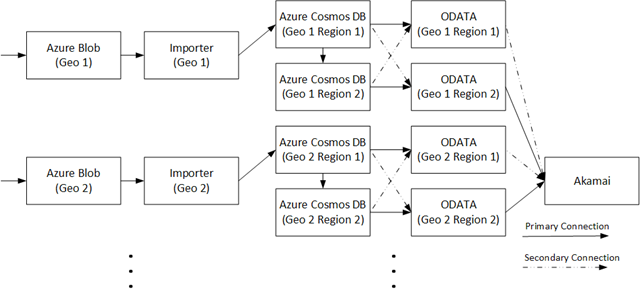
The telemetry data needed to generate such reports was collected in a system called usage analytics, that until recently ran on the community version of MongoDB. The image below shows the data flow, with an importer web service used to write log streams collected in Azure Blob storage to MongoDB. An OData web service exposes APIs to extract the stored data for both reporting within the Microsoft 365 admin center and for access through Microsoft Graph. Every day, as part of a full daily refresh, several billion rows of data were added to the system.

Azure Cosmos DB, Azure Certifications, Azure Study Materials, Azure Guides

Each of the primary geographies served by Office 365 has an independent usage analytics repository, all employing a similar architecture. In each geography, data was stored on two MongoDB clusters, with each cluster consisting of up to 50 virtual machines (VMs) hosted in Azure Virtual Machines and running MongoDB. The two clusters in each geography functioned in a primary/backup configuration. Data was written separately to both clusters and under normal operation, all reads were performed on the primary cluster.

Each cluster was designed for a write-heavy workload. To speed writes, sharding of data across individual cluster nodes was done using a random globally unique identifier (GUID) such as a MongoDB shard key. Every day for a few hours, new data from Azure Blob storage was written using a multithreaded importer. Each thread wrote batches of 2,000 records at a time to all cluster nodes and waited for all records to finish before starting on the next batch of 2,000.

Problems and pains


This architecture presented several problems for the Microsoft 365 usage analytics team, ranging from excessive administrative effort and costs to limited performance, reliability, availability, and scalability. Some specific pains included:

◈Poor performance. Reads were inefficient and reports sometimes timed out because of the use of a random GUID as a shard key required querying all nodes. In addition, during the few hours each day when new data was imported, with writes and reads hitting the primary cluster node during the same time, performance was poor. To make matters worse, if anything failed during a batch write, which often happened due to internal database errors, all 2,000 records had to be written again.

Full-time administration. Maintenance of the MongoDB clusters was manual and time-consuming, requiring human resources to dedicate time towards managing the clusters. This put an unnecessary resource constraint on the team, which would rather use its bandwidth to bring new reports to market. Plus, bugs in MongoDB 3.2 required all servers to be restarted weekly. And renewing the security certificates on each cluster node within the virtual network had to be completed annually, and required an additional two weeks of effort per cluster. During such routine administrative tasks, if an operation failed on one cluster node, the entire cluster was down until the issue was resolved.

High costs. Significant costs were incurred to run the MongoDB backup clusters, which remained idle most of the time. Those costs continued to increase as Office 365 usage grew.

Limited scalability. Less than three years after MongoDB was initially deployed, the largest repository was almost at maximum capacity. Any spare capacity was forecast to run out within six months as more products and reports were added, with no easy way to scale.

While the team was dealing with the architectural limitations of its existing solution, they were looking ahead to a lineup of new, high-scale capabilities that they wanted to enable for customers in the usage analytics space. The team started looking for a new, cost-effective, and low-maintenance solution that would let them move from self-maintained VMs running MongoDB to a fully managed database service.

Geo-distribution on Azure Cosmos DB: The key to an improved architecture


After exploring their options, the team decided to replace MongoDB with Azure Cosmos DB, a fully managed globally-distributed, multi-model database service designed for global distribution and virtually unlimited elastic scalability. The first step was to deploy the needed infrastructure.

In contrast to the primary/backup, two-cluster configuration that it had used with MongoDB, the team took advantage of turnkey global distribution of active data in Azure Cosmos DB. Using multiple Azure regions for data replication provided an easy way to write to any region, read from any region, and better balance the workload across the database instances—all while relying on Azure Cosmos DB to transparently handle active data replication and data consistency.

“True geo-replication had been deemed too hard to do with MongoDB, which is why the previous architecture separately wrote data to both the primary and backup clusters,” says Xiaodong Wang, a Software Engineer on the Microsoft 365 usage analytics team. “With Azure Cosmos DB, implementing transparent geo-distribution literally took minutes—just a few mouse clicks.”

The image below shows the internal architecture of the usage analytics system today. Each of the primary geographies served by Office 365 is served by Cosmos databases geo-replicated across two Azure regions within that geography. Under normal operating conditions, writes are sent to one region within each geography while reads are routed to both. If for some reason a region is prevented from serving reads, those reads are automatically routed to the other region serving that same geography.

Azure Cosmos DB, Azure Certifications, Azure Study Materials, Azure Guides

Migrating a production workload to Azure Cosmos DB


Developers began writing a new data access layer on the new infrastructure to accommodate reads and writes, using the Azure Cosmos DB SQL (Core) API. After bringing the new system online, the team began to write new production data to both old and new systems, while continuing to serve production reports from the old one.

Developers began to address the reports that they would need to duplicate for the new solution, working through them one at a time. Separate Cosmos containers were created within the database for most reports, so that each collection would be separately scalable after the system came online. The largest reports were addressed first to ensure that Azure Cosmos DB could handle them, and after each new report was verified, the team began serving it from the new environment.

After all functionality and reports were being served by Azure Cosmos DB, and everything was running as it should, the team stopped writing new data to the old system and decommissioned the MongoDB environment. The development team was able to move to Azure Cosmos DB, rewrite the data access layer, and migrate all reports for all geographies without any service interruptions to end users.

Wednesday, 28 November 2018

Azure Cosmos DB and multi-tenant systems

We will discuss how to build a multi-tenant system on Azure Cosmos DB. Azure Cosmos DB itself is a multi-tenant PaaS offering on Microsoft Azure. Building a multi-tenant system on another multi-tenant system can be challenging, but Azure provides us all the tools to make our task easy. An example of a multi-tenant system would be a company providing background check services that any other company can use in their HR system. For the purposes of this blog post we are going to use this example and continue from the point of view of company providing background checks as a service. We will refer to this company as “publisher.”

Let’s begin to discuss how you can build a multi-tenant system that will store sensitive user data. Data isolation and security is the most important aspect of any system. We must design the system so that each tenant’s data is isolated from one another. The data stored in any given tenant should be divided into compartments so one tenant breach cannot flow into another tenant. This would be similar to compartmentalizing the hull of a ship to reduce floodability.

To increase the isolation and protection of customer data in a multi-tenant system, we should build the system with only one approved service that can have just in time (JIT) access to tenant data. We need to set up a different system principal for each customer’s data partition so that the scope of access for any principal is segmented by customer. We don’t want a service to have access to all tenant data, that is a big security risk. What we want is the service to get the access permission for one tenant JIT. The benefit of this approach is tenants can rotate their certificates and keys anytime.

Every tenant can manage their data using the publisher's front-end service (FES), but they cannot directly manipulate their own data in Azure Cosmos DB collections. This isolation will remove the need for every tenant to have access to master and read-only keys. All the data access will happen through a service and no one will access Azure Cosmos DB unless directly on the portal or through code. The publisher application, which manages the customer data, is hosted in a different Azure Active Directory tenant and subscription, which is separate from that of the customer’s tenant and data.

However, the tenant will own all the collections and data without having direct access to the data. This simplifies the billing for all data storage and throughput that the tenant is directly billed, but is a tricky requirement. Let’s see how you can manage this requirement.

The main actors of this solution are Azure Managed Applications, Daemon Application, Azure Cosmos DB, Azure Key Vault and Azure Active Directory (AAD). The following paragraphs will help us understand each of the mentioned solutions.

An Azure Managed Application is like a service catalog in the marketplace, but with one key difference. In a managed application, the resources are provisioned in a resource group that is managed by the publisher of the app. The resource group is present in the consumer's subscription, but an identity in the publisher's tenant has access to the resource group in the customer subscription. As the publisher, you specify the cost of ongoing support for the solution.

Azure Cosmos DB, Azure Certification, Azure Tutorial and Material, Azure Learning, Azure Database

Managed applications reduce barriers to consumers using your solutions. They do not need expertise in cloud infrastructure to use your solution. Consumers have limited access to the critical resources. They don't need to worry about making a mistake when managing it. Managed applications enable customers to adopt your solution without needing expertise in the underlying Azure infrastructure.

Managed applications enable you to establish an ongoing relationship with your consumers. You define the terms for managing the application, and all charges are handled through Azure billing.

Although customers deploy these managed applications in their subscriptions, they do not have to maintain, update, or service them. You can ensure that all customers are using approved versions. Customers do not have to develop application specific domain knowledge to manage these applications. They automatically acquire application updates without the need to worry about troubleshooting and diagnosing issues with the applications. The advantages of an Azure Managed Application is billing, separation of data between different tenants, easy maintenance, among other benefits.

After deploying a tenant managed application, create a daemon application. Follow the instructions on how to create an AAD application and service principal that can access resources. This daemon application has its own identity and access to tenant subscription. This application is the bridge between the customer tenant application and the service provider (publisher).

It is important to understand a few things. First, user interaction is not possible with a daemon application, which requires the application to have its own identity. An example of a daemon application is a batch job, or an operating system service running in the background. This type of application requests an access token by using its application identity and presenting its application ID, credentials (password or certificate), and application ID URI to AAD. After a successful authentication, the daemon receives an access token which represents the identity of the application from AAD and is then used to call the web API.

The magic of Azure Managed Applications is that the publisher can access the customer subscription resources it managed as if these resources are located within a subscription in the publisher’s AAD tenant. The customer tenant subscription resources are visible to the customer in their own Azure subscription, but are not accessible due to an Azure Resource Lock. Only the publisher has full access to the managed application resources in the customer’s subscription.

After creating the daemon application, you need to register it in the identity and access (IAM) of Azure Cosmos DB instance, which is deployed as a managed resource component of the customer tenant subscription.

The last piece you will develop is the front-end service (FES). This the service used to manage the components in the customer tenant. This service cannot directly access Azure Cosmos DB until it goes through the orchestration of taking the daemon application identity. The following illustrates a step-by-step walkthrough for the FES interaction with the customer’s subscription resources.

Azure Cosmos DB, Azure Certification, Azure Tutorial and Material, Azure Learning, Azure Database

FES takes over the daemon application identity at the run time. FES also has its own managed identity (MSI) which is registered in Key Vault for access. At the run time, the FES connects to the Key Vault using the Azure MSI and obtains the certificate credential, which in turn uses a credential to obtain a token from AAD representing the daemon application (Step 1).

Once the FES gets the certificates, it assumes the identity of daemon service by using the client ID and secret certificate. Then it will call AAD to get the access token for the Managed Application (Step 2). This FES uses Azure Active Directory Authorization DLL (AAD DLL). See the FES code snippet below, which helps FES to get the token from AAD.

using Microsoft.Azure.KeyVault;
using Microsoft.Azure.Services.AppAuthentication;
using Microsoft.IdentityModel.Clients.ActiveDirectory;

string secretIdentifier = " key vault secretIdentifier for daemon app goes here ";
var tokenCache = TokenCache.DefaultShared;
string pubTenantId = " publisher’s Azure AD directory id here ";

//// get app key from Key Vault (… let me know if you need a sample for reading a certificate/private key instead of a secret
var azureServiceTokenProvider = new AzureServiceTokenProvider();

var keyVaultClient = new KeyVaultClient(new KeyVaultClient.AuthenticationCallback(azureServiceTokenProvider.KeyVaultTokenCallback));
string secret = keyVaultClient.GetSecretAsync(appKey)
.GetAwaiter()
.GetResult();

//// now get a token representing the Daemon app, using the secret credential of the Daemon Azure AD application.  Resource is the appropriate Azure resource Uri.
string daemonAppId = "daemon Azure AD application Id";
string authString = $"https://login.microsoftonline.com/{pubTenantId}";
string daemonAppResourceUri = "https://management.core.windows.net/";
var clientCredential = new ClientCredential(daemonAppId, secret.Value);
var authenticationContext = new AuthenticationContext(authString, false, tokenCache);

var authnResult = authenticationContext.AcquireTokenAsync(resourceUri, clientCredential)
.GetAwaiter()
.GetResult();

string daemonToken = authnResult.AccessToken;

//// alternately, to use a certificate you would substitute the above variables:
////     var clientCredential = new ClientAssertionCertificate(clientId, certificate);

Once the access token is obtained by FES, it calls into Azure Cosmos DB to get the master key (Step 3 and 4). This is accomplished by using the access token of the daemon application. For this FES we pass the AAD token in header.

using Microsoft.Azure.Management.CosmosDB.Fluent;
using Microsoft.Azure.Management.Fluent;
using Microsoft.Azure.Management.ResourceManager.Fluent;
using Microsoft.Azure.Management.ResourceManager.Fluent.Core;

string subscriptionId = " subscribing customer’s subscription id ";
string resourceGroupName = " subscribing customer’s resource group name ";
string databaseAccountName = " subscribing customer’s Cosmos DB account name ";

var credential = new AzureCredentials(new TokenCredentials(daemonToken), pubTenantId, AzureEnvironment.AzureGlobalCloud);

var azure = Azure.Configure()
.WithLogLevel(HttpLoggingDelegatingHandler.Level.Basic)
.Authenticate(credential)
.WithSubscription(subscriptionId);

var cosmosDbAccounts = azure.CosmosDBAccounts;
var readWritekeys = cosmosDbAccounts.ListKeysAsync(resourceGroupName, databaseAccountName)
.GetAwaiter()
.GetResult();

Once it has the master key, it starts accessing the Cosmos DB (Step 5).

using Microsoft.Azure.Documents;
using Microsoft.Azure.Documents.Client;

string cosmosDBendpointUri = $"{databaseAccountName}.documents.azure.com:443/";

string masterKey = readWritekeys.PrimaryMasterKey; //// pick the one you need

var connectionPolicy = new ConnectionPolicy { ConnectionMode = ConnectionMode.Direct, ConnectionProtocol = Protocol.Tcp };

var documentClient = new DocumentClient(new Uri(cosmosDBendpointUri), masterKey, connectionPolicy);

client.OpenAsync()
.GetAwaiter()
.GetResult();

You may wonder why the daemon application identity, rather than an Azure MSI representing the FES, is used to retrieve the Azure Cosmos DB keys. The answer is security isolation, JIT access, getting the daemon application secret from Key Vault, and accessing AAD to get it’s token all help support security isolation. This orchestration makes sure that FES does not have access to all the tenants’ keys. It can get access to keys JIT only by using the daemon identity.

This system has the following advantages:

◈ No access key is kept with the publisher, in code, or in any configuration files. This method provides the security needed for every tenant.
◈ One publisher access token cannot access all the tenants.
◈ Each subscribing customer is provisioned with its own daemon application identity for access to that customer’s resources.
◈ Only at the run time can FES get the access token by using the daemon application secrets.

Azure Cosmos DB brings many of its advantages to this solution, such as:

◈ The publisher does not know how much throughput and space is required at the time of onboarding a new tenant.
◈ Azure Cosmos DB’s elastic nature for storage and throughput keeps this solution very flexible.
◈ The Azure Managed Applications template defined by the publisher comes with a minimum default Azure Cosmos DB whose request units can be expanded as needed.
◈ JIT access through the use of daemon applications and Key Vault.

Thursday, 22 November 2018

How to develop secure applications using Azure Cosmos DB

Before we begin to discuss how to develop secure applications using Azure Cosmos DB, we should also highlight some of the different layers of security that Azure Cosmos DB offers. The following image illustrates these various layers of security:

Azure Certification, Azure Learning, Azure Tutorial and Material, Azure Cosmos DB

Azure Cosmos DB is a ring zero Azure service, this means it will be available in any new Azure data center as soon as it goes online and must keep all its compliance certificates current.

The first layer of Azure provides physical safety of data centers and continuous protections from DDoS attacks. Azure has dedicated teams to continuously monitor the security issues. All Azure services run a common security agent to collect anomalous activity. Production resources are patched regularly and all the secrets, certificates, or passwords have a defined lifetime. These certificates or secrets should be rotated after they expire. All the production ports in Azure Cosmos DB are scanned and penetration tested regularly. The source code is scanned for security issues and they require two approvers before integrating into the product. 

Azure Certification, Azure Learning, Azure Tutorial and Material, Azure Cosmos DB

Access to Azure is restricted. Operations staff or developers working for Azure Cosmos DB cannot access any production from their machines. All production is accessed via dedicated secure access workstations (SAWs). These workstations are watertight, there is no outside access from these machines unless it is through Azure. Engineers get just in time (JIT) approval for all production access. All access is monitored and every activity of an engineer is monitored by an escort.  All production deployments require multiple approvals including test sign off and approvers.

Azure has a very strict access policy by Microsoft personnel. It is almost impossible for any Microsoft employee to access the production system if he or she is not authorized. I am mentioning these details because customers often ask if their data is secure in Azure and whether Azure Cosmos DB engineering teams can access their data.

Security offered by IP firewall


Using an IP firewall is the first layer of protection to secure your database. Azure Cosmos DB supports policy driven IP-based access controls for inbound firewall support. This model is like the firewall rules of a traditional database system and provides an additional level of security to the Azure Cosmos DB account. With this model, you can now configure an Azure Cosmos DB account to be accessible only from an approved set of machines and/or cloud services. Access to Azure Cosmos DB resources from these approved sets of machines and services still require the caller to present a valid authorization token.

The IP access control policy can be set in the Azure portal, or programmatically through Azure CLI, Azure PowerShell, or the REST API by updating the “ipRangeFilter” property.

Security offered by virtual network

Virtual network is the next layer that secures Azure Cosmos DB accounts. You can configure your Azure Cosmos DB account to allow access only from a specific subnet of Azure Virtual Networks. By enabling a service endpoint for Azure Cosmos DB from a virtual network and its subnet, traffic is ensured an optimal and secure route to Azure Cosmos DB.

Once an Azure Cosmos DB account is configured with a virtual network service endpoint, it can be accessed only from the specified subnet, and the public or Internet access is removed. To learn in detail about service endpoints, refer to the Azure “Virtual Network Service Endpoints” overview article. 

You can filter network traffic to and from Azure resources in an Azure Virtual Network with a network security group. A network security group contains security rules that allow or deny inbound network traffic and outbound network traffic from several types of Azure resources. 

Access control with keys

The security layers discussed so far come as part of Azure Cosmos DB and don’t require much other than configuring the firewall and virtual network. Now, let’s discuss what you can do as an application developer. All access to Azure Cosmos DB is controlled by two keys, a master key and read-only key. Master key, as its name implies is a master key and can do all operations on Azure Cosmos DB. A read-only key enables you to read the data, but no other actions are possible with this key.

Developers may worry about keys, wondering if someone could steal them and access their data. The rest of this post will discuss the architecture you should adopt to build a secure application on Azure Cosmos DB.

Architecture for building a secure application


First, no application should have access keys in the config file or in code. Keys should always be kept in Key Vault. Your application or users can have managed identities registered with Key Vault and they can get the keys at the run time.

Second, application should not try to access the database directly. They should have a middle tier web service to access data. This approach provides the following benefits:

◈ Frontend application can call REST service to get the data. Frontend does not need to understand different API’s of Azure Cosmos DB. Azure Cosmos DB is a multi-model database, data can be kept in different formats, but the frontend applications can be abstracted away from all the details of data access.

◈ Generally you may have many applications, in different formats (PC, phone, and web) which will be accessing the same data. Not all application must repeat the data retrieval logic.

◈ You can provide throttling if needed to any rogue application at the web service layer before they can harm the database.

◈ You can audit at the finer granularity all the access to database.

◈ And then of course, there are different benefits of three tier architecture e.g. abstraction from data layer, opportunity for caching, different teams can work on different layer parallelly, scaling different layers separately, ease of maintenance etc.

Moreover, the biggest benefit is that you only have one service which needs to access keys. As you rotate keys only one service will need to refresh them, rather than hundreds or thousands of clients.

Azure Certification, Azure Learning, Azure Tutorial and Material, Azure Cosmos DB

As shown above, you can have an application, which is authenticated by AAD and calls the REST web service. The application shown above can be tens of thousands of instance of a web site. REST API will get the caller identity in the call. Here is an opportunity for this web service to apply some business rules for the call. This web service can consult its custom rules to see which user has permission for which Azure Cosmos DB collection. Once the business rule layer validates the call, Data Service can get the keys from Key-Vault to access the data from Azure Cosmos DB.

If you are following Azure Cosmos DB closely, you may wonder about resource tokens. You should prefer the above architecture rather than implementing a service which can dispense the resource tokens and then a client can use those resource tokens to access Azure Cosmos DB directly.

I will assert having a data service is a better design than letting multiple client apps directly access the database. Resource token is a right solution for any small application, but it has some of its own limitations. Resource token does not work for all the API’s. It works only for SQL API. You still have to create a web service, which will dispense the token as per your business rules, so why don’t that service go one-step ahead and dispense the data itself.

Yes, you are adding a hop for the application, and it may be adding few milliseconds, but this is a better alternative to Resource token.

Azure Cosmos DB keeps all your data encrypted at rest and on wire.  With virtual network, IP Filtering, Key-Vault you can built a very secure application with Azure Cosmos DB.