Wednesday, 9 October 2019

Introducing Azure Spring Cloud: fully managed service for Spring Boot microservices

As customers have moved their workloads to the cloud, we’ve seen a growth in the use of cloud-native architectures, particularly microservices. Microservice-based architectures help improve scalability and velocity but implementing them can pose challenges. For many Java developers, Spring Boot and Spring Cloud have helped address these challenges, providing a robust platform with well-established patterns for developing and operating microservice applications. But creating and maintaining a Spring Cloud environment requires work. Such as setting up the infrastructure for dynamic scaling, installing and managing multiple components, and wiring up the application to your logging infrastructure.

To help make it simpler to deploy and operate Spring Cloud applications, together with Pivotal, Microsoft have created Azure Spring Cloud.

Azure Spring Cloud is jointly built, operated, and supported by both Pivotal and Microsoft. This means that you can use Azure Spring Cloud for your most demanding applications and know that both Pivotal and Microsoft are standing behind the service to ensure your success.

High productivity development


Azure Spring Cloud abstracts away the complexity of infrastructure management and Spring Cloud middleware management, so you can focus on building your business logic and let Azure take care of dynamic scaling, security patches, compliance standards, and high availability.

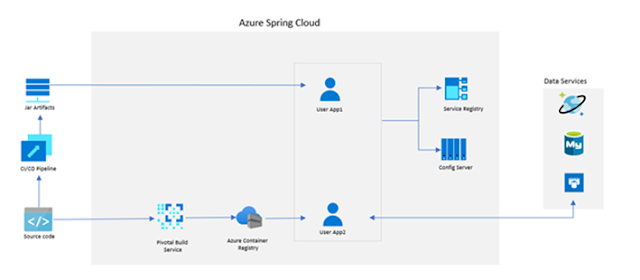
With a few clicks, you can provision an Azure Spring Cloud instance. After configuring a couple dependencies in your pom file, your Spring Cloud app is automatically wired up with Spring Cloud Config Server and Service Registry. Furthermore, you can deploy and scale Spring Boot applications in seconds.
Azure Tutorial and Material, Azure Learning, Azure Study Materials, Azure Guides, Azure Certifications, Azure Online Exam

To accelerate your development experience, we provide support for the Azure Spring Cloud Maven plugin and VS Code extensions that optimize Spring development. In other words, you can use the tools that you already know and love.

Ease of monitoring


With out-of-the-box support for aggregating logs, metrics, and distributed app traces into Azure Monitor, you can easily visualize how your applications are performing, detect and diagnose issues across microservice applications and their dependencies, drill into monitoring data for troubleshooting and gain better understanding of what end-users do with your apps.

Azure Tutorial and Material, Azure Learning, Azure Study Materials, Azure Guides, Azure Certifications, Azure Online Exam

Open source innovation with Spring integrations


Azure Spring Cloud sets up the compute foundation for cloud-native Spring applications. From there, Azure Spring Cloud makes it simple to connect to data services such as Azure SQL Database, MySQL, PostgreSQL, or Cosmos DB to enable enterprise grade end-user authentication and authorization using Azure Active Directory, to bind cloud streams with Service Bus or Event Hubs, and to load and manage secrets with Azure Key Vault.

Sign up for Azure Spring Cloud


Both Pivotal and Microsoft are looking forward to hearing feedback on the new Azure Spring Cloud from our joint customers.

The service will be available in public preview, for all customers, before end of the calendar year.

Tuesday, 8 October 2019

Azure Data Factory Mapping Data Flows are now generally available

In today’s data-driven world, big data processing is a critical task for every organization. To unlock transformational insights and embrace a data-driven culture, companies need tools to help them easily integrate and transform data at scale, without requiring specialized skills.

Today we’re announcing the general availability of the Mapping Data Flows feature of Azure Data Factory (ADF), our productive and trusted hybrid integration service. Data Factory now empowers users with a code-free, serverless environment that simplifies ETL in the cloud and scales to any data size, no infrastructure management required.

Built to handle all the complexities and scale challenges of big data integration, Mapping Data Flows allow users to quickly transform data at scale. Build resilient data pipelines in an accessible visual environment with our browser-based designer and let ADF handle the complexities of Spark execution.

Mapping Data Flows simplifies data processing, with built-in capabilities to handle unpredictable data schemas and to maintain resilience to changing input data. With Mapping Data Flows, customers like Nielsen are empowering their employees to turn data into insights, regardless of data complexity or the coding skills of their teams.

"Mapping Data Flows have been instrumental in enabling Nielsen's analytics teams to perform data cleansing and preparation in a user-friendly and code-free environment, and allow us to deliver insights to our clients in a faster and more automated way."

Azure Data Factory, Azure Learning, Azure Certifications, Azure Guides, Azure Study Materials

Accelerate time to insights by focusing on building your business logic without worrying about managing and maintaining server clusters or writing code to build pipelines. Easily perform ETL tasks like loading fact tables, maintaining slowly changing dimensions, aggregating semi-structured big data, matching data using fuzzy matching, and preparing data for modeling. With our intuitive visual interface, design your data transformation logic as easy-to-read graphs, and build libraries of transformation routines to easily turn raw data into business insights.

Work the way you want – code-first, or entirely code-free with Mapping Data Flows. Use built-in transformations to perform common actions like joining, aggregating, pivoting, and sorting. Customize these transformations with the expression builder, which includes auto-complete and comprehensive online help.

As you build your logical graphs, validate in real-time using ADF’s live data preview capability. Features like null counts, value distributions, and standard deviation provide immediate insights into your data.

Azure Data Factory, Azure Learning, Azure Certifications, Azure Guides, Azure Study Materials

Finally, build pipelines and debug your new ETL process end-to-end using the drag and drop pipeline builder with interactive debugging.

Azure Data Factory, Azure Learning, Azure Certifications, Azure Guides, Azure Study Materials

Build schedules for your pipelines and monitor your data flow executions from the ADF monitoring portal. Easily manage data availability SLAs with ADF’s rich availability monitoring and alerts, and leverage built-in CI/CD capabilities to save and manage your flows in a managed DataOps environment. And establish alerts and view execution plans to validate that your logic is performing as planned as you tune your data flows.

Mapping Data Flows is a game-changer for any organization looking to make data integration and transformation faster, easier, and accessible to everyone.

Saturday, 5 October 2019

Reduce disaster recovery time with Azure Site Recovery

Companies and cloud solutions teams by and large understand the need for a disaster recovery solution. One of the first steps while defining and choosing a disaster recovery plan is to perform a business impact analysis. This process helps in identifying applications that support critical business processes, the impact to the business in case of an outage, and guides in developing the right disaster recovery strategy for your business. Once you perform the analysis and identify critical applications, the next step is to chart down your disaster recovery strategy. This usually translates into:

1. Identifying the right employees or admins who will handle the disaster recovery segment
2. Setting targets for recover time objectives (RTOs) and recovery point objectives (RPOs)
3. Identifying the right product or service based on the needs
4. Identifying all the required software and hardware resources needed
5. Frequently testing the disaster recovery strategy
6. Making continuous improvements to improve the RPO and RTO, identifying and rectifying failure points if any

Configuring disaster recovery of Azure Virtual Machines using Azure Site Recovery


With the best in class RTO and RPO, Azure Site Recovery is one of the leaders in the space of disaster recovery. Being a first-class solution in Azure also gives the service, the edge to enable, test, and perform disaster recovery for customers in just a few clicks. One of the key differentiators while choosing a disaster recovery solution is the availability of integrations with additional resources to achieve parity between source and target. This essentially also reduces the RTO as it reduces the number of manual steps required once the virtual machine is brought up online in the target. The failure points are also minimized with this.

Let’s take a look at a common architecture model.

Azure Site Recovery, Azure Certifications, Azure Learning, Azure Tutorial and Materials, Azure Certifications

As a disaster recovery administrator, there are multiple components that you would need to handle to ensure that a target disaster recovery site is activated with similar configurations in the event of a disaster. Other than the virtual machines, it also includes the internal load balancers, the network security groups, and the public IPs that are used to access the virtual machines from outside of Azure. With Azure Site Recovery, while configuring for disaster recovery for your virtual machines, you can also provide the input for corresponding network resources in the target, which will be honored at the time of failover. This takes away the complexities of having to deal with scripts or manual steps and reduces the RTO significantly. The service is also intelligent enough to allow selection of only those target resources that comply with the target virtual machine that will be created, thereby reducing the points of failover.

Azure Site Recovery, Azure Certifications, Azure Learning, Azure Tutorial and Materials, Azure Certifications

Azure natively provides you the high availability and reliability for your mission-critical workloads, and you can choose to improve your protection and meet compliance requirements using the disaster recovery provided by Azure Site Recovery.

Thursday, 3 October 2019

SAP on Azure Architecture - Designing for performance and scalability

This is the second in a four-part blog series on designing a SAP on Azure Architecture. In the first part of our blog series we have covered the topic of designing for security. Robust SAP on Azure Architectures are built on the pillars of security, performance and scalability, availability and recoverability, and efficiency and operations. This blog will focus on designing for performance and scalability.

Microsoft support in network and storage for SAP


SAP on Azure Architecture, Azure Learning, Azure Tutorials and Materials, Azure Guides, Azure Certifications
Microsoft Azure is the eminent public cloud for running SAP applications. Mission critical SAP applications run reliably on Azure, which is a hyperscale, enterprise proven platform offering scale, agility, and cost savings for your SAP estate.

With the largest portfolio of SAP HANA certified IaaS cloud offerings customers can run their SAP HANA Production scale-up applications on certified virtual machines ranging from 192GB to 6TB of memory. Additionally, for SAP HANA scale-out applications such as BW on HANA and BW/4HANA, Azure supports virtual machines of 2TB memory and up to 16 nodes, for a total of up to 32TB. For customers that require extreme scale today, Azure offers bare-metal HANA large instances for SAP HANA scale-up to 20TB (24TB with TDIv5) and SAP HANA scale-out to 60TB (120TB with TDIv5).

Our customers such as CONA Services are running some of the largest SAP HANA workloads of any public cloud with a 28TB SAP HANA scale out implementation.

Designing for performance


Performance is a key driver for digitizing business processes and accelerating digital transformation. Production SAP applications such as SAP ERP or S/4HANA need to be performant to maximize efficiency and ensure a positive end-user experience. As such, it is essential to perform a detailed sizing exercise on compute, storage and network for your SAP applications on Azure.

Designing compute for performance


In general, there are two ways to determine the proper size of SAP systems to be implemented in Azure, by using reference sizing or through the SAP Quick Sizer.

For existing on-premises systems, you should reference system configuration and resource utilization data. The system utilization information is collected by the SAP OS Collector and can be reported via SAP transaction OS07N as well as the EarlyWatch Alert. Similar information can be retrieved by leveraging any system performance and statistics gathering tools. For new systems, you should use SAP quick sizer.

Within the links below you can also attain the network and storage throughput per Azure Virtual Machines type:

◈ Sizes for Windows Virtual Machines in Azure
◈ Sizes for Linux Virtual Machines in Azure

Designing highly performant storage


In addition to selecting an appropriate database virtual machine based on the SAPS and memory requirements, it is important to ensure that the storage configuration is designed to meet the IOPS and throughput requirements of the SAP database. Be mindful, that the chosen virtual machine has the capability to drive IOPS and throughput requirements. Azure premium managed disks can be striped to aggregate IOPS and throughput values, for example 5 x P30 disks would offer 25K IOPS and 1000 MB/s throughput.

In the case of SAP HANA databases, we have published a storage configuration guideline covering production scenarios and also a cost-conscious non-production variant. Following our recommendation for production will ensure that the storage is configured to successfully pass all SAP HCMT KPIs, it is imperative to enable write accelerator on the disks associated with the /hana/log volume as this facilitates sub millisecond writes latency for 4KB and 16KB blocks sizes.

SAP on Azure Architecture, Azure Learning, Azure Tutorials and Materials, Azure Guides, Azure Certifications
Ultra Disks is designed to deliver consistent performance and low latency for I/O-intensive workloads such as SAP HANA and any database (SQL, Oracle, etc.) With ultra disk you can reach maximum virtual machine I/O limits with a single Ultra DISKS, without having to stripe multiple disks as is required with premium disks.

At September 2019, Azure Ultra Disk Storage is generally available in East US 2, South East Asia, North Europe regions. and supported on DSv3 and ESv3 VM types. Refer to the FAQ for the latest on supported VM sizes for both Windows and Linux OS hosts. This video demonstrates the leading performance of Ultra Disk Storage.

Designing network for performance


As the Azure footprint grows, a single availability zone may span multiple physical data centers, which can result in network latency impacting your SAP application performance. A proximity placement group (PPG) is a logical grouping to ensure that Azure compute resources are physically located close to each and achieving the lowest possible network latency i.e. co-location of your SAP Application and Database VMs.

We recommend you consider PPGs within your SAP deployment architecture and that you enable Accelerated Networking on your SAP Application and Database VMs. Accelerated Networking enables single root I/O virtualization (SR-IOV) to your virtual machine which improves networking performance, bypassing the host from the data-path. SAP application server to database server latency can be tested with ABAPMeter report /SSA/CAT.

ExpressRoute Global Reach allows you to link ExpressRoute circuits from on-premise to Azure in different regions together to make a private network between your on-premises networks. Global Reach can be used for your SAP HANA Large Instance deployment to enable direct access from on-premise to your HANA Large Instance units deployed in different regions. Additionally, GlobalReach can enable direct communication between your HANA Large Instance units deployed in different regions

Designing for scalability


With Azure Mv2 VMs, you can scale up to 208 vCPUs/6TB now and 12 TB shortly. For databases that require more than 12 TB, we offer SAP HANA Large Instances (HLI), purpose-built bare metal offering that are dedicated to you. The server hardware is embedded in larger stamps that contains HANA TDI certified compute, network and storage infrastructure, in various sizes from 36 Intel CPU cores/768 GB of memory up to a maximum size of 480 s CPU cores and 24 TB of memory.

Azure global regions at HyperScale


Azure has more global regions than any other cloud provider, offering the scale needed to bring applications closer to users around the world, preserving data residency, and offering comprehensive compliance and resiliency options for customers.

Customers like the Carlsberg Group, transformed IT into a platform for innovation through a migration to Azure centered on its essential SAP applications. The Carlsberg migration to Azure encompassed 700 servers and 350 applications—including the essential SAP applications—involving 1.6 petabytes of data, including 8 terabytes for the main SAP database.

Within this blog we have touched upon several topics relating to designing highly performant and scalable architectures for SAP on Azure.

As customers embark on their SAP to Azure journey, in order to methodically deploy highly performant, and scalable architectures, during various phases of the deployment, it is recommended to deep dive into , the SAP on Azure documentation to deepen their understanding of using Azure for hosting and running their SAP applications. The SAP workload on Azure planning and deployment checklist can be used as a compass to navigate through the various phases of a customer’s SAP Greenfield deployment or on-premises to Azure migration project.

Wednesday, 2 October 2019

Hot patching SQL Server Engine in Azure SQL Database

In the world of cloud database services, few things are more important to customers than having uninterrupted access to their data. In industries like online gaming and financial services that experience high transaction rates, even the smallest interruptions can potentially impact the end-user’s experience. Azure SQL Database is evergreen, meaning that it always has the latest version of the SQL Engine, but maintaining this evergreen state requires periodic updates to the service that can take the database offline for a second. For this reason, our engineering team is continuously working on innovative technology improvements that reduce workload interruption.

Today’s post, in collaboration with the Visual C++ Compiler team, covers how we patch SQL Server Engine without impacting workload at all.

Azure SQL Database, Azure Learning, Azure Certifications, Azure Tutorials and Materials, Azure Guides

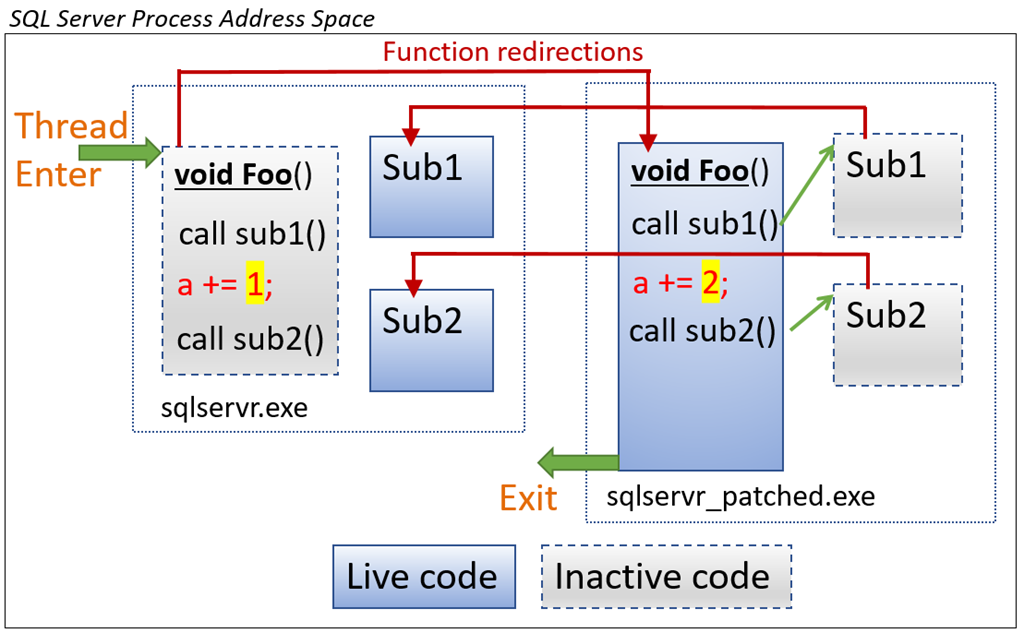
Figure 1 – This is what hot patching looks like under the covers.

The challenge


The SQL Engine we are running in Azure SQL Database is the very latest version of the same engine customers run on their own servers, except we manage and update it. To update SQL Server or the underlying infrastructure (i.e., Azure Service Fabric or the operating system), we must stop the SQL Server process. If that process hosts the primary database replica, we move the replica to another machine, requiring a failover.

During a failover, the database may be offline for a second and still meet our 99.995 percent SLA. However, failover of the primary replica impacts workload because it aborts in-flight queries and transactions. We built features such as resumable index (re)build and accelerated database recovery to address these situations, but not all running operations are automatically resumable. It may be expensive to restart complex queries or transactions that were aborted due to an upgrade. So even though failovers are quick, we want to avoid them.

SQL Server and the overall Azure platform invests significant engineering effort into platform availability and reliability. In SQL database, we have multiple replicas of every database. During upgrade, we ensure that hot standbys are available to take over immediately.

We’ve worked closely with the broader Azure and Service Fabric teams to minimize the number of failovers. When we first decide to fail over a database for upgrade, we apply updates to all components in the stack at the same time: OS, Service Fabric, and SQL Server. We have automatic scheduling that avoids deploying during an Azure region’s core business hours. Just before failover, we attempt to drain active transactions to avoid aborting them. We even utilize database workload patterns to perform failover at the best time for the workload.

Even with all that, we don’t get away from the fact that to update SQL Engine to a new version, we must restart the process and failover the database’s primary replica at least once. Or do we?

Hot patching and results


Hot patching is modifying in-memory code in a running process without restarting the process. In our case, it gives us the capability to modify C++ code in SQL Engine without restarting sqlservr.exe. Since we don’t restart, we don’t failover the primary replica and interrupt the workload. We don't even need to pause SQL Server activity while we patch. Hot patching is unnoticed by the user workload, other than the patch payload, of course!

Hot patching does not replace traditional, restarting upgrades – it complements them. Hot patching currently has limitations that make it unsuitable when there are a large number of changes, such as when a major new feature is introduced. But it is perfect for smaller, targeted changes. More than 80 percent of typical SQL bug fixes are hot patchable. Benefits of hot patching include:

◈ Reduced workload disruption - No restart means no database failover and no workload impact.

◈ Faster bug fixes - Previously, we weighed the urgency of a bug fix vs. impact on customer workloads from deploying it. Sometimes we would deem a bug fix not important enough for worldwide rollout because of the workload impact. With hot patching, we can now deploy bug fixes worldwide right away.

◈ Features available sooner - Even with the 500,000+ functional tests that we run several times per day and thorough testing of every new feature, sometimes we discover problems after a new feature has been made available to customers. In such cases, we may have to disable the feature or delay go-live until the next scheduled full upgrade. With hot patching, we can fix the problem and make the feature available sooner.

We did the first hot patch in production in 2018. Since then, we have hot patched millions of SQL Servers every month. Hot patching increases SQL Database ship velocity by 50 percent, while at the same time improving availability.

Tuesday, 1 October 2019

Built-in Jupyter notebooks in Azure Cosmos DB are now available

Earlier this year, we announced a preview of built-in Jupyter notebooks for Azure Cosmos DB. These notebooks, running inside Azure Cosmos DB, are now available.

Azure Cosmos DB, Azure Learning, Azure Tutorials and Materials, Azure Guides, Azure Study Materials

Cosmic notebooks are available for all data models and APIs including Cassandra, MongoDB, SQL (Core), Gremlin, and Spark to enhance the developer experience in Azure Cosmos DB. These notebooks are directly integrated into the Azure Portal and your Cosmos accounts, making them convenient and easy to use. Developers, data scientists, engineers and analysts can use the familiar Jupyter notebooks experience to:

◈ Interactively run queries

◈ Explore and analyze data

◈ Visualize data

◈ Build, train, and run machine learning and AI models

In this blog post, we’ll explore how notebooks make it easy for you to work with and visualize your Azure Cosmos DB data.

Easily query your data


With notebooks, we’ve included built-in commands to make it easy to query your data for ad-hoc or exploratory analysis. From the Portal, you can use the %%sql magic command to run a SQL query against any container in your account, no configuration needed. The results are returned immediately in the notebook.

Azure Cosmos DB, Azure Learning, Azure Tutorials and Materials, Azure Guides, Azure Study Materials

Improved developer productivity


We’ve also bundled in version 4 of our Azure Cosmos DB Python SDK for SQL API, which has our latest performance and usability improvements. The SDK can be used directly from notebooks without having to install any packages. You can perform any SDK operation including creating new databases, containers, importing data, and more.

Azure Cosmos DB, Azure Learning, Azure Tutorials and Materials, Azure Guides, Azure Study Materials

Visualize your data


Azure Cosmos DB notebooks comes with a built-in set of packages, including Pandas, a popular Python data analysis library, Matplotlib, a Python plotting library, and more. You can customize your environment by installing any package you need.

Azure Cosmos DB, Azure Learning, Azure Tutorials and Materials, Azure Guides, Azure Study Materials

For example, to build interactive visualizations, we can install bokeh and use it to build an interactive chart of our data.

Azure Cosmos DB, Azure Learning, Azure Tutorials and Materials, Azure Guides, Azure Study Materials

Users with geospatial data in Azure Cosmos DB can also use the built-in GeoPandas library, along with their visualization library of choice to more easily visualize their data.

Azure Cosmos DB, Azure Learning, Azure Tutorials and Materials, Azure Guides, Azure Study Materials

Getting started


1. Follow our documentation to create a new Cosmos account with notebooks enabled or enable notebooks on an existing account.

Azure Cosmos DB, Azure Learning, Azure Tutorials and Materials, Azure Guides, Azure Study Materials

2. Start with one of the notebooks included in the sample gallery in Azure Cosmos Explorer or Data Explorer.

Azure Cosmos DB, Azure Learning, Azure Tutorials and Materials, Azure Guides, Azure Study Materials

3. Share your favorite notebooks with the community by sending them to the Azure Cosmos DB notebooks GitHub repo.

4. Tag your notebooks with #CosmosDB, #CosmicNotebooks, #PoweredByCosmos on social media. We will feature the best and most popular Cosmic notebooks globally!

Saturday, 28 September 2019

Azure Sentinel general availability: A modern SIEM reimagined in the cloud

This marks an important milestone in our journey to redefine Security Information and Event Management (SIEM) for the cloud era. With Azure Sentinel, enterprises worldwide can now keep pace with the exponential growth in security data, improve security outcomes without adding analyst resources, and reduce hardware and operational costs.

With the help of customers and partners, including feedback from over 12,000 trials during the preview, we have designed Azure Sentinel to bring together the power of Azure and AI to enable Security Operations Centers to achieve more. There are lots of new capabilities coming online this week. I’ll walk you through several of them here.

Collect and analyze nearly limitless volume of security data


With Azure Sentinel, we are on a mission to improve security for the whole enterprise. Many Microsoft and non-Microsoft data sources are built right in and can be enabled in a single click. New connectors for Microsoft services like Cloud App Security and Information Protection join a growing list of third-party connectors to make it easier than ever to ingest and analyze data from across your digital estate.

Workbooks offer rich visualization options for gaining insights into your data. Use or modify an existing workbook or create your own.

Azure Study Materials, Azure Tutorials and Materials, Azure Learning, Azure Online Exam

Apply analytics, including Machine Learning, to detect threats


You can now choose from more than 100 built-in alert rules or use the new alert wizard to create your own. Alerts can be triggered by a single event or based on a threshold, or by correlating different datasets (e.g., events that match threat indicators) or by using built-in machine learning algorithms.

Azure Study Materials, Azure Tutorials and Materials, Azure Learning, Azure Online Exam

We’re previewing two new Machine Learning approaches that offer customers the benefits of AI without the complexity. First, we apply proven off-the-shelf Machine Learning models for identifying suspicious logins across Microsoft identity services to discover malicious SSH accesses. By using transferred learning from existing Machine Learning models, Azure Sentinel can detect anomalies from a single dataset with accuracy. In addition, we use a Machine Learning technique called fusion to connect data from multiple sources, like Azure AD anomalous logins and suspicious Office 365 activities, to detect 35 different threats that span different points on the kill chain.

Expedite threat hunting, incident investigation, and response


Proactive threat hunting is a critical yet time-consuming task for Security Operations Centers. Azure Sentinel makes hunting easier with a rich hunting interface that features a growing collection of hunting queries, exploratory queries, and python libraries for use in Jupyter Notebooks. Use these to identify events of interest and bookmark them for later reference.

Azure Study Materials, Azure Tutorials and Materials, Azure Learning, Azure Online Exam

Incidents (formerly cases) contain one or more alerts that require further investigation. Incidents now support tagging, comments, and assignments. A new rules wizard allows you to decide which Microsoft alerts trigger the creation of incidents.

Azure Study Materials, Azure Tutorials and Materials, Azure Learning, Azure Online Exam

Using the new investigation graph preview, you can visualize and traverse the connections between entities like users, assets, applications, or URLs and related activities like logins, data transfers, or application usage to rapidly understand the scope and impact of an incident.

Azure Study Materials, Azure Tutorials and Materials, Azure Learning, Azure Online Exam

New actions and playbooks simplify the process of incident automation and remediation using Azure Logic Apps. Send an email to validate a user action, enrich an incident with geolocation data, block a suspicious user, and isolate a Windows machine.

Azure Study Materials, Azure Tutorials and Materials, Azure Learning, Azure Online Exam

Build on the expertise of Microsoft and community members


The Azure Sentinel GitHub repository has grown to over 400 detection, exploratory, and hunting queries, plus Azure Notebooks samples and related Python libraries, playbooks samples, and parsers. The bulk of these were developed by our MSTIC security researchers based on their vast global security experience and threat intelligence.

Azure Study Materials, Azure Tutorials and Materials, Azure Learning, Azure Online Exam

Support managed Security Services Providers and complex customer instances


Azure Sentinel now works with Azure Lighthouse, empowering customers and managed security services providers (MSSPs) to view Azure Sentinel for multiple tenants without the need to navigate between tenants. We have worked closely with our partners to jointly develop a solution that addresses their requirements for a modern SIEM. 

DXC Technology, one of the largest global MSSPs is a great example of this design partnership:

“Through our strategic partnership with Microsoft, and as a member of the Microsoft Security Partner Advisory Council, DXC will integrate and deploy Azure Sentinel into the cyber defense solutions and intelligent security operations we deliver to our clients.” said Mark Hughes, senior vice president and general manager, Security, DXC. “Our integrated solution leverages the cloud native capabilities and assets of Azure Sentinel to orchestrate and automate large volumes of security incidents, enabling our security experts to focus on the forensic investigation of high priority incidents and threats.”