Saturday, 9 November 2019

10 user experience updates to the Azure portal

We’re constantly working to improve your user experience in the Azure portal. Our goal is to offer you a productive and easy-to-use single-pane-of glass where you can build, manage, and monitor your Azure services, applications, and infrastructure. In this post, I’d like to share the highlights of our latest experience improvements, including:

◉ Improved portal home experience: increased focus and clarity to bring services and instances that are relevant to you front and center.

◉ New service cards: new service hovercards that present contextual information relevant to each service.

◉ Enhanced service browsing experience: simplified offering navigation by progressively disclosing services.

◉ Extended Microsoft Learn integration: contextual integration of free training in key parts of the experience.

◉ Improved instance browsing experience: updated experience for more than 70 services with improved performance, better filtering and sorting options, grouping, and to allow exporting your resource lists to a CSV file.

◉ Improved Azure Resource Graph experience: re-use and share your queries via Resource Graph Saved Queries.

◉ Automatic refresh in Azure Dashboard: set automatic refresh intervals for your dashboard.
Improved service icons: New icons re-designed for better visual consistency and reduced distractions.

◉ Simplified settings panel: better separation between general settings and localization.

◉ New landing page for Azure Mobile application: added a new landing page that brings important information.

Improved portal home experience


We have improved the Azure portal home page to increase focus and clarity and to make things that are important to you easily accessible.


Figure 1 – simplified Azure portal home.

We’ve organized these into differentiated sections for ease of use:

◉ Services and resources (dynamic): the top section has dynamic content that gets adjusted based on your usage without requiring any additional customizations. The more you use the portal, the more it adjusts to you!

◉ Common entry points and useful info (static): the lower section contains static content with common entry points to provide quick access to main navigation flows that are always there, enabling users to develop muscle memory for repeated usage.


Figure 2 – sections of the home page.

The Azure services section provides quick access to the Azure Marketplace, a list of eight of the most-used Azure services, and access to browse the entire Azure offering. The list of services is populated by default with some of our most popular services and gets automatically updated with your most recently used services. The Recent resources section shows a list of your recently used resources. Both lists get updated as you use the product. Our goal is to bring relevant services and instances front and center without requiring customization. The more you use the product, the more useful it gets for you! The rest of the sections are static, providing important points of reference for navigation and access to key Azure products, services, content, and training.

The overall home experience has been streamlined by hiding the left navigation bar under an always present menu button in the top navigation bar:


Figure 3 – The menu button

The main motivation for this change is improving focus, reducing distractions and redundancy, and to enable more immersive experiences. Before this change, when you were immersed in a workload in the portal you always had two vertical menus side by side, the left navigation bar and the menu for the experience. The left navigation bar is still available with all its functionality, including favorites, through the menu button at the top bar, always only one click away.


Figure 4 – The new experience allows for more focus.

If you prefer the old visual, having the left navigation always present, you can always bring it back using the Portal Settings panel.

New service cards


We have added hover cards associated with each service that show contextual information and provide direct access to some of the most common workflows. These hover cards are displayed after the cursor is placed for about a second on a service tile. We used the same interaction pattern and design than Outlook uses for identities (users and groups) that are well established with our customer base.


Figure 5 – hover card for virtual machines.

The cards expose relevant contextual information and actions for a service, including:

◉ Create an instance: this provides quick access to a very common flow, short circuiting going though intermediate screens to launch the creation.

◉ Browse instances: browse the full list of instances of that service.

◉ Recently used: the last three recently used instances of that service, providing direct contextual access.

◉ Microsoft Learn content: specialized free training curated for that service. The curation has been done by the Microsoft Learn team based on usage data and customer feedback.

◉ Links to documents: key documents to learn or use the product (quick starts, technical docs, pricing.)

◉ Free offerings available: if the service has free options available, surface them.


Figure 6 – Anatomy of the card

The cards help improve on multiple aspects including more efficient customer journeys, better discoverability, and contextualized information, all presented in the context of one service. The card also helps customers of all levels of expertise: While new customers can benefit from Microsoft Learn content and free offerings advanced customers have a faster path the create instances or access their recently used instances of that service.

The card does not only show on the home page. It is available in every place we display a service like the left navigation bar, the all services list, as well as the Azure home page.

Extended Microsoft Learn integration


Microsoft Learn provides official high-quality free learning material for Microsoft technologies. In this portal update we have introduced several contextual integration points:

◉ Service browsing: contextual integration at the service category level (compute, storage, web, etc.)

◉ Service cards: contextual integration at the service level (virtual machine, Cosmos DB, etc.) available in Azure home page, left navigation, and service browsing experience.

◉ Azure QuickStart center: integration of most popular trainings in the landing page

◉ Azure home: direct access to the main Microsoft Learn entry point

Moving forward, the Azure portal and Microsoft Learn integration will continue to grow, to help you improve your Azure journey!

Enhanced service browsing experience


Azure is big and gets bigger every day. Navigating through Azure’s offering in the portal can be intimidating and challenging due to the vast set of available services. To make this easier, we’ve made the following updates:

◉ Improved global search: improved performance and functionality when searching for services in the global search box in the top bar of the portal. This improved search is also always present and available in your portal session.

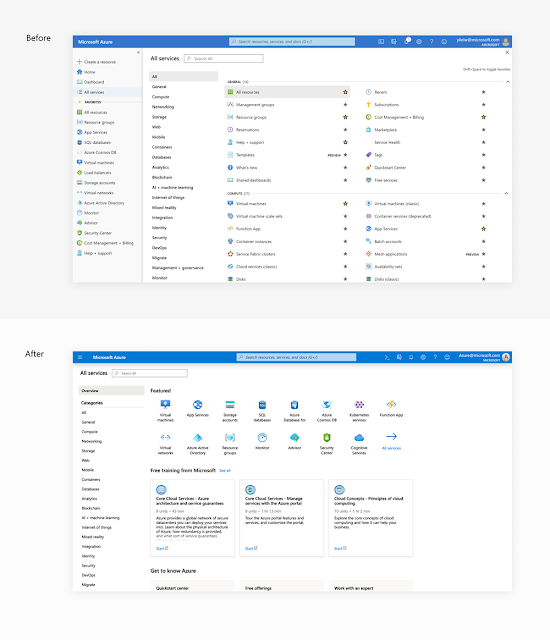
◉ Improved service browsing experience: improved the All services experience adding an overview category supporting progressive disclosure of services, reducing visual clutter, and adding contextual Microsoft Learn content.

For service browsing, we introduced an overview category with the goal of progressively disclosing information.

Azure Study Materials, Azure Tutorial and Material, Azure Online Exam

Figure 7 – progressive disclosure of information and better discoverability

The new Overview category presents a list of 15 of Azure’s most popular services, curated Microsoft Learn training content, and access to key functionality like Azure QuickStart center and free offerings.

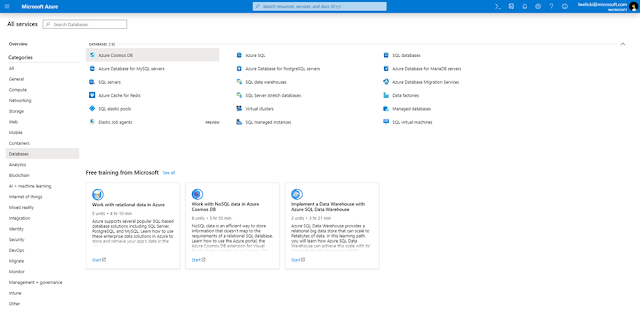
If the service that you are looking for is not available on this screen you can use the service search functionality, at the top left, or you can browse through the different categories available, at the left of the screen. When displaying a category, we are now surfacing contextual and free Microsoft Learn content to assist you in your Azure learning journey.

Azure Study Materials, Azure Tutorial and Material, Azure Online Exam

Figure 8 – service category with contextual and free Microsoft Learn integration. The training offered in this category is contextual and related to databases in this case.

Improved instance browsing experience


The resource instances browsing experience, going through the list of instances and services is one of the most common entry points for customers using the portal. We are introducing an updated experience that leverages the power of Azure Resource Graph to provide improved performance, better filtering and sorting options, better grouping, and allows exporting your resource lists to a CSV file.

Azure Study Materials, Azure Tutorial and Material, Azure Online Exam

Figure 9 – improved resource browsing experience

As of this month, this experience will be available for more than 70 services and over the next few months it will be rolled out across the entire platform.

Improved Azure Resource Graph experience


The Azure Resource Graph Explorer available in the portal enables you to write queries and create dashboards using the full power of Azure Resource Graph. Here is a video that shows how to use Resource Graph to write queries and create an inventory dashboard for your Azure subscriptions.

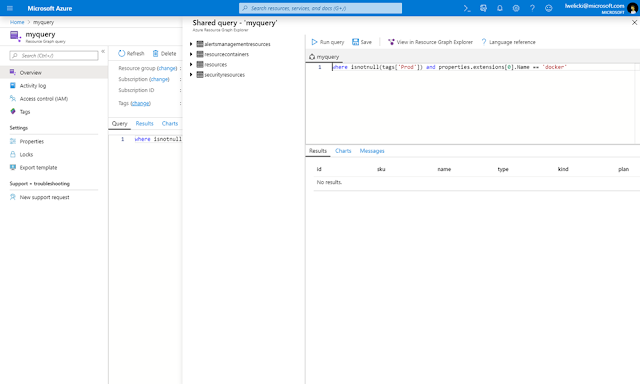
We have now introduced Azure Resource Graph Queries in the Azure portal as a new top-level resource. Basically, you can save any Kusto Query Language (KQL) query as a resource in your Azure subscription. Like any other resource you can share it with colleagues, set permissions, check activity logs, and tag it.

Azure Study Materials, Azure Tutorial and Material, Azure Online Exam

Figure 10 – Azure Graph Queries

Automatic refresh in Azure Dashboards


We have added automatic refresh to our Azure dashboards, allowing to automatically refresh your dashboards over several time intervals.

Azure Study Materials, Azure Tutorial and Material, Azure Online Exam

Figure 11 – Configuring automatic refresh

Improved service icons


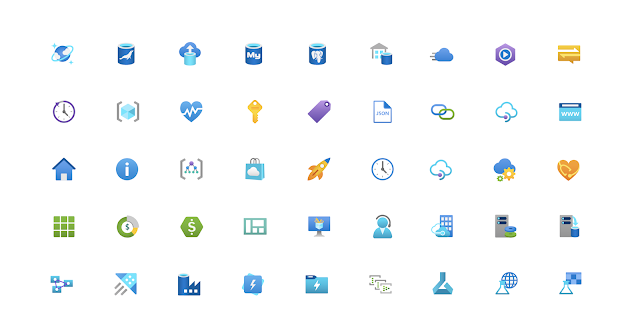
We've updated all of the service icons in the Azure portal with a more consistent and modern look. All these icons have been designed together as a family to provide better visual consistency and reduce distractions.

Azure Study Materials, Azure Tutorial and Material, Azure Online Exam

Figure 12– Improved icons

Simplified settings panel


The settings panel has been simplified. The main reason for this change is that many customers could not find the “Language & region” settings in the previous design and were asking us for capabilities that were already available in the portal. This new design separates the general and the Language & region settings, the portal supports 18 languages and dozens of regional formats, which was a common source of confusion for many of our users.

Azure Study Materials, Azure Tutorial and Material, Azure Online Exam

Figure 13 – separation of general and localization settings

New landing page for Azure Mobile application


The Azure mobile app enables you to stay connected, informed, and in control of your Azure assets while on the go. The app is available for iOS and Android devices.

We have added a brand-new landing screen to the Azure Mobile App that brings all important information together as soon as you open the application. The new Home experience is composed of multiple cards with support for:

◉ Azure services
◉ Recent resources
◉ Latest alerts
◉ Service Health
◉ Resource groups
◉ Favorites

The home view is fully customizable, you can decide what sections to show and in which order to show them.

Azure Study Materials, Azure Tutorial and Material, Azure Online Exam

Figure 14 – new home in the Azure Mobile App

If you have not tried the Azure Mobile app yet, make sure to try it out.

Thursday, 7 November 2019

New Azure Security Center and Azure platform security capabilities

At Microsoft Ignite we're sharing the many new capabilities our teams have built to improve security with Azure Security Center and the Azure Platform. We have a long list of new innovations, and this blog provides our general direction and summarizes some of our favorite new features.

Turn on the protection you need with Azure Security Center


Azure Security Center provides unified infrastructure security management that strengthens security posture and provides advanced threat protection across your workloads running in Azure, on-premises, and in other clouds. It enables continuous assessment of security posture, protects against cyberattacks using Microsoft’s vast threat intelligence, and helps implement security faster with integrated controls.

Azure Security Center, Azure Platform Security, Azure Tutorial and Material, Azure Study Materials

With Security Center, you can monitor the security of machines, networks, and Azure services using hundreds of built-in security assessments or create your own in a central dashboard.

Extending Azure Security Center’s coverage with a platform for community and partners


A constantly evolving threat landscape requires new approaches to protection, cloud security posture, enterprise-scale deployment, and automation. Through partnering with members of the Microsoft Intelligent Security Association, Microsoft is able to leverage a vast knowledge pool to defend against a world of increasing cybersecurity threats.

Leverage all of Security Center's capabilities against built-in and partner recommendations. Azure Security Center's simple onboarding flow connects existing solutions, including Check Point CloudGuard, CyberArk, and Tenable, enabling you to view all security posture recommendations in a single place. Run unified reports and export Security Center’s recommendations for connected partner products.

We invite users to contribute and help improve policies and configurations used in Security Center through the Azure Security Center community menu for additional scripts, content, and community resources.

Azure Security Center, Azure Platform Security, Azure Tutorial and Material, Azure Study Materials

Enhanced threat protection for cloud resources

Threat protection detects and prevents attacks across a wide variety of services, from infrastructure as a service (IaaS) layer to platform as a service (PaaS) resources in Azure, including Azure IoT and Azure App Service, and on-premises virtual machines.

Stream threat detection findings to Azure Sentinel for investigation, threat hunting, correlation with signals from other security solutions, and security operations center (SOC) level management.

The latest threat protection capabilities include:

◉ Threat protection and vulnerability assessment support for SQL Server hosted on an Azure Virtual Machine.

◉ Vulnerability assessment capabilities for VMs is part of our virtual machine protection offering (powered by Qualys) at no additional cost. Security Center collects the vulnerabilities and displays them as part of the secure score.

◉ Threat protection suite for containers focusing on Azure Kubernetes Service (AKS) includes scanning of container images for vulnerabilities, secure configuration of the AKS cluster, and threat detection on the Kubernetes runtime activities.

◉ Threat protection for Azure Key Vault is in preview in North America regions. This provides an additional layer of security intelligence that detects unusual and potentially harmful attempts to access or exploit your encryption keys, certificates, and secrets in Azure Key Vault.

◉ Threat protection for Azure Storage offers new detections powered by Microsoft Threat Intelligence for detecting malware uploads to Azure Storage using hash reputation analysis and suspicious access from an active Tor exit node (an anonymizing proxy.) You can now view detected malware across storage accounts using Azure Security Center.

Cloud security posture management enhancements

Misconfiguration is the most common cause of security breaches for cloud workloads. Security Center provides a bird’s eye security posture view across your Azure environment, enabling you to continuously monitor and improve your security posture using the Azure secure score. Security Center helps manage and enforce your security policies to identify and fix misconfigurations across different resources and maintain compliance.

New capabilities:

◉ Secure score simplified: Use the updated, percentage based secure score to get better visibility into the secure score controls and provide a more reliable method for calculating the score.

◉ Address misconfigurations faster with new quick-fix capabilities.

◉ Add custom assessments, created in Azure Policy, into the secure score and monitor their compliance state in Security Center.

◉ Automatically assess compliance state against a new set of regulatory standards, including NIST SP 800-53 R4, SWIFT CSP CSCF v2020, Canada Federal PBMM, and UK Official together with UK NHS.

Misconfigurations are the leading source of attacks and improving your secure score can make a remarkable difference in your overall security posture.

Implement security faster with Azure Security Center


To enable large organizations to leverage Security Center’s findings in enterprise-scale, Azure Security Center continues to provide clear APIs, automation, and management capabilities that can help customers connect Security Center to workflows, processes, and tools used across the organization.

A new capability in Security Center enables the creation of rich workflows using Azure Logic Apps and policies trigger based on a recommendation or alert. Configure a logic app to perform a custom action supported by the vast community of Logic App connectors, or use one of the templates provided, including to send an email or open a service ticket.

Security from the ground up


In addition to Azure Security Center updates, we have several additional enhancements for Azure platform security. To empower you to do more, we are continuously enhancing the platform services to improve existing offerings and address your feedback.

Here are some of the exciting updates coming to the platform. 

Extension of Customer Lockbox for Microsoft Azure beyond virtual machines

Customer Lockbox provides customers the capability to control Azure support engineers' access to workloads that contain customer data This expanded support now provides customers control over access to their data for a larger set of Azure offerings.

New services and scenarios, available in preview:

◉ Azure Storage
◉ Azure SQL Database
◉ Azure Data Explorer
◉ Memory dumps and managed disks for Azure Virtual Machines
◉ Transferring Azure subscriptions

Release of Microsoft Secure Code Analysis toolkit to help you build secure code

With the Microsoft Security Code Analysis extension, you can infuse security analysis tools including Credential Scanner, BinSkim, and others into your Azure DevOps continuous integration and delivery (CI/CD) pipelines. Increase developer productivity and simplify security through easily configurable build tasks that abstract away the complexities (installing, updating, maintaining, and running) from analysis tools without relinquishing control over them. 

This product is now available via Unified Support. Customers can sign up using their existing credit or paying the service fee.

Azure Disk Encryption in more places, and more services offering customer-managed keys

Azure Disk Encryption enables you to encrypt your Azure Virtual Machine disks with your keys safeguarded in Azure Key Vault. Previously this capability was available through PowerShell and CLI. We have now added this capability to the Azure portal, which makes it very easy to use. We have also added support for the latest versions of the common Linux distros on Azure, including Red Hat Enterprise Linux 7.6 and 7.7 as well as CentOS Linux 7.6 and 7.7.

Try it yourself using Quickstart for Windows or Quickstart for Linux now.

The following services recently announced preview for customer-managed keys for encryption at rest.

◉ Azure Event Hubs
◉ Azure Managed Disks
◉ Power BI

New Azure policies to manage certificates across your organization, currently in preview

Large organizations have thousands of certificates in key vaults distributed across thousands of applications and subscriptions. If you are responsible for security and compliance across the organization, you need a simple way to set rules across all these certificates, prove that those rules were followed, and flag violations. Azure policy helps with this. We have added new policies in preview for certificates in Azure Key Vault.

◉ Issuer Policy: Flag certificates that are (or are not) issued by a particular issuer.
◉ Key Type Policy: Flag certificates that are (or are not) protected by a RSA or ECC key pairs.
◉ Key Size Policy: Flag certificates that are (or are not protected) by a key of a certain size.
◉ Expiry Policy: Flag certificates that are (or are not) renewed within “X” number of days of their expiry date.
◉ Validity Lifespan Policy: Flag certificates that have (or do not have) Validity Lifespan that is less than, or more than, or equal to "X" number of years.

Azure Key Vault Virtual Machine extension now generally available

The Azure Key Vault Virtual Machine extension makes it easier for apps running on virtual machines to use certificates from a key vault, by abstracting the common tasks as well as best practices—authenticate, handle common network errors, cache, periodically refresh the certificate from the key vault, and bind the certificate for Transport Layer Security (TLS).

Free Azure managed certificates for your domains on Azure

We want to make sure there are no reasons not to use TLS in your Azure applications. Azure now provides TLS certificates at no cost to you for your custom domains hosted on the following services. Azure renews these certificates automatically.

◉ Azure CDN managed certificates (generally available.)
◉ Azure Front Door managed certificates (generally available.)
◉ Azure App Service managed certificates for both web apps and functions (currently in preview.)

We will expand this to other Azure PaaS services in the future.

Note that this is just one of your options. If you have a need to use certificates from a different certificate authority (CA), then you have the option to configure these Azure services to use a certificate you manage in your key vault.

Tuesday, 5 November 2019

Building retail solutions with Azure IoT Central

Azure IoT Central is an IoT app platform for solution builders that simplifies the challenges of building and deploying scalable and affordable enterprise grade IoT applications. Across the retail industry, the use of connected devices to deliver business performance continues to grow in popularity. New solutions are accelerating business model transformation by connecting manufacturers, supply chains, warehouses, and store shelves to owners, operators, and customers in exciting new ways. Today we’ll discuss our stance on IoT in the retail industry, as well as tell you about just a few of our partners building incredible solutions on Azure IoT Central.

Based on the recent IoT Signals report, our survey of over 3,000 enterprise decision makers across the world, the Retail industry has the highest adoption rate of IoT related solutions at 90 percent, which is higher than Manufacturing, Transportation, Healthcare, or Government. Right now, retail and wholesale companies see top use cases for IoT within their supply chains (64 percent) and inventory optimization (59 percent) and of course leaders across all industries have concerns about security. Yet, we know that retailers and companies along the value chain have a long way to go before reaping all the benefits that IoT will provide.

Updates to IoT Central


Today, we announced updates to Azure IoT Central to help solution builders move beyond proof of concept to building business-critical applications they can brand and sell directly or through Microsoft AppSource. IoT Central can help retail solution builders accelerate development, enabling them to get connected, stay connected and transform their business by managing IoT solutions that deliver IoT data and insights to business applications where decisions are made.

We are supporting retail specific solution builders with five IoT Central retail app templates for builders to brand, customize, and make their own apps using extensibility via APIs, data connectors to business applications, repeatability and manageability of their investment through multitenancy, and seamless device connectivity. Get started today with any app template for free and starter materials like a sample operator dashboard and simulated devices to show you what’s possible. In early 2020 updated pricing will help with predictability as you sell your solutions directly to customers or through Microsoft AppSource.

When you are ready to get to customizing and extending, take a look at our rich documentation set, which augments the journey with overviews, tutorials, how-to’s, and industry relevant concepts.

Microsoft Study Materials, Azure Guides, Azure Learning, Azure Tutorial and Material, Azure Certification

Figure 1, Your brand -- Your SaaS - Customize and extend one of these 5 retail app templates to make them your own

Innovative retail partners building their SaaS with IoT Central


Established industry leaders across the retail ecosystem are optimizing omnichannel solutions with IoT Central; delivering IoT insights and actions from the beginning of the supply chain through distribution, warehousing, and into the hands of consumers through storefront or delivery. Learn about what QuEST Global, C.H. Robinson, Dynamics 365 Connected Store, and Footmarks Inc. are doing today.

Digital distribution center solution from Lenovo


In July, Lenovo introduced Lenovo Digital Distribution Center (built with IoT Central) and discussed many of the challenges faced by distribution centers globally, including staffing surges during peak times, labor costs, space constraints, and overall productivity.

Microsoft Study Materials, Azure Guides, Azure Learning, Azure Tutorial and Material, Azure Certification

Figure 2, An illustration of the digital distribution workflow

Microsoft Study Materials, Azure Guides, Azure Learning, Azure Tutorial and Material, Azure Certification

Figure 3, Architecture diagram of Digital Distribution Center by Lenovo

Today we’ll introduce three more solution builders developing solutions across connected logistics, store analytics, and smart inventory management.

Connected logistics solutions from C.H. Robinson and QuEST Global


The challenges facing global logistics and fleet management continue to grow as more retailers move to just-in-time shipping and warehousing. With the holiday shopping (and shipping) season fast approaching, global shipping and freight transportation provider, C.H. Robinson, is putting IoT Central to work during its busiest time of the year. Intel intelligent gateways and IoT tags managed by IoT Central bring new data and insights into industry leading Navisphere Vision. Jordan Kass, President of TMC, a division of CH Robinson responsible for Navisphere told us; “Navisphere Vision provides global shippers supply chain visibility and a predictive analytics platform. To speed up our deployment, increase our capabilities, and evolve for the future, we are partnering and building new device connections with Azure IoT Central to empower one robust agnostic connection that allows for infinite scalability and speed. This enables us to further optimize and deliver better outcomes—such as improved savings, reliability, and visibility—during these high-stakes holiday shipping months.”

Microsoft Study Materials, Azure Guides, Azure Learning, Azure Tutorial and Material, Azure Certification

Figure 4, An example of a Navisphere Vision dashboard for multimodal shipment insight using IoT device sensors for location, temperature, humidity, shock, tilt, light, and pressure.  

Microsoft Study Materials, Azure Guides, Azure Learning, Azure Tutorial and Material, Azure Certification

Figure 5, Architecture diagram for Navisphere Vision by C.H. Robinson

Road safety is a global issue affecting billions of people around the world. QuEST Global's fleet management solution Fleet Tracker aims to reduce roadside issues, using CalAMP OBD2 dongles to deliver real-time location, driving pattern, speed, engine health, and geo fencing; simultaneously managing vehicles nearly anywhere in the world. Maxence Cacheux, Head of Strategic Partnerships from QuEST Global told us, “We are delighted with the successful deployment of our fleet management solution built on IoT Central, which enhanced its speed, security, and scalability. Now we are planning for the future when our customers around the world have tens of thousands of connected devices, delivering business transforming insights and actions.”

Microsoft Study Materials, Azure Guides, Azure Learning, Azure Tutorial and Material, Azure Certification

Figure 6, an example of a dashboard from QuEST Global’s Fleet Tracker solution, delivering insights from connected vehicles

Microsoft Study Materials, Azure Guides, Azure Learning, Azure Tutorial and Material, Azure Certification

Figure 7, Architecture diagram for Fleet Tracker by QuEST Global

Store analytics from Dynamics 365


Dynamics 365 Connected Store empowers retailers with real-time observational data to improve in-store performance. From customer movement to the status of products and store devices, Dynamics 365 Connected Store will provide a better understanding of your retail space. Built with IoT Central, Dynamics 365 Connected Store empowers store managers and employees to provide optimal shopping experiences through triggered alerts based on real-time data from video cameras and IoT sensors. This new workflow can significantly improve in-store performance by protecting inventory, increasing profitability, and optimizing the shopping experience in real time.

Microsoft Study Materials, Azure Guides, Azure Learning, Azure Tutorial and Material, Azure Certification

Figure 8, An example of Dynamics 365 Connected Store dashboard enabling retail staff to visualize the flow of traffic throughout their grocery store using optical IoT sensors

Microsoft Study Materials, Azure Guides, Azure Learning, Azure Tutorial and Material, Azure Certification

Figure 9, Architecture diagram of Dynamics 365 Connected Store

Smart Inventory Management from Footmarks Inc.


Consumer packaged goods (CPG) manufacturers share many of the same challenges, one of them is getting hundreds or sometimes thousands of custom assets like displays to the correct retail locations, and keeping them in the store for the right amount of time.

When displays don’t reach their pre-determined locations, retailers experience significant loss in sales, a key impact for brands during important buying times. Around the country today, we know a significant portion of point-of-purchase (POP) display programs are not compliant, a problem that Footmarks Inc. is looking to solve through their Smart Tracking app built with IoT Cental, an asset tracking application that delivers previously unavailable insights to CPG’s.

CPG’s can now track the location of their POP assets throughout the entire supply chain and into store execution. Gone are the days of mystery shopping and expensive store visits to get details on your assets.  Shawn Englund, Footmarks Inc.’s CEO is enthusiastic for the future saying, “We are excited to be working with some of the world’s largest CPGs to solve the age-old issue of merchandizing compliance. By adding Azure IoT Central we are able to gain even more insights throughout our CPG partner supply chains and provide actionable insights throughout each of their campaigns.”

Microsoft Study Materials, Azure Guides, Azure Learning, Azure Tutorial and Material, Azure Certification

Figure 10, An example of a Footmarks Inc. Smart Tracking dashboard showing POP asset tracking along the supply chain.

Microsoft Study Materials, Azure Guides, Azure Learning, Azure Tutorial and Material, Azure Certification

Figure 11, Architecture diagram of Smart Tracking by Footmarks Inc.

Sunday, 3 November 2019

Azure IoT Central: Democratizing IoT for all solution builders

For the last five years, our industry has buzzed with the promises of IoT. IoT has evolved from being a next-horizon term, to a common vernacular employed across industry conversations. In fact, earlier this year we surveyed 3,000 enterprise decision makers across the world and learned that 85% have developed at least one IoT project. Across four major industries (manufacturing, retail, healthcare, and government), more than 84% of enterprise decision makers consider IoT “critical” to success

Azure IoT Central, Azure Certifications, Azure Study Materials, Azure Online Exam

Despite this near consensus, the average maturity of production-level IoT projects remains extremely low. Over 90% of companies experience some failure in the proof of concept stage due to concerns and knowledge gaps around how to scale their solutions securely, reliably, and affordably. This finding is not surprising. Scaling a project not only increases the cost, it also introduces significant technical complexity—from knowing how to adapt an architecture as the number of connected devices grows to millions, to ensuring your security remains robust as your breachable footprint expands.

Having worked with thousands of IoT customers, our engineers have encountered these issues time and time again. We used these learnings to evolve Azure IoT Central and help solution builders avoid common pitfalls that prevent many projects from moving beyond the proof of concept stage. We explained these findings in our new report, “8 attributes of successful IoT solutions,” to help IoT solution builders ask the right questions upfront as they design their systems, and help them select the right technology platforms.

A fully managed IoT app platform


Azure IoT Central, Azure Certifications, Azure Study Materials, Azure Online Exam
Azure IoT Central is our IoT app platform for solution builders (such as ISVs, SIs, and Azure IoT Central helps you connect your devices, manage devices and generate insights and bring insights into your business applications. OEMs), to design, deploy, and manage enterprise-grade solutions that they can brand and sell to their customers, either directly or through Microsoft AppSource.

Azure IoT Central provides a complete and robust platform that handles the “plumbing” of IoT solutions. It is by no means an end-to-end solution. The value of IoT Central is brought to life when solution builders leverage it to connect and manage their devices, as well as to extend device insights into their line of business applications. This allows solution builders to spend their time and energy in their area of expertise, transforming their businesses through value-adding and brand-differentiating elements. With whitelabeling, solution builders can go to market with a resulting solution that reflects their brand. While many customers choose to design and build cloud solutions using individual Azure services (a Platform as a Service, or PaaS, approach), Azure IoT Central reduces the cost of building and maintaining a PaaS-based solution by providing a fully managed platform.

Today we’re announcing several major updates to Azure IoT Central. We’re confident these updates will inspire builders to develop industry-leading solutions with the peace of mind that their applications rest on a secure, reliable, and scalable infrastructure–enabling them to connect and manage devices, generate insights, and bring those new insights into their existing applications.

New app templates for industry-focused enablement


Today we are releasing 11 new industry app templates, designed to illustrate the types of solutions our partners and customers can build across retail, healthcare, government, and energy.

Azure IoT Central, Azure Certifications, Azure Study Materials, Azure Online Exam

Innovative partners using Azure IoT across industries


From startups to established leaders, we are seeing solution builders across industries leverage Azure IoT Central to transform their industries.

One area where we're seeing solution builders use Azure IoT Central to design innovative solutions is healthcare. Every 20 seconds a limb is lost to diabetes. To tackle this issue, Seattle-based startup, Sensoria Health joined forces with leading orthopedic medical footwear manufacturer, Optima Molliter, to launch an IoT solution that enables continuous, remote monitoring of patients recovering from diabetic foot ulcers. Patients and physicians can leverage the Sensoria Core solution, a hub utilizing IoT and artificial intelligence (AI) based on telemetry from Optima footwear, to monitor real-time patient adherence to clinician recommendations via a mobile app.

Physicians can leverage the clinician dashboard, which provides a holistic view of their patient population, to manage patient interactions, understand patient adherence to recommendations over time, and to decide which patients are in most need of care at a given moment. By enabling real-time alerts, physicians can manage care escalation decisions to expedite the healing of foot wounds and reduce the risk of amputations. Azure IoT Central provided the IoT application infrastructure that allowed Sensoria to quickly build a globally available, secure, and scalable IoT solution. Furthermore, Azure IoT Central leverages Azure API for FHIR, enabling Sensoria Health to ensure healthcare interoperability and compliance standards are met when managing the health data provided by EMR systems and from Sensoria Core embedded microelectronic devices.

We're also seeing well-established solution builders like C.H. Robinson, an American Fortune 500 provider of multimodal transportation services and third-party logistics, are taking advantage of IoT Central. Using Intel intelligent gateways and IoT tags managed by Azure IoT Central, C.H. Robinson has quickly integrated IoT data and insights into its industry-leading Navisphere Vision product. The Navisphere solution is being used by leading retailers including Microsoft’s own supply chain teams to optimize logistics and costs as we prepare to deliver Surface and Xbox products ahead of the holiday season. Jordan Kass, President of TMC, a division of C.H. Robinson responsible for Navisphere described the challenges facing the industry; “Today, Retailers of all sizes need to know where their products are and where they are going … . Building with IoT Central offered us speed, scale, and simplicity to connect devices like Intel’s gateways and IoT tags.”

Vattenfall, a Swedish energy company investing deeply in renewable energy, and Microsoft are collaborating on solutions using Azure IoT Central to address challenges in energy markets to match supply and demand for renewable energy. “The IoT Central app platform has expedited our product development, providing fast and seamless device connectivity and device management, and built-in data storage, rule creation, and dashboarding for our operators,” says, Sebastian Waldenström, Head of Vattenfall’s IoT and Energy Management.

While many of our partners have established industry expertise within verticals, we’ve also seen IoT Central be used by solution builders with horizontal reach, such as Mesh Systems. Mesh Systems is a global expert in asset-tracking solutions, with customer applications spanning retail, logistics, banking, pest control, construction, and much more. “IoT Central helps us do what we do best–only now what used to take 3 months to build now takes 3 days” said Doyle Baxter, strategic alliance manager at Mesh Systems.

New capabilities for production-level solutions


Expanding IoT Central portfolio with IoT Edge: Businesses can now run cloud intelligence directly on IoT devices at the edge managed by Azure IoT Central. This new feature helps businesses connect and manage Azure IoT Edge devices, deploy edge software modules, publish insights, and take actions at-scale–all from within Azure IoT Central.

Seamless device connectivity with IoT Plug and Play: Solution builders building with Azure IoT Central can select from a range of Azure IoT Pre-Certified Plug and Play devices and quickly connect them to the cloud. Customers can now build production grade IoT solutions within days without having to write a single line of device code, drastically cutting down the time to market and costs.

Range of actions within the platform: Azure IoT Central exposes various levels of extensibility from within the platform. A user can define rules on device data streams that trigger no-code (Microsoft Flow) or low-code actions (Azure Logic Apps). A solution builder could also configure more complex actions, exchanging data with an external service via a Webhook or Azure Functions based action.

Extensibility through data export: Continuous Data Export from Azure IoT Central can be used to integrate data streams directly into Azure PaaS services like Azure Blob Storage for data retention, or Azure Event Hub and Azure Service Bus for building rich processing pipelines for IoT data and insights into business applications, or into storage for Azure Machine Learning.

Public APIs to access features: Solution builders with extensibility needs beyond device data now have access to Central features through our public APIs. Users can develop robust IoT solutions that leverage IoT Central programmatically as the core for device modelling, provisioning, lifecycle management, operations (updating and commanding), and data querying.

Application repeatability: Today, solution builders can use application templates to export their investments and duplicate them for new customers, saving hours of time on configuration and customization.

Manageability and scale through multitenancy: We know that many solution builders need more than just repeatability; they also need manageability to truly scale their investments to customers. Which is why in the coming months, Azure IoT Central will support multitenancy; solution builders can build once and use a multitenancy interface to on-board, configure, and update many customers and organizations globally across regions, offering both device and data sovereignty without sacrificing manageability.

User access control through custom user roles: Organizational complexity varies across customer solution implementations. Custom user roles allow for clearly defined access control to the data as well as actions and configurations within the system. It gives users control over exactly what they need and nothing more.

Device and data scale: Azure IoT Central scales users' data processing pipelines and provides storage to support millions of devices. Solution builders can achieve device scale by seamlessly connecting devices with IoT Plug and Play integration and authoring IoT Central experiences for Plug and Play devices.

Pricing update: In early 2020, we're unveiling a new pricing tier that will make scaling solutions more affordable and will provide more flexibility for solution builders. IoT Central customers will soon be able to select between multiple pricing plans based on their specific message volume needs for their projects. Check back on our pricing page in the coming weeks for more details.

Azure IoT Central: your IoT application platform


Microsoft is investing $5 billion in Azure IoT over the next four years. Our goal is to simplify the journey in IoT, allowing solution builders to bring solutions to market faster, while staying focused on digital transformation.

Azure IoT Central offers a powerful example of how Microsoft continues to deliver on this commitment. By removing the complexity and overhead of setup, management burden, and operational costs, we can accelerate the creation of innovative solutions across all industries. Azure IoT Central provides organizations with the IoT application platform they need to create the next wave of innovation in IoT. And that means a more intelligent and connected world that empowers people and organizations to achieve more.

Saturday, 2 November 2019

Advancing industrial IoT capabilities in Azure Time Series Insights

Late last year, we announced the preview of some of the foundational capabilities of our industrial IoT analytics platform with a scalable time series storage for trending decades of data, semantic model support to describe domain-specific metadata, and enhanced analytics APIs and UX. We are building on the power of this analytics platform with additional new capabilities that will add richness and flexibility, and open up new scenarios for our enterprise IoT customers. Today, we are announcing the following new capabilities:

◈ Warm and cold analytics support that builds on top of our existing preview and provides retention-based data routing between warm and cold stores. Customers can now perform interactive analytics over warm data as well as gain operational intelligence over decades of historical data stored in a customer-owned Azure Data Lake.

◈ A flexible analytics platform that enables attaching a customer-owned Azure Data Lake to Azure Time Series Insights for data archival, thereby allowing customers to have ownership of their IoT data. Customers can connect to and interop across a variety of advanced analytics scenarios such as predictive maintenance and machine learning using familiar technologies including Apache Spark™, Databricks, Jupyter, etc.

◈ Rich query APIs and user experience to support interpolation, new scalar and aggregate functions, categorical variables, scatter plots, and time shifting of time series signals for in-depth analysis.

◈ Significant scale and performance improvements at all layers of the solution including ingestion, storage, query, and metadata/model to support customers’ IoT solution needs.

◈ Azure Time Series Insights Power BI connector that enables customers to take the queries they do in Azure Time Series Insights directly into Power BI to get a unified view of their BI and time series analytics in a single pane of glass.

Azure Time Series Insights continues to provide a scalable pay-as-you-go pricing model enabling customers to tune their usage to suit their business demands and let Azure Time Series Insights analytics platform worry about scaling the infrastructure to meet their growing needs.

A comprehensive analytics platform for Industrial IoT


We released a preview of our first wave of capabilities last year in December. We have since had great customer adoption and feedback that has led us to the preview refresh today.

Our customers span all major industrial IoT segments including manufacturing, automotive, oil and gas, power and utility, smart buildings, and IoT consulting. These customers are telling us that IoT time series analytics is more than just the potential to achieve operational excellence. IoT time series data together with rich contextualization helps them drive dynamic transformation, enabling their businesses to become more agile and data-driven than ever before.

To help maximize the value of time series data and drive this digital revolution, we're updating the Azure Time Series Insights offering to support comprehensive and rich analytics over multi-layered storage, open file format and flexibility to connect to other data services for connected data scenarios, enterprise grade scale and performance, enhanced user experience and SDK support, and out-of-box connectors to data services such as Power BI to enable end-to-end analytics scenarios.

Details of the new features in preview refresh


Comprehensive and rich analytics over multi-layered storage

The majority of industrial IoT customers work with IoT data for a variety of data access scenarios. To satisfy these requirements, Azure Time Series Insights provides scalable multi-layered time series storage for warm and cold data analytics. When a customer provisions Azure Time Series Insights, upon selecting the PAYG pricing option, they can configure Azure Storage as the cold store, as well as enable warm store. Additionally, a customer can choose the retention period (configurable at any time) for the warm store.  Azure Time Series Insights will automatically route ingested data based on the configured retention period to warm store, for example if retention was configured as 30d, as data is being streamed, 30d worth of data is stored in warm store. All data is, by default, routed to customer-owned Azure data lake for purposes of archiving and analytics. Queries done over the configured retention period are always served up from the warm store with no additional input from the user. Queries outside of the retention period are always served up from the cold store. This allows customers to do high volume, interactive, asset-based analytics over warm for monitoring, dashboarding, and troubleshooting scenarios. Customers can continue to do asset-based analytics over decades of cold data stored in their Azure Data Lake for operational intelligence including troubleshooting, golden batch analysis, predictive analytics, etc.

Azure Tutorial and Material, Azure Guides, Azure Learning, Azure Certifications

Flexible analytics platform for integrating with first and third party data services

A critical and powerful capability that is unleashed with our cold store is data connectivity to other data solutions for end-to-end scenario coverage. As mentioned earlier, the cold store is a customer-owned Azure Data Lake and is the source of truth for all their IoT data and metadata. Data is stored in an open source, Apache Parquet format for efficient data compression, space, query efficiency, and portability.

Azure Time Series Insights will provide out-of-box connectors for popular and familiar data services that our customers use, for example Apache Spark™ or Databricks for machine learning, and predictive analytics. This is a work in progress and will become available to customers shortly.

As part of this preview refresh, we are releasing the Azure Time Series Insights Power BI connector. This feature is available in the Azure Time Series Insights Explorer user experience through the ‘Export’ option, allowing customers to export the time series queries they create in our user experience directly into the Power BI desktop and view their time series charts alongside other BI analytics. This opens the door to a new class of scenarios for industrial IoT enterprises who have invested in Power BI. It provides a single pane of glass over analytics from various data sources including IoT time series, thereby unlocking significant business and operational intelligence.

Enhanced asset-based analytics API and user experience

Since our preview launch in December last year, we have worked with a number of key IoT enterprise customers to prioritize the set of requirements around query and user experience. The result is the following new capabilities we are announcing as part of our preview refresh today:

◈ Interpolation to reconstruct time series signals from existing data
◈ Discrete signal processing with categorical variables
◈ Trigonometric functions
◈ Scatter plots
◈ Time shifting time series signals to understand data patterns
◈ Model API improvements for hierarchy traversal, time series search, auto-complete, paths, and facets
◈ Improved search and navigation efficiency and continuation token to support query at scale
◈ Improved charting capabilities including support for step interpolation, minimum or maximum shadows, etc.​
◈ Updated model authoring and editing experience
◈ Increased query concurrency to support up to 30 concurrent queries

We have a number of new capabilities coming in this space including support for time weighted averages, additional scalar and aggregate functions, dashboards, etc. over the coming months.

Azure Tutorial and Material, Azure Guides, Azure Learning, Azure Certifications

Azure Time Series Insights is committed to our customers’ success


We look forward to continuing to deliver on our commitment of simplifying IoT for our customers and empowering them to achieve more with their IoT data and solutions.

Thursday, 31 October 2019

Disaster recovery for SAP HANA Systems on Azure

This blog will cover the design, technology, and recommendations for setting up disaster recovery (DR) for an enterprise customer, to achieve best in class recovery point objective (RPO) and recovery time objective (RTO) with an SAP S/4HANA landscape.

Microsoft Azure provides a trusted path to enterprise-ready innovation with SAP solutions in the cloud. Mission critical applications such as SAP run reliably on Azure, which is an enterprise proven platform offering hyperscale, agility, and cost savings for running a customer’s SAP landscape.

System availability and disaster recovery are crucial for customers who run mission-critical SAP applications on Azure.

RTO and RPO are two key metrics that organizations consider in order to develop an appropriate disaster recovery plan that can maintain business continuity due to an unexpected event.  Recovery point objective refers to the amount of data at risk in terms of “Time” whereas Recovery Time Objective refers to the amount of time or the maximum tolerable time that system can be down after disaster occurs.

The below diagram gives a view of RPO and RTO on a timeline view in a business as usual (BAU) scenario.

SAP HANA Systems, Azure Study Materials, Azure Guides, Azure Tutorial and Material, Azure Certifications, Microsoft Online Exam

Orica is the world's largest provider of commercial explosives and innovative blasting systems to the mining, quarrying, oil and gas, and construction markets. They are also a leading supplier of sodium cyanide for gold extraction and a specialist provider of ground support services in mining and tunneling.

As part of Orica’s digital transformation journey, Cognizant has been chosen as a trusted technology advisor and managed cloud platform provider to build highly available, scalable, disaster proof IT platforms for SAP S/4HANA and other SAP applications in Microsoft Azure.

This blog describes how Cognizant took up the challenge of building a disaster recovery solution for Orica as a part of the Digital Transformation Program with SAP S/4HANA as a digital core. This blog contains the SAP on Azure architectural design considerations, by Cognizant and Orica, over the last two years, leading to a reduction in RTO to 4 hours. This is achieved by deploying the latest technology features available on Azure, coupled with automation. Along with reduction in RTO, there’s also reduction in RPO to less than 5 minutes with the use of database specific technologies such as SAP HANA system replication and Azure Site Recovery.

Design principles for disaster recovery systems


◈ Selection of DR Region based on SAP Certified VMs for SAP HANA – It is important to verify the availability of SAP Certified VMs types in DR Region.

◈ RPO and RTO Values – Businesses need to lay out clear expectations in RPO and RTO values which greatly affect the architecture for Disaster Recovery and requirements of tools and automation required to implement Disaster Recovery

◈ Cost of Implementing DR, Maintenance and DR Drills
     ◈ Criticality of systems – It is possible to establish Trade-off between Cost of DR implementation and Business Requirements. While most critical systems can utilize state of the art DR architecture, medium and less critical systems may afford higher RPO/RTO values.
     ◈ On Demand Resizing of DR instances – It is preferable to use small size VMs for DR instances and upsize those during active DR scenario. It is also possible to reserve the required capacity of VMs at DR region so that there is no “waiting” time to upscale the VMs. Microsoft offers Reserved Instances with which one can reserve virtual machines in advance and save up to 80 percent. According to required RTO value a tradeoff needs to be worked out between running smaller VMs vs. Azure RI.
     ◈ Additional considerations for cloud infrastructure costs, efforts in setting up environment for Non-disruptive DR Tests. Non-disruptive DR Tests refers to executing DR Tests without performing failover of actual productive systems to DR systems thereby avoiding any business downtimes. This involves additional costs for setting up temporary infrastructure which is in completely isolated vNet during the DR Tests.
     ◈ Certain components in SAP systems architecture such as clustered network file system (NFS) which are not recommended to be replicated using Azure Site Recovery, hence there is a need for additional tools with license costs such as SUSE Geo-cluster or SIOS Data keeper for NFS Layer DR.

◈ Selection of specific technology and tools – While Azure offers “Azure Site Recovery (ASR)” which replicates the virtual machines across the region, this technology is used at non-database components or layers of the system while database specific methods such as SAP HANA system replication (HSR) are used at database layer to ensure consistency of databases.

Disaster recovery architecture for SAP systems running on SAP HANA Database


At a very high level, the below diagram depicts the architecture of SAP systems based on SAP HANA and which systems will be available in case of local or regional failures.

SAP HANA Systems, Azure Study Materials, Azure Guides, Azure Tutorial and Material, Azure Certifications, Microsoft Online Exam

The diagram below gives next level details of SAP HANA systems components and corresponding technology used for achieving disaster recovery.

SAP HANA Systems, Azure Study Materials, Azure Guides, Azure Tutorial and Material, Azure Certifications, Microsoft Online Exam

Database layer


At the database layer, database specific method of replications such as SAP HANA system replication (HSR) is used. Use of database specific replication method allows better control over RPO values by configuring various replication specific parameters and offers consistency of database at DR site. The alternative methods of achieving disaster recovery at the database (DB) layer such as backup and restore, and recovery or storage base replications are available however, they result in higher RTO values.

RPO Values for SAP HANA database depend on factors including replication methodology (Synchronous in case of high availability or Asynchronous in case of DR replication), backup frequency, backup data retention policies, savepoint, and replication configuration parameters.

SAP Solution Manager can be used to monitor the replication status, such that an e-mail alert is triggered if the replication is impacted.

SAP HANA Systems, Azure Study Materials, Azure Guides, Azure Tutorial and Material, Azure Certifications, Microsoft Online Exam

Even though multi-node replication is available as of SAP HANA 2.0 SP 3, revision 33, at the time or writing this article, this scenario is not tested in conjunction with high availability cluster. With successful implementation of multi-target replications, the DR maintenance process will become simpler and will not need manual interventions due to fail-over scenarios at primary site.

Application layer – (A)SCS, APP, iSCSI


Azure Site Recovery is used for replication of non-database components of SAP systems architecture including (A)SCS, application servers, and Linux cluster fencing agents such as iSCSI (with an exception of NFS layer which is discussed below.) Azure Site Recovery replicates workloads running on a virtual machines (VMs) from a primary site to a secondary location at storage layer and it does not require VM to be in a running state, and VMs can be started during actual disaster scenarios or DR drills.

There are two options to set up a pacemaker cluster in Azure. You can either use a fencing agent, which takes care of restarting a failed node via the Azure APIs or you can use a storage based death (SBD) device. The SBD device requires at least one additional virtual machine that acts as an iSCSI target server and provides an SBD device. These iSCSI target servers can however be shared with other pacemaker clusters. The advantage of using an SBD device is a faster failover time.

Below diagram describes disaster recovery at the application layer, (A)SCS, App servers, and iSCSI servers use the same architecture to replicate the data across DR region using Azure Site Recovery. 

SAP HANA Systems, Azure Study Materials, Azure Guides, Azure Tutorial and Material, Azure Certifications, Microsoft Online Exam

NFS layer – NFS layer at primary site uses a cluster with distributed replicated block device (DRBD) for high availability replication purposes. We evaluated multiple technologies for the implementation of DR at NFS layer. Since DRBD and Site Recovery configurations are not compatible, solutions such as SUSE geo cluster, SIOS data keeper, or simple VM snapshot backups and restore are available for achieving NFS layer DR. Since DRBD enables high availability at NFS layer using disk replication, Site Recovery replication is not supported. In case where DRBD is enabled, the cost-effective solution to achieve DR for NFS layer is by using simple backup/restore using VM snapshot backups.

Steps for invoking DR or a DR drill


Microsoft Azure Site Recovery technology helps in faster replication of data at the DR region. In a DR implementation where Site Recovery is not used or configured, it would take more than 24 hours to recover about five systems, and eventually RTO will result in 24 or more hours. However, when Site Recovery is used at the application layer with database specific method of replication at DB Layer being leveraged, it is possible to reduce the RTO value to well below four hours for same number of systems. Below diagram describes timeline view with the steps to activate disaster recovery with four hours RTO Value.

Steps for Invoking DR or a DR drill:

◈ DNS Changes for VMs to use new IP addresses
◈ Bring up iSCSI – single VM from ASR Replicated data
◈ Recover Databases and Resize the VMs to required capacity
◈ Manually provision NFS – Single VM using snapshot backups
◈ Build Application layer VMs from ASR Replicated data
◈ Perform cluster changes
◈ Bring up applications
◈ Validate Applications
◈ Release systems

SAP HANA Systems, Azure Study Materials, Azure Guides, Azure Tutorial and Material, Azure Certifications, Microsoft Online Exam

Recommendations on non-disruptive DR drills


Some businesses cannot afford down-time during DR drills. Non-disruptive DR drills are suggested in case where it is not possible to arrange downtimes to perform DR. A non-disruptive DR procedure can be achieved by creating an additional DR VNet, isolating it from the network, and carrying out DR Drill with below steps.

As a prerequisite, build SAP HANA database servers in the isolated VNet and configure SAP HANA system replication.

1. Disconnect express route circuit to DR region, as express route gets disconnected it simulates abrupt unavailability of systems in primary region

2. As a prerequisite, backup domain controller is required to be active and in replication mode with primary domain controller until the time of express route disconnection

3. DNS server needs to be configured in isolated DR VNet (additional DR VNet Created for non-disruptive DR drill) and kept in standby mode until the time of express route disconnection

4. Establish point to site VPN tunnel for administrators and key users for DR test

5. Manually update the NSGs so that DR VNet is isolated from the entire network

6. Bring up applications using DR enable procedure in DR region

7. Once test is concluded, reconfigure NSGs, express route, and DR replications

Involvement of relevant infrastructure and SAP subject matter experts is highly recommended during DR tests.

Note that the non-disruptive DR procedure need to be executed with extreme caution with prior validation and testing with non-production systems. Database VMs capacity at DR region should be decided with a tradeoff between reserving full capacity vs. Microsoft’s timeline to allocate required capacity to resize the database VMs.