Thursday, 19 December 2019

New features in Azure Monitor Metrics Explorer based on your feedback

A few months ago, we posted a survey to gather feedback on your experience with metrics in Azure Portal. Thank you for participation and for providing valuable suggestions!

We want to share some of the insights we gained from the survey and highlight some of the features that we delivered based on your feedback. These features include:

◉ Resource picker that supports multi-resource scoping.

◉ Splitting by dimension allows limiting the number of time series and specifying sort order.

◉ Charts can show a large number of datapoints.

◉ Improved chart legends.

Resource picker with multi-resource scoping


One of the key pieces of feedback we heard was about the resource picker panel. You said that being able to select only one resource at a time when choosing a scope is too limiting. Now you can select multiple resources across resource groups in a subscription.

Microsoft Tutorial and Material, Microsoft Certifications, Microsoft Learning, Microsoft Online Exam, Azure Study Materials

Ability to limit the number of timeseries and change sort order when splitting by dimension


Many of you asked for the ability to configure the sort order based on dimension values, and for control over the maximum number of timeseries shown on the chart. Those who asked explained that for some metrics, including available memory and remaining disk space, they want to see the timeseries with smallest values, while for other metrics, including CPU utilization or count of failures, showing the timeseries with highest values make more sense. To address your feedback, we expanded the dimension splitter selector with Sort order and Limit count inputs.

Microsoft Tutorial and Material, Microsoft Certifications, Microsoft Learning, Microsoft Online Exam, Azure Study Materials

Charts that show a large number of datapoints


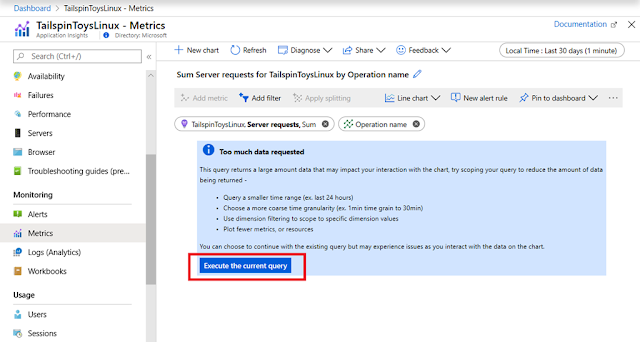
Charts with multiple timeseries over the long period, especially with short time grain are based on queries that return lots of datapoints. Unfortunately, processing too many datapoints may slow down chart interactions. To ensure the best performance, we used to apply a hard limit on the number of datapoints per chart, prompting users to lower the time range or to increase the time grain when the query returns too much data.

Some of you found the old experience frustrating. You said that occasionally you might want to plot charts with lots of datapoints, regardless of performance. Based on your suggestions, we changed the way we handle the limit. Instead of blocking chart rendering, we now display a message that suggests that the metrics query will return a lot of data, but will let you proceed anyways (with a friendly reminder that you might need to wait longer for the chart to display).

Microsoft Tutorial and Material, Microsoft Certifications, Microsoft Learning, Microsoft Online Exam, Azure Study Materials

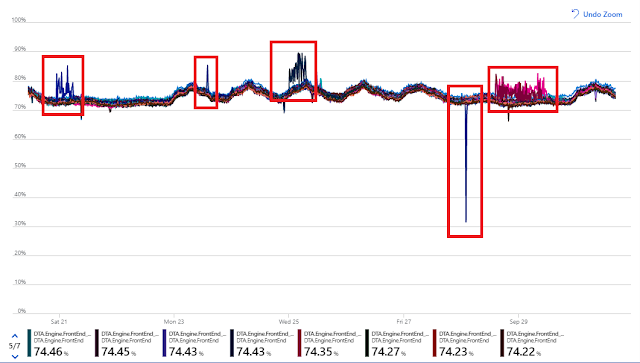
High-density charts from lots of datapoints can be useful to visualize the outliers, as shown in this example:

Microsoft Tutorial and Material, Microsoft Certifications, Microsoft Learning, Microsoft Online Exam, Azure Study Materials

Improved chart legend


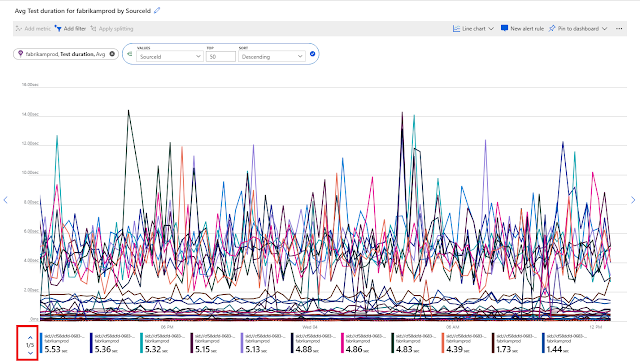
A small but useful improvement was made based on your feedback that the chart legends often wouldn’t fit on the chart, making it hard to interpret the data. This was almost always happening with the charts pinned to dashboards and rendered in the tight space of dashboard tiles, or on screens that have a smaller resolution. To solve the problem, we now let you scroll the legend until you find the data you need:

Microsoft Tutorial and Material, Microsoft Certifications, Microsoft Learning, Microsoft Online Exam, Azure Study Materials

Feedback


Let us know how we're doing and what more you'd like to see. Please stay tuned for more information on these and other new features in the coming months. We are continuously addressing pain points and making improvements based on your input.

If you have any questions or comments before our next survey, please use the feedback button on the Metrics blade. Don’t feel shy about giving us a shout out if you like a new feature or are excited about the direction we’re headed. Smiles are just as important in influencing our plans as frowns.

Microsoft Tutorial and Material, Microsoft Certifications, Microsoft Learning, Microsoft Online Exam, Azure Study Materials

Wednesday, 18 December 2019

Roadmap to Success: Implementing a Data Warehouse with Microsoft SQL Server Certification

Implementing a Data Warehouse with Microsoft SQL Server Certification explains how to implement a data warehouse platform to support a BI solution. Students will determine how to create a data warehouse with Microsoft SQL Server 2014, perform ETL with SQL Server Integration Services, and confirm and cleanse data with SQL Server Data Quality Services and SQL Server Master Data Services.
data warehouse certification, implementing a data warehouse with microsoft sql server 2012 pdf, data warehouse certification microsoft, microsoft data warehouse training, microsoft data warehouse certification, implementing a data warehouse with microsoft sql server 2014, implementing a data warehouse with microsoft sql server 2012/2014, training kit (exam 70-463): implementing a data warehouse with microsoft sql server 2012, 70-463, microsoft 70-463, exam 70-463, 70-463 exam, 70-463 dumps, 70-463 certification, 70-463 microsoft certification
This Data Warehouse certification is designed for customers who are interested in learning SQL Server 2012 or SQL Server 2014. It covers the new features in SQL Server 2014, but also the necessary capabilities across the SQL Server data platform.
Using Microsoft Azure is an efficient way to improve your data warehouse. Businesses use Azure SQL Data Warehouse to create net-new data warehouses in the cloud, increase their current enterprise data warehouse to the cloud, and migrate their on-premises data warehouse to Azure SQL Data Warehouse.

Target Audience for Implementing a Data Warehouse with Microsoft SQL Server

This Data Warehouse certification is intended for database professionals who require to create and support a data warehousing solution.
Primary responsibilities include:
  • Implementing a data warehouse.
  • Developing SSIS sets for data removal, transformation, and loading.
  • Enforcing data integrity by using Master Data Services.
  • Cleansing data by using Data Quality Services.

Prerequisites

This Data Warehouse certification requires that you meet the following requirements:
At least two years’ experience of working with relational databases, including:
  • Designing a normalized database.
  • You are creating tables and relationships.
  • Querying with Transact-SQL.
  • Some exposure to basic programming constructs such as looping and branching.
  • Experience of key business priorities, such as revenue, profitability, and financial accounting, is helpful.
  • When an intelligent data management platform powers your data migration to the cloud, you can instantly deliver accessible, convenient, and actionable data to fuel transformative business decisions.
  • The different use cases of Azure SQL Data Warehouse.
  • How to create an automated data management strategy to support these use cases.
  • A checklist of items to consider and prepare for when moving to Azure SQL Data Warehouse.
If modernizing your organization’s data warehouse approach is an essential imperative for your data-driven digital transformation, download the workbook today.

Preparing for Microsoft Implementing a Data Warehouse using SQL Server Exam

Even though I have worked as a SQL Server, SSIS, and Data Warehouse architect and developer for many years, gaining hands-on experience in multiple projects, I had to spend several weeks studying for this exam. I have minimal experience with hardware, designing storage solutions, and working with DQS and MDS, for example, so a lot of my time was allocated on those topics.
Because I like to be prepared and structured, that is why I work with data! I decided to study in a particular way:
  • Go through every single skill measured and secure I knew how to explain the concept or complete the task.
  • While considering, I continuously referenced the SQL Server Docs and took complete study notes.
In general, I was delighted with these courses. For me, it was an excellent strategy to start with these structured courses with videos and labs. It was a unique way of refreshing my memory on topics I already knew logically well and gave me a solid overview of issues I didn’t know as well. The labs gave me the hands-on experience I had not previously had in projects.
This Implementing a Data Warehouse with Microsoft SQL Server exam is a bit tricky, and you may have to spend several weeks studying for it. Your hands-on experience will also aid you to pass this exam. You have to go through the topics several times to grasp the exam material properly.
The tips and tricks below will aid you in your preparation. Make sure you take your exam study seriously.

Understand the Skills Tested in the Exam:

The objectives or skills that the exam assesses you in are the essential aspects of the exam. Read through the goals many times to make sure you have not left out anything. Even when you have covered all the topics, come back to the skills measured and check if you’ve learned them all. You can get this information and other exam details from the Microsoft Website.

Use Study Guides:

Using study guides is another way to understand and read the topics covered in the test and to know the exam objectives. It is the first thing you should get before starting your exam preparation. Also, the Data Warehouse study guide will help you organize your time effectively.

Register for an Instructor-led Course:

Microsoft suggests Implementing a SQL Data Warehouse instructor-led course for your Microsoft exam preparation. You can take the on-demand or classroom option, depending on your availability. In case you have some problems while reading a study guide or a free book, you can ask your instructor to interpret the question that arose.

Take the Online Practice Test:

The AnalyticsExam.com Practice Test Implementing a Data Warehouse with Microsoft SQL Server prepares candidates for Implementing a Data Warehouse with Microsoft SQL Server 2012 who develop and implement Business Intelligence (BI) solutions. Candidates for this Data Warehouse exam should have hands-on experience with data warehouse implementation and data cleansing.

The Career Benefits of Data Warehouse Certification

  • SQL Server 2012 is a robust platform that is widely used in the enterprise and cloud. Many critical systems are based on it.
  • Passing the Implementing a Data Warehouse with SQL Server 2012 exam is a necessity to getting MCSA certified, which in turn is a need to achieving an MCSE certification.
  • In high-growth industries, entry-level employees with a Microsoft Certified Solutions Associate (MCSA) certification can periodically earn up to $74,000 more than their non-certified peers.
  • Better job opportunities also await them.

Final Thoughts

Knowing the right materials to use for your exam preparation is only the first step. You must deliberately set enough time and concentrate on your studies. There’s no shortcut to passing the Implementing a Data Warehouse with Microsoft SQL Server exam. Assure you have all the concepts learned and compartmentalized a few days to take your exam.
This way, you will be assured of passing your exam to get your Implementing a Data Warehouse with Microsoft SQL Server certification. With this credential, you can make a great career as a data analyst, BI analyst, or database analyst.

Tuesday, 17 December 2019

Networking enables the new world of Edge and 5G Computing

At the recent Microsoft Ignite 2019 conference, we introduced two new and related perspectives on the future and roadmap of edge computing.

Before getting further into the details of Network Edge Compute (NEC) and Multi-access Edge Compute (MEC), let’s take a look at the key scenarios which are emerging in line with 5G network deployments. For a decade, we have been working with customers to move their workloads from their on-premises locations to Azure to take advantage of the massive economies of scale of the public cloud. We get this scale with the ongoing build-out of new Azure regions and the constant increase of capacity in our existing regions, reducing the overall costs of running data centers.

For most workloads, running in the cloud is the best choice. Our ability to innovate and run Azure as efficiently as possible allows customers to focus on their business instead of managing physical hardware and associated space, power, cooling, and physical security. Now, with the advent of 5G mobile technology promising larger bandwidth and better reliability, we see significant requirements for low latency offerings to enable scenarios such as smart-buildings, factories, and agriculture. The “smart” prefix highlights that there is a compute-intensive workload, typically running machine learning or artificial intelligence-type logic, requiring compute resources to execute in near real-time. Ultimately the latency, or the time from when data is generated to the time it is analyzed, and a meaningful result is available, becomes critical for these smart-scenarios. Latency has become the new currency, and to reduce latency we need to move the required computing resources closer to the sensors, data origin or users.

Multi-access Edge Compute: The intersection of compute and networking


Internet of Things (IoT) creates incredible opportunities, but it also presents real challenges. Local connectivity in the enterprise has historically been limited to Ethernet and Wi-Fi. Over the past two decades, Wi-Fi has become the de-facto standard for wireless networks, not due to it necessarily being the best solution, but rather its entrenchment in the consumer ecosystem and lack of alternatives. Our customers from around the world tell us that deploying Wi-Fi to service their IoT devices requires compromises on coverage, bandwidth, security, manageability, reliability, and interoperability/roaming. For example, autonomous robots require better bandwidth, coverage, and reliability to operate safely within a factory. Airports generally have decent Wi-Fi coverage inside the terminals, but on the tarmac, coverage often drops significantly, making it insufficient and less suitable to power the smart airport.

Next-gen private cellular connectivity greatly improves bandwidth, coverage, reliability, and manageability. Through the combination of local compute resources and private mobile connectivity (private LTE), we can enable many new scenarios. For instance, in the smart factory example used earlier customers are now able to run their robotic control logic, highly available and independent of connectivity to the public cloud. MEC helps ensure that operations and any associated critical first-stage data processing remain up and production can continue uninterrupted.

With its promise and advantage of near-infinite compute and storage, the cloud is ideal for large data-intensive and computational tasks, such as machine learning jobs for predictive maintenance analytics. At this year’s Ignite conference, we shared our thoughts and experience, along with a technology preview of MEC with Azure. The technology preview brings private mobile network capabilities to Azure Stack Edge; an on-premises compute platform managed from Azure. In practical terms, the MEC allows locally controlling the robots; even if the factory suffers a network outage.

From an edge computing perspective, we have containers, running across Azure Stack Edge and Azure. A key aspect is that the same programming paradigm can be used for Azure and the edge-based MEC platform. Code can be developed and tested in the cloud, then seamlessly deployed at the edge. Developers can take advantage of the vast array of DevOps tools and solutions available in Azure and apply them to the new exciting edge scenarios. The MEC technology preview focuses on the simplified experience of cross-premises deployment and operations of managed compute and Virtual Network Functions with integration to existing Azure services.

Network Edge Compute


Whereas Multi-access Edge Compute (MEC) is intended to be deployed at the customer’s premises, Network Edge Compute (NEC) is the network carrier equivalent, placing the edge computing platform within their network. Last week we announced the initial deployment of our NEC platform in AT&T’s Dallas facility. Instead of needing to access applications and games running in the public cloud, software providers can bring their solutions physically closer to their end-users. At AT&T’s Business Summit we gave an augmented reality demonstration, working with Taqtile, and showed how to perform maintenance on an aircraft landing gear.

Microsoft Tutorial and Materials, Microsoft Online Exam, Microsoft Certifications, Microsoft Learning

The HoloLens user sees the real landing gear along with the virtual manual along with specific parts of the landing gear virtually highlighted. The mixing of real-world and virtual objects displayed via HoloLens is what is often referred to as augmented reality (AR) or mixed reality (MR).

Edge Computing Scenarios


We have been showcasing multiple MEC and NEC use-cases over these past few weeks.

Mixed Reality (MR)

Mixed reality use cases such as remote assistance can revolutionize several industrial automation scenarios. Lower latencies and higher bandwidth coupled with local compute, enables new remote rendering scenarios to reduce battery consumption in handsets and MR devices.

Retail e-fulfillment

Attabotics provides a robotic warehousing and fulfillment system for the retail and supply chain industries. Attabotics employs robots (Attabots) for storage and retrieval of goods from a grid of bins. A typical storage structure has about 100,000 bins and is serviced by between 60 and 80 Attabots. Azure Sphere powers the robots themselves. Communications using Wi-Fi or traditional 900 MHz spectrum does not meet the scale, performance and reliability requirements.

Microsoft Tutorial and Materials, Microsoft Online Exam, Microsoft Certifications, Microsoft Learning

The Nexus robot control system, used for command and control of the warehousing system, is built natively on Azure and uses Azure IoT Central for telemetry. With a Private LTE (CBRS) radio from our partners Sierra Wireless and Ruckus Wireless and packet core partner Metaswitch, we enabled the Attabots to communicate over a private LTE network. The reduced latency improved reliability and made the warehousing solution more efficient. The entire warehousing solution, including the private LTE network used for a warehouse, run on a single Azure Stack Edge.

Gaming

Multi-player online gaming is one of the canonical scenarios for low-latency edge computing. Game Cloud Studios has developed a game based on Azure Play Fab, called Tap and Field. The game backend and controls run on Azure, while the game server instances reside and run on the NEC platform. Having lower latencies results in better gaming experiences for players who are nearby in venues such as e-sport events, arcades, arenas, and similar venues.

Public Safety

The proliferation of drone use is disrupting many industries, from security and privacy to the delivery of goods. Air Traffic Control operations are on the cusp of one of the most significant disruptive events in the field, going from monitoring only dozens of aircrafts today to thousands tomorrow. This necessitates a sophisticated near real-time tracking system. Vorpal VigilAir has built a solution where drone and operator tracking is done using a distributed sensor network powered by a real-time tracking application running on the NEC.

Microsoft Tutorial and Materials, Microsoft Online Exam, Microsoft Certifications, Microsoft Learning
Data-driven digital agriculture solutions

Azure FarmBeats is an Azure solution that enables aggregation of agriculture datasets across providers, and generation of actionable insights by building artificial intelligence (AI) or machine learning (ML) models by fusing the datasets. Gathering datasets from sensors distributed across the farm requires a reliable private network, and generating insights requires a robust edge computing platform that is capable of being operated in a disconnected mode in remote locations where connectivity to the cloud is often sparse. Our solution, based on the Azure Stack Edge along with a managed private LTE network, offers a reliable and scalable connectivity fabric along with the right compute resources close to the farm.

MEC, NEC, and Azure: Bringing compute everywhere


MEC enables a low-latency connected Azure platform in your location, NEC provides a similar platform in a network carrier’s central office, and Azure provides a vast array of cloud services and controls.

At Microsoft, we fundamentally believe in providing options for all customers. Because it is impractical to deploy Azure datacenters in every major metropolitan city throughout the world, our new edge computing platforms provide a solution for specific low-latency application requirements that cannot be satisfied in the cloud. Software developers can use the same programming and deployment models for containerized applications using MEC where private mobile connectivity is required, deploying to NEC where apps are optimally located outside the customer’s premises, or directly in Azure. Many applications will look to take advantage of combined compute resources across the edge and public cloud.

We are building a new extended platform and continue to work with the growing ecosystem of mobile connectivity and edge computing partners. We are excited to enable a new wave of innovation unleashed by the convergence of 5G, private mobile connectivity, IoT and containerized software environments, powered by new and distributed programming models. The next phase of computing has begun.

Monday, 16 December 2019

AnalyticsExam.com Review: 5 Important Tips to Crack Microsoft 70-463 Certification Exam

AnalyticsExam.com Review, Microsoft 70-463 Certification, 70-463 Exam, 70-463 Practice Exam, 70-463 Mock Test, 70-463 Syllabus
As I preferred a self-study, I followed the tips listed below:

1.Finding the correct book:

When preparing for the 70-463 certification, success depends on studying from the proper material. Microsoft has published a book dedicated to the 70-463 certification. I used to read from that book.

2.Taking a lot of Practice Test:

The success of 70-463 certification exam depended on revising the topic multiple times. I took the practice test from AnalyticsExam.com. The website provides unlimited practice exam access for two months. The questions on the site are so real time based, and they gave me a clear idea about the actual exam pattern.

3.Dividing the Syllabus:

I planned the 70-463 certification study schedule based on the topics covered in the syllabus. I spent more time on the topics of Data transformation and extraction, Loading data, and Deployment and configuring SSIS solutions, which carries more percentage in the syllabus.

4.Setting a Particular Goal for Per Study session:

As I was doing self-study and was following some online group studies, I fixed an everyday goal for myself to cover every topic of the syllabus. I devoted a maximum of 2 hours for study every day and tried to cover as much as possible within these hours.

5.Kept My Phone Away:

As we are living in a technological world, and we are unable to spend our lives without our gadgets, I was determined to keep my phone away during my devoted study time, while preparing for Microsoft 70-463 certification.

Why I Opted for 70-463 Certification?

  • 70-463 certification changed my life. I have been working in the I.T field for the past five years as a data warehouse developer.
  • Creating business intelligence solutions, implementing data warehouse, cleansing data, and Extract Transform Load (ETL) implementation are some of my work responsibilities.
  • I had already cleared the other two examinations namely,
    • Querying Microsoft SQL Server 2012/2014(70-461) and Administering Microsoft SQL Server Databases(70-462) certifications.
    • Then I thought of getting the 70-463 certification to make significant progress in the professional front. 70-463 is the last exam of the MCSA windows server 2012-2014 series.

Details about Microsoft 70-463 exam:

Before we proceed further, let’s take a look at details of the Microsoft 70-463 exam.
  • The exam includes 55 multiple-choice, multiple-answer, and scenario-based questions. The questions are supposed to test your skills in designing, maintaining, and configuring Microsoft SQL servers.
  • The total time for the exam is 2 hours, and you must score at least 700 marks out of 1000. The registration fee for this test is $165.
  • The different kinds of questions made the exam very interesting, but some items were more difficult than I expected. The questions I found the most difficult were about installing, maintaining, backing up, and restoring because I did not have a lot of practical experience with these topics.

Syllabus for 70-463 certification exam:

The exam’s total number of topic is divided into five groups. Each topic holds a different percentage in the total content. Below you can find a short description of each category and the topics applicants need to focus on to pass the Microsoft 70-463 certification:

Data warehouse design and implementation
(topic embraces around 10-15% of the total)
  • This section evaluates your knowledge on dimensions together with designing fact tables and implementing them, more to add performing data lineage of dimension tables.

Data transformation and extraction (covering around 20-25%)
  • You will receive questions related to the expertise in defining a connection manager or designing data flow.
  • Applicants are asked to demonstrate knowledge of data flow implementation, execution of SSIS package management, together with the implementation of SSIS script tasks.

Loading data (25-30%) 
  • Here, you should get knowledge of the principles of control flow design, besides realization of control flow, data loading features, and script components implementation in SSIS.

Deployment and configuring of SSIS solutions (20-25%)
This item implies prowess in-
  • Data integration troubleshooting
  • SSIS components installation and support
  • Event audit and logging 
  • SSIS solutions deployment
  • SSIS security settings configuration.

Design of quality data solutions (15-20%)
In this final assignment-
Applicants should be prepared to answer questions, related to quality services with data as of
  • installation and maintenance
  • issues on the implementation and solutions of master data administration
  • and data quality projects for data cleaning.

Final Thoughts:
  • The 70-463 certification can significantly improve your career prospects in the long run. It is interesting to see that many people dream of succeeding in their careers.
  • But only a few people are ready to put in the much-needed effort. Don’t fall into the first category that believes success comes without sacrifice.
  • Take the initiative to excel in your I.T career to a brand new level. Get enrolled for sample practice tests provided at AnalyticsExam.com and make a mark in your resume with Microsoft 70-463 certification.

Saturday, 14 December 2019

Announcing the General Availability of Proximity Placement Groups

Today’s general availability of proximity placement groups continues to be particularly useful for workloads that require low latency. In fact, this logical grouping construct ensures that your IaaS resources (virtual machines, or VMs) are physically located close to each other and adds new features and best practices for success.

Azure Study Materials, Azure Guides, Azure Certifications, Azure Learning, Azure Online Exam

New features

Since preview, we’ve added additional capabilities based on your great feedback:

More regions, more clouds

Starting now, proximity placement groups are available in all Azure public cloud regions (excluding India central).

Portal support

Proximity placement groups are available in the Azure portal. You can create a proximity placement group and use it when creating your IaaS resources.

Move existing resources to (and from) proximity placement groups

You can now use the Azure portal to move existing resources into (and out of) a proximity placement group. This configuration operation requires you to stop (deallocate) all VMs in your scale set or availability set prior to assigning them to a proximity placement group.

Supporting SAP applications

One of the common use cases for proximity placement groups is with multi-tiered, mission-critical applications such as SAP.

Measure virtual machine latency in Azure

You may need to measure the latency between components in your service such as application and database. We’ve documented the steps and tools on how to test VM network latency in Azure.

Learn from our experience

We’ve been monitoring proximity placement groups adoption as well as analyzing failures customers witnessed during the preview and captured the best practices for using proximity placement groups.

Azure Study Materials, Azure Guides, Azure Certifications, Azure Learning, Azure Online Exam

Best Practices


Here are some of the best practices that with your help we were able to develop:
  • For the lowest latency, use proximity placement groups together with accelerated networking. Accelerated networking enables single root I/O virtualization (SR-IOV) to a VM, greatly improving its networking performance. This high-performance path bypasses the host from the data-path, reducing latency, jitter, and CPU utilization. For more information, see Create a Linux virtual machine with Accelerated Networking or Create a Windows virtual machine with Accelerated Networking.
  • When trying to deploy a proximity placement group with VMs from different families and SKUs, try to deploy them all with a single template. This will increase the probability of having all of your VMs successfully deployed.
  • A proximity placement group is assigned to a data center when the first resource (VM) is being deployed and released once the last resource is being deleted or stopped. If you stop all your resources (including to save costs), you may land in a different data center once you bring them back. Reduce the chances of allocation failures by starting with your largest VM which could be memory optimized (M, Msv2), storage optimized (Lsv2) or GPU enabled.
  • If you are scripting your deployment using PowerShell, CLI or the SDK, you may get an allocation error OverconstrainedAllocationRequest. In this case, you should stop/deallocate all the existing VMs, and change the sequence in the deployment script to begin with the VM SKU/sizes that failed.
  • When reusing an existing proximity placement group from which VMs were deleted, wait for the deletion to fully complete before adding VMs to it.
  • You can use a proximity placement group alongside availability zone. While a PPG can’t span zones, this combination is useful in cases where you care about latency within the zone like in a case of an active-standby deployment where each is in a separate zone.
  • Availability sets and Virtual Machine Scale Sets do not provide any guaranteed latency between Virtual Machines. While historically, availability sets were deployed in a single datacenter, this assumption does not hold anymore. Therefore, using proximity placement groups is useful even if you have a single tier application deployed in a single availability set or a scale set.
  • Use proximity placement groups with the Azure Virtual Machine Scale Set new features (now in preview) which now supports heterogeneous Virtual Machine sizes and families in a single scale set, achieving high availability with fault domains in a single availability zone, using custom images with shared image gallery and more.

Thursday, 12 December 2019

Azure Machine Learning—ML for all skill levels

Enterprises today are adopting artificial intelligence (AI) at a rapid pace to stay ahead of their competition, deliver innovation, improve customer experiences, and grow revenue. AI and machine learning applications are ushering in a new era of transformation across industries from skill sets to scale, efficiency, operations, and governance.

Microsoft Azure Machine Learning provides enterprise-grade capabilities to accelerate the machine learning lifecycle and empowers developers and data scientists of all skill levels to build, train, deploy, and manage models responsibly and at scale. At Microsoft Ignite, we’re announcing a number of major advances to Azure Machine Learning across the following areas:

◉ New studio web experience that boosts machine learning productivity for developers and data scientists of all skill levels, with flexible authoring options from no-code drag-and-drop and automated machine learning, to code-first development.

◉ New industry-leading Machine Learning Operations (MLOps) capabilities to manage the machine learning lifecycle, enabling data science and IT teams to deliver innovation faster.

◉ New open and interoperable capabilities that provide choice and flexibility with support for R, Azure Synapse Analytics, Azure Open Datasets, ONNX, and other popular frameworks, languages, and tools.

◉ New security and governance features including role-based access control (RBAC), Azure Virtual Network (VNet), capacity management, and state-of-the-art responsible AI interpretability and fairness capabilities.

Let’s dive into these announcements in detail to see how Azure Machine Learning is helping individuals, teams, and organizations meet and exceed business goals.

Access machine learning for all skill levels and boost productivity


The new studio web experience (currently in preview) enables data scientists and data engineers of all skill levels to complete end-to-end machine learning tasks, including data preparation, model training, deployment, and management in a seamless manner. Choose from three different authoring options based on your skill and preference—no-code drag-and-drop designer, automated machine learning, or a code-first notebooks experience. Access Azure Machine Learning assets (including datasets and models) and rich capabilities (including data drift, monitoring, labeling and more) all from a single location.

Azure Machine Learning, Azure Certifications, Azure Tutorial and Materials, Azure Guides, Azure Online Exam
Studio web experience

Designer (currently in preview) provides drag-and-drop workflows to simplify the process of building, testing, and deploying machine learning models using a visual experience. Customers currently using the classic version of Azure Machine Learning Studio are encouraged to try Designer so they can benefit from the scale and security of Azure Machine Learning.

Automated machine learning user interface (currently in preview) helps data scientists build models without writing a single line of code. Automate the time-intensive tasks of feature engineering, algorithm selection, and hyperparameter sweeping, then operationalize your model with a few clicks of a button.

Notebooks (currently in preview) are a fully managed solution for developers and data scientists to easily get started with machine learning, with pre-configured custom environments that eliminate setup time, while providing management and enterprise readiness capabilities for IT administrators.

New data labeling (currently in preview). High quality labeled data is vital to creating high accuracy models for supervised learning. Teams can now manage data labeling projects seamlessly from within the studio web experience to get labels against data, speeding up the time-intensive process of manual labeling. Labeling tasks supported include object detection, multi-class image classification, and multi-label image classification.

Operationalize at scale with industry-leading MLOps


Azure Machine Learning features built-in MLOps capabilities for enterprise-grade machine learning lifecycle management, that enables data science and IT teams to collaborate and increase the pace of model development and deployment.

New updates to build reproducible models and achieve machine learning governance and control

Datasets help data scientists and machine learning engineers easily access data from a number of Azure storage services, apply datasets rapidly, reuse them efficiently across tasks, and track data lineage automatically. Rich dataset and model registries help track assets and information to effectively operationalize models and simplify workflows from training to inferencing. Version control helps track and manage assets providing enhanced traceability and supporting the creation of reproducible pipelines for consistent model delivery. Audit trail capabilities ensure asset integrity and provide control logs to help meet regulatory requirements.

New updates to easily deploy models and efficiently manage the machine learning lifecycle

Batch inference helps increase productivity and decrease cost by generating predictions on terabytes of structured or unstructured data. Controlled roll-out enables the deployment of different model versions under a common scoring endpoint in order to implement a sophisticated deployment pipeline and release models with confidence. Data drift monitoring helps maintain model accuracy by detecting model performance issues from changes to model input data over time. Drift analysis includes magnitude of drift, contribution by feature, and other insights so that appropriate action can be taken, including retraining the model.

Azure Machine Learning, Azure Certifications, Azure Tutorial and Materials, Azure Guides, Azure Online Exam

Data drift monitoring

Innovate using open and interoperable capabilities


With Azure Machine Learning, developers and data scientists can access built-in support for open source tools and frameworks like PyTorch, TensorFlow, and scikit-learn, or the open and interoperable ONNX format. We now support Open Neural Network Exchange (ONNX), the open standard for representing machine learning. With the new v1.0 release, ONNX Runtime offers stable Python APIs that can be used in Azure Machine Learning on both CPU and GPU.

New R-based capabilities enable data scientists to run R jobs on Azure Machine Learning and then manage and deploy R models as web services. Data scientists can choose their development environment of choice—one-click access to the browser integrated development (IDE) of RStudio Server (open source edition) or Jupyter with R.

Azure Synapse Analytics is now deeply integrated with Azure Machine Learning to greatly expand the discovery of insights from all your data and apply machine learning models to your intelligent apps.

Azure Open Datasets are now generally available and provide curated datasets, hosted on Azure, and easily accessible from Azure Machine Learning workspaces to accelerate model training. Over 25 datasets are now available, including socio-economic data, satellite imagery, and more. New datasets are continuously being added, and you can nominate additional datasets to Azure.

Build on a secure foundation


Security and enterprise readiness updates

Workspace capacity management (currently in preview) helps administrators review compute usage across workspaces and clusters within a subscription for efficient resource distribution. Capacity limits can be set to reallocate resources for capacity management and governance. Role Based Access Control, or RBAC, (in preview) helps define custom roles for granular access control and supports advanced security scenarios. Virtual network, or VNet, (in preview) provides a security boundary to isolate compute resources used to train and deploy models when running experiments through inferencing.

Fairness: In addition to model interpretability in Azure Machine Learning, which supports transparency and model understanding, data scientists and developers can now leverage Fairlearn, the new open source fairness assessment and mitigation tool. This tool assists organizations with uncovering insights about fairness in their model predictions through an intuitive and configurable set of visualizations.

Azure Machine Learning, Azure Certifications, Azure Tutorial and Materials, Azure Guides, Azure Online Exam
Fairness feature insights

Tuesday, 10 December 2019

Announcing the preview of Azure Spot Virtual Machines

We’re announcing the preview of Azure Spot Virtual Machines. Azure Spot Virtual Machines provide access to unused Azure compute capacity at deep discounts. Spot pricing is available on single Virtual Machines in addition to Virtual Machine Scale Sets (VMSS). This enables you to deploy a broader variety of workloads on Azure while enjoying access to discounted pricing. Spot Virtual Machines offer the same characteristics as a pay-as-you-go Virtual Machines, with differences in pricing and evictions. Spot Virtual Machines can be evicted anytime if Azure needs capacity.

The workloads that are ideally suited to run on Spot Virtual Machines include, but are not necessarily limited to, the following:

• Batch jobs.
• Workloads that can sustain and/or recover from interruptions.
• Development and test.
• Stateless applications that can use Spot Virtual Machines to scale out, opportunistically saving cost.
• Short-lived jobs which can easily be run again if the Virtual Machine is evicted.

Preview for Spot Virtual Machines will replace the preview of Azure low-priority Virtual Machines on scale sets. Eligible low-priority Virtual Machines will be automatically transitioned over to Spot Virtual Machines. Please refer to the FAQ for additional information.

Pricing


Unlike low-priority Virtual Machines, prices for Spot Virtual Machines will vary based on capacity for a size or SKU in an Azure region. Spot pricing can give you insights into the availability and demand for a given Azure Virtual Machine series and specific size in a region. The prices will change slowly to provide stabilization, thus allowing you to better manage budgets. In the Azure portal, you will have access to the current Azure Virtual Machine Spot prices to easily determine which region or Virtual Machine size best fits your needs. Spot prices are capped at pay-as-you-go prices.

Azure Spot Virtual Machines, Azure Study Materials, Azure Tutorial and Material, Azure Guides, Azure Learning

Deployment


Spot Virtual Machines are easy to deploy and manage. Deploying a Spot Virtual Machine is similar to configuring and deploying a regular Virtual Machine. For example, in the Azure portal, you can simply select Azure Spot Instance to deploy a Spot Virtual Machine. You can also define your maximum price for your Spot Virtual Machines. Here are two options: 

1. You can choose to deploy your Spot Virtual Machines without capping the price. Azure will charge you the Spot Virtual Machine price at any given time, giving you peace of mind that your Virtual Machines will not be evicted for price reasons.

Azure Spot Virtual Machines, Azure Study Materials, Azure Tutorial and Material, Azure Guides, Azure Learning

2. Alternatively, you can decide to provide a specific price to stay in your budget. Azure will not charge you above the maximum price you set and will evict the Virtual Machine if the spot price rises above your defined maximum price.

Azure Spot Virtual Machines, Azure Study Materials, Azure Tutorial and Material, Azure Guides, Azure Learning

There are few other options available to lower costs.

1. If your workload does not require a specific Virtual Machine series and size, then you can find other Virtual Machines in the same region that may be cheaper.

2. If your workload is not dependent on a specific region, then you can find a different Azure region to reduce your cost.

Quota


As part of this announcement, to give better flexibility, Azure is also rolling out a separate quota for Spot Virtual Machines that is separate from your pay-as-you-go Virtual Machine quota. The quota for Spot Virtual Machines and Spot VMSS instances is a single quota for all Virtual Machine sizes in a specific Azure region. This approach will give you easy access to a broader set of Virtual Machines.

Azure Spot Virtual Machines, Azure Study Materials, Azure Tutorial and Material, Azure Guides, Azure Learning

Handling Evictions


Azure will try to keep your Spot Virtual Machine running and minimize evictions, but your workload should be prepared to handle evictions as runtime for an Azure Spot Virtual Machines and VMSS instances is not guaranteed. You can optionally get a 30-second eviction notice by subscribing to scheduled events. Virtual Machines can be evicted due to the following reasons:

1. Spot prices have gone above the max price you defined for the Virtual Machine. Azure Spot Virtual Machines get evicted when the Spot price for the Virtual Machine you have chosen goes above the price you defined at the time of deployment. You can try to redeploy your Virtual Machine by changing prices.

2. Azure needs to reclaim capacity.

In both scenarios, you can try to redeploy the Virtual Machine in the same region or availability zone.

Best practices


Here are some effective ways to best utilize Azure Spot Virtual Machines:

◉ For long-running operations, try to create checkpoints so that you can restart your workload from a previous known checkpoint to handle evictions and save time.

◉ In scale-out scenarios, to save costs, you can have two VMSS, where one has regular Virtual Machines and the other has Spot Virtual Machines. You can put both in the same load balancer to opportunistically scale out.

◉ Listen to eviction notifications in the Virtual Machine to get notified when your Virtual Machine is about to be evicted.

◉ If you are willing to utilize pay-as-you-go prices, then use Eviction type to “Capacity Eviction only”, in the API provide “-1” as max price as Azure never charges you more than the Spot Virtual Machine price.

◉ To handle evictions, build a retry logic to redeploy Virtual Machines. If you do not require a specific Virtual Machine series and size, then try to deploy a different size that matches your workload needs.

◉ While deploying VMSS, select max spread in portal management tab or FD==1 in the API to find capacity in a zone or region.